

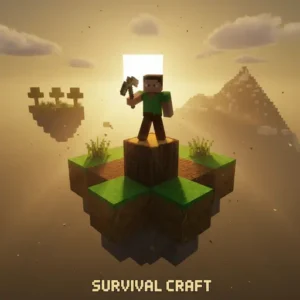
Survival Craft
VariousImagine waking up on a deserted blocky shore with nothing but your wits, an empty inventory, and a hungry tiger somewhere in the trees. That’s the opening minute of Survival Craft, a sandbox survival adventure you can jump into online for free in your browser. It’s a long-running blocky world game where every choice matters – what you eat, where you sleep, and whether you build that shelter before sundown. Fans of open world survival games love it because the rules of nature really bite back. 🌲
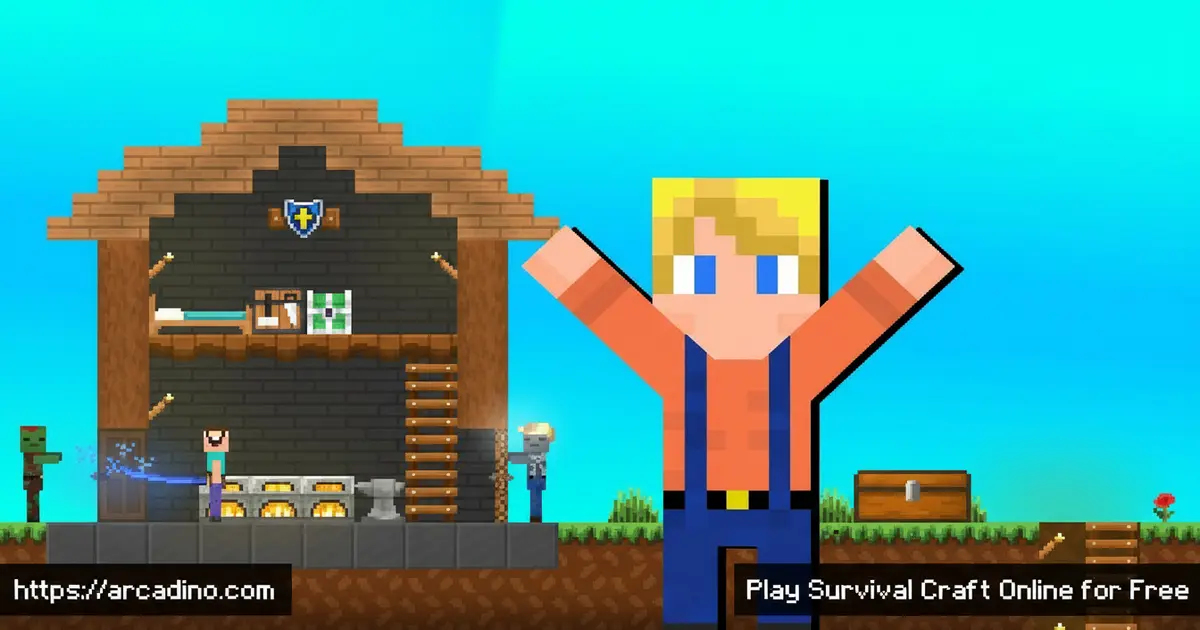
- Infinite procedurally generated blocky world with forests, deserts, swamps, and caves
- Hunt, tame, ride, or breed animals like horses, camels, donkeys, and cattle
- Build complex electric devices using logic gates, pistons, timers, and wiring
- Six main play modes including a tough survival mode and a creative sandbox
What Is Survival Craft?
Survival Craft is a sandbox survival and construction game set in an endless blocky world. You’re marooned on the shores of an island that never ends, and your job is simple: stay alive. You’ll mine resources, craft tools and weapons, tailor clothes, hunt animals, and grow plants to keep your character fed and warm. The deeper you dig, the wilder it gets – huge underground chambers, lava rivers, and rare gems wait below.
What makes this title stand out from other voxel games is how seriously it takes the “survival” part. Temperature zones, weather, animal AI, and a real injury model all push back against you. In my own browser run, the blocky world loaded quickly and the first-person controls felt responsive once I tweaked sensitivity. The art style is chunky and familiar, but the lighting and weather give Survival Craft a moodier, lonelier feel than most crafting survival games.
Survival Craft Gameplay
The core loop is gather, craft, build, survive – then repeat with bigger goals. You start by punching trees for wood, shaping basic tools, and finding food before night falls. Once you have a shelter, you branch out into farming, smelting, and ranching cattle. Each in-game day adds a new threat or a new opportunity, so the loop never feels stale.
Combat matters too. Lions, tigers, bears, wolves, and rhinos all roam the map, and meat-eaters can smell you at night. You’ll craft bows, crossbows, spears, and even firearms to defend yourself. Traps and explosives let clever players turn the tables on predators instead of running.
Building, Electricity, and Crafting Systems
Building is where Survival Craft really opens up. You can paint stairs, slabs, fences, and signs, and stack blocks into anything from a tiny hut to a working castle. The crafting menu is deep, with a Recipaedia that acts like an in-game cookbook for every item you can make. Furniture crafting lets you decorate rooms instead of just walling them in.
Then there’s the electricity system, which is genuinely impressive for a sandbox survival game. You can wire up logic gates, pistons, timers, and electric gates to build automatic doors, traps, and machines. Players who love tinkering treat this like a giant blocky engineering kit. It’s the same kind of redstone-style fun that draws crowds to other open world survival games.
Your First Electricity Project: An Automatic Door
The fastest way to fall in love with the wiring system is to build a simple automatic door. Place a regular wooden door, then put a pressure plate on the floor in front of it. Run a short line of electric wire from the pressure plate up to the door block. Step on the plate and watch it pop open by itself – that’s your first working circuit. Once that clicks, try adding an AND gate so the door only opens if you’re holding a torch and standing on the plate. From there you can wire timers to close it after 5 seconds, or hook up a piston trap that drops sand on any wolf that follows you in. It’s the same logic real engineers use, just with chunky blocks.
Animals, Biomes, and Weather in Survival Craft
The world is packed with biomes: dense spruce forests, swamps, grassy plains, deserts, snowy tundra, and deep cave systems. Each one has its own animals and its own dangers. You can ride horses, camels, or donkeys across long distances, and herd cattle to keep them safe from predators. Animal behavior is AI-driven, so creatures actually hunt, flee, or breed depending on the situation.
Weather is more than scenery here. Rain, snow, thunderstorms, and freezing temperatures will hurt you if you’re not dressed right. Submerging in cold water drops your body temperature fast, so clothing and shelter become real survival tools. Lightning can even start fires that destroy buildings, which keeps players on edge.
Body Temperature and Clothing Layers
Body temperature is one of the trickiest stats to manage in Survival Craft. Your character has three clothing slots – head, torso, and legs – and you can stack multiple layers in each one for extra warmth. A linen shirt is fine in spring, but in the snowy tundra you’ll want a fur coat plus leather pants stacked together. Getting wet is a huge danger because soaked clothes lose most of their insulation, and swimming in icy water drains your temperature in seconds. If you start freezing, sprint to a shelter, light a campfire, and stand right next to it until your warmth bar refills. Crafting a sleeping bag or bed nearby helps you recover overnight without freezing to death.
How to Play Survival Craft
Getting started is easy. Open the game in your browser, pick a play mode, generate a world, and you’re dropped onto the shore. Spend the first day collecting wood, stone, and food, then build a small shelter before night. From there, you set your own goals – explore, farm, build a mansion, or wire up a self-locking door.
The Six Play Modes Explained
Each of the six modes changes the rules in a big way, so picking the right one matters. Harmless is the chill option – no predators attack you and you can’t really die, perfect for new players. Challenging is the standard survival experience with hunger, temperature, and aggressive animals turned on. Cruel ramps everything up: you only get one life, so dying means your world ends forever. Adventure lets a world creator set custom rules and goals for other players to follow. Creative hands you every block in the game with no health bar, ideal for builders. Custom lets you mix and match settings like spawn rates, day length, and permadeath. Most kids start on Harmless, then graduate to Challenging once they know the recipes.
Your First 20 Minutes: A Survival Walkthrough
The opening 20 in-game minutes decide whether you survive your first night, so here’s a tight plan. Minutes 1-5: punch 6 logs from the closest trees and turn 2 of them into planks and sticks. Minutes 5-10: craft a wooden club for defense and a wooden pickaxe, then mine 8 stone blocks from any cliff or boulder. Minutes 10-15: upgrade to a stone pickaxe and stone club, and grab any pumpkin, raw meat, or berries you spot. Minutes 15-20: dig a 1×2 dirt bunker straight into a hillside and block the entrance with dirt or a crafted door. Sleep through the night safely, mine your way out at dawn, and you’ve officially survived day one. This little routine works on every difficulty except Cruel, where you’ll want extra food first.
Survival Craft Controls
On desktop, use WASD to move, the mouse to look around, and left-click to mine or attack. Right-click places blocks and uses items, while the number keys swap inventory slots. Press Space to jump or swim upward, and tap it twice to fly in Creative mode. Hold Shift to sneak so you don’t fall off ledges, and press E or Tab to open your inventory. The F5 key toggles between first-person and third-person view, and Esc opens the pause menu where you’ll find the Recipaedia button. On mobile, tap the screen to interact and use the on-screen buttons for movement, jump, sneak, and menus. The Recipaedia button is your best friend when you’re learning recipes.
Tips and Tricks for Survival Craft
- Build a basic shelter with a door before your first night – predators hunt in the dark and follow scent trails.
- Craft clothing early to manage body temperature; getting wet in cold biomes drains health fast.
- Always carry a torch, food, a weapon, and a bucket – they cover most emergencies.
- Tame a horse or camel as soon as you can. Riding makes exploring the infinite world way faster.
- Use the Recipaedia constantly. It shows every recipe you’ve unlocked, so you don’t have to memorize them.
Key Features of Survival Craft
- Infinite procedurally generated worlds with caves, magma chambers, and varied biomes
- Realistic systems including temperature, weather, animal breeding, and a deeper injury model
- Logic-based electricity with gates, wires, pistons, and timers for complex contraptions
- Six play modes covering survival, creative, adventure, and harder challenge settings
- Ridable and tameable animals plus full furniture crafting and paintable blocks
Where to Play Survival Craft
The fastest way to jump in is right here on Arcadino – load the page, hit play, and you’re crafting in seconds with no download. The browser version runs well on laptops, school Chromebooks, and most desktops without restrictions on the domain. If you want to take your worlds on the go, mobile apps are also available.
Grab the Android version on the Google Play Store or the iOS version on the App Store. Stick to the official stores – random APK sites can bundle unsafe files. PC players who prefer a desktop window can use the browser version full-screen for a similar feel.
Playing on a School Chromebook
Survival Craft is one of the few sandbox games that actually runs smoothly on a school Chromebook. The blocky graphics are light, so most managed devices hit a steady 30-60 frames per second even on entry-level models. A trackpad works fine, but plugging in a USB mouse makes mining and aiming way easier. Touchscreen Chromebooks can use the on-screen buttons just like a phone, which is handy when you don’t have a mouse. Because the game loads from your browser with no install, locked or managed school accounts usually let it run as long as the Arcadino domain isn’t blocked. Save big builds before the bell rings – some school accounts wipe browser storage at logout.
For Parents
Survival Craft is generally a good fit for kids 9 and up who already enjoy blocky building games. It does include hunting, weapons, and predators that can attack the player, so it’s a bit edgier than a pure creative sandbox. There’s no open chat in the browser version, which keeps social risk low, and worlds can be played fully solo. Many families find a 30-45 minute session works well – long enough to make real progress without burning out, and in line with general screen-time guidance from groups like the American Academy of Pediatrics.
Similar Games to Survival Craft
If you enjoy this blocky survival adventure, a few other sandbox and crafting survival games are worth a look:
- Survivalcraft 2 – the direct sequel with deeper crafting, furniture, and split-screen multiplayer.
- Minecraft Classic – the original blocky building experience and a clear cousin to this title.
- Browse more Casual games for laid-back picks.
FAQs About Survival Craft
Is Survival Craft free to play?
Yes, you can play Survival Craft free in your browser on Arcadino. The mobile apps may offer paid or demo versions, but the online version lets you jump in without paying. There’s no sign-up required to start a world.
Is Survival Craft the same as Minecraft?
No, Survival Craft is its own game, though it shares the blocky look. It leans harder into realistic survival systems like temperature, weather, and animal AI. Crafting and electricity also work differently from Minecraft.
Can you breed animals in Survival Craft?
Yes, animals can be tamed and bred in Survival Craft. Cattle ranching is a popular activity, and you can also ride horses, camels, and donkeys. Animals have AI-driven behavior, so they react to threats and food.
Is Survival Craft appropriate for kids?
Survival Craft is suitable for most kids around age 9 and up. It does include hunting, weapons, predator attacks, and dangers like lightning fires, so it can feel scarier than pure creative games. Parents of younger kids may want to play along the first few times.
How many play modes does Survival Craft have?
Survival Craft has six main play modes. These cover everything from harsh survival to relaxed creative building and adventure-style runs. You pick the mode when you generate a new world.
Does Survival Craft work on Chromebooks?
Yes, Survival Craft runs well on Chromebooks through the browser. The blocky graphics are light enough for school laptops, and you can use a mouse or touchscreen. It’s a popular pick on classroom devices.
Can I share my Survival Craft worlds online?
Yes, you can share worlds with other players. From the main menu, pick the world you want to share and choose the export option to save it as a single file. You can then upload that file to a cloud service like Dropbox or Google Drive and send the link to friends. To play someone else’s world, download their file and use the import button on the same menu. The community content browser inside the game also lists fan-made worlds you can grab with one tap. That means you can explore creations built by other fans or show off your own.
Why Survival Craft Is Worth Your Time
Few browser games pack this much depth into a blocky package. Between the infinite worlds, the realistic survival systems, and the wild electricity contraptions, Survival Craft gives you a sandbox you can keep coming back to for months. Whether you want to ranch cattle, wire up a trap, or just build the perfect spruce-forest cabin, the tools are all there. Spawn a fresh world, grab some wood, and see how long you can last before the night closes in.
Gameplay Video

