

























Watch one short ad and play ad-free for 30 minutes.
Basketball Orbit
PINPIN TEAMEver wanted to chuck a basketball so hard it leaves the planet? That’s the whole pitch of Basketball Orbit, a free browser arcade game where the hoop sits more than 100 feet away. You launch the ball, watch it bounce across the map, and try to time a perfect green-meter click for max power. It’s silly, satisfying, and surprisingly tricky once the wind and bounce start working against you.
This is one of those one-button sports games you can pick up in seconds. No download, no sign-up, just open it and start flinging hoops toward orbit. 🏀
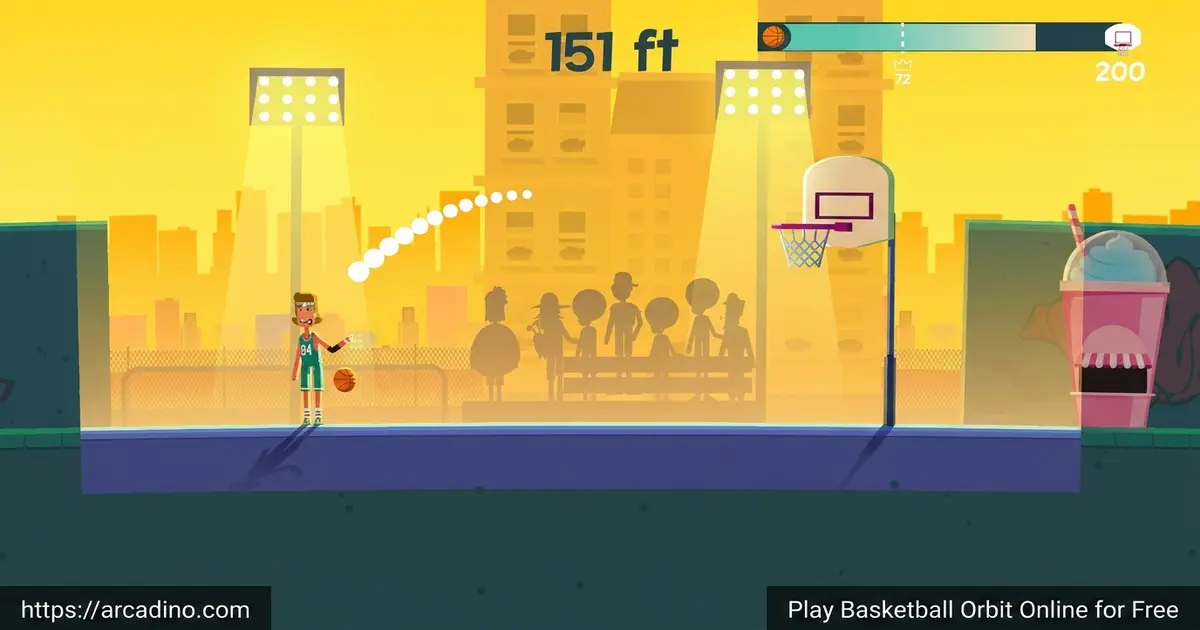
- One-click shooting with a color-coded power meter
- Launch shots from over 100 feet, sometimes into space
- Upgrade strength, speed, and bounce to fly farther
- Unlock new characters and backgrounds in the locker room
What Is Basketball Orbit?
Basketball Orbit is a physics-based arcade basketball game built around one wild idea: the hoop is really, really far away. You start over 100 feet from the basket and slam the ball forward with timed clicks. Each bounce carries you closer, and a perfect green-zone click can send the ball flying so high it brushes the clouds.
People sometimes search for it as just “basketball games” or mix it up with regular basketball arcade titles, but this one is its own thing. It’s not 1-on-1 hoops or a dunk contest. It’s a distance-launching, timing-based puzzle wrapped in a sports skin.
Loading it up in Chrome on a mid-range laptop, the game popped open in a couple of seconds with no stutters. The cartoon visuals are clean and bright, and the click response feels snappy, which matters a lot when you’re chasing that green flash.
Basketball Orbit Gameplay
The core loop is simple but sneaky. A color meter in the middle of the screen cycles through red, yellow, orange, and green. Click on green and your shot rockets forward with full power. Click on yellow and you’ll move partway. Click on red and the ball just sadly bounces at your feet.
Once the ball gets close to the hoop, the game switches gears. Instead of pure power, you click and drag to aim the arc directly into the basket. Nailing a swish from mid-air feels great, and bonus shots like cloud shots and long-distance baskets earn extra coins.
Bonus Shot Types and How They Earn Coins
Basketball Orbit rewards you for style, not just distance. A swish shot means the ball drops cleanly through the rim without touching it, and that earns a nice coin bonus. A free throw happens when you sink a basket from a marked spot, paying out a small but steady reward. Cloud shots trigger when your ball soars high enough to bump the clouds before falling into the hoop, doubling your coin haul. Long-distance baskets from way past the normal range pay the biggest bonus of all. Stacking these bonuses in a single run is the fastest way to grind coins for upgrades.
Upgrades and Unlocks in Basketball Orbit
Coins from your shots feed into three stats: strength, speed, and bounce. Strength boosts how hard you launch. Speed changes how fast the ball travels. Bounce decides how far it skips along after landing. Maxing all three turns a regular shot into a screen-clearing missile.
You can also pop into the locker room to swap your character or change the background. Hitting certain distance milestones unlocks new Basketers and ball skins, so there’s always something to chase. Some cosmetics are free, while others cost coins you earn through play.
The milestone ladder gives you something to push toward every run. At 200 ft, you unlock your first new Basketer and a fresh ball skin. Pushing past 500 ft opens up rarer characters and themed backgrounds. Cracking 1000 ft unlocks premium Basketers and high-tier ball designs that feel like a real flex. Beyond that, distance records keep dropping cosmetic surprises, so chasing the next checkpoint never really stops.
First 5 Minutes: A Smart Upgrade Order
Most new players sprinkle coins everywhere and stall out around 150 feet. Here’s a cleaner plan. Pump Strength to level 3 first, because raw launch power gives you the biggest distance jump per coin early on. Then push Bounce to level 3, since extra skips turn even an “okay” yellow click into a long roll. Save Speed upgrades for later, because faster balls don’t help if they can’t fly far in the first place. Speed mostly matters once your shots already cover huge distances and you want them to land quicker. Follow that order and you’ll likely double your starting distance inside five minutes.
Graphics and Feel
The art style leans cartoony and colorful, with chunky characters and big bouncy physics. Backgrounds shift as you travel farther, which gives you a real sense of distance. The sound effects, especially that satisfying “thunk” when the ball clears the rim, do a lot of work to keep you hooked.
Basketball Orbit vs. Golf Orbit: What’s the Difference?
Basketball Orbit and Golf Orbit come from the same launch-it-to-the-moon family, so they share a lot of DNA. Both use a timing-based power meter, both reward distance milestones, and both let you upgrade strength, speed, and bounce. The big difference is the target: Basketball Orbit ends every run with a hoop you need to aim into, while Golf Orbit just wants you to roll as far as possible toward a flag. Basketball Orbit also adds that click-and-drag aiming phase near the rim, which Golf Orbit skips. Golf Orbit feels more relaxed and rolling, while Basketball Orbit feels punchier thanks to the dunk finish. If you love one, you’ll almost certainly love the other.
Accessibility and One-Handed Play
Basketball Orbit is one of the friendliest arcade games for one-handed or low-mobility players. The whole game runs on a single input: either a mouse click or the Spacebar, your pick. That means you can play comfortably with just your thumb on a Spacebar, a single mouse button, or even a switch device mapped to one key. Near the hoop you do need to move the cursor to aim, but the timing is gentle and you can pause between shots. There are no twitchy combos, no key chords, and no required mouse-and-keyboard juggling. For a sports arcade title, that’s a real win.
How to Play Basketball Orbit
Getting started is about as easy as it gets. Open the game in your browser, wait a few seconds for it to load, and you’re already on the launch line. Your first shot teaches you the meter, and from there it’s just rinse and repeat with smarter timing.
The trick is patience. Don’t mash the button. Watch one full cycle of the meter so you learn the rhythm, then click on the green band. Each clean shot builds momentum and gets you closer to that 100-foot hoop.
Basketball Orbit Controls
- Left mouse click or Spacebar: launch the ball
- Move the mouse (when near the hoop): aim your shot into the basket
- Tap the screen on mobile to launch and aim
Tips and Tricks for Basketball Orbit
- Learn the meter rhythm first. Watch a couple of full cycles before clicking. Green is narrow, so timing beats luck.
- Pump bounce early. Boosting bounce means each shot keeps rolling and skipping, so even a yellow click can carry you a long way.
- Save aiming for the final approach. Don’t try to curve every shot. Use raw power until the hoop is in clear view, then click-and-drag to aim.
- Chase distance milestones. Hitting markers like 200 ft or 500 ft unlocks random characters and ball skins, so push for those checkpoints.
- Spend coins on speed last. Strength and bounce give the biggest distance jumps early on. Speed pays off once your other stats are higher.
Key Features of Basketball Orbit
- One-click launching with a four-color timing meter
- Shots that can fly past the clouds and into space
- Upgradeable strength, speed, and bounce stats
- Locker room with unlockable characters and ball skins
- Bonus shot types like swish, free throw, and cloud shots
Where to Play Basketball Orbit
The easiest way to jump in is right here in your browser. Basketball Orbit runs as a free HTML5 game on desktop, laptop, and Chromebook, so there’s no install and no sign-up. It also adapts to tablets and phones, with touch controls replacing the mouse.
If you’d rather have it on your phone, there are official mobile versions too. Grab it on Google Play for Android, or on the App Store for iPhone and iPad. Stick to those official links and skip random APK sites, since unofficial downloads can carry malware.
For Parents
Basketball Orbit is a good fit for kids around 8 and up. The gameplay is non-violent, the goal is just shooting hoops into the sky, and the only “skill” being trained is timing and patience. There’s no chat feature, so kids aren’t talking with strangers.
The browser version is free with no required purchases. The mobile app does include optional ads and an optional paid subscription that removes ads and adds bonus characters. Sessions are short and easy to stop, which makes it a solid 15-to-20-minute break game rather than something that demands hours.
If your kid asks about the VIP subscription on mobile, here are the details to know. It runs about $7.99 per week after a 3-day free trial, and it auto-renews unless you cancel before the trial ends. VIP perks include triple coins on every run, 5 exclusive players, and no ads. The free trial signup happens through the App Store or Google Play, so you can block it with normal parental controls. We’d suggest playing the free browser version first, since it offers most of the fun without any of the billing risk.
Similar Games to Basketball Orbit
If you like the mix of timing, physics, and silly distance challenges, these basketball and arcade games hit a similar nerve:
- Basket Random – A goofy 2-player basketball game where the physics change every round and chaos rules.
- Basketball Legends – A two-player hoops game starring bobblehead versions of famous players.
- Basketbros – Quick-fire street basketball with customization and online multiplayer.
- Golf Orbit – The same launch-it-to-the-moon formula, but with a golf ball instead of a hoop.
- Tap Tap Shots – A simple tap-to-shoot hoops game that’s all about rhythm.
- Fish Orbit – Another launcher in the Orbit series, where you fling a fish across the sea for huge distances.
Want more? Browse the full Basketball category for other hoop-themed picks.
FAQs About Basketball Orbit
Is Basketball Orbit free to play?
Yes, Basketball Orbit is free in your browser with no download needed. The mobile apps are also free to install, though they include ads and an optional VIP subscription that removes ads and adds extra characters.
How do you dunk in Basketball Orbit?
To dunk, get within close range of the hoop and aim the arc straight into the basket. Once you’re near the rim, click and drag your mouse to fine-tune the angle. A clean arc lined up with the hoop almost always lands a slam dunk.
What do strength, speed, and bounce do?
They control how powerful, fast, and bouncy your shots are. Strength sets the raw launch power. Speed changes how quickly the ball travels through the air. Bounce decides how much extra distance you get after the ball hits the ground.
Can you play Basketball Orbit unblocked at school?
Yes, it runs in any modern browser with no install, so it usually works on school Chromebooks. If your network blocks the main page, ask a teacher before trying mirror sites. Many school-friendly portals also list it under their basketball arcade game section.
Does Basketball Orbit have multiplayer?
No, Basketball Orbit is a single-player game focused on personal high scores. You’re competing against your own distance records and chasing milestone unlocks. There’s no online lobby or head-to-head mode.
What devices can run Basketball Orbit?
It works on PC, Mac, Chromebook, Android, and iOS. The browser version adapts to whatever screen size you’re on. On phones and tablets you use touch controls instead of a mouse.
Final Shot
Basketball Orbit takes one tiny idea, shooting a hoop from absurdly far away, and turns it into a full arcade experience with upgrades, unlocks, and that addictive green-zone chase. The timing meter is easy to learn but hard to master, and stacking strength, speed, and bounce never gets old. Crack open a tab, line up your first launch, and see how far past the clouds you can send the ball.
Gameplay Video