






















Watch one short ad and play ad-free for 30 minutes.
Tung Sahur Clicker
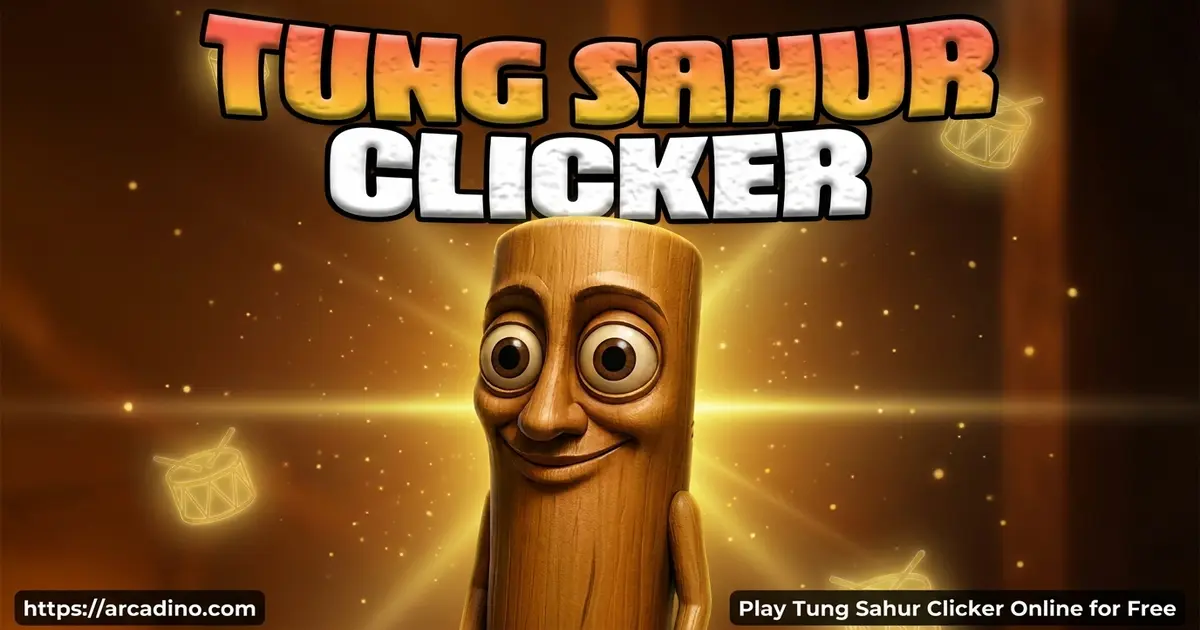
1Games.IOIf you’ve ever wanted to tap a wooden meme creature into superstardom, Tung Sahur Clicker is your new obsession. This free browser clicker drops you into the Italian Brainrot universe with the viral character Tung Tung Tung Sahur (you might’ve seen it spelled “tum tum tum tum sahur” online too). Click anywhere, watch coins fly, and unlock skins that turn this wooden weirdo into a king, wizard, or galactic overlord. 🥁
- One-button idle clicker fueled by meme chaos
- 15 unlockable Sahur skins from Witch to Galactic
- 2x Multiplier mode with a glowing street-corner stage
- Free to play instantly in your browser, no install needed
What Is Tung Sahur Clicker?
Tung Sahur Clicker is a casual idle clicker built around Tung Tung Tung Sahur, the viral wooden meme character with big feet, expressive eyes, and a baseball bat. Every tap makes him dance, chant, and rake in coins you spend on absurd upgrades. The whole game lives inside a goofy street-corner scene that lights up when you click fast enough.
I jumped in on Chrome and was clicking within about three seconds of the page loading. There’s no menu maze, no sign-up, just a giant wooden meme begging to be tapped. The animations stay smooth even when the screen fills with coin pops, which is exactly what you want in a tapping game.
The game was made by indie developer GarkoDEV, who also built the official Android app on the Google Play Store. The browser version on Arcadino and the mobile app share the same character, art, and core loop. That means you’re playing the real deal, not a copycat clone.
Where Tung Tung Tung Sahur Actually Comes From
Here’s a fun twist: even though fans group him with the Italian Brainrot crew, Tung Tung Tung Sahur actually started in Indonesia. The “tung tung tung” sound copies the wooden drum people bang during Ramadan to wake neighbors for sahur, the pre-dawn meal before fasting. That’s where the wooden body and baseball bat come from.
The meme then exploded on TikTok and got pulled into the Italian Brainrot universe with characters like Tralalero Tralala and Bombardiro Crocodilo. So there’s a friendly origin debate online — Indonesian roots, Italian Brainrot fame. Both sides are kinda right.
Gameplay in Tung Sahur Clicker
The loop is dead simple: click, collect, upgrade, laugh, repeat. You tap anywhere on the screen (outside the shop area) or smash the spacebar to earn coins. Every click also makes Tung Sahur groove with his stick, and the faster you tap, the wilder he gets.
Once you’ve stacked enough coins, you head to the shop and buy upgrades. Some boost your click value, others give passive income so you keep earning even when you stop tapping. The real trick is triggering the 2x Multiplier by clicking quickly — that’s when the magic happens.
The 2x Multiplier Mode
When you click fast enough in Tung Sahur Clicker, the background flips into a spooky nighttime street corner. A dim streetlight casts shadows, Tung Sahur launches into a full-body dance, and every coin you earn doubles. Sometimes the legendary Golden Sahur even flashes by like a ghost.
This is the best window to buy upgrades because their value doubles too. Timing your big purchases during the multiplier is the difference between a slow grind and a coin avalanche. It’s a small mechanic, but it totally changes how you play.
Ascend and Rebirth: Resetting for Permanent Bonuses
Once your coin pile gets huge, you can hit the Ascend (or Rebirth) button to reset your progress. You lose your coins and most upgrades, but you gain permanent click-power bonuses that carry into every future run. Think of it like leveling up your whole account, not just one playthrough.
The trick is knowing when to prestige. Reset too early and the bonus is tiny. Wait too long and you’re grinding upgrades that barely move the needle. A good rule: ascend when buying new upgrades starts to feel like a slog. After two or three rebirths, you’ll be earning coins way faster than your first run ever did.
Skins and Upgrades in Tung Sahur Clicker
There’s a solid collection of 15 unlockable Sahur skins waiting for you to hit score milestones. The full lineup includes Apple Sahur, Witch Sahur, King Sahur, Umbrella Sahur, Noel Sahur, Sun Glass Sahur, Mexican Sahur, Superhero Sahur, Ghost Sahur, Wizard Sahur, Robinhood Sahur, Galactic Sahur, Sahur & Friend, Strawhat Sahur, and Black & White Sahur. Yep, that’s a lot of wooden weirdness.
Upgrades also transform the character into stuff like a meme CEO with a formal vest, a spinning wooden hat, a royal crown, or even Sahur-shaped temples and factories. Each unlock changes both the visuals and your earning rate. It’s the carrot that keeps you clicking long after you should’ve stopped.
Weather and Visual Effects
The backdrop isn’t just one boring scene. There are 5 dynamic weather events — rain, snow, starry skies, wind, and sunny mode — that roll through as you hit score milestones. Just like skins, they unlock automatically the deeper you climb, so each new look feels like a reward.
They don’t change the gameplay, but they keep the screen feeling alive during long sessions. Pair that with Tung Sahur’s chanting voice lines and wooden thumping sounds, and the whole thing feels less like a clicker and more like a tiny meme theater. It’s silly in the best way.
How to Play Tung Sahur Clicker
Getting started is the easiest part. Open the game in your browser, wait a moment for it to load, and start tapping the wooden character in the middle of the screen. Your coin counter ticks up, the shop unlocks, and you’re off building your meme empire.
From there, your job is to balance active clicking with smart shop purchases. Grab passive income upgrades early so coins keep flowing, then chase skins for the bragging rights.
Controls for Tung Sahur Clicker
- Left-click anywhere on the screen to earn coins
- Press the spacebar as an alternative tap button
- Click shop buttons to buy upgrades and unlock skins
- On mobile and tablet, tap anywhere on the screen to play
Early-Game Roadmap: Your First 5 Minutes
Want to skip the guesswork? Here’s a clean step-by-step path to start strong:
- Tap by hand for ~30 seconds to bank your first 50 coins.
- Buy the Cursor upgrade first — it starts generating coins for you automatically.
- Grab the Auto Click upgrade next so passive income stacks while you breathe.
- Buy your first click-power upgrade to make every manual tap worth more.
- Hold off on big purchases until you trigger the 2x Multiplier with fast clicks.
- During 2x mode, buy the next tier of click-power — values double, so you save big.
- Repeat the multiplier-timing trick every time you’ve got enough for a major upgrade.
Stick to this order and you’ll unlock your second or third skin within the first ten minutes. After that, just keep chasing milestones and saving big buys for multiplier windows.
Accessibility and Avoiding Finger Strain
Tung Sahur Clicker is one of the friendlier clickers for players who can’t mash a mouse all day. The spacebar works as a full alternative to clicking, so you can rest your wrist and tap with a thumb instead. Some players even hold the spacebar down to auto-fire taps, depending on their keyboard’s repeat settings.
To dodge sore fingers during long sessions, switch between mouse and spacebar every few minutes. Buying auto-click and passive upgrades early also means you can step away without losing progress. Parents: this makes it a safer pick than clickers that demand nonstop mashing.
Tips and Tricks for Tung Sahur Clicker
- Buy click-power upgrades early so each tap is worth more before you grind for big skins.
- Save your biggest purchases for when the 2x Multiplier kicks in — values double instantly.
- Grab passive income upgrades like auto-click as soon as you can afford them, so coins pile up while you rest your finger.
- Alternate between mouse clicks and spacebar to keep your tapping speed high without cramping.
- Chase score milestones on purpose — new skins drop automatically when you hit them.
Key Features of Tung Sahur Clicker
- One-button gameplay with click or spacebar input
- 2x Multiplier mode with glowing nighttime visuals
- 15 unlockable Sahur skins tied to score milestones
- 5 dynamic weather effects including rain, snow, and starry skies
- Passive income upgrades that earn coins while you’re idle
- Ascend/Rebirth system for permanent click-power bonuses
- Global leaderboard where you can chase top scores against players worldwide
Tung Sahur Clicker vs Cookie Clicker vs Italian Brainrot Clicker
Wondering which clicker fits your mood? Here’s a quick head-to-head:
- Tung Sahur Clicker — Fastest to learn, snappiest visuals, best for 15-20 minute bursts. The 2x Multiplier adds light strategy without overwhelming you.
- Cookie Clicker — The deepest of the three. Tons of upgrades, prestige layers, and mini-games, but it expects long sessions and patience.
- Italian Brainrot Clicker — Closest cousin to Tung Sahur. Similar meme energy with a bigger roster of brainrot characters but slightly less polished animations.
Short on time and want max silliness? Go Tung Sahur. Want a long-haul project? Cookie Clicker. Love the whole brainrot crew? Italian Brainrot Clicker is your jam.
Where to Play Tung Sahur Clicker
The fastest way in is right here in your browser on Arcadino. The game loads instantly, runs on Chrome, Firefox, Safari, and Edge, and doesn’t ask for an account. It works on school Chromebooks and home laptops alike, as long as the site isn’t blocked on your network.
If you’d rather tap on your phone, there’s an official Android version by GarkoDEV on the Google Play Store. Stick to the official store link — random APK downloads from unknown sites can carry malware, so it’s not worth the risk. On PC, the browser version is honestly the smoothest way to play.
Playing on a Chromebook or School Network
Tung Sahur Clicker is built in HTML5, which is exactly why it works on locked-down school Chromebooks. There’s no Flash, no plugins, and no big download — the game just streams as a regular web page. It also uses very little bandwidth, so it loads even on slow school Wi-Fi.
If your school blocks Arcadino specifically, the game won’t load no matter what you try. Don’t bother with sketchy proxy sites or random “unblocked” mirrors — they often hide malware or trackers. The safe move is to bookmark Arcadino at home and save your clicker sessions for after school.
For Parents
Tung Sahur Clicker is a low-stakes, no-violence clicker that’s fine for kids around 8 and up. The humor is goofy meme-style chaos with wooden characters dancing and chanting, nothing scary or inappropriate. There’s no chat feature and no required sign-up, so kids aren’t exposed to strangers online.
The browser version is free without forced ads breaking up play, though the mobile app may include standard mobile ads. Sessions are easy to cap because each play feels complete after about 15–20 minutes of upgrading. It’s a fun pick for short breaks rather than long marathons.
Similar Games to Tung Sahur Clicker
If the meme-fueled tapping in this idle hit clicks with you, these brainrot and clicker cousins are worth a look.
- Italian Brainrot Clicker — Tap zany meme characters from the same chaotic universe to stack scores and unlock weird upgrades.
- Labubu Clicker — Same addictive tapping loop with the viral Labubu character instead of a wooden Sahur.
- Cookie Clicker — The grandfather of the genre, where you bake cookies and unlock absurd upgrades like time machines.
- Chill Guy Clicker — A laid-back meme clicker with offline rewards and quirky power-ups.
- 67 Clicker — Tap the iconic 67 meme for points with cursors, farms, and humorous upgrades.
- Plants Vs Brainrots — A tower-defense twist where plants battle waves of brainrot meme creatures.
- Unchill Guy Clicker — The angry-mode flip of Chill Guy with faster tapping and louder upgrades.
- Chicken Jockey Clicker — Tap the Minecraft-inspired chicken jockey meme for chaotic combo upgrades.
Want more tap-happy fun? Browse the full Clicker category for dozens of similar picks.
FAQs About Tung Sahur Clicker
Is Tung Sahur Clicker free to play?
Yes, Tung Sahur Clicker is completely free in the browser. You don’t need to pay, sign up, or download anything to start clicking. The Android version on Google Play is also free, though it may include ads.
Is this the same game as “tum tum tum tum sahur”?
Yes, it’s the same character — people just spell the name differently. Tung Tung Tung Sahur is the original meme name, but tons of players type it as “tum tum tum tum sahur” or “tung tung clicker.” They all point to the same wooden meme icon.
How many skins are in Tung Sahur Clicker?
There are 15 unlockable Sahur skins in total. You earn them automatically by hitting score milestones, starting with the default look and working up to Galactic Sahur. New weather effects also unlock the same way.
Can I play Tung Sahur Clicker unblocked at school?
Yes, the browser version usually works on school networks that allow Arcadino. Since it runs in the browser without downloads, it loads fine on most Chromebooks. If your school blocks gaming sites entirely, you’ll need to play at home.
What is the 2x Multiplier in Tung Sahur Clicker?
It’s a short boost mode where every coin you earn doubles. You activate it by clicking quickly, which shifts the background into a glowing nighttime scene. Buying upgrades during this window is the fastest way to grow your empire.
Does Tung Sahur Clicker have offline rewards?
Yes, passive income upgrades keep earning coins while you’re away. Once you buy auto-clickers and similar upgrades, your total grows even when the tab is closed or you’re not actively tapping.
What controls does Tung Sahur Clicker use?
You can left-click anywhere on the screen or press the spacebar. On mobile, just tap the screen. There’s no keyboard movement or complex inputs to learn — it’s a true one-button game.
Final Thoughts on Tung Sahur Clicker
Between the 2x Multiplier light show, the parade of ridiculous Sahur skins, and the weather effects rolling through the background, this clicker punches way above its weight for a one-button game. It’s silly, snappy, and surprisingly satisfying once you start chaining upgrades.
Pop the game open, give that wooden meme a few hundred taps, and see how fast you can unlock Galactic Sahur. Your finger might get tired, but your coin pile won’t stop growing.
Gameplay Video