


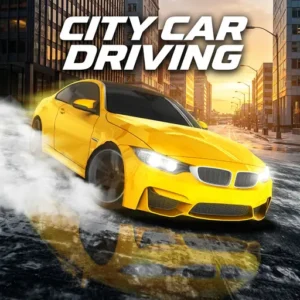

























Watch one short ad and play ad-free for 30 minutes.
City Car Driving
Forward DevelopmentIf you’ve ever wanted to take the wheel without leaving your desk, City Car Driving is the simulator for you. It’s a free online driving game where you cruise through busy streets, obey traffic lights, and even practice parking. You can pick Career, Slalom, Drift, or Free mode and earn points to unlock new rides. The detailed interiors and realistic traffic make every drive feel like the real deal. 🚗
City Car Driving rewards careful drivers but also lets reckless players go wild in Free mode. It’s a smart mix of driving school lessons and arcade-style fun.
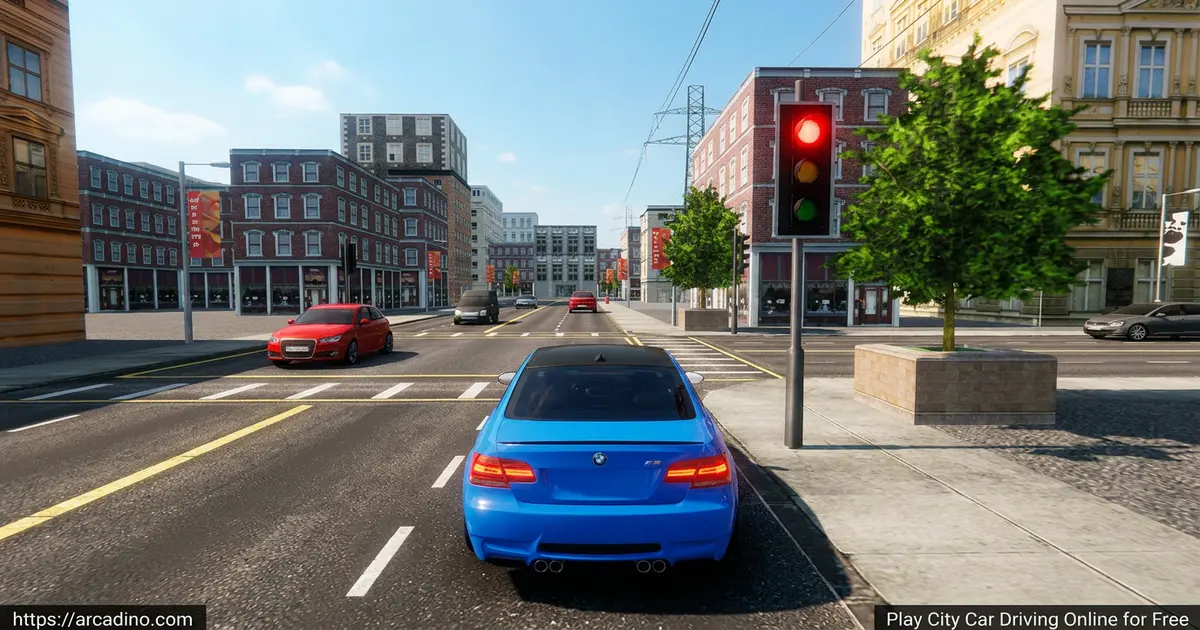
- Four modes: Career, Slalom, Drift, and Free driving
- 17 unlockable cars with customization options
- Realistic traffic, traffic lights, and working blinkers
- Multiple camera angles, including a first-person interior view
What Is City Car Driving?
City Car Driving is a realistic car driving simulator playable right in your browser. You drive through a busy city, follow traffic rules, and complete missions to earn points. The goal is simple: master the road, then spend your points on better cars and upgrades.
What sets this driving sim game apart is how serious it takes the small stuff. Blinkers, red lights, lane discipline – they all matter in Career mode. When I fired it up, the interior camera view felt surprisingly polished for a browser title, with smooth steering response and no annoying load wait.
City Car Driving Gameplay
The core loop is easy to grab. Pick a mode, hop in a car, and start driving. In Career mode you follow yellow arrows from point A to point B, signaling before turns and stopping at red lights. Park inside the green zone to finish the run and bank your points.
Slalom mode swaps the city for cones – weave through them before the timer runs out. Drift mode is pure fun: hold the handbrake and slide your car sideways to rack up style points. Free mode drops the rules entirely so you can just explore.
The traffic AI keeps you on your toes. Other drivers sometimes run yellow lights, brake hard, or change lanes without warning. Pedestrians may step into the crosswalk when you least expect it, so you’ve got to stay sharp. These surprise moments make the city feel alive and teach you to drive defensively, just like in real life.
Cars and Customization in City Car Driving
You start with a basic ride, but points unlock a solid lineup of vehicles. There are 17 cars to choose from, and each one can be personalized. Swap paint, tweak parts, and shape your dream daily driver.
Different cars handle differently, so a heavier SUV won’t drift like a low sports coupe. Trying each one is half the fun, and unlocking the faster cars gives you a real reason to keep grinding Career missions.
Transmission and Gear-Shifting
Most cars in the browser version use automatic transmission. That means gears shift on their own while you focus on steering, braking, and signaling. It’s perfect for new players who don’t want to juggle too many controls at once.
The paid PC edition adds a full manual gearbox with clutch control for players who want a deeper challenge. You can rev-match, downshift into corners, and feel each gear change. The browser version keeps it simple so anyone can jump in and drive right away.
Graphics and Camera Views
The 3D city looks sharp for a browser game. Streets have working traffic lights, other cars obey lanes, and your headlights cast real beams at night. Crashes show visible damage on your car, which makes you actually care about avoiding fender-benders.
You can switch between several camera angles with a single key. The interior view puts you behind the steering wheel for that real-driver feel. Chase cam and top-down options help when you’re parking or lining up a tight drift.
Weather, Night Driving, and Seasons
The browser version mostly sticks to clear daytime driving, which keeps things smooth and easy to learn. Headlights still work for darker moments, and you can flip them on with the L key. It’s a clean experience for younger players who are still getting the hang of the rules.
The full PC edition turns up the realism big time. Rain makes the road slick, snow covers winter streets, and fog cuts your view. Night drives bring glowing headlights and dim shop signs to life. These weather and season changes test your reactions and reward careful, slower driving.
Why Players Love City Car Driving
The mix of driving-school precision and arcade freedom keeps people coming back. One run you’re practicing parallel parking, the next you’re chaining drifts around an empty roundabout. Earning points to unlock cars adds a quiet progression hook you don’t always get in browser sims.
Browser Version vs Paid PC Edition
Not sure which version fits you best? Here’s a quick side-by-side so you can pick the right one without guessing.
What the Free Browser Version Includes
- Four modes: Career, Slalom, Drift, and Free driving
- 17 unlockable cars with paint and part customization
- Automatic transmission for easy pick-up-and-play
- Keyboard, mouse, or touch controls
- Clear daytime city driving with working traffic lights
- No download, no account, no cost
What the Paid Steam Edition Adds
- Full manual gearbox with clutch and rev-matching
- Fuel simulation – you actually have to stop for gas
- Dynamic weather: rain, snow, fog, and changing seasons
- VR support for Oculus Rift and HTC Vive
- Force-feedback steering wheel compatibility
- Traffic cops who pull you over for violations
- Multi-level car parks and tougher parking challenges
If you just want quick fun in a browser tab, the free version is plenty. If you’re chasing the most realistic driving sim possible, the Steam edition is worth a look.
How to Play City Car Driving
Getting started is quick. Open the game page, wait a few seconds for the city to load, and pick your mode from the menu. Choose a car, and you’re on the road. No accounts, no installs, no waiting around.
Career mode is the best place for new players. It teaches you signals, speed limits, and parking before turning you loose. Once you’re comfortable, jump into Drift or Free mode for stress-free fun.
City Car Driving Controls
- WASD or arrow keys – steer, accelerate, and brake
- Space bar – handbrake (great for drifts)
- Q and E – left and right turn signals
- L – headlights, C – change camera view
- Mobile: tilt, on-screen steering, or arrow buttons
Performance Tips for Low-End Devices
Running on an older laptop or budget Chromebook? City Car Driving usually loads in 10 to 20 seconds in Chrome or Edge. Firefox sometimes runs a touch slower but works fine too. If the city loads at a crawl, close other browser tabs and switch off any heavy extensions first.
For smoother frame rates, try shrinking your browser window or lowering your screen resolution. On mobile, tilt controls feel cool but can cause motion sickness for some players – if your stomach flips, switch to on-screen steering buttons. They give the same control without all the screen wobble.
From Game to Real Driving Lessons
Career mode quietly teaches habits that real driver’s-ed classes drill into teen learners. Tapping your blinker before a lane change mirrors the real rule of signaling three seconds early. Stopping at red lights, watching for gaps in traffic, and choosing safe moments to turn – those are real skills called gap acceptance.
Parking inside the green zone trains your eyes to line up with marked bays, just like in a parking lot. Even slowing down for crosswalks builds habits you’ll thank yourself for later. It’s not a replacement for real lessons, but it’s a fun head start for kids dreaming about their first license.
Tips and Tricks for City Car Driving
- Always tap your blinker before turns in Career mode – it adds bonus points to every trip.
- Don’t run red lights. The fine wipes out points you worked hard to earn.
- Use the handbrake in Drift mode at the start of a turn, not the middle, for longer slides.
- In Slalom mode, keep your speed steady. Slamming the gas between cones costs you control.
- Park fully inside the green zone before exiting the car, or the mission won’t count.
Key Features of City Car Driving
- Four distinct modes – Career, Slalom, Drift, and Free driving
- 17 cars with paint and part customization
- Realistic traffic AI with working traffic lights and blinkers
- Multiple camera options, including an interior cockpit view
- Three control schemes: tilt, on-screen steering, or arrow keys
Where to Play City Car Driving
You can play City Car Driving free online in any modern browser – Chrome, Edge, Firefox, or Safari all work. No downloads, no sign-ups. Just load the page and start driving.
Prefer your phone? Grab the mobile version on Google Play or the App Store. Stick to those official stores – random APK sites can hide unsafe files. On PC, the browser version runs fine without any special hardware.
For Parents
City Car Driving is a kid-friendly pick because it skips the stuff parents usually worry about. There’s no chat feature, no violence, and no scary content – just cars, streets, and traffic rules. The driving sim also teaches basic road rules, signaling, and patience at red lights, which are useful real-world ideas.
Crashes show visible damage but nothing graphic. Short sessions of 20 to 30 minutes work well, especially when kids try to beat their best Career score.
Similar Games to City Car Driving
If you like realistic driving sims with city streets and customizable cars, these picks are worth a spin:
- City Car Driving: Stunt Master – a stunt-focused spin with loops, jumps, and police chases.
- Burnout Drift – pure drift action on twisty mountain roads.
- Burnout Drift: Seaport Max – drift around a busy seaport with bigger cars.
- Burnout Drift: Hilltop – slide your way down scenic hilltop roads with sharp hairpin turns.
- Toy Car Simulator – mini cars zipping around playful indoor maps.
- Explore more in Simulation games.
FAQs About City Car Driving
Is City Car Driving free to play?
Yes, City Car Driving is free to play online in your browser. You don’t need an account or any download. A paid PC edition exists separately, but the browser version is fully free.
Can you play City Car Driving on PS5?
The browser version isn’t built for PS5 consoles. The full PC simulator can be downloaded and played on supported devices, but the free online version is meant for desktop browsers and mobile. For console play, check the official store listings.
Does City Car Driving support VR?
The full PC edition supports VR headsets like Oculus Rift and HTC Vive. The free browser version doesn’t include VR support – it’s designed for keyboard, mouse, and touchscreen play.
How do I change gears in City Car Driving?
Most browser cars use automatic transmission, so gears shift on their own. Just press the accelerator and steer. The PC simulator offers manual gearbox options for players who want full control.
Does City Car Driving have force feedback?
The full PC simulator supports steering wheels with force feedback. The free browser version uses keyboard, mouse, or touch controls, so force feedback isn’t part of the online experience.
Can I play City Car Driving on mobile?
Yes, City Car Driving is available on Android and iOS. Download it from Google Play or the App Store using the official links above. Mobile uses tilt or on-screen steering controls.
What is the best car in City Car Driving?
The faster unlockable cars handle best in Drift and Free mode. Heavier vehicles are easier for Career mode parking. Try a few – each car has a different feel, and the best one depends on which mode you enjoy most.
Ready to Hit the Road?
City Car Driving packs a full driving school, a drift playground, and a free-roam city into one browser tab. Between the 17 cars, four modes, and realistic traffic, there’s always something new to try. Pick a mode, fire up the engine, and see how clean you can keep your driving record – or how sideways you can take that next corner.
Gameplay Video


