























Watch one short ad and play ad-free for 30 minutes.
Crazy Stunt Cars Multiplayer
Faramel GamesImagine huge ramps, looping bridges, and a parking lot full of supercars you can tune from the wheels up. That’s the playground waiting in Crazy Stunt Cars Multiplayer, a free browser racing game where stunts matter more than finish lines. You can hop in solo or join a room and race buddies in seconds. Since lots of players hunt for it under the broader name “crazy cars,” you might land here looking for that too — same wild stunt action, just the multiplayer version. 🚗
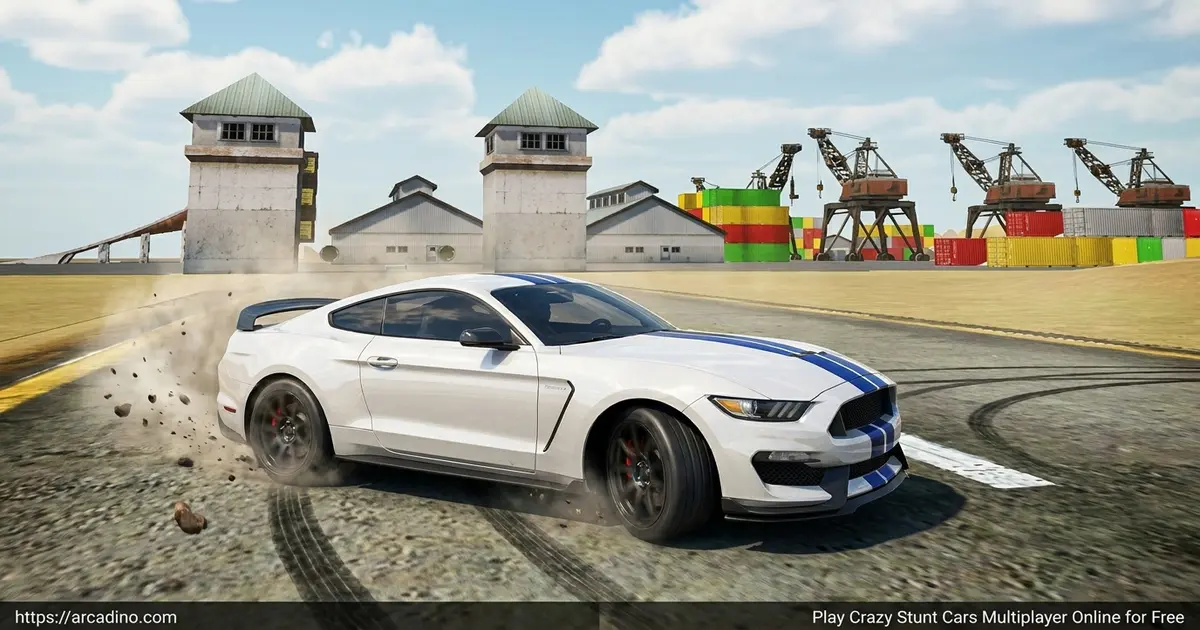
- Open sandbox map packed with ramps, loops, and stunt obstacles
- Solo mode plus online multiplayer rooms with random join
- Deep car tuning: suspension, camber, torque, drivetrain, and more
- Three driving styles to switch between: drift, racing, and arcade
What Is Crazy Stunt Cars Multiplayer?
Crazy Stunt Cars Multiplayer is an online stunt-driving sandbox built by Faramel Games. It’s the multiplayer follow-up to the original Crazy Stunt Cars and Crazy Stunt Cars 2. Instead of finishing laps, your job is to launch off ramps, drift around corners, and out-trick whoever else is in the lobby. The whole map is one big playground.
What stood out to me is how quickly it loads. Click play, pick a car, and you’re driving in under a minute — no installs, no patches. The handling has real weight too, so smashing into a wall actually crumples your bumper. One tap of the R key and you’re fixed up for the next jump.
Quick Facts About the Game
- Developer: Faramel Games, an indie studio known for stunt-driving titles.
- Released: August 2018, with the multiplayer version landing later in November 2018.
- Platforms: Web browser (Windows, Mac, Chromebook) plus Android.
- Series: Third entry after Crazy Stunt Cars and Crazy Stunt Cars 2.
- Price: Free in the browser, with no signup required.
Gameplay in Crazy Stunt Cars Multiplayer
The loop is simple: pick a car, pick a mode, and go wild. Every map has ramps that send you spinning, loops you can pull off if you hit them fast enough, and giant obstacles that double as launch pads. There’s no timer pushing you, so you can practice one ramp for ten minutes if you want.
Multiplayer is where this stunt sandbox really clicks. You can find a lobby with empty slots or hit “Join a random room” and drop in with strangers. Then you and the other drivers share the map, chasing each other, doing synced jumps, or just causing chaos. Solo mode is great for learning new tricks before showing them off.
The damage model goes beyond just looking cool. If you smash your front end into a wall, steering gets twitchy and pulls to one side. Bash your rear suspension and the car wobbles on landings. That means every crash actually changes how you drive until you hit R to repair — so smart drivers fix up before lining up the next big jump.
Car Customization and Tuning
This is where the game goes way deeper than most browser racers. You can adjust ride height, camber, spring force, and suspension settings on each vehicle. Push power and torque too high and your tires won’t grip — so there’s actual strategy in the tuning menu. You can also swap between RWD and AWD drivetrains.
Looks matter too. Pick your headlight color, choose smoke colors in red, green, or blue, and preview your flames before hitting the map. With more than ten cars in the garage (the lineup has grown across updates), you can build a signature ride no one else will copy.
Tuning Recipes That Actually Work
Most guides just list which sliders exist. Here are real setups to copy when you load the tuning menu:
- Best setup for landing loops: Lower the ride height, crank spring force to stiff, switch to AWD, and pull torque back to about 70%. You’ll grip the loop walls and land flat.
- Best drift setup: Pick RWD, soften the rear suspension, add a touch of negative rear camber, and bump torque toward 85%. The back end swings out smoothly without spinning.
- Best ramp launcher: Medium ride height, AWD, balanced camber, and full power. Straight-line speed matters most for huge gaps.
- Best beginner build: Stock settings, AWD, and all assists on. Learn the map first, then start tweaking.
Game Modes and Driving Styles
Three core modes let you flip the feel of the whole game. Drift mode loosens the tires so you can slide around corners and chain long drifts. Racing mode tightens everything up for serious speed. Arcade mode sits in the middle — fast, loose, and forgiving, which is perfect for beginners.
You can also toggle driving assists like ABS, TCS, ESP, and a steering helper. Turn them on while you learn, then turn them off once you want a tougher challenge. It’s a smart way to grow with the game instead of feeling locked out.
Extra Behavior Types and HUD Tweaks
Dig into the settings and you’ll find more than just three modes. The full behavior list includes simulator (the most realistic physics), racing, arcade, drift, fun (super bouncy and floaty, great for goofing around), and custom. Custom lets you mix grip, weight, and steering response however you want. You can also recolor the HUD — your speedo, gear indicator, and menus all swap to your chosen color. It’s a small touch, but it makes the dashboard feel like yours.
Multiplayer Lobby Tips and Stunt Teamwork
The “Join a random room” button is your fastest way into action, but it can drop you in an empty lobby. If that happens, leave and rejoin — the matchmaker will try a different room next time. Lobbies with three to six players usually have the best vibe, since huge rooms get chaotic at ramps. Once you’re in, try lining up next to another driver before a big ramp and counting down with the headlight flash to pull off a synced jump. Players also love trick trains — follow a faster driver through a loop and copy their line. Be patient at busy ramps and don’t ram people mid-launch. Good lobby manners get you invited to do bigger group stunts.
How to Play Crazy Stunt Cars Multiplayer
Getting started takes about three clicks. Choose solo or multiplayer, then pick your car from the lineup. Before launching, bump the graphics quality up if your computer can handle it — the visuals look way sharper. Then customize the car or just hit drive and figure out the upgrades later.
Controls for Crazy Stunt Cars Multiplayer
- W or Up arrow — Accelerate
- S or Down arrow — Brake or reverse
- A and D / Left and Right arrows — Steer
- Space bar — Handbrake (essential for tight drifts and quick spins)
- R — Repair your car instantly
- C — Change camera angle
- G or H — Switch to the next or previous car
Browser Performance and Chromebook Tips
The game runs smoothly on most modern laptops, but school Chromebooks can struggle if you leave the settings on high. For a low-end Chromebook, pick the low or medium graphics preset and aim for 30+ FPS — that’s plenty for stunts. If you see lag spikes, close extra browser tabs, turn shadow quality down, and disable any heavy extensions. Fullscreen mode often runs better than windowed because the browser focuses GPU power on the game. On a decent home PC, you can crank everything to high and expect 60 FPS. If frames still drop, try Chrome or Edge — they tend to handle WebGL games faster than older browsers.
Tips and Tricks for Crazy Stunt Cars Multiplayer
- Approach ramps straight on. Even a small angle sends you spinning sideways in the air, which usually ends in a crash.
- Tap R after every wreck. Repair is instant, so there’s no reason to drive a dented car around the map.
- Tune torque before top speed. Cranking power too high makes the tires spin out before you ever launch off a ramp.
- Try drift mode for loops. The looser grip actually helps you stick the landing on big circular loops.
- Switch the camera with C. The chase cam looks cool, but the closer view helps you judge ramp distance better.
Key Features of Crazy Stunt Cars Multiplayer
- Live multiplayer rooms where you can race or stunt with other players online
- More than ten unique cars, each with its own handling personality
- In-depth tuning menu with suspension, drivetrain, and power controls
- Realistic damage that changes how your car steers and lands until you repair it
- Six behavior types (simulator, racing, arcade, drift, fun, custom) plus toggleable assist options
Where to Play Crazy Stunt Cars Multiplayer
The fastest way to play is right here in your browser — no download, no signup, just click and drive. The game runs on Chrome, Firefox, Edge, and Safari on both Windows and Mac. Since it’s a web game, it also works on Chromebooks, which makes it a popular pick for school laptops where installs aren’t allowed.
If you’d rather play on the go, there’s a mobile version on the Google Play Store. Stick to the official store link — random APK files from other sites can be unsafe. Phone players will want to use the on-screen buttons since the desktop game leans heavily on keyboard input.
For Parents
Crazy Stunt Cars Multiplayer is a good fit for kids around 8 and up. There’s no violence beyond cartoon-style car crashes, and damage is purely visual — you just hit R to fix it. The game can include online lobbies with other players, but interaction is limited to driving alongside them, not open chat.
It’s a solid pick for short play sessions of 20–30 minutes. Kids pick up cause-and-effect lessons from the tuning menu, since changing torque or suspension actually changes how the car behaves. There are no in-app purchases on the browser version.
Similar Games to Crazy Stunt Cars Multiplayer
If you love sandbox driving with ramps and tuning, these stunt and racing games hit the same sweet spot:
- Madalin Stunt Cars 2 — Another huge multiplayer stunt map with supercars and crazy ramps.
- Drift Hunters — A drifting game with ten tracks and deep car tuning options.
- Moto X3M — A wild dirt-bike stunt game for thrill seekers who like ramps and loops.
- Top Speed Racing 3D — A pure-speed racer if you want straight competition instead of stunts.
- Madalin Cars Multiplayer — A massive open-world supercar lobby where you cruise and stunt with other players online.
- Madalin Stunt Cars 3 — The next chapter of the Madalin series with fresh maps and even bigger ramps.
- Mr Racer — A slick highway racer with traffic dodging and quick upgrade runs.
Browse more high-octane picks in our Racing Games category.
FAQs About Crazy Stunt Cars Multiplayer
Can you drift in Crazy Stunt Cars Multiplayer?
Yes, drifting is a built-in mode in the game. Switch to drift mode from the options menu and the tires lose grip so you can slide around corners. It’s the easiest mode for chaining stylish moves together.
Is there a single-player mode?
Yes, you can play solo or jump into multiplayer rooms. Single-player drops you on the same stunt map without other drivers, which is perfect for practicing ramps. Multiplayer adds live players to the lobby.
Is Crazy Stunt Cars Multiplayer free to play?
Yes, the browser version is completely free. You don’t need an account, a download, or any payment to start driving. Just open the page and pick a car.
Is this the same game as Crazy Cars?
No, but they’re closely related stunt driving titles. “Crazy Cars” is a broader search term that often leads players to this multiplayer version. If you want the solo originals, look for Crazy Stunt Cars or Crazy Stunt Cars 2.
How many cars are in Crazy Stunt Cars Multiplayer?
There are more than ten cars available to drive, and the lineup has grown across updates. Each one has different handling, top speed, and stunt feel. You can switch between them anytime with the G or H key.
Can I play it unblocked at school?
Yes, since it runs in a browser with no install, it works on most school Chromebooks. Access depends on your school’s network filters. If the page loads, you’re good to go.
What’s the best mode for beginners?
Arcade mode is the friendliest starting point. It keeps the controls forgiving while still letting you launch off ramps and chase stunts. Switch to racing or drift once you feel comfortable.
Ready to Hit the Ramps?
Between the deep tuning menu, the three driving styles, and the chaos of live multiplayer lobbies, Crazy Stunt Cars Multiplayer earns its spot in the stunt-driving hall of fame. The repair button means you never lose progress over a bad jump — just respawn and try a bigger trick. Pick your car, crank the quality up, and find a lobby. The biggest ramps are still waiting for someone to land them clean.
Gameplay Video