


















Watch one short ad and play ad-free for 30 minutes.
Subway Runner
SYBO Games / Kiloo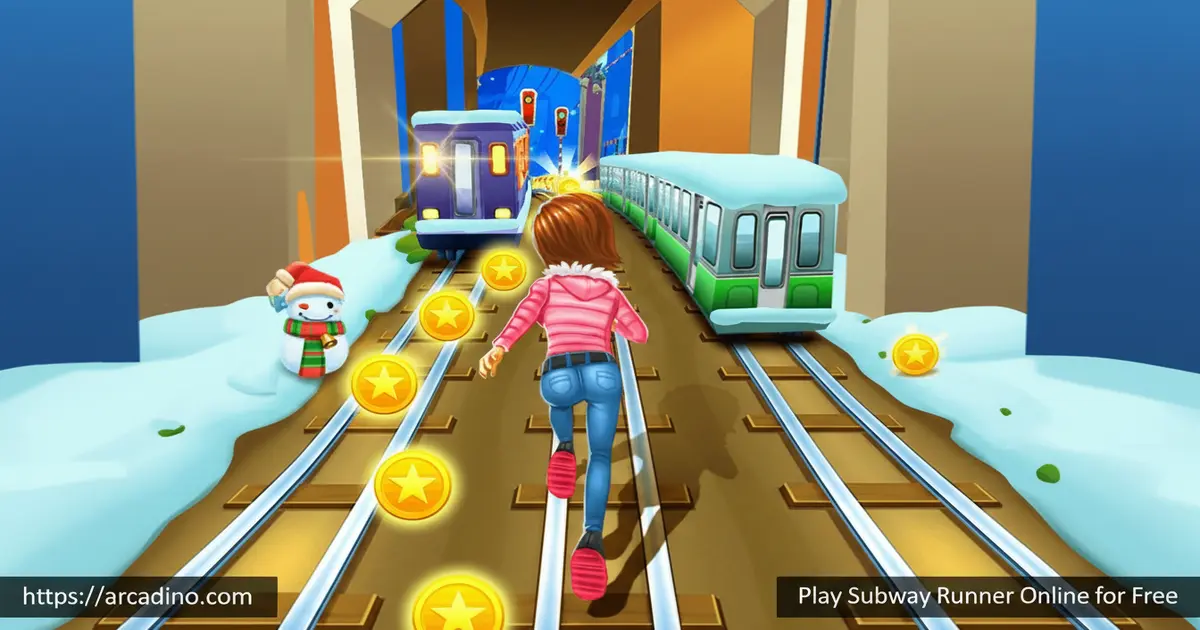
Some games hook you in the first three seconds — Subway Runner is exactly that kind of game. It’s free to play online right now, and the rush of dodging your first oncoming train is genuinely hard to shake. This endless runner throws you into a packed subway environment where one wrong move ends everything. If you’ve ever wondered whether an endless runner can be both simple to pick up and surprisingly hard to master, this is your answer. 🚆
- Free endless runner set in a fast-moving subway world
- Dodge trains and obstacles while collecting coins on the track
- Unlock exciting characters using coins you earn mid-run
- Use powerups like jetpacks and hoverboards to survive longer
What Is Subway Runner?
Subway Runner is a fast-paced endless runner game where you sprint through subway tracks and dodge everything in your path. The goal is simple: run as far as possible without getting caught or crushed. It belongs to the same genre as classic runners, but it leans hard into the subway setting — trains, tunnels, and tight lane switches are the heart of every run.
The game draws clear inspiration from the endless runner formula made famous by titles like Subway Surfers. What stands out here is how quickly the pace escalates — early runs feel manageable, but the game speeds up fast. Controls snap to your input with very little delay, which makes close calls feel thrilling rather than unfair. The browser version loads quickly and stays responsive even as obstacles start flying at you faster.
Subway Runner vs. Subway Surfers — What’s the Same and What’s Different?
It’s fair to say Subway Runner and Subway Surfers share the same basic DNA — both are endless runners set in a subway world, both have lane-switching, coins, and powerups. But there are real differences worth knowing. Subway Surfers is made by SYBO and Kiloo, a professional studio, and it features a famous inspector-and-dog chase mechanic where a grumpy inspector always hunts you down. Subway Runner doesn’t have that pursuer — your only threat is the obstacles ahead of you. Subway Surfers also has a huge rotating roster of characters tied to seasonal world tours, while Subway Runner keeps its character list leaner and simpler. If you want a cleaner, no-account browser experience with a faster startup, Subway Runner wins. If you want seasonal events, a bigger story universe, and more characters, Subway Surfers is the fuller package.
Subway Runner Gameplay — The Loop That Keeps You Going
Your character moves forward automatically from the moment a run begins. Your job is to control direction — switching lanes, jumping over barriers, and ducking under low obstacles. The game uses classic endless runner mechanics, which means there’s no final level or finish line. Every run ends eventually, and your score depends entirely on how far you make it.
Subway Runner focuses on a single endless mode — there are no separate stage modes, challenge modes, or boss levels to unlock. That’s actually a strength, not a weakness. Everything is built around one clean loop: run, dodge, collect, and beat your record. The simplicity means you’re never confused about what to do next, and every session feels instantly familiar from your very first attempt.
What makes the gameplay genuinely gripping is the speed curve. Runs start at a manageable pace, then the screen fills with hazards faster than you expect. One late lane switch sends you straight into a train, and you’re immediately back at the start trying to beat your previous distance. That restart loop is exactly what makes this idle-free runner so hard to put down.
Characters, Coins, and Powerups in Subway Runner
Coins scattered across the tracks aren’t just decoration — they’re your ticket to new characters. You start with a default runner and unlock more by spending the coins you collect during each run. The characters don’t change how the game plays mechanically, but earning them gives every run a secondary purpose beyond just surviving.
Powerups are where things get really fun. Jetpacks and hoverboards are confirmed pickups that change how you move through the subway. A hoverboard gives you a buffer when you hit an obstacle, while a jetpack lifts you above the chaos entirely for a brief stretch. These powerups turn a desperate run into a moment of total control — right before the speed ramps up again.
Hoverboard vs. Jetpack — Which Powerup Should You Use First?
Most players grab whatever powerup appears first without thinking about it — but there’s a smarter approach. Hoverboards are best saved for the mid-run speed spike, when obstacle density starts to peak and one wrong lane choice can end a great run instantly. Think of a hoverboard as an insurance policy: it absorbs one collision and keeps your run alive at exactly the moment you’re most likely to make a mistake. Jetpacks, on the other hand, are more valuable in the late run, when the track is moving so fast that reading individual lanes becomes nearly impossible. A jetpack lifts you completely above the chaos, giving your eyes and reflexes a few seconds to reset before you land back into the action. If you get both powerups in the same run, try to use the hoverboard first around the mid-game speed surge, then hold the jetpack for when things get truly frantic. Using them in this order can add significant distance to your personal best.
Coin Efficiency and Character Unlock Pacing
Understanding how coins add up is the key to unlocking new characters faster. In a typical short run, you can expect to collect somewhere between 20 and 60 coins depending on how aggressively you chase coin lanes. Longer runs that push into high-speed territory can yield 100 or more coins if you stay on coin-heavy paths. Entry-level character unlocks generally cost a few hundred coins, which means a motivated player can realistically unlock a new character after five to ten solid runs. The best way to speed this up is to run dedicated coin-focused sessions — pick lanes with heavy coin clusters even if they’re slightly riskier, since the coin payoff outweighs the risk when your only goal is progression. Setting a target like 75 coins per run before you stop playing keeps unlock pacing steady and gives every session a concrete goal beyond just surviving longer.
Graphics and the City Environment
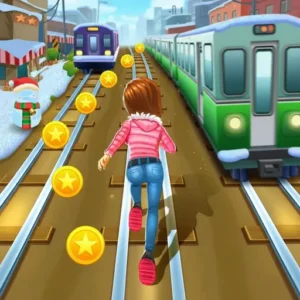
The game drops you into an animated city subway that looks vibrant without being overwhelming. Tracks, tunnels, and urban scenery scroll past at speed, giving each run a genuine sense of momentum. The visual style is colorful and clean, which makes it easy to read upcoming obstacles even when the pace gets intense.
Characters are well-designed for a browser runner — expressive enough to feel fun without slowing the game down. The city backdrop adds personality to every run, making it feel like you’re actually tearing through a real urban underground. It’s not a graphically complex game, but the art direction does exactly what an endless runner needs it to do.
How to Play Subway Runner
Getting started takes about five seconds — the game begins the moment you hit play. Your runner launches forward automatically, and your whole focus shifts to what’s coming next. The key skill is reading the track ahead and reacting early rather than at the last second. Even your very first run will teach you that hesitation is the fastest way to end a good streak.
Powerups appear regularly throughout each run, so grab them whenever you can. Collecting coins while also dodging obstacles becomes second nature after a few attempts. The more you play, the better your instincts get at spotting safe lanes before obstacles arrive.
Subway Runner Controls
On mobile, the controls are all swipe-based — swipe up to jump, swipe left or right to switch lanes, and swipe down to roll under obstacles. Tapping the screen twice activates your hoverboard when you have one equipped. On desktop, use your arrow keys or WASD for movement and the spacebar for actions. The swipe controls feel natural on touchscreen devices, and the keyboard version responds cleanly without input lag.
Tips and Tricks for Subway Runner
- Look two obstacles ahead, not one. Reacting to the immediate obstacle often puts you in the path of the next one — scan further down the track.
- Save your hoverboard for high-speed sections. Using it early wastes its protection — activate it once the pace starts feeling dangerous.
- Prioritize lane position over coins. A coin in a risky lane isn’t worth a run-ending collision, especially in the early stages of a new session.
- Use the jetpack to reset your focus. When you activate a jetpack, use those seconds to breathe and mentally prepare for the pace that follows landing.
- Set a coin target per run. Working toward specific coin totals keeps you focused on character unlocks, which adds motivation beyond just beating your distance record.
Key Features of Subway Runner
- True endless runner format — no stages, no checkpoints, just pure distance-based scoring that scales in difficulty automatically.
- Jetpack and hoverboard powerups — two distinct powerups that change your movement style and help extend your run in different ways.
- Coin-based character unlocks — every run contributes to your next unlock, giving progression a clear and rewarding structure.
- Fast-escalating difficulty — the speed curve is steep enough to keep experienced players challenged without punishing complete beginners too hard at the start.
- City subway setting — a colorful, animated underground environment that gives the game a distinctive visual identity within the endless runner genre.
Where to Play Subway Runner
Subway Runner is available to play for free directly in your browser at arcadino.com — no downloads required and no account needed to start a run. The browser version runs smoothly on both desktop and laptop, making it easy to jump in during a break. Arcadino.com keeps the game fully accessible without restrictions, so you can play it at any time.
Browser Performance and Accessibility
One of the biggest advantages of the browser version is how lightweight it is. On a mid-range laptop, Subway Runner loads in under three seconds and runs without any noticeable frame drops, even during the fastest late-run sections. It works on Chrome, Firefox, and Safari without any plugins or special settings required. School Chromebooks handle it well too — the game doesn’t demand much processing power, so even older hardware keeps up with the action. On tablets and iPads, the browser version loads cleanly and the swipe controls respond just as well as they do in the mobile app. If you’re deciding between playing in-browser or downloading the app, the browser version is the easier choice for quick sessions on shared or lower-spec devices, since there’s nothing to install and no storage space required.
If you prefer gaming on your phone or tablet, a mobile version is available for Android. Grab the Android version from the Google Play Store. Note that the Google Play listing links to Gumdrop Games’ runner title — always verify the app name matches before downloading. For iOS users, a dedicated Subway Runner app is not currently confirmed on the Apple App Store, so the browser version on arcadino.com is the recommended way to play on iPhone or iPad. If you’re looking for APK files from third-party sites, stick to official sources only — unofficial APKs can carry security risks that aren’t worth the shortcut.
For Parents
Subway Runner is considered safe and age-appropriate for kids — it contains no explicit content, no violence beyond cartoon-style collisions, and no inappropriate themes. The running and dodging gameplay can actually sharpen reaction time and hand-eye coordination, which are genuine cognitive benefits of fast-paced games like this one. There’s no live chat system in the game, so younger players aren’t exposed to strangers online.
Parents should be aware that mobile versions may include in-app purchases for cosmetic items or progression boosts. For the browser version on arcadino.com, there are no paywalls interrupting gameplay. A suggested play session for ages 8–13 is around 20–30 minutes, since the short run format makes it easy to stop naturally between attempts.
Similar Games to Subway Runner
If you love the high-speed lane-switching action of this subway runner, these other endless runners deliver the same addictive rush in their own unique settings.
- Subway Surfers — The iconic endless runner from SYBO and Kiloo where Jake, Tricky, and Fresh dodge trains and collect coins while escaping an inspector and his dog.
- Temple Run — A jungle-based endless runner where you sprint through ancient ruins and swipe to dodge deadly obstacles at increasing speeds.
- Bus and Subway Runner — An endless runner that sends you through a city subway on a hoverboard while dodging buses and a pursuing police car.
- Subway Princess Runner — A running game featuring a princess protagonist who dashes through subway tracks and beaches, with seasonal events and character unlocks.
Which Subway Runner Game Is Right for You?
Choosing between similar subway runners is easier when you know what each one actually delivers. Pick Subway Runner if you want the leanest browser experience — no account, no install, and instant play from any device. Pick Subway Surfers if you want seasonal world tours, a huge character roster, and the classic inspector-chase tension that started the genre. Choose Bus and Subway Runner if you like the idea of a police pursuit added to the mix, with a hoverboard as your main movement tool. Go with Subway Princess Runner if you prefer a lighter visual style with beach and themed environments, plus seasonal events. And if you want structured variety, Subway Rush: Escape adds multiple game modes for players who find a single endless loop too repetitive. The core lane-switching fun is present in all of them — your choice comes down to how much extra content and complexity you want around it.
Explore more games in the Running category on Arcadino.
FAQs About Subway Runner
Is Subway Runner an endless game?
Yes, Subway Runner is an endless runner with no finish line or final stage. Your run continues until you collide with an obstacle or get caught. The goal is to beat your personal distance record on every attempt.
Is Subway Runner free to play online?
Yes, Subway Runner is completely free to play in your browser. You can access it directly on arcadino.com without creating an account or downloading anything. The browser version gives you full access to the core gameplay at no cost.
Is Subway Runner safe for kids?
Yes, Subway Runner is safe for kids and contains no inappropriate content. The gameplay involves cartoon-style running and dodging, which is suitable for ages 8 and up. There’s no live chat in the browser version, making it a low-risk choice for younger players.
How do you control Subway Runner on mobile?
Swipe up to jump, left or right to switch lanes, and down to roll under obstacles. Tapping the screen twice activates your hoverboard when it’s available. These swipe controls are quick to learn and work smoothly on both phones and tablets.
Can you download Subway Runner for PC?
You can play Subway Runner on PC directly through your browser — no download is needed. If you want a dedicated app experience, the Android version is available on the Google Play Store and can also be run on PC through Google Play Games. The browser version on arcadino.com works well on any modern desktop browser.
What powerups are in Subway Runner?
Subway Runner features jetpacks and hoverboards as confirmed powerups. A hoverboard protects you from one collision before breaking, while a jetpack lifts you above the track temporarily. Both powerups can significantly extend your run when used at the right moment.
How do you unlock new characters in Subway Runner?
You unlock new characters by collecting coins during your runs. Coins are scattered across the subway tracks throughout every run. Spending those accumulated coins on characters gives you a rewarding sense of progression beyond just chasing high scores.
What is the tragic story behind Subway Surfers?
The lore around Subway Surfers includes the story of Kyler, a teenager whose real-life story is said to have inspired the inspector-chase premise at the heart of the game’s universe. The idea of a young person running from authority through a subway became the emotional core of the Surfers narrative, and fans have explored it deeply online. Subway Runner doesn’t carry that backstory — it’s a separate game with no inspector mechanic and no pursuit narrative. If you’re curious about the Surfers universe, it’s worth looking into the original SYBO and Kiloo lore. For Subway Runner, the story is simpler: just you, the tracks, and the next obstacle.
Ready to Race the Subway Tracks?
Subway Runner packs everything great about the endless runner genre into one fast, free, and endlessly replayable experience. The combination of coin-collecting, character unlocks, and powerups like jetpacks and hoverboards means every run feels like it’s building toward something. The speed escalation keeps even confident players humble — just when you think you’ve got it figured out, the track hits a new gear.
Head to arcadino.com, hit play, and find out exactly how far your reflexes can take you. Your longest run is always one more attempt away.
Gameplay Video


