














Geometry Dash Meltdown
RobTop GamesIf you love rhythm games where one missed beat sends you flying back to the start, Geometry Dash Meltdown is going to live in your head. This free spin-off of the main Geometry Dash series packs three blazing levels into a tight, no-download browser experience. You can play it instantly online, no installs, no sign-ups, just your reflexes against a wall of spikes and saw blades. 🔥
Many players search plain “geometry dash” when they actually want this fiery mini-version, so don’t worry if you ended up here by accident. Geometry Dash Meltdown is the shorter, hotter cousin built around F-777’s electronic soundtrack and lava-flavored visuals.
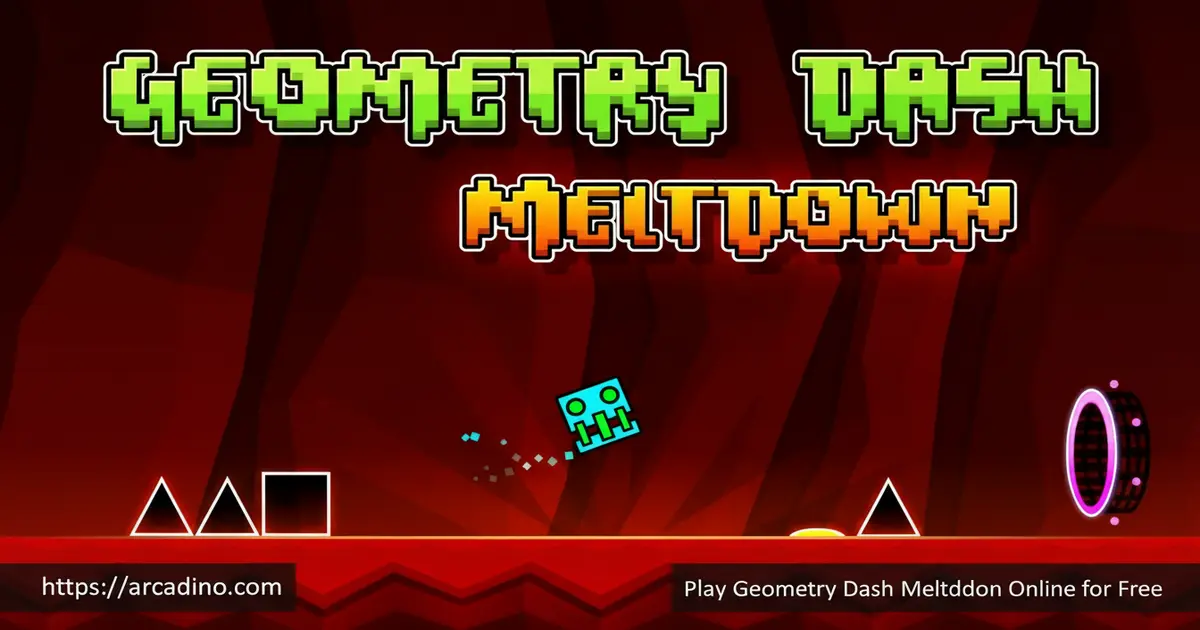
- Three exclusive levels: The Seven Seas, Viking Arena, and Airborne Robots
- One-button rhythm controls synced to F-777’s electronic tracks
- Hidden secret coins on every stage for extra challenge
- Practice Mode with checkpoints to learn tricky sections
What Is Geometry Dash Meltdown?
Geometry Dash Meltdown is a rhythm-based 2D platformer made by RobTop Games. It launched as a standalone spin-off of the main Geometry Dash series and was originally a teaser for upcoming updates. You guide a little cube that auto-runs forward, jumping and flying past spikes, saws, and gravity flips, all timed to the music.
I tested the HTML5 browser version and the sync between beat and obstacle is what makes this title special. The cube responds the instant you tap, which matters a lot when one frame of hesitation ends your run. Load times are short and the lava-soaked backgrounds stay smooth even on a budget laptop.
Release Date and Development Background
Geometry Dash Meltdown launched on December 19, 2015, built by Swedish developer Robert Topala (RobTop Games). It wasn’t just a side project, it was a teaser meant to hype up the big Geometry Dash 2.0 and 2.1 updates. The three levels showed off new effects, vehicles, and music styles before they hit the main game. That’s why Meltdown still feels like a “preview reel” of everything cool the series can do.
Hazards You’ll Face Beyond Spikes and Saws
Meltdown isn’t just sharp pointy stuff. You’ll dodge homing missiles in Airborne Robots, ride launching jump pads, and tap glowing jump rings mid-air for extra hops. Moving platforms slide under you in Viking Arena, and gravity portals flip the whole screen upside down without warning. Some hazards aren’t obstacles at all but tools, like speed portals that suddenly double your pace. Learning which color does what is half the battle.
Geometry Dash Meltdown Gameplay
The core loop is brutally simple: your cube moves on its own, and you tap to jump. Miss a single spike or saw and the level restarts from the beginning. There are no mid-level checkpoints in normal mode, so finishing a stage means stringing together every jump perfectly from start to finish.
What keeps you locked in is the rhythm. Every obstacle lines up with a drum hit or bass drop in the F-777 soundtrack. Once you stop watching with your eyes and start listening with your ears, runs suddenly click. That “aha” moment is why people grind hundreds of attempts on a single stage.
The Three Geometry Dash Meltdown Levels
Meltdown has exactly three levels, each with its own theme, music, and difficulty curve. They get harder fast, and each one introduces a new vehicle form for your cube.
- The Seven Seas (Easy) – “Pirate Dance Machine” by F-777: A pirate-flavored warm-up that introduces the Ship form, where you hold to fly up and release to drop.
- Viking Arena (Normal) – “Viking Arena” by F-777: A volcanic Norse stage with speed changes, jump pads, and fake spike traps shaped like monster mouths.
- Airborne Robots (Hard) – “Ludicrous Speed” by F-777: A neon techno gauntlet with gravity portals that flip you upside down and the Robot vehicle for variable jumps.
Customization and Unlockable Icons
Beat levels and grab hidden coins and you’ll unlock exclusive Meltdown icons and color schemes. From the Character Select menu you can swap your cube for other shapes like ships, balls, and robots, and recolor the body, outline, and details.
It’s a small touch, but picking your own neon palette makes those endless retries feel personal. You can mix custom colors instead of sticking to the default board, so no two players’ cubes have to look the same.
Achievements and Secret Coins
Each of the three Meltdown stages hides three secret coins along risky alternate paths. Grabbing them often means falling into a gap on purpose or skipping an “obvious” jump, which adds a whole second layer to mastery. The game also tracks stats like total jumps, attempts, and stars across every level.
Achievements roll in as you hit milestones, giving you something to chase even after you’ve cleared all three songs. Coin collection is the real long-term goal for completionists.
Coin Hunting Example: The Seven Seas First Coin
Here’s a concrete one to show how sneaky the coin paths are. Early in The Seven Seas, you’ll see a row of elevated platforms that look like the obvious safe route. Don’t take them. Instead, drop into the lower gap below and let your cube ride along the bottom path, where the first coin is floating just out of sight. It feels wrong because it looks like a death pit, but trusting the fall is the trick. Most coins in Meltdown follow this same “do the scary thing” rule.
Browser Performance and Input Lag (The Stuff That Decides Your Runs)
Why Browser Choice Actually Matters for Rhythm Games
Rhythm games punish even tiny delays, so the browser you pick really matters. The HTML5 version of Meltdown adds a few milliseconds of input lag compared to the native mobile app, which most players never notice on The Seven Seas but absolutely feel on Airborne Robots. Chrome and Edge tend to give the most consistent frame timing because they share the same Chromium engine and handle audio sync well. Firefox works fine, but Safari can sometimes drift the beat by a hair on older Macs. Close extra tabs and any video playing in the background, since they steal CPU from the game loop. Here’s a quick test before you grind: try clearing The Seven Seas without going for coins. If you can finish it cleanly in under ten attempts, your setup is responsive enough for the harder stages. If jumps feel “late” no matter when you tap, switch browsers or try fullscreen mode before blaming yourself.
How to Play Geometry Dash Meltdown
Getting started takes about ten seconds. Open the page, pick a level from the menu, and your cube starts running the moment the song kicks in. Your only job is to tap at the right moments.
Start with The Seven Seas to learn the timing before you touch the harder stages. If you keep dying at the same spot, jump into Practice Mode from the pause menu and drop checkpoints so you can drill that one tough section.
Geometry Dash Meltdown Controls
- Jump or fly: Spacebar, Up Arrow, or Left Mouse Button
- Hold to bounce: Keep the jump button held down for back-to-back jumps on contact
- Set checkpoint (Practice Mode only): Press Z
- Delete last checkpoint: Press X
- Mobile: Tap anywhere on the screen to jump or fly
Your Attempt Budget: A Numbered Training Plan
Random retries waste time. Try this structured plan to actually improve instead of mashing space for an hour:
- Attempts 1-20: The Seven Seas, no coins. Just clear it cleanly. You’re learning how the cube and ship feel, not chasing 100%.
- Attempts 21-50: Viking Arena in Practice Mode. Drop a checkpoint right before the fake monster-mouth section and rehearse that part 30 times in a row.
- Attempts 51-70: Viking Arena full runs. Now turn off Practice and chain it from the start. Expect lots of fails around the speed change.
- Attempts 71-120: Airborne Robots split sessions. Alternate ten Practice Mode runs (drilling gravity-portal flips) with five real attempts. Repeat until you clear it.
- Attempts 121+: Coin hunting. Only now should you go back and chase the three coins per stage. You already know the layouts cold.
This plan turns Meltdown from a rage spiral into a real skill ladder. Stick to it and Airborne Robots will fall in a single afternoon.
Tips and Tricks for Geometry Dash Meltdown
- Listen, don’t just look. Every jump lines up with a beat in the F-777 track, so close your eyes mentally and trust the rhythm.
- Use Practice Mode for the 80% wall. Drop a checkpoint right before the part that keeps killing you and rehearse it ten times before retrying full runs.
- Hold the jump button on tight platform sections. The cube auto-bounces the moment it lands, which saves you from mistiming consecutive hops.
- Memorize fake spike traps in Viking Arena. Some “monster mouth” hazards look deadly but are safe pass-throughs once you know the pattern.
- Skip coin hunting on your first clear. Beat the level cleanly first, then come back and learn the risky alt-paths for the three secret coins.
Accessibility and Ergonomics for Long Sessions
Meltdown rewards repetition, which means your hands will be tapping for a while. Spacebar is usually the least fatiguing input because your thumb is the strongest finger and the key has a long travel. Left mouse click works too, but tiny finger taps add up over hundreds of attempts and can sting your knuckle. On mobile, switch which thumb taps every few runs so one hand doesn’t get sore. Headphones genuinely raise clear rates, because the beat cues are easier to lock onto when laptop speakers aren’t washing them out. For players who are hard of hearing, watch the background pulse and the screen-shake on bass drops, since RobTop syncs visual flashes to most beats too. Players with motor differences can try Practice Mode permanently, which lets you save progress section by section without grinding full runs.
Key Features of Geometry Dash Meltdown
- Three hand-crafted levels scored by electronic artist F-777
- Multiple vehicle forms including cube, ship, ball, and robot
- Gravity-flip portals that turn the level upside down mid-run
- Hidden secret coins on every stage with branching paths
- Practice Mode checkpoints for grinding through tough segments
Where Meltdown Sits on the RobTop Spin-Off Difficulty Ladder
If you’re trying to figure out which official spin-off to tackle first, here’s how the hardest level in each one stacks up. Geometry Dash World’s “Payload” is the gentlest end-boss, sitting around Easy-Normal and great for newcomers. Meltdown’s Airborne Robots jumps up to a solid Hard, with gravity portals and missile dodges that punish lazy timing. SubZero’s “Power Trip” goes a step further, generally rated Harder, with faster speed sections and tighter ship corridors than anything in Meltdown. So the rough ladder reads: World (warm-up) → Meltdown (real challenge) → SubZero (next level up) → main Geometry Dash demon levels (a different planet entirely). Beat Airborne Robots and you’re absolutely ready to take on Power Trip next.
Where to Play Geometry Dash Meltdown
The fastest way in is the free HTML5 browser version, which runs on PC and mobile without downloads or APK files. Just open the page in Chrome, Firefox, Safari, or Edge and you’re dashing in seconds. Avoid sketchy APK sites if you want the safe official experience.
If you’d rather have it installed, RobTop Games offers Geometry Dash Meltdown on mobile stores. Grab it on Google Play for Android or the App Store for iPhone and iPad. There’s no official standalone PC client, so the browser version is your best bet on a desktop or Chromebook.
For Parents
Geometry Dash Meltdown is generally fine for kids around 9 and up. The game is fast, loud, and uses hyper-techno music, but there’s no violence, no chat feature, and no way for strangers to contact your child. The browser version we link to is free, with no in-app purchases or paid unlocks.
It’s actually great for building focus, pattern recognition, and frustration tolerance, since progress comes from repetition. Short play sessions of 20 to 30 minutes work well, because the difficulty can get genuinely rage-inducing during Airborne Robots.
Similar Games to Geometry Dash Meltdown
If you love one-button rhythm platformers and the Geometry Dash universe, these picks scratch the same itch:
- Geometry Dash SubZero – Another official spin-off with three icy levels and the same beat-synced jumping.
- Geometry Dash Lite – The free taster of the main series, with more levels but easier difficulty curves.
- Geometry Dash World – Two worlds of bite-sized stages perfect if you want shorter runs.
- Geometry Dash Breeze – A fan-style entry with breezy pacing and chill rhythm tracks.
- Slice Master – A different one-button game built around precise timing and satisfying flow.
- Geometry Dash – The full parent title with dozens of stages, a level editor, and endless user-made maps.
- Drift Boss – A timing-based one-button driving game where you tap to steer around tight corners.
Looking for more? Browse the full Platformer category.
FAQs About Geometry Dash Meltdown
How many levels are in Geometry Dash Meltdown?
Geometry Dash Meltdown has exactly three levels. They are The Seven Seas, Viking Arena, and Airborne Robots, listed from easiest to hardest. Each one is paired with its own F-777 soundtrack and hides three secret coins.
Is Geometry Dash Meltdown free?
Yes, Geometry Dash Meltdown is completely free in browser and on mobile. The HTML5 version plays in any modern browser without downloads. The official mobile app on Google Play and the App Store is also free, with no hidden fees.
How do I play Geometry Dash Meltdown on PC?
The easiest way is the free HTML5 browser version on PC. There’s no official desktop installer, so you just open the game page in Chrome, Firefox, or Edge and play. Use Spacebar, Up Arrow, or left-click to jump.
How do I get all the coins in Geometry Dash Meltdown?
Each level hides three coins along alternate, riskier paths. You usually have to skip an obvious jump or fall into a gap to grab them. Use Practice Mode to learn the coin routes before attempting them on a real run.
What’s the difference between Geometry Dash and Geometry Dash Meltdown?
Meltdown is a free, three-level spin-off of the main Geometry Dash. The full Geometry Dash has many more stages, a level editor, and user-created maps. Meltdown has no editor but adds exclusive icons, music, and visual effects.
Can I create my own levels in Meltdown?
No, Meltdown does not have a level editor. Custom levels and the user map browser are only in the paid full version of Geometry Dash. Meltdown sticks to its three official stages.
How do I beat Airborne Robots?
Use Practice Mode and grind the section that keeps killing you. Drop checkpoints with Z right before tough parts and learn the gravity portal flips by muscle memory. Listen to the beat instead of staring at obstacles when speed picks up.
Ready to Melt Down?
Three levels, three coins each, and a soundtrack that hits harder the more you fail. Geometry Dash Meltdown is short, brutal, and weirdly addictive, with rhythm-locked obstacles and gravity flips that reward pure repetition. Crank the volume, line up your taps with the F-777 drums, and see how far you can push before the lava wins.
Gameplay Video