




























Watch one short ad and play ad-free for 30 minutes.
Worms Zone
Wild SpikePicture a wiggly little worm dropped into a giant arena filled with jellybeans, cupcakes, and rival worms ready to chomp. That’s Worms Zone, a free online .io arcade where you slither, snack, and slowly grow into a massive anaconda-sized champion. It plays right in your browser with no download needed, and folks who love the classic Google snake game will feel instantly at home. Sometimes searchers even mix it up with “snake google” because the eat-and-grow loop feels so familiar.
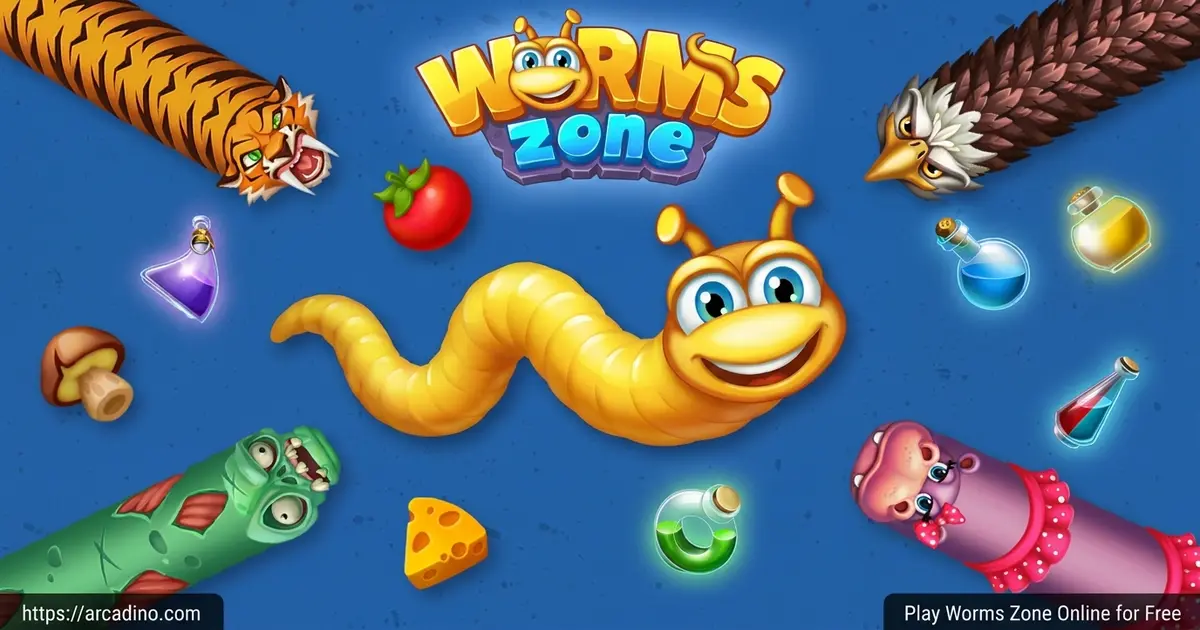
- Free-to-play hungry snake arena with colorful 2D graphics
- Six power-up potions that boost speed, food, and vision
- Wardrobe full of unlockable worm skins and custom faces
- Daily and weekly leaderboards for record chasers
What Is Worms Zone?
Worms Zone is an .io arcade game built by Wild Spike where dozens of players share one buffet-style arena. Your goal is simple: eat the scattered treats, dodge other worms, and stretch into the longest noodle on the map. It’s often compared to Slither.io, but with chunkier worms, bouncier animations, and more on-screen items to chase. 🐛
Loading the game in Chrome takes only a few seconds, and the mouse tracking feels snappy even when the screen fills up with rivals. I noticed the worm’s head responds instantly when you flick the cursor, which matters a lot during tight squeezes. The minimalistic art style keeps the frame rate smooth on older laptops too.
Worms Zone Quick Facts
- Developer: Wild Spike
- Release date: July 2018
- Platforms: Web browser, Android, iOS
- Genre: .io arcade, multiplayer snake
- Price: Free with optional in-app purchases
That long track record means the game has had years of updates, new skins, and seasonal events added since launch. It’s one of the most polished worm .io titles you’ll find online today.
Worms Zone Gameplay
You start as a tiny worm and immediately get to work munching gelatinous goodies, donuts, and jelly cubes. Every snack adds length, and the bigger you get, the more space you take up in the arena. The catch? If your head bumps any other worm’s body, you pop instantly and have to restart.
The clever twist is the encircle move. If you wrap your long body around a smaller worm, they’re forced to crash into you and drop all their food. Suddenly you’ve got a buffet of leftovers and a huge score jump. That risk-reward loop is what keeps runs feeling fresh.
Power-Ups in Worms Zone
Potion bottles spawn across the map and each color does something different. Red and blue ones widen your capture radius so food flies toward you. A blue potion multiplies the food you eat by five times, which is the fastest way to grow.
Green potions speed your worm up, round green ones boost maneuverability, and the yellow potion zooms the camera out for a wider view. Purple shows where other worms recently crashed, so you can race to grab their leftover snacks. Smart players grab potions early before bigger worms steal them.
Worm Outfits and Customization
The wardrobe is half the fun. You can pick from a big set of ready-made skins, including stripes, neon glow patterns, and goofy themed designs. You can also build your own combo and customize the worm’s face with different eyes and expressions.
As you level up, funkier outfits unlock. Seasonal events sometimes drop limited skins too, like dinosaur worms during Dino Era weeks. It’s a nice reward loop for players who log in often.
Game Modes in Worms Zone
There’s more than one way to play. Infinity mode lets you keep growing until you finally crash. Time mode is a 7-minute sprint with double points and double coins, which is perfect for a quick session.
Treasure Hunter mode scatters treasures across the map for you to find. Seasonal modes pop in around holidays like Halloween, Christmas, and Easter, with exclusive rewards. Rotating modes keep the worm io grind from getting stale.
How to Play Worms Zone
Getting started takes about ten seconds. Open the game in your browser, pick a skin from the wardrobe, and tap play. You’ll drop into the arena right next to some food, so begin munching immediately to build a starter length.
From there, focus on safe edges of the map before pushing into the messy middle. Watch the bigger worms carefully because they love trapping smaller players against their own bodies. Patience beats greed in this hungry snake brawl.
Worms Zone Controls
Use your mouse to steer, just point in the direction you want the worm to slither. Click the left or right mouse button (or press the spacebar) to turbo-boost forward. Turbo costs score points, so use it sparingly when you’re huge and freely when you’re tiny. On mobile, drag your finger across the screen to steer and tap the boost button to sprint.
How Turbo Boost Really Works
Here’s a sneaky detail: when you turbo-boost, your worm physically shrinks in length, not just your score number. Those dropped chunks become food other players can scoop up, so boosting near rivals basically feeds them. Upgrades you buy in the main menu only stretch how long your potion power-ups last – they do not raise your base speed or starting size. So don’t expect menu upgrades to make you tougher in a head-to-head chase. Save your coins for skins and potion duration boosts instead.
Tips and Tricks for Worms Zone
- Grab the blue 5x food potion the moment you spot it – it’s the single fastest growth tool in the game.
- When you get big, stay near the outer edges where fewer worms can box you in from multiple sides.
- Use turbo to cut in front of a rival’s head, then loop back so they crash into your body.
- Save boost for emergencies once you’re long, because the score cost gets brutal at high lengths.
- After a big worm dies, sprint to the trail of dropped food – it’s the easiest jackpot in the arena.
Pick Your Player Style: Fighter, Trickster, or Builder
Most pros fall into one of three play styles, and picking yours early helps you focus. Fighters charge into traffic, turbo-cut rival heads, and farm the food left behind from popped worms. Tricksters bait other players by faking crashes, then snap the encircle shut once a greedy worm follows them in. Builders stay near the safe edges, munch potions, and quietly grow into a giant before anyone notices. Try each style for a few rounds and stick with whichever feels most fun.
Encircle Move: Step-by-Step Tutorial
The encircle is the highest-reward move in Worms Zone, but it takes practice. Here’s how to land one cleanly:
- Pick a smaller target – aim for a worm clearly shorter than you, so you have enough body to wrap around them.
- Approach from the side, not head-on. Slide past their head at roughly a 90-degree angle.
- Start the loop early, while you’re already a worm-length past them. Curve your head in a wide arc back toward your own tail.
- Tighten the circle slowly – if you turn too sharp, your own head can clip your body.
- Close the gap by aiming your head to meet your tail without crossing it. The trapped worm will panic, boost, and crash.
- Sweep up the food while it’s still glowing. Other worms will be racing in too.
Practice on tiny worms first. Once it clicks, you’ll be able to trap medium worms with smooth, lazy loops.
Chasing the Highest Score: Leaderboard Strategy
If you want your name on the daily or weekly leaderboard, the math matters. Time mode is the smartest pick for record chasing because it doubles both points and coins for the full 7 minutes. That means every food pellet, every potion grab, and every encircle counts twice toward your total. Aim to grab a blue 5x potion within the first minute, then stack a red-and-blue capture radius potion right after – that combo can push your length past 1,000 in under three minutes. Avoid turbo-boosting after you cross the 500-length mark, since the shrink cost eats into your score faster than new food can replace it. Patrol the spot where giants tend to crash (usually the middle), and sweep their leftovers instead of fighting fresh players. One clean Time mode run with two potion stacks and a single big-worm cleanup can outscore an hour of careless Infinity runs.
Will Worms Zone Run on My Chromebook or Old Laptop?
Good news for school players: Worms Zone runs great on locked-down Chromebooks because it’s a modern HTML5 game with no Flash, no plugins, and no install needed. It loads over HTTPS, which usually passes through standard school web filters, though strict districts may still block .io domains. The game uses well under 500 MB of RAM in most sessions, so it works fine on budget laptops and older Chromebooks with 4 GB of memory. It does not work offline – you need an internet connection because every match is live multiplayer. There’s no official Android TV app, but you can sideload the Google Play version on TV boxes that support it. If your school blocks the main site, try a different .io game hub or ask a teacher about unblocking the URL.
Key Features of Worms Zone
- Massive PvP arena where dozens of worms compete in each match
- Six unique potion power-ups with stacking effects
- Wardrobe with dozens of skins plus a custom face builder
- Daily and weekly leaderboards for record-chasing players
- Multiple modes including Infinity, Time, Treasure Hunter, and seasonal events
Where to Play Worms Zone
The easiest way is right here in your browser – no install, no sign-up, just click and slither. The web version runs well on Chrome, Firefox, Edge, and Safari, and works on school Chromebooks too. Many players also discover the game through .io game hubs like CrazyGames, which mirrors the same build.
If you’d rather take Worms Zone on the go, official mobile apps are available. Grab it on Google Play for Android or the App Store for iPhone and iPad. Skip random APK download sites – they often bundle viruses and aren’t safe.
For Parents
Worms Zone is rated suitable for kids 8 and up. The action is cartoony with no blood, gore, or scary themes – worms just poof into food when they crash. There’s no open chat with strangers, which removes a common safety worry for .io games.
The mobile version does include optional in-app purchases for coins and skins, so check your device settings if you want to block those. Short Time mode rounds make it easy to limit sessions to 10 or 15 minutes per sit-down.
Similar Games to Worms Zone
If you enjoy the eat-grow-survive loop, these slithering snake game alternatives are worth a slither:
- Slither.io – The original snake .io hit that inspired the genre, with neon trails and tighter arenas.
- Agar.io – Same grow-and-eat formula but you’re a blob instead of a worm, with split mechanics.
- Snake.io – A blocky, retro-flavored take on the multiplayer snake battle.
- Little Big Snake – Adds bugs, missions, and a deeper progression system to the slither formula.
- Snow Rider – A fast sled-dodging arcade game that’s perfect for quick breaks between worm rounds.
- Browse more IO Games for the full collection.
FAQs About Worms Zone
Is Worms Zone free?
Yes, Worms Zone is completely free to play in your browser. The mobile apps are also free to download. Optional in-app purchases exist for coins and cosmetic skins, but you never need to pay to compete.
Is Worms Zone multiplayer?
Yes, Worms Zone is a real-time multiplayer .io game. You share the arena with many other live players at once. Every worm you see slithering around is controlled by another person trying to grow bigger than you.
Can you play Worms Zone with friends?
Worms Zone doesn’t have an official private-room or party invite system. The game matches you with random players each round, so there’s no confirmed way to guarantee you’ll land in the same arena as a friend. The best shared experience is racing each other on the daily leaderboard, or sitting side by side and comparing high scores.
Is Worms Zone the same as the Google snake game?
No, they’re different games with similar ideas. The Google snake game is a solo arcade hidden in Chrome, while Worms Zone is a colorful multiplayer arena with power-ups and skins. Many fans of one tend to enjoy the other.
How do you eat other worms in Worms Zone?
Cut in front of them so their head crashes into your body. When they pop, they drop every snack they collected. Encircling smaller worms is the highest-reward move in the game.
What’s the fastest way to grow in Worms Zone?
Grab the blue potion, which multiplies food intake by five times. Combine it with the red-and-blue capture radius potion for even faster growth. Hunting the leftovers of recently popped giants is also a quick boost.
Does Worms Zone work on PC?
Yes, it runs perfectly on PC through any modern web browser. There’s no separate Windows download needed. The mouse controls actually feel sharper on PC than on touchscreens.
Final Slither
Worms Zone nails that addictive “one more round” feeling with its colorful arena, six different potion power-ups, and the satisfying thrill of trapping rival worms. The wardrobe, seasonal events, and rotating modes give you plenty of reasons to come back. Fire it up, pick a wild skin, and see if you can climb tonight’s leaderboard – that anaconda life is closer than you think.
Gameplay Video


