


























Watch one short ad and play ad-free for 30 minutes.
Papa’s Sushiria
Flipline Studios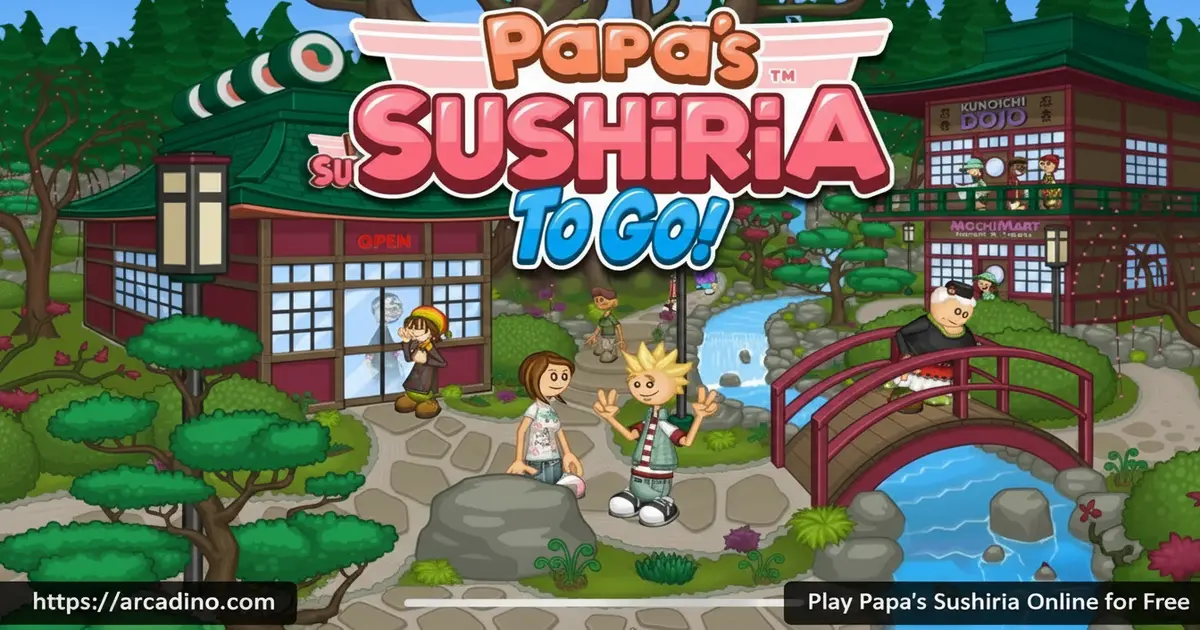
Rolling sushi, pouring bubble tea, and juggling a full restaurant — Papa’s Sushiria packs all of that into a free browser game you can start right now. This is the thirteenth entry in Flipline Studios’ legendary Papa Louie series, and it might be the most detailed one yet. Every customer’s order takes you through four separate stations, each with its own skill set to master. If you’ve ever wanted to feel like a real sushi chef, this is the game for it. 🍣
- Four distinct cooking stations, from rice preparation to bubble tea service
- Play as Matt, Clover, or build your own custom character from scratch
- Seasonal holiday menus with new ingredients to unlock each season
- Daily minigames after every shift, including Papa’s Raceway and Home Run Derby
What Is Papa’s Sushiria?
Papa’s Sushiria is a restaurant time-management game developed by Flipline Studios. It’s set in the coastal town of Sakura Bay, where you’ve accidentally smashed Papa Louie’s lucky cat statue on opening day. Now you owe him — and the only way to pay off that debt is to run his sushi restaurant until the bill is cleared. It’s a fun setup that gives every order you take a little extra meaning.
The game sits firmly in the cooking and business simulation genre. Unlike simpler café games, this title chains together four stations that must all be handled in the right order with real precision. The Ruffle Flash emulator runs it in modern browsers, though performance can vary — more on that below. It’s one of the most content-rich browser cooking games you’ll find online today.
Papa’s Sushiria Gameplay — Four Stations, One Hungry Crowd
Every customer visit in Papa’s Sushiria follows the same satisfying loop: take the order, then move through four stations to fill it perfectly. First, you head to the rice station and use the all-in-one Sushi Square cooker to cook, season, and spread rice onto nori or soy paper. Then it’s off to the build station, where you add fillings like salmon, lobster, avocado, or mango. Some orders even require you to flip the roll so the rice faces outward.
After building the roll, you add toppings, drizzle sauces, and slice the sushi into neat, even pieces. The final station is the bubble tea bar, where you pour a base tea, add flavoring, and drop in tapioca pearls or other flavored bubbles. Customers grade you on both speed and accuracy, so every station matters. Nail all four and you’ll walk away with a bigger tip to reinvest in the restaurant.
Which Station Is Hardest? A Beginner’s Breakdown
Most new players breeze through the rice and build stations early on — but the bubble tea bar catches a lot of people off guard. The milk portioning is manual, and the rest of your order queue doesn’t pause while you’re at the drink station, so it’s easy to lose track of timing. The topping and slicing station trips up beginners too, because even slightly uneven cuts lower your score. At the rice station, seasoning requires precise timing — if you overshoot it, the rice quality drops before you’ve even started building. The Cook Booster upgrade directly fixes that last problem, which is exactly why it’s the best first purchase. Knowing which stations demand the most attention up front helps you focus your practice and avoid losing tips on avoidable mistakes.
Levels and Progression in Papa’s Sushiria
Papa’s Sushiria grows with you the more you play it. Early days in Sakura Bay are manageable, but the restaurant fills up fast as new customers unlock and the orders get more complex. You’ll discover additional fillings, rice types, sauces, and soy paper options as you progress through the game’s seasons. The sense of unlocking something new every few days keeps the momentum going strong.
The holiday system is a big part of that progression. Each season brings themed ingredients and festive customer orders tied to specific holidays. Your regular customers even have Special Recipes they can share with you, which then become the Daily Special — a bonus challenge that rewards you for executing it perfectly. It’s a smart loop that makes long-term play feel genuinely rewarding.
As you advance through the game, keep an eye out for Closers and Gold Envelope Holders. Closers are special customers who show up right at the very end of each shift. They’re easy to spot because they carry gold envelopes packed with bonus rewards. Serving them well before the day wraps up can earn you extra cash and items you won’t get from regular customers. It’s one of those late-game surprises that makes finishing every shift worth it.
Customization and Upgrades Worth Knowing
Tips you earn from happy customers aren’t just pocket money — they fund real improvements to the Sushiria. The Cook Booster is one of the most impactful early purchases, speeding up the rice-cooking process at a station you visit for every single order. The Milk Auto-Pour is another smart grab, automatically measuring the right milk amount for every bubble tea order so you can focus on other details.
Beyond equipment, you can also deck out the restaurant lobby with themed furniture, holiday decorations, and matching accessories. These decorative upgrades actually reduce customer waiting times, so the styling choices have real gameplay value. You can also update your worker’s outfit with holiday-themed gear to match whatever season is currently running. It’s the kind of customization that makes the shop feel like your own.
Minigames and the Sticker Collection
After every shift, Papa’s Sushiria rewards you with three chances at one of several minigames. These include Home Run Derby, Papa’s Raceway, Rico’s Chiliworks, Freeze-Putt, Soda Shot, Hallway Hunt, and Mitch’s Mess. Each minigame is a short, punchy challenge that breaks up the restaurant routine nicely. Win them and you’ll pick up extra rewards to bring back into the main game.
There’s also a full Sticker collection to chase. Each customer in Sakura Bay has three favorite Stickers tied to them, earned by completing specific tasks and achievements during your time in the restaurant. Earn all three of a customer’s Stickers and you unlock a special bonus from them. It gives completionists a long-term goal that runs quietly in the background of every shift.
Special Delivery — Phone Orders and the Driver System
As you progress further into the game, a new mechanic opens up called Special Delivery. Customers can call the Sushiria by phone to place orders remotely instead of coming in person. These phone orders show up in your queue just like regular ones, but you’ll need to hire a Driver character to handle the deliveries. The Driver takes the completed order and brings it to the customer, so you still have to make every roll perfectly — they just don’t eat in the restaurant. It adds a fun new layer of pressure to busy shifts, since phone orders can stack up alongside your dine-in crowd. This feature appears prominently in the To Go mobile version; check the browser vs. To Go comparison below if you want to know which version includes it.
How to Play Papa’s Sushiria
Starting out is simple — pick one of three save slots, then choose to play as Matt, Clover, or create your own custom character. If you go the custom route, the character creator lets you pick a gender aesthetic and type in a name. Then you choose from a range of hair styles and hair colors, eye styles, eye accessories, eyebrow shapes, and skin tones. It’s surprisingly detailed for a browser game, and you can mix and match to make a chef that feels totally yours. After a short cutscene explaining the lucky cat incident, your first shift begins immediately. The game walks you through each station before the restaurant gets busy, so new players have time to get comfortable.
Each shift ends after serving a set number of customers for the day. Between shifts, you can spend your earnings on upgrades, decorations, or wardrobe changes before the next day starts. The friendly mailman Vincent can even help you send coupons to customers you’re missing, bringing them back for more orders. Progress saves to your chosen slot, so you can pick up right where you left off.
Controls for Papa’s Sushiria
Papa’s Sushiria runs on simple mouse-based controls for the browser version. Click to interact with every element — take orders, move between stations, and assemble each roll step by step. On mobile and tablet, the game uses touch controls instead, with taps and swipes replacing mouse clicks. The station navigation buttons sit clearly at the bottom center of the screen for quick switching.
Tips and Tricks for Papa’s Sushiria
- Prioritize the Cook Booster upgrade early. Rice is needed for every sushi order, so speeding up that station pays off for literally every customer you serve.
- Study each customer’s order card carefully before starting. Missing a single filling or topping drops your score, and the tip difference adds up fast over a full day.
- Grab the Milk Auto-Pour when bubble tea orders increase. Manual milk portioning is slow, and automating it frees up mental energy for the sushi stations.
- Use Vincent’s coupons strategically. Sending coupons to your highest-tipping regulars keeps the money flowing on slower days in Sakura Bay.
- Don’t skip the daily minigames. Even a single win in Home Run Derby or Freeze-Putt can earn you bonus rewards that accelerate your restaurant’s upgrades.
Key Features of Papa’s Sushiria
- Four-station sushi workflow — rice cooking, roll building, topping and slicing, and bubble tea service all demand separate skills
- Full custom character creator — choose Matt, Clover, or design your own Papa Louie-styled chef with unique hair, outfits, and holiday gear
- Seasonal holiday menus — each in-game season introduces exclusive fillings, sauces, and soy papers tied to real holiday themes
- Special Recipe and Daily Special system — earn recipes from loyal customers and serve them as featured dishes for bonus rewards
- Seven post-shift minigames — Home Run Derby, Papa’s Raceway, Rico’s Chiliworks, and more add variety between every working day
Where to Play Papa’s Sushiria
You can play Papa’s Sushiria free in your browser at arcadino.com with no account needed and no files to install. The game runs through the Ruffle Flash emulator, which makes it accessible on all major modern browsers including Chrome, Firefox, Safari, and Edge. There are no paywalls or locked content — the full game is available from the moment you hit play. It’s also accessible without restrictions on the site, so school or public networks shouldn’t be a barrier.
If you’d rather play on your phone or tablet, the To Go version of this title is available on both major mobile platforms. Download it from the Google Play Store for Android or the Apple App Store for iPhone and iPad. The mobile version is redesigned for smaller screens and supports touch controls natively. Always download from official stores — avoid any APK files from third-party sites, as these can carry security risks.
Browser Version vs. To Go — What’s Different?
Both versions of Papa’s Sushiria give you the same four stations, seasonal menus, sticker collection, and minigames. The browser version on arcadino.com runs the original Flash build through the Ruffle emulator — it’s completely free, needs no download, and works on any computer. The To Go mobile app, however, adds features that weren’t in the original Flash release. The Special Delivery phone-order system and the Driver hire mechanic are To Go additions, meaning you won’t find them in the browser build. The mobile app is also redesigned from the ground up for touch screens, with a layout that feels more natural on a phone. If you just want to jump in quickly and play on a laptop or school computer, the browser version is the easiest choice. If you want the fullest version of the game with extra mechanics, the To Go app is worth the download.
A Honest Look at the Ruffle Emulator
The Ruffle emulator does a solid job of bringing the original Flash game to modern browsers. Click interactions, station navigation, save slot loading, and the core order loop all work reliably. That said, it’s worth knowing about a few known limitations before you sit down for a long session. Some players notice occasional audio desync, where sound effects fall slightly out of step with on-screen actions. There can also be a rare freeze when transitioning into or out of the post-shift minigames. These issues don’t break the game, but they can be a little surprising if you’re not expecting them. If you run into consistent problems, switching to the To Go mobile app is a smooth alternative that runs natively without an emulator.
For Parents
Papa’s Sushiria is a great fit for kids aged 8 and up. It builds genuine skills like multi-step task management, following sequential instructions, and time prioritization — all wrapped inside a colorful, cartoon sushi restaurant. There’s no chat system, no violence, and no inappropriate content of any kind. The business elements, like spending tips on upgrades and managing customer satisfaction, also introduce basic financial thinking in a fun, low-stakes way.
In-app purchases exist in the mobile To Go version, so parents may want to review those settings before handing a device to younger players. The browser version on arcadino.com is completely free with no purchase prompts. A session of 20–30 minutes covers a satisfying chunk of the game, making it easy to set reasonable playtime boundaries without leaving kids mid-challenge.
Similar Games to Papa’s Sushiria
If you love the multi-station restaurant action in Sakura Bay, these other cooking and time-management games are worth jumping into next.
- Papa’s Wingeria — Another Flipline Studios classic where you fry, sauce, and serve chicken wings through a similarly satisfying order-fulfillment loop.
- Papa’s Freezeria — Run an ice cream shop on an island, mixing sundaes and frozen treats for a growing lineup of picky customers.
- Papa’s Pancakeria — Stack and serve customized pancake breakfasts, managing a griddle and drink bar at the same time.
- Papa’s Pizzeria — The original restaurant sim that started the Papa Louie series, tasking you with crafting perfect pizzas to order.
- Jacksmith — A Flipline Studios spin-off where you forge weapons for warrior customers instead of cooking food, swapping the kitchen for a smithy.
Browse more games in the Cooking category for even more restaurant and chef adventures.
FAQs About Papa’s Sushiria
Is Papa’s Sushiria free to play?
Yes, Papa’s Sushiria is completely free to play in your browser. No sign-up, no subscription, and no locked content stands between you and the full game. The mobile To Go version is also free to download on both iOS and Android, though it does include optional in-app purchases.
Who made Papa’s Sushiria?
Flipline Studios developed Papa’s Sushiria. They’re the same team behind the entire Papa Louie restaurant series, including Papa’s Wingeria, Papa’s Freezeria, and Papa’s Pizzeria. Flipline Studios is well known for building detailed, progression-rich browser cooking games.
How many stations are in Papa’s Sushiria?
Papa’s Sushiria has four stations in total. You move through the rice station, the build station, the topping and cutting station, and finally the bubble tea bar for each customer order. Every station requires a different set of actions and must be completed in sequence.
Can I play Papa’s Sushiria on mobile?
Yes, the To Go version is available on both Android and iOS. You can download it from the Google Play Store or the Apple App Store. It’s redesigned with touch-friendly controls and smaller screen layouts, so it plays well on smartphones and tablets.
Does Papa’s Sushiria have an end?
Papa’s Sushiria doesn’t have a fixed ending in the traditional sense. The game continues as you unlock more customers, seasonal ingredients, and upgrades across multiple in-game holidays. Your long-term goals become completing the Sticker collection and maxing out restaurant improvements rather than reaching a final level.
What are the best upgrades in Papa’s Sushiria?
The Cook Booster and the Milk Auto-Pour are the two standout upgrades to prioritize. The Cook Booster speeds up rice cooking, which affects literally every sushi order you’ll ever make. The Milk Auto-Pour handles bubble tea milk portions automatically, saving time at the drink station when orders pile up.
What is the story behind Papa’s Sushiria?
You break Papa Louie’s lucky cat statue on a tour of his new Sakura Bay restaurant. Blamed for the restaurant’s rough opening day, you’re left to run the Sushiria and work off your debt while Papa Louie disappears on a mysterious trip. The story plays out through cutscenes and sets up the whole game’s premise in a fun, lighthearted way.
Conclusion
Papa’s Sushiria earns its spot as one of the most layered entries in the Papa Louie series. The four-station workflow, seasonal holiday menus, and the deep Sticker collection system give it real staying power beyond a casual afternoon. Whether you’re a long-time fan of Flipline Studios’ cooking games or stepping into Sakura Bay for the first time, there’s a lot here to sink your teeth into.
Head over to arcadino.com, grab your Sushi Square, and start rolling. That lucky cat debt won’t pay itself off.
Gameplay Video


