


























Watch one short ad and play ad-free for 30 minutes.
Google Pac-Man
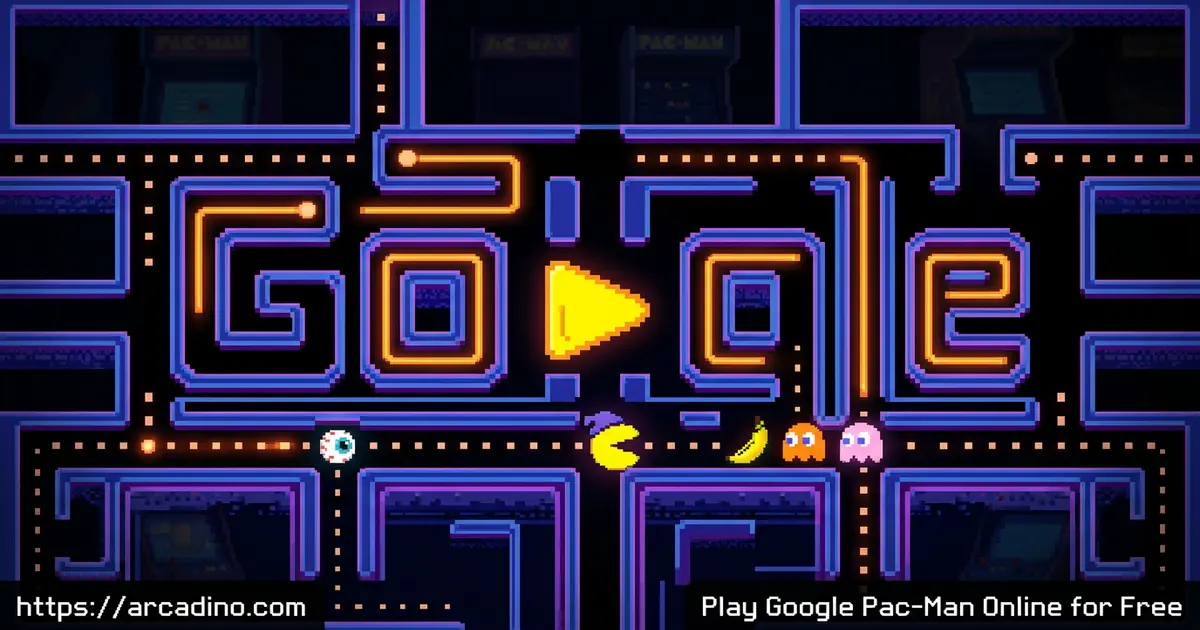
Google (based on Namco's Pac-Man)Google Pac-Man is the playable Doodle that took over the search homepage on May 21, 2010, and you can still chomp dots in it for free right now. It started as a one-day tribute for Pac-Man’s 30th birthday, but the maze was so loved that Google parked it in their archives forever. You’re guiding the yellow hero through a labyrinth shaped like the Google logo, dodging four colorful ghosts, and gobbling power pellets to flip the chase. People often just search “pacman” when they mean this version, so if a friend mentions the Google Doodle Pac-Man, this is the one. 🟡
- Free browser arcade based on the original 1980 maze
- Maze shaped like the letters G-O-O-G-L-E
- Four classic ghosts: Blinky, Pinky, Inky, and Clyde
- Press “Insert Coin” twice for a hidden second player
What Is Google Pac-Man?
Google Pac-Man is an interactive Google Doodle built in 2010 to celebrate the arcade legend’s 30th anniversary. It was Google’s first-ever playable Doodle, made by doodler Ryan Germick and UX designer Marcin Wichary. The team kept the original game logic, sprite art, sound effects, and even the ghosts’ individual personalities intact.
Here’s a fun bit of history most kids don’t know. Google only planned to run the Doodle for 48 hours as a weekend treat. But players loved it so much that the search giant gave it a permanent home at google.com/pacman. That makes it the first interactive Doodle ever and one of the most-played mini-games in web history.
What makes this version stand out is the maze itself — the walls spell out the Google logo, so every corridor feels custom-built. Loading is almost instant in any modern browser, and the chiptune audio still has that crunchy arcade snap. I clicked into it on a basic laptop and it ran without a single hiccup, which is wild for something built fifteen years ago.
Gameplay in Google Pac-Man
The loop is the one millions of kids grew up with. You steer Pac-Man around the maze, munching every pellet while four ghosts hunt you down. Touch a ghost without protection and you lose a life.
The twist is the power pellet — those four big glowing dots in the corners. Grab one and the ghosts turn blue and flee, giving you a few seconds to chase and eat them for huge bonus points. Clear every pellet on the board and the level resets faster and meaner. It’s simple to pick up, but reading the ghost patterns is what separates a quick death from a long run.
The Ghosts and Their Personalities
Each ghost in Google Pac-Man has its own attack style, just like the 1980 cabinet. Blinky, the red one, chases you directly and speeds up as the maze empties. Pinky, the pink one, tries to ambush you by aiming a few tiles ahead of where you’re heading.
Inky, the cyan ghost, uses a tricky pattern based on both Blinky’s spot and yours, which makes him unpredictable. Clyde, the orange one, is the goofball — he switches between chasing you and wandering off on his own. Learning who’s who is half the fun.
Ghost AI Strategy Guide: How Each Ghost Really Thinks
If you want to push your score higher, it helps to know exactly how each ghost’s brain works. Blinky has a famous mode called “Cruise Elroy” — once about 20 dots are left on the board, he speeds up, and at around 10 dots he speeds up again. Pinky targets the tile four squares ahead of Pac-Man, but there’s a classic bug: when you face up, she aims four tiles up and four tiles left, so heading up can actually shake her off. Inky is the trickiest because his target is a vector drawn from Blinky’s tile through a spot two squares ahead of Pac-Man, then doubled — meaning he flanks you based on where Blinky is. Clyde is the chill one: if he’s within 8 tiles of Pac-Man he runs to his corner, but outside that radius he chases like Blinky. Knowing these rules turns chaos into a puzzle you can solve.
Scoring Table: Exact Point Values
Most guides just say “bonus points,” but the real numbers help you plan combos. Here’s what each thing on the board is worth, straight from the 1980 arcade logic the Doodle uses.
- Regular dot: 10 points
- Power pellet: 50 points
- 1st ghost eaten under one power pellet: 200 points
- 2nd ghost: 400 points
- 3rd ghost: 800 points
- 4th ghost: 1,600 points (a full combo is 3,000)
- Cherry bonus fruit: 100 points
- Strawberry: 300 points
- Orange: 500 points
So eating all four ghosts under one power pellet is worth as much as 300 regular dots. That’s why pros bait the ghosts into a cluster before chomping a pellet.
The Hidden Two-Player Mode
Here’s the secret that Google Pac-Man fans love sharing. If you press the “Insert Coin” button a second time, Ms. Pac-Man joins as a second player. One person uses the arrow keys for Pac-Man while the other uses WASD for Ms. Pac-Man.
You share the same maze, the same ghosts, and the same pellets. It turns into a friendly race for dots and a chaotic dodge-fest when the ghosts come hunting. It’s one of the best couch co-op moments hidden inside a Google Doodle.
Sound and Visual Style
The audio is pulled straight from the arcade — the opening jingle, the waka-waka chomp, the ghost-eaten warble. Hearing it inside a browser tab is pure nostalgia for anyone who grew up near an arcade cabinet. Kids playing for the first time still react to those bleeps with a grin.
Visually, the Google-shaped maze keeps the chunky pixel sprites everyone remembers. The colors are bright, the ghosts pop against the dark background, and nothing feels stretched or blurry. It’s a faithful port that respects the source.
How to Play Google Pac-Man
Getting started takes about five seconds. Open the game page, click the “Insert Coin” button (or just wait a moment for it to auto-start), and the maze loads up ready to go. There’s no sign-up, no tutorial pop-up, no ads to click past.
If you want the secret two-player mode, hit “Insert Coin” a second time before play begins. Otherwise, you’re solo against the four ghosts. Lose all your lives and you can restart instantly.
Controls for Google Pac-Man
Use the arrow keys on desktop to move Pac-Man up, down, left, and right. In two-player mode, the second player uses W, A, S, and D for Ms. Pac-Man. On mobile or tablet, swipe in the direction you want to turn — the touch controls are tuned to read fast swipes cleanly. You don’t need any buttons for actions; just steer and the chomping happens automatically.
Tips and Tricks for Google Pac-Man
- Save power pellets until two or three ghosts are nearby, then grab one for a big combo of bonus points.
- Watch Blinky closely — he speeds up when most of the maze is cleared, so leave a cluster of dots in his path.
- Use the tunnel on the side of the Google-shaped maze to escape ghosts — they slow down a lot inside it, and Pac-Man slows slightly too, so you still gain ground.
- Pinky ambushes ahead of you, so fake a direction and turn last-second to dodge her.
- Eat ghosts in the same power-pellet window for stacking score multipliers — the fourth ghost is worth way more than the first.
Key Features of Google Pac-Man
- Original 1980 arcade logic, graphics, and sound preserved
- Custom Google-logo-shaped maze you won’t find anywhere else
- Secret two-player mode with Ms. Pac-Man
- Side tunnels that slow ghosts down for clutch escapes
- Runs in any browser with zero installs or accounts
Classroom and Accessibility Notes
Google Pac-Man is one of the most school-and-Chromebook-friendly games on the web. It’s keyboard-only on desktop, so no mouse or extra controller is needed. The game runs at a tiny CPU and bandwidth footprint, meaning even older school laptops handle it without lag. You can mute the tab completely and still win — no audio cues are required to play. For colorblind players, the ghosts are mainly distinguished by color (red Blinky, pink Pinky, cyan Inky, orange Clyde), so red-green colorblind players may want to focus on movement patterns and starting corners instead. Because it’s hosted on Google itself, it often loads on school networks where bigger gaming sites are blocked.
Where to Play Google Pac-Man
Google Pac-Man lives permanently in the Google Doodle archives, so it’s always one click away. It also runs perfectly on Arcadino with no downloads and no sign-ups — just open the page and the maze loads. Because it’s HTML5, it works on Chrome, Firefox, Safari, Edge, and any modern mobile browser.
There’s no official mobile app for this exact Doodle version. If you find an APK claiming to be Google Pac-Man, skip it — sticking to the browser version keeps you safe from sketchy downloads. On school or work networks where bigger gaming sites are blocked, this one often slips through because it’s hosted on Google itself.
The 2025 Halloween 45th Anniversary Doodle
In October 2025, Google brought Pac-Man back for the game’s 45th birthday with a spooky twist. This new Doodle was built in partnership with Bandai Namco and features eight levels across four haunted-house mazes. Each haunted house is themed after one of the four ghosts’ personalities, so Blinky’s level feels relentless while Clyde’s is more playful and mixed-up. The art is full of Halloween details like pumpkins, cobwebs, and glowing windows, but the chomp-and-dodge gameplay stays true to the original. It’s a great follow-up if you’ve already mastered the 2010 Google-shaped maze and want something fresh.
2010 Doodle vs. 1980 Arcade vs. 2025 Halloween Doodle
Each version of Pac-Man has its own flavor. Here’s a quick side-by-side so you can pick the one that fits your mood.
- Maze shape — 2010 Doodle: Google logo letters. 1980 Arcade: classic symmetrical maze. 2025 Halloween: four haunted-house layouts.
- Level count — 2010 Doodle: 256 levels (matching the arcade, with the famous kill screen). 1980 Arcade: 256 levels. 2025 Halloween: 8 levels across 4 houses.
- Ghost behavior — All three use the original chase/scatter AI with Blinky, Pinky, Inky, and Clyde. The 2025 version themes each haunted house around one ghost’s personality.
- Controls — 2010 Doodle: arrow keys plus WASD for player two, swipe on mobile. 1980 Arcade: 4-way joystick. 2025 Halloween: arrow keys or swipe.
- Extras — 2010 Doodle: hidden Ms. Pac-Man two-player mode. 1980 Arcade: fruit bonuses and intermission cutscenes. 2025 Halloween: Bandai Namco partnership art and seasonal sounds.
For Parents
Google Pac-Man is one of the most kid-friendly arcade games out there. There’s no chat, no in-app purchases, and no account needed. The “violence” is a yellow circle eating dots and ghosts — about as gentle as gaming gets. The game itself contains no ads on the official Google-hosted page; if you play through a portal like Arcadino, the host site may show standard banner ads around the game, but nothing inside the play area.
It’s a great pick for ages 6 and up, and short rounds make it easy to set a 15-20 minute play window. The maze also sneaks in some real skills: pattern recognition, planning routes, and reading enemy behavior. Honestly, parents who played it as kids often have more fun than the kids do.
Similar Games to Google Pac-Man
If you love the chase-and-chomp loop of Google Pac-Man, these arcade maze games scratch the same itch.
- Google Pac-Man Halloween – The 2025 spooky 45th anniversary edition with eight levels and four haunted-house mazes themed after each ghost.
- Pacman 30th Anniversary – The exact same Doodle build, often listed under its anniversary name on game portals.
- Ms. Pac-Man – The 1981 follow-up with new mazes, moving fruit, and a faster pace.
- Pac-Man 256 – An endless runner twist where a glitch wave chases you up the maze.
For more dot-munching mazes and retro arcade hits, browse the Arcade category.
FAQs About Google Pac-Man
Is Google Pac-Man free to play?
Yes, Google Pac-Man is completely free with no sign-up. It runs in any browser straight from the Google Doodle archive or from game sites like Arcadino. There are no ads inside the game itself and no paid upgrades to worry about.
Why is Pac-Man on Google?
Pac-Man appeared on Google as a Doodle for the game’s 30th birthday in 2010. It was meant to run for 48 hours but got so popular Google made it permanent. A second version returned in October 2025 for the 45th anniversary with a Halloween theme.
How do you play Pac-Man on Google?
Click “Insert Coin” or wait a few seconds for the maze to start. Use the arrow keys to move Pac-Man, eat all the dots, dodge the four ghosts, and grab power pellets to chase them. On mobile, swipe in the direction you want to turn.
How do you get two players on Google Pac-Man?
Press the “Insert Coin” button twice before play begins. The second click adds Ms. Pac-Man, controlled with the WASD keys, while player one uses the arrow keys. Both characters share the same maze.
Is Google Pac-Man the same as regular Pac-Man?
It uses the original 1980 game’s logic, sprites, and sound, but the maze is shaped like the Google logo. The ghost personalities, power pellets, and scoring all match the arcade version. Searching just “pacman” often leads people to this Doodle version too.
How do you beat Google Pac-Man?
Clear every pellet on each level without losing all your lives. The Doodle mirrors the arcade’s 256 levels, and level 256 is the famous “kill screen” where the right side of the maze glitches out — that’s as far as the game can technically go. Most players just chase the highest score they can rack up before then.
Does Google Pac-Man work on mobile?
Yes, the Doodle works on phones and tablets using swipe controls. The touch input is tuned to read fast swipes, so turns feel snappy. Any modern mobile browser like Chrome or Safari handles it without issues.
Is there a god mode in Google Pac-Man?
No, there’s no official god mode or cheat code built in. The game uses the original arcade logic exactly as it shipped in 1980. The best way to “feel invincible” is to chain power pellets and learn the ghost patterns.
Final Word on Google Pac-Man
Google Pac-Man is more than a throwback — it’s a Doodle that got so loved it became permanent, with a Google-shaped maze, faithful arcade sound, and a hidden two-player surprise most people never discover. Grab the arrow keys, hit Insert Coin twice for a friend, and see how far you can push your high score before Blinky catches up. 🕹️
