























Watch one short ad and play ad-free for 30 minutes.
Slope 3
Rob Kay
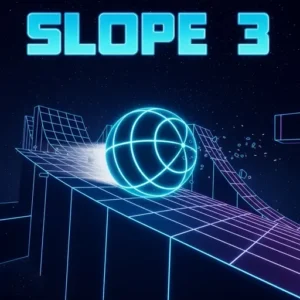
A glowing ball. A neon track that never ends. And a speed that just keeps climbing. Slope 3 is a free-to-play browser game that throws you straight into one of the sharpest reflex challenges in the endless runner genre. It’s playable right now online — no installation needed. If you’ve ever wondered how long you can survive a track that actively tries to throw you off, this is the game that answers that question the hard way.
- Endless 3D neon track that builds itself as you run
- Shifting and rotating platforms that catch you off guard
- Speed increases the further you survive — no ceiling
- Touching a red obstacle or falling off the edge ends your run instantly
What Is Slope 3?
Slope 3 is the third installment in the beloved Slope ball-running series. It’s a 3D endless runner where you steer a glowing sphere down a procedurally generated neon track. The track never repeats, and the goal is simple: survive as long as possible and post the highest score you can. Every run is a fresh challenge because the path builds itself differently each time.
Compared to the original Slope, this version looks more complex with updated visuals and additional track mechanics. The earlier games focused on a clean, minimalist run — Slope 3 raises the stakes with thin pathways, bigger jumps, and sections of the track that tilt or shift beneath your ball. There are no extra lives and no checkpoints. When your run ends, you start from the very beginning. The HTML5 and WebGL build means it loads quickly in any modern browser — on a Chromebook the controls respond the moment the page is ready, with no noticeable input lag even at high speeds.
Where Did Slope Come From?
The original Slope game was created by Rob Kay — the same developer behind the legendary music game Guitar Hero. He released it back in 2014, and it quickly became one of the most played browser games on the internet. That history gives the whole series a lot of credibility. Slope 3 builds on that foundation with more polish and trickier mechanics, but the core idea Rob Kay designed — a ball that never stops rolling — is still at the heart of every run.
How Slope 3 Compares to the Other Games in the Series
Not sure which version is right for you? Here’s a quick breakdown of how the three main games in the series stack up against each other.
- Slope (Original) — The simplest of the three. Clean track design, no shifting platforms, and a forgiving pace at the start. It’s the best place to begin if you’re new to the series.
- Slope 2 — A step up in speed and obstacle density. The track layout gets trickier faster, and the pacing leaves a little less room for error than the original.
- Slope 3 — The most complex version. It adds shifting and rotating platform sections that don’t appear in either earlier game. The visual style is also the most detailed, with brighter neon effects and a darker background contrast. This one is the hardest of the three.
Slope 3 Gameplay — The Loop That Hooks You
The moment your run starts, the ball rolls forward on its own. You don’t control the speed — the track handles that for you, and it always goes up. Your only job is to steer left and right, keeping the ball alive as walls, blocks, and sudden drops appear ahead. It sounds manageable at first, but the game has a way of making you feel comfortable right before something goes very wrong.
There are no power-ups or support items anywhere on the track. Every point you earn comes purely from skill and fast reactions. The further you go, the faster the ball moves — and the less time you have to make each decision. That constant pressure is exactly what makes players keep hitting restart. One more run always feels possible, and the score always feels beatable.
The Math Behind the Name
Ever wonder why this game is called Slope? It’s actually a nod to a real math concept. In mathematics, slope describes how steeply something rises or falls — think of it as rise over run. The track in this game is always angled downward, which is exactly what a slope is. That design choice is why the ball accelerates on its own without you pressing anything. Gravity is doing the work, just like it would on a real ramp. So if you’ve played this game in school, you’ve already experienced slope in action — just at a much faster pace than your textbook describes. It’s a surprisingly clever piece of game design hiding inside what looks like a simple reflex challenge.
Neon Visuals and the Feel of Speed
The aesthetic of Slope 3 is sharp and immediately recognizable. The track floats in a dark void, lit up by neon lines and glowing surfaces that make the ball easy to track even at high speeds. The visual style isn’t just for show — the contrast between the bright track and the black background actually helps you spot obstacles faster. 🎮
The sense of speed in this game is real. As the ball accelerates, the neon track rushes past with increasing intensity, and the visual feedback makes every near-miss feel genuinely tense. It’s a game that looks great without needing a powerful device to run it, which is part of what makes it so widely playable.
Difficulty and Track Progression
Slope 3 doesn’t have traditional levels with a start and finish. Instead, the difficulty grows organically the longer you stay alive. Early in a run, the track is wide enough to make mistakes, but obstacles appear at a manageable pace. Push further and the speed climbs, thin paths appear more often, and red blocks stack up in trickier formations.
One of the standout differences in this installment is the inclusion of platforms that shift or rotate as your ball crosses them. Some sections tilt suddenly to push your ball toward the edge. Others move just enough to throw off your rhythm. Recognizing which parts of the track are stable and which are moving is a skill that takes several runs to develop — but mastering it is what separates good scores from great ones.
How to Play Slope 3
Starting a run in Slope 3 is immediate — load the page and the ball begins rolling within seconds. The ball exits a tunnel automatically, and from that moment, control is yours. Your focus should be on reading the track ahead rather than staring directly at the ball. Looking further down the neon path gives you more time to react to what’s coming.
The game ends the moment your ball touches a red obstacle or rolls off the edge. There are no second chances in a single run. When that happens, restart right away — you’ll carry what you learned into the next attempt, and runs improve surprisingly quickly with repetition.
Slope 3 Controls
Steering uses the left and right arrow keys on your keyboard. Press left to guide the ball left, and press right to guide it right — that’s the entire control scheme. On mobile, the game is available as a downloadable app, with touch-based controls adapted for smaller screens. Keep your inputs light and deliberate, especially at higher speeds, since heavy presses can send the ball past the safe zone.
Tips and Tricks for Slope 3
- Stay near the center of the track. Hugging the middle gives you the most room to dodge red blocks that appear on either side. Moving toward the edges should be intentional, not accidental.
- Look ahead, not at the ball. Fix your eyes further down the neon track so you can spot jumps, narrow paths, and tight turns before they arrive. Reacting to what’s already under you is too late.
- Use light taps, not holds. As speed increases, the ball responds more sharply to every input. Short, controlled taps keep it stable far better than pressing and holding a direction.
- Watch for shifting platforms. When a section of the track starts to tilt, move to the high side — the ball will naturally drift toward the lower edge if you don’t correct it actively.
- Review what ended your run. Every time the ball hits a red block or drops off the edge, there’s a reason. Remembering that moment helps you make a better choice when the same pattern appears in a future run.
How to Recalibrate Your Inputs as Speed Increases
Here’s something most guides don’t tell you: your controls don’t stay the same throughout a run. As the ball speeds up, the game’s steering sensitivity effectively increases too. A light tap that nudges the ball safely at the start of a run can become a dangerous overcorrection at top speed. The good news is that this is a trainable skill, not just random bad luck. Try thinking of your input pressure in three stages — easy taps at the start, shorter and lighter taps in the mid-game, and almost micro-taps once you’re flying at full speed. Players who consciously adjust how hard they press the keys at different speed stages last noticeably longer than those who keep the same input style the whole way through. Once you start paying attention to this, your scores will improve in a way that feels earned rather than accidental.
Key Features of Slope 3
- Procedurally generated endless track — the course builds itself infinitely, so no two runs are ever identical.
- Shifting and rotating platform sections — unique to this installment, these moving track pieces add a layer of unpredictability beyond standard obstacles.
- Escalating speed with no cap — the ball accelerates continuously, making every run progressively harder the longer you survive.
- Pure skill-based scoring — there are no power-ups, no shortcuts, and no items. Your score is entirely the result of how well you control the ball.
- HTML5 and WebGL browser build — runs directly in the browser on PCs, laptops, and Chromebooks without any download or installation required.
Where to Play Slope 3
You can play Slope 3 for free directly in your browser at arcadino.com. The HTML5 build loads fast and runs without needing any plugins or downloads. It’s also accessible on school Chromebooks and standard PCs, since the lightweight WebGL build isn’t blocked by typical network restrictions.
If you prefer playing on a phone or tablet, the game is available as a dedicated mobile app. Download it from the Google Play Store for Android or from the Apple App Store for iPhone and iPad. Stick to these official sources — APK files from unofficial websites can carry security risks, so it’s always safer to download from the verified stores.
For Parents
In our view, Slope 3 is a good fit for most kids aged around 8 and up. The game has no violent content, no story involving mature themes, and no chat features — players compete only against their own previous scores. There are no in-app purchases in the browser version, making it a genuinely free experience with nothing to spend money on.
The game does reward persistence and pattern recognition, which are useful skills. However, the fast pace and the frustration of sudden losses can make some younger players want to keep going past a reasonable stopping point. Setting a time limit before play starts is a practical idea — maybe two or three rounds rather than open-ended sessions.
Similar Games to Slope 3
If the endless neon runner format has you hooked, these titles share that same mix of speed, reflexes, and one-more-run energy.
- Slope 2 — The direct predecessor to this game, featuring the same ball-rolling format on a neon track but with a slightly different obstacle layout and pacing.
- Slope — The original that started the series. Its minimalist design and clean track make it a great starting point if you want to build up to the harder installments.
- Tunnel Rush — A fast-paced endless runner where you guide a shape through a tunnel of oncoming obstacles. The reflex demand is very similar to what Slope 3 requires.
- Electron Dash — Another endless runner with neon-style visuals, but at a slower starting pace that makes it a solid option for players still developing their reflexes.
Browse more fast-paced titles in the Running category.
FAQs About Slope 3
Does Slope 3 ever end?
No — Slope 3 is an infinite endless runner with no finish line. The track generates itself continuously, and the game only ends when your ball hits a red obstacle or falls off the edge. The goal is purely to survive as long as possible and beat your own high score.
What’s the difference between Slope 3 and the original Slope?
The two games feel quite different once you get past the first few seconds. The original Slope has a clean, flat track with no moving parts — obstacles are stationary, the path is wide, and it eases you in gently. Slope 3 introduces shifting and rotating platform sections that the original never has, meaning parts of the track itself can tilt and push your ball toward the edge while you’re trying to dodge obstacles at the same time. Slope 3 also starts at a higher base speed and features a more detailed neon visual style with stronger contrast. If you can beat the original comfortably, Slope 3 will still surprise you with how much harder that extra movement layer makes things.
How do you control the ball in Slope 3?
Use the left and right arrow keys to steer the ball. Pressing left moves it left, and pressing right moves it right. At higher speeds, light taps work better than holding a key down for too long.
What ends a run in Slope 3?
Touching a red obstacle or falling off the track ends your run immediately. When your ball hits a red block, it doesn’t just stop — it bursts apart in a quick visual explosion that signals the run is over. It’s the game’s way of making a collision feel dramatic rather than just freezing on screen. There are no extra lives or recovery options — the run is over and you restart from the beginning. Learning which obstacles and drops are hardest to avoid is the key to lasting longer each time.
Is Slope 3 free to play?
Yes — Slope 3 is completely free in the browser version. There are no in-app purchases and no paywalls blocking progress. The mobile app versions on the Play Store and App Store are the official ways to access it on a phone or tablet.
What is a good score in Slope 3?
A good score depends on how much time you’ve spent practicing. Beginners often find surviving the first major speed increase a solid early milestone. Experienced players push much further by mastering the shifting platform sections and staying centered on the track during fast stretches.
Can you play Slope 3 at school?
Yes — and there’s a specific reason it works so well in school environments. The game is built entirely in HTML5 and WebGL, which means it has no Flash dependency, requires no executable download, and makes no calls to external plugins. Those are exactly the three things that most school network filters block. Because Slope 3 loads like a regular webpage with no extra software involved, it passes through standard school Wi-Fi restrictions without needing a VPN or any workaround. You can open it through arcadino.com on a school Chromebook and be playing within seconds, the same way you’d load any other website.
Ready to Beat Your Best Score?
Slope 3 delivers something rare in browser gaming — a challenge that’s genuinely hard to walk away from. The shifting platforms, the neon track that builds itself forever, and the ball speed that never stops climbing combine into a game that’s always one run away from a new personal best.
Load it up on arcadino.com, take a breath before that first drop, and see how far your reflexes can carry you. The track is waiting, and it doesn’t get easier — but you definitely get better.
Gameplay Video


