






















Watch one short ad and play ad-free for 30 minutes.
Going Balls
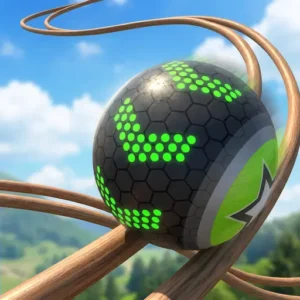
Supersonic StudiosEver wanted to roll a shiny metal ball across sky-high wooden tracks without falling into nothing? That’s the whole thrill of Going Balls, a 3D arcade hit you can play online for free right in your browser. You swipe, you steer, you dodge swinging hammers – and you collect coins to unlock cooler balls along the way. It’s quick, satisfying, and surprisingly tricky once the guardrails disappear.
This rolling ball game blends precision and speed in a way few mobile-style titles manage. The tracks twist, the gaps appear out of nowhere, and every checkpoint feels earned. If you love arcade games with simple controls and deep challenge, you’ll get hooked fast.

- Roll through 1,000+ levels of floating wooden tracks
- Unlock futuristic balls like basketballs, footballs, and fruit-themed skins
- Use checkpoints to resume runs after a tumble
- Works in any browser – no download required
What Is Going Balls?
Going Balls is a 3D arcade game built by Supersonic Studios LTD. Your job sounds simple: roll a metal ball down a wooden track and reach the finish line. The catch? Some sections have guardrails, and a lot of sections don’t. One wrong swipe and your ball drops into the abyss.
The game officially launched on January 19, 2022, after some earlier soft-launch builds in 2021. Since then, it’s been updated regularly with fresh level packs, new ball skins, and seasonal events. So if you played it a year ago, there’s probably tons of new content waiting for you now.
You might see different studios credited online, and that’s worth clearing up. Supersonic Studios LTD developed the original game, while 2Play is often listed as the publisher behind some web ports and mirrored versions. So both names are technically correct – one built it, the other helps share it.
It’s often described as a mix between a precision puzzle and a speed runner. The physics feel real – the ball wobbles, accelerates, and reacts to every tap. Loading it in a browser tab takes just a few seconds on most laptops, and once it boots, the controls feel snappy with no input lag worth mentioning.
What makes this rolling ball game stand out from similar titles is the freedom to roll backward. Most endless runners lock you forward. Going Balls lets you turn around and grab a coin you missed.
Going Balls Gameplay
The core loop is pure arcade. You swipe (or tap arrow keys) to nudge the ball along narrow wooden platforms suspended mid-air. Each swipe pushes the ball a short distance, so you keep tapping to maintain momentum. Speed feels great – until a swinging hammer comes out of nowhere.
Coins are scattered everywhere, and hidden keys unlock treasure chests for bonus rewards. Gray tiles and floating metal balls act as checkpoints. Touch one and you’ll respawn there if you fall, which saves a ton of frustration on the harder maps.
The obstacles come in a few clear flavors, and learning them helps a lot:
- Swinging hammers: Big pendulums that sweep across the track in steady rhythms.
- Wrecking balls: Heavier swingers that knock you off if you mistime the dash.
- Moving cubes and blocks: Sliding platforms that open and close gaps as you approach.
- Narrow beams: Skinny rails with no guardrails – one nudge too far and you’re gone.
- Tricky ramps: Steep jumps over huge gaps that need full speed to clear.
Levels get trickier the deeper you go. Sharp turns, moving blocks, narrow beams, and ramps over huge gaps all show up. It’s the kind of progression that keeps your reflexes sharpening every run.
Graphics and Worlds in Going Balls
The visuals are bright and clean, with detailed ball models and colorful environments. You’ll roll through sky-high platforms and industrial-looking zones with twisting wooden ramps. Nothing looks cluttered, which matters when you’re trying to spot a gap two seconds ahead.
The ball skins are honestly the visual highlight. There’s a strong collection of unlockable balls – basketballs, footballs, billiard balls, baseballs, and even fruit-themed designs like apple and watermelon. Each one has its own look without changing how the ball physically rolls.
Levels and Progression in Going Balls
This is where the game really stretches its legs. There are well over 1,000 levels in total, each with its own layout of obstacles and shortcuts. Early stages teach you the swipe rhythm. Later ones throw moving cubes, missing guardrails, and tight ramps at you all at once.
Popular checkpoint levels like Level 83 and Level 100 are talked about a lot because they ramp up the difficulty in clever ways. You’ll feel yourself getting better with every attempt, which is the secret sauce behind the replay value. 🎯
Inside Level 83 and Level 100: A Mini Walkthrough
Level 83 is famous for its zigzag wooden beams with almost no guardrails. The first checkpoint sits right before a sharp left turn, so touch it before you commit. After the turn, you’ll meet a pair of swinging hammers timed back-to-back – wait for the second one to swing away, then dash. The final stretch is a thin ramp over a huge drop, and momentum matters more than steering here.
Level 100 is a real milestone and feels like a boss stage. It mixes moving cubes, a wrecking ball, and a narrow spiral ramp into one combo. The smart play is slowing down right after the first checkpoint and watching the wrecking ball’s rhythm for a full cycle. Then ease forward between swings, hit the spiral at medium speed, and roll backward once if you miss a key. Clearing Level 100 feels like graduating from beginner mode into the real game.
Customization and Unlockable Balls
Coins aren’t just for show. You spend them to unlock new ball designs from a pretty massive collection. Keys you find along the tracks open treasure chests with extra rewards inside.
None of the cosmetics affect gameplay – they’re just for personalizing your runner. But there’s real satisfaction in rolling a fruit-patterned ball across a track that wrecked you yesterday.
How to Play Going Balls
Getting started takes about ten seconds. Open the game in your browser, wait for the first track to load, and start swiping or tapping. The first few levels act as a soft tutorial – you’ll figure out the swipe rhythm without needing instructions.
Aim for the finish line, grab coins on the way, and try not to roll off the edge. If you do fall, checkpoints bring you back close to where you slipped up.
Going Balls Controls
- Arrow Keys: Left and right arrows steer the ball; down arrow rolls it backward
- WASD: W, A, S, D work the same as the arrow keys
- Spacebar: Pause the game or trigger special actions
- Mouse: Move left or right to steer; left-click for special actions
- Touch: Swipe across the screen on phones and tablets
Trackpad and Laptop Control Tips
If you’re rolling on a Chromebook or MacBook, the trackpad is actually a hidden weapon. Use two-finger swipes left and right to steer smoothly, which gives way more precision than arrow keys on tight beams. Keep your other hand on the keyboard so you can tap the down arrow to roll backward at any moment. This combo – trackpad for steering, keyboard for reverse – lets you grab missed coins without losing your line. On a MacBook, lowering your trackpad sensitivity in system settings makes tiny ball nudges feel more natural. It’s a small tweak, but it turns a frustrating run into a clean one.
Browser vs. Mobile App: Which Should You Play?
Both versions are free, but they feel pretty different. Here’s a quick side-by-side so you can pick what fits your setup:
- Load time: Browser loads in a few seconds with no install. The mobile app needs a download first, but boots fast after that.
- Ads: The browser version on this site is much cleaner. The mobile app shows ads between runs and after some level fails.
- Controls: Browser uses keyboard, mouse, or trackpad – great for precision. The app uses touch swipes, which feel more natural for casual play.
- Save progress: The mobile app saves your levels and coins to your phone account. Browser progress depends on the site and might reset if you clear cookies.
- Best for: Pick browser for quick sessions on a laptop with no ads. Pick the app for longer sessions on the couch with your phone.
Honestly, a lot of players use both. Browser at homework breaks, app on long car rides.
Tips and Tricks for Going Balls
- Slow down near gaps. Speed is fun but deadly on tracks without guardrails. Ease off before tricky sections.
- Use the backward roll. If you miss a coin or key, turn around and grab it. This game lets you, unlike most runners.
- Touch every checkpoint. The gray tiles and floating metal balls are lifesavers on long levels – never skip one.
- Watch obstacle patterns. Swinging hammers and moving blocks follow rhythms. Wait one beat instead of rushing in.
- Hunt for bonus portals. Some levels hide portals to bonus stages packed with extra coins. Look around before sprinting to the finish.
Key Features of Going Balls
- 1,000+ levels of floating wooden tracks, each with its own obstacle mix
- Backward rolling – rare in arcade runners and great for coin collecting
- Realistic physics engine where balance, speed, and momentum all matter
- Huge ball collection including sports balls and fruit-themed skins
- Checkpoint system so a single fall doesn’t ruin a long run
Where to Play Going Balls
The easiest way is right here in your browser – no download, no sign-up, no waiting. The game runs smoothly on Chrome, Firefox, Safari, and Edge across desktops, laptops, Chromebooks, and tablets. Many players also search for it on portals like CrazyGames and Lagged, but you can roll straight into it from this page.
If you’d rather play on your phone, the official app is available on both major mobile stores:
Stick to those official store links. Random APK downloads from third-party sites can carry malware, so it’s safer to skip them.
For Parents
Going Balls is well-suited for kids aged 8 and up. The gameplay is non-violent – just rolling a ball, collecting coins, and avoiding obstacles. There’s no chat feature or social interaction, which removes a lot of the usual concerns about online play.
The mobile app version includes ads, which can pop up between levels. The browser version on this site offers a cleaner experience. Short, intense runs make it great for 15-20 minute play sessions between homework or chores.
Similar Games to Going Balls
If you love rolling balls down tracks and dodging obstacles, these games hit the same nerve:
- Slope – The endless ball-rolling classic that inspired Going Balls; faster, simpler, brutal.
- Rolling Ball 3D – Another physics-based ball roller with colorful tracks and tight controls.
- Run 3 – A tunnel runner where you race through space platforms with similar reflex demands.
- Tunnel Rush – High-speed dodging through neon tunnels for fans of fast arcade action.
- Arcade Games – Browse more quick-pick titles like this one.
FAQs About Going Balls
Is Going Balls free to play?
Yes, Going Balls is completely free to play online in your browser. The mobile app on Google Play and the App Store is also free to download. Some mobile versions show ads between runs, but the core game costs nothing.
Who made Going Balls?
Going Balls was developed by Supersonic Studios LTD, a studio that specializes in hyper-casual arcade games. Some web ports are published under 2Play, which is why you’ll see both names. It officially launched on January 19, 2022 and has been updated regularly with new levels since.
How many levels does Going Balls have?
Going Balls has over 1,000 levels in total. Each one introduces new obstacle layouts, sharper turns, and trickier gaps. The difficulty climbs steadily, so even level 100 feels very different from level 10.
Can you play Going Balls online without downloading?
Yes, you can play Going Balls online for free without any download. Just open the game page in your browser on a laptop, desktop, Chromebook, or tablet. No account or sign-up is needed.
How do you get more precise control in Going Balls?
For tight beams, use short taps instead of long holds – tiny nudges keep the ball centered. Pair a trackpad or mouse with the keyboard’s down arrow so you can reverse instantly. Slowing your input speed near gaps beats raw reflexes almost every time.
What are checkpoints in Going Balls?
Checkpoints are gray tiles and floating metal balls placed along the track. Touch one and you’ll respawn there if you fall off. They make long levels far less punishing.
Can you play Going Balls on PC?
Yes, Going Balls runs on any PC with a modern web browser. You can use a mouse, trackpad, or keyboard to control the ball. Combining swipe gestures with the down arrow gives you the most precise control.
Final Roll
Going Balls nails the sweet spot between casual swiping and real skill. The 1,000+ levels keep things fresh, the backward roll adds a clever twist, and unlocking a new ball skin always feels rewarding. Whether you’ve got five minutes or an hour, this rolling ball game fits.
Grab a track, pick your favorite ball, and see how far you can roll before gravity wins. 🏆
Gameplay Video