























Watch one short ad and play ad-free for 30 minutes.
Bookworm
PopCap GamesIf you love forming words from a jumbled grid of letters, Bookworm is the puzzle for you. This classic word game is free to play online in your browser, with no download or sign-up. You guide Lex, a friendly green worm, while linking adjacent letter tiles into valid English words. The longer the word, the bigger your score, and the safer your library stays from burning red tiles. 📚
It’s a thinking game with real stakes: let a fiery tile slide to the bottom and the whole library goes up in smoke. That tension is what makes Bookworm feel like a puzzle and a survival challenge at once.
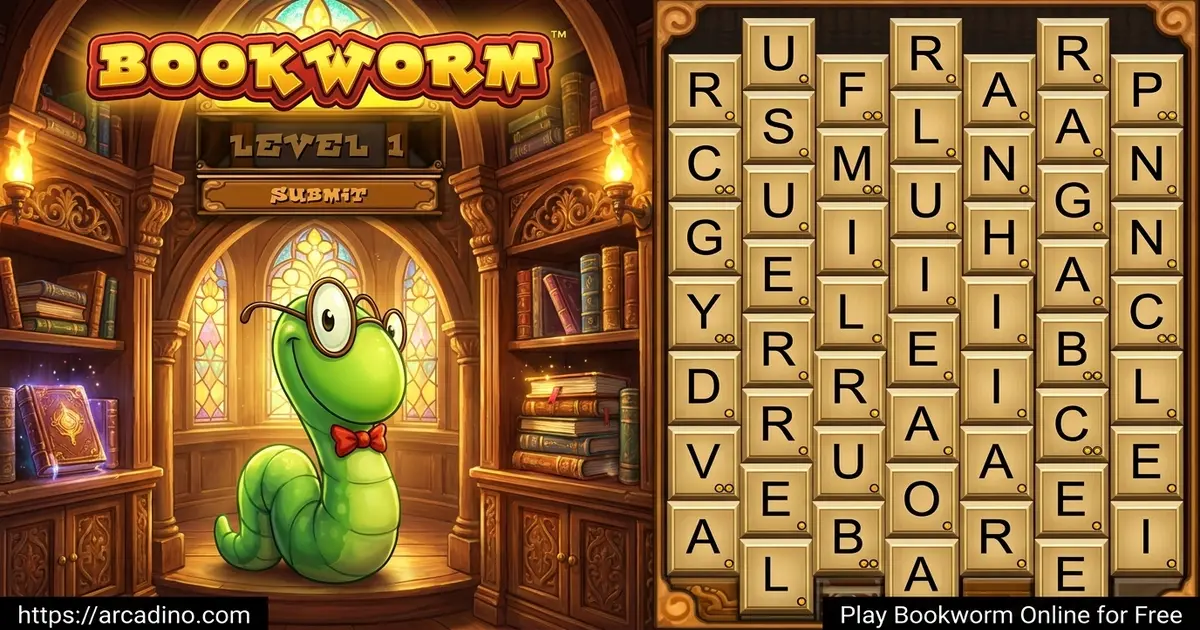
- Chain adjacent letters across a staggered 7-row honeycomb grid
- Watch out for red burning tiles that can end your run
- Earn gold, green, sapphire, and diamond tiles for big words
- No timer in classic play, so you can think every move through
What Is Bookworm?
Bookworm is a word-puzzle game from PopCap Games, first released in 2003. Your job is simple to learn but tricky to master: build words from a grid of letter tiles by clicking adjacent letters. Once a word is submitted, Lex munches the tiles, and fresh letters drop in to take their place. The grid is always changing, so every round feels different.
Running it in the browser, the game loads fast and feels snappy even on older laptops. The cartoon art style is light on resources, so you don’t need a fancy machine to enjoy it. That’s part of why Bookworm has stayed popular for so many years across word-game fans.
Bookworm Gameplay and Word Building
The core loop is pure word-building. Click letters that touch each other on the grid, form a valid English word, and hit submit. Longer words score way more points than short ones, so racing to spell “CAT” is rarely the smart play.
One handy detail: tiles can connect horizontally, vertically, and diagonally. That means any letter touching another, even at a corner, is fair game. Spotting diagonal paths often unlocks longer words you’d otherwise miss. Train your eyes to scan in every direction before submitting.
Stuck with a board full of awkward letters? Click Lex to scramble the grid into a fresh layout. The catch: scrambling costs you points and can introduce burning tiles, so use it sparingly. This push-and-pull between safety and risk is what gives the game its strategic edge.
Special Tiles in Bookworm
Beyond the regular wooden letters, several special tiles spice things up. Each one changes how you plan your next word, and stacking them inside a single word multiplies your score nicely.
- Burning tiles: Red, fiery, and dangerous. If one reaches the bottom row, your library burns and the game ends.
- Green tiles: Bonus tiles that appear randomly and boost the word score they’re included in.
- Gold tiles: Earned when you create a word of five letters or more, worth even more than green.
- Sapphire and diamond tiles: Rare rewards for words packed with two or more gold or green tiles.
Bonus Words for Extra Points
Starting from round two, Bookworm shows a bonus word next to Lex. If you spell that exact word from the grid, you score a big point boost on top of the normal value. Chaining bonus words round after round increases the reward each time, so streaks really pay off. A new bonus word appears every level, often pulled from medium-length vocabulary. Keep an eye on Lex’s side of the screen and try to hunt the bonus word before going for general high-scorers. It’s one of the fastest ways to climb levels.
Scoring in Bookworm
Scores in this word puzzle work a lot like Scrabble. Word length matters most, but letter rarity is huge too. Look at the small yellow dots in the corner of each tile, the more dots, the rarer the letter and the bigger the points.
Reward tiles stack on top of the base score, and the level you’re on also adjusts how much each word is worth. Combining a long word, scarce letters, and a sapphire tile is the dream play. That’s when the score really jumps.
Worked Examples: Building Big Words from Small Roots
Strategy clicks faster when you see it in action. Take a simple root like PORT (4 letters, maybe 8 points). Add -ING and you’ve got PORTING (7 letters, around 18 points plus a gold tile). Swap to PORTED for similar value, or stretch to PORTERS for a bit more. Push further with a TRANS- prefix and -ATION suffix and you can land TRANSPORTATION, which uses 14 tiles and scores massive points before any bonus tiles. Other goldmine roots include ACT (ACTING, REACTION, TRANSACTION) and FORM (FORMING, REFORMED, TRANSFORMATION). The trick is to scan for short roots first, then bolt prefixes and suffixes onto them like LEGO pieces.
Why Players Love Bookworm
The charm comes from Lex. He reacts to your words, cheers your big plays, and gives the game a warm personality that pure puzzle games often miss. The visuals are a charming 2D cartoon style that hasn’t aged badly at all.
Players also love the no-pressure pace. Without a clock ticking in classic mode, you can stare at the board, plan a monster word, and feel clever when it lands. It’s relaxing and brain-stretching at the same time, which is rare.
How to Play Bookworm
Getting started is easy. Open the game in your browser, wait a few seconds for it to load, and the grid will appear with Lex on the side. Look at the letters, find a word you can spell using tiles that touch each other, and click them in order. Hit submit, watch Lex munch, and repeat.
Fill the bookshelf bar by scoring points to climb to the next level. As you go up, the game adds more burning tiles, so the pressure rises naturally.
Classic Mode vs Action Mode
Bookworm actually offers two ways to play. Classic mode has no timer, so you can plan slowly and chase huge words at your own pace. Action mode adds a clock and faster-spreading fire, turning the game into a speed challenge where quick spotting wins. Classic is best for relaxing or learning the ropes. Action mode is where competitive players go to test reflexes against vocabulary. Both share the same grid and scoring, just with very different vibes.
Bookworm Controls
Controls are friendly for any age. On desktop, click letters with your mouse to select them, then click the submit button. On mobile or tablet, tap each letter and then tap submit. A mute button sits in the bottom-left corner if Lex’s sound effects get noisy.
Tips and Tricks for Bookworm
- Hunt for suffixes: Common endings like -ING, -ED, -ER, and -TION can stretch a four-letter root into a high-scoring monster.
- Burn the fire tiles first: Always include red burning tiles in your next word if possible. Letting them slide down is how runs end.
- Use rare letters early: Tiles like J, Q, X, and Z (the ones with lots of yellow dots) score huge. Don’t hoard them.
- Aim for five-letter words: Hitting five letters spawns a gold tile, which then becomes ammo for an even bigger word later.
- Scramble only as a last resort: Clicking Lex to reshuffle costs points and can add burning tiles, so try every angle first.
Burning Tile Management by Level
Fire tiles aren’t just a one-time threat, they spawn faster the higher you climb. By level 5, expect a new burning tile every couple of words. By level 10 and beyond, two or three can hang on the grid at once. Use this simple rule: never let a fire tile sit within two rows of the bottom. The moment one crosses that line, drop everything and build any legal word that includes it, even a short one. Trading a juicy Q or Z to clear a fire tile is almost always worth it. Hoarding rare letters while the library burns is the most common way good runs end.
Key Features of Bookworm
- Six tile types (wood, fire, green, gold, sapphire, diamond) each shaping your strategy
- Survival mechanic where burning tiles can end your run
- Lex the bookworm mascot reacting to your plays
- Scrabble-style scoring based on length, scarcity, and level
- Bonus words near Lex that grant streak rewards each round
- Two modes: relaxed Classic play and time-pressured Action mode
Where to Play Bookworm
The fastest way to enjoy Bookworm is right here in your browser. There’s no download, no installer, and no account needed, just open the page and Lex is ready to go. It runs in Chrome, Firefox, Safari, and Edge across Windows, macOS, Linux, Android, and iOS.
If you want it on your phone for offline play, official versions are available on the major app stores. Grab the mobile build from Google Play or the App Store. Stick to those official links, sideloaded APK files from random sites can carry malware. Searches for “Bookworm free online” often land on browser versions like this one because it loads instantly and never asks for a credit card.
For Parents
Bookworm is a great fit for kids ages 8 and up who are building their vocabulary. There’s no chat, no in-app purchases on the browser version, and no scary content beyond a cartoon fire animation when you lose. It rewards spelling, pattern-spotting, and patience, all useful school-adjacent skills.
Because there’s no timer, kids can play for short 10-minute bursts or longer sessions without feeling rushed. It pairs nicely with reading practice, since spotting suffixes inside the grid carries over to recognizing them in books.
Bookworm in the Classroom and Homeschool
Teachers and homeschool parents can lean on Bookworm as a sneaky vocabulary tool. Try a 10-minute warm-up at the start of language arts to wake up word brains. Run suffix hunting drills where students must build three words ending in -ING or -TION before submitting. Pair the game with a vocabulary journal: every time a student plays a word they don’t fully know, they write it down and look up the meaning later. For group settings, take turns at one screen and award points for the longest word or the cleverest use of a rare letter. It’s low-prep, screen-light, and turns spelling practice into something kids actually ask to do again.
Similar Games to Bookworm
If Bookworm’s mix of grid-puzzling and word-hunting clicks for you, these word games scratch the same itch:
- Wordle – Guess a five-letter word in six tries using color clues, perfect for daily word-game fans.
- Text Twist 2 – Rearrange jumbled letters into as many words as possible before time runs out.
- Scrabble Online – The classic board game where letter scarcity and bonus squares decide the winner.
- Word Ruffle – A fast-paced anagram challenge that rewards quick spotting of long words.
- Scrabble Blast – A bubble-shooter twist on Scrabble where you launch letter tiles to spell words on a bouncy grid.
- Scrabble Sprint – A time-attack version of Scrabble that rewards fast thinkers chasing big word combos.
Want more brain-teasers like this one? Browse the full Puzzle collection.
FAQs About Bookworm
Is Bookworm free to play online?
Yes, Bookworm is completely free to play in your browser. There’s no sign-up, no paywall, and no download needed. Just load the page and start chaining letters with Lex.
Who made Bookworm?
Bookworm was developed by PopCap Games and released in 2003. PopCap later released a follow-up called Bookworm Adventures in 2006, which added story and RPG elements to the word-building formula.
Can I save my progress in Bookworm?
No, the browser version of Bookworm does not save progress between sessions. Each time you open the game, you start a fresh run. If you want save support, the mobile app versions on the official stores handle progression differently.
How do I mute the sound in Bookworm?
Click the mute button in the bottom-left corner of the game screen. It’s right there once the game loads. You can toggle it back on the same way whenever you miss Lex’s munching sound effects.
What are burning tiles in Bookworm?
Burning tiles are red, fiery letters that slowly move down the grid. If one reaches the bottom row, the library catches fire and the game ends. Use them inside a word quickly to remove them safely.
How do I get gold tiles in Bookworm?
Gold tiles appear when you submit a word of five or more letters. They’re worth far more points than regular tiles. Stacking two gold tiles in one word can also spawn rare sapphire or diamond tiles.
Does Bookworm have a time limit?
No, the classic mode of Bookworm has no timer at all. You can take as long as you want to plan each word. Action mode adds a timer if you want speed pressure, but Classic is fully relaxed.
Is Bookworm good for kids?
Yes, Bookworm is friendly for kids around age 8 and up. It builds vocabulary, spelling, and pattern recognition in a low-pressure way. There’s no chat or violent content, just Lex and a grid of letters.
Ready to Spell Your Way to a High Score?
Bookworm has earned its place as a word-puzzle classic for good reasons: Lex’s charm, the Scrabble-style scoring, and that nail-biting moment when a burning tile is one row from the bottom. Whether you’re chasing diamond tiles or just relaxing with a long word, the game gives you something to think about every turn. Grab a comfy spot, open the grid, and see how many five-letter words you can land before the library goes up in flames.
Gameplay Video