


Flip Bottle
PamPam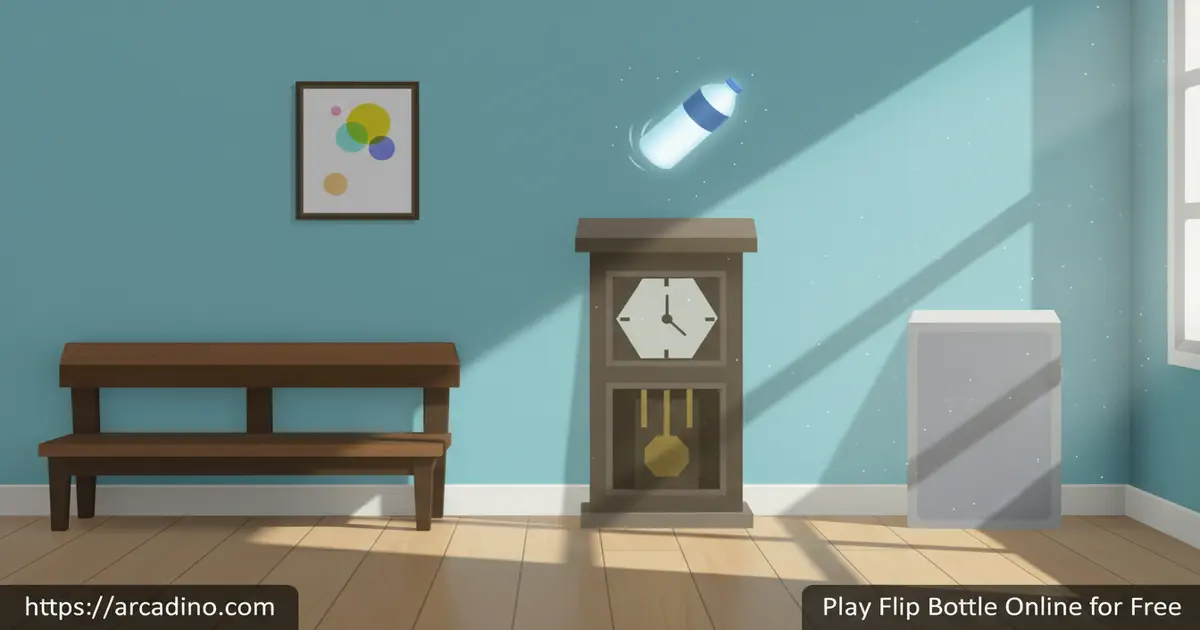
A single tap. A spinning bottle. And a living room full of shelves, sofas, and subwoofers standing between you and the finish line. Flip Bottle is a free browser game you can play right now — no install needed. It turns the viral 2016 bottle flipping craze into a one-button skill challenge that’s surprisingly hard to put down.
The game was developed by BPTop and inspired by the real-world trend of tossing a water bottle and watching it land upright. It’s simple to understand in seconds but genuinely tricky to master. Every level asks you to nail your timing, or the bottle tumbles straight to the floor.
- One-button control: tap or click at exactly the right moment to flip and jump
- Room-based levels: land on shelves, chairs, TVs, microwaves, and more
- Coin rewards: earn coins for completing levels and spend them in the bottle shop
- Double jump mechanic: chain two flips in a row to clear bigger gaps
What Is Flip Bottle?
Flip Bottle is a hyper-casual arcade skill game built on the 2016 bottle flipping trend that took over school hallways and social media. The goal is straightforward: flip a plastic bottle across a series of platforms inside everyday rooms, and reach the checkered block that marks the end of each level. It was created by developer BPTop and sits in the Sports and arcade category.
What makes it stand out from other tap games is how much weight the timing carries. The controls feel snappy in the browser — there’s almost no delay between your click and the bottle’s launch, which makes each failed landing feel fair rather than frustrating. That responsiveness is what pulls you back for one more attempt every single time.
Flip Bottle Gameplay — Timing Is Everything
The core loop of Flip Bottle is beautifully tight. You tap or click to launch the bottle into a spin, and it needs to land upright on the next platform. The platforms aren’t flat tables in a row — they’re real household objects arranged across a living room. Think bookshelves at different heights, sofas with awkward cushion surfaces, and even subwoofers tucked in corners. 🎯
Each level is a short obstacle course through these rooms. You jump from object to object, aiming for the checkered finish block at the far end. Miss a landing and the bottle crashes to the floor, sending you back to try again. The game also includes a double jump, which lets you chain two flips together to cross wider gaps between platforms.
That double jump adds a real skill ceiling. Basic levels reward clean single flips, but later platforms are spaced too far apart for one tap alone. Learning when to use the second jump — and timing it in mid-air — is what separates smooth runs from crash-heavy ones.
Levels and Progression in Flip Bottle
Each level in the game takes place inside a familiar indoor setting. You might land on a TV unit one moment and bounce off a microwave the next. The variety of objects keeps the layout feeling fresh, since the height and spacing of each platform changes with every stage.
Completing a level earns you coins. Those coins stack up as you push further through the game, and they’re the key to unlocking everything in the bottle shop. Progress feels rewarding because each finished stage drops currency directly into your total, even on your first clean run through a tricky room.
How the Difficulty Curve Actually Scales
The first few levels are forgiving. Platforms are close together, and a single clean flip is almost always enough to reach the next one. You’ll get a feel for the timing without much punishment. Around the middle stages, gaps start widening and platform heights become less predictable — that’s when the double jump stops being optional and becomes something you genuinely need to plan around. Later levels can feel relentless, with tight sequences where one mistimed tap means starting the whole stage over. Knowing that the challenge ramps up gradually helps you stay patient early on rather than rushing into harder jumps before you’re ready. There’s real satisfaction in reaching those punishing later rooms once your timing clicks into place.
Customization — Unlocking New Bottles
The bottle shop is one of the more fun extras in this title. Using the coins you earn from cleared levels, you can swap out your standard plastic bottle for new ones. Unlockable options include soda cans, fizzy pop bottles, and a range of novelty bottles with eye-catching designs — think bold colors, unusual shapes, and special-edition styles that make your runs feel a little more personal.
Most bottles are locked at the start and need to be purchased from the store screen. That gives you a reason to keep playing beyond just finishing levels — there’s always a new bottle to save toward. It’s a small touch, but it adds a satisfying layer of progression to what is otherwise a pure skill game.
How to Play Flip Bottle
Getting started is instant. Load the game in your browser, hit the play button on the welcome screen, and you’re dropped straight into the first level. The game walks you into the action without a lengthy tutorial, since the one-button mechanic explains itself within the first few seconds.
From the store screen, you can pick which bottle to play with before you begin. Your current score appears in the bottom-left corner during a run, and your best score shows in the bottom-right. Aim to beat that personal best every session — it’s the main driver that keeps runs competitive with yourself.
Controls
Press the left mouse button at the right moment to make the bottle jump and flip. On touchscreen devices, tap the screen instead. That’s the entire control scheme — one input, endlessly precise.
The challenge isn’t learning the control; it’s mastering when to press it. Tap too early and the bottle overshoots. Tap too late and it clips the edge of the platform. Finding that sweet timing window is the whole game.
Tips and Tricks for Flip Bottle
- Watch the gap before you jump: Each platform is at a different height. Glance at the distance to the next object before tapping so you know whether to single flip or use the double jump.
- Don’t mash the button: Patience is the key skill here. Wait for the bottle to arc slightly before clicking — hitting too early sends it spinning wild and off target.
- Use the double jump on wider gaps only: Chaining two flips when the platforms are close together often overshoots the landing. Save the second tap for the obviously long jumps.
- Aim for the center of each platform: Landing near the edge of a shelf or sofa increases the risk of the bottle tipping over. Target the middle of each object for the most stable landing.
- Spend coins on bottles you like: You play slightly better with a bottle style you enjoy looking at. Use your coins to unlock something from the shop early — it makes the sessions more fun and keeps you motivated to collect more.
Key Features of Flip Bottle
- One-button arcade gameplay: The entire game runs on a single tap or click, making it instantly accessible but genuinely hard to master.
- Household obstacle courses: Levels are set inside real rooms with shelves, chairs, sofas, TVs, microwaves, and subwoofers as your platforms.
- Double jump mechanic: Chain two flips mid-air to cross wide gaps that a single tap can’t reach.
- Coin-based bottle shop: Earn currency from every cleared level and spend it unlocking soda cans, fizzy pop bottles, and more.
- Checkered finish block: Each level has a clear visual goal at the end, so you always know exactly how close you are to completing the stage.
Where to Play Flip Bottle
Flip Bottle is free to play in your browser at arcadino.com — no download, account, or payment required. The HTML5 version works across modern browsers including Chrome, Firefox, Safari, and Edge. It’s also accessible without restrictions on arcadino.com, so you can jump in whenever you have a few minutes free.
If you prefer playing on your phone, the game is available as a dedicated mobile app on both major platforms. Grab it below:
If you ever come across APK files for this game on third-party sites, avoid them — only download apps from official stores to keep your device safe.
Browser Version vs. Mobile App — Which Feels Better?
Both versions of Flip Bottle are fun, but they do feel a little different to play. In the browser on a desktop or laptop, you’re clicking with a mouse, and the HTML5 engine responds almost instantly — there’s barely any delay between your click and the bottle launching. On the mobile app, you’re tapping glass, which some players actually prefer because it feels more like the real bottle flip trick. The app version tends to fill your screen edge to edge, making platforms look bigger and easier to read at a glance. Input lag on older phones can occasionally make timing trickier, so if you’re finding the app version harder, that’s not just you — try the browser version on a computer for the most responsive experience. The core level content is the same across both, so you won’t miss out on any stages by choosing one over the other.
For Parents
Flip Bottle is suitable for players from around age 7 and up. The content is completely family-friendly — there’s no violence, chat system, or inappropriate themes of any kind. Younger players may find the timing mechanic frustrating at first, so it’s better suited to kids who already have a little patience with trial-and-error gameplay.
The game quietly builds real skills like timing, hand-eye coordination, and persistence. Every failed attempt teaches the player something about force and precision, which means the challenge has genuine educational value. There are no in-app purchases in the browser version, and coins are earned purely through gameplay rather than real money. A session of 10–15 minutes is plenty for younger players, though older kids will naturally want to push further into the level progression.
Similar Games to Flip Bottle
If you love testing your timing and precision in quick arcade challenges, these other skill-based browser games are worth trying next.
- Flip Master — a trampoline flipping game packed with perfect rotations and crowd-pleasing tricks, sharing Flip Bottle’s core appeal of nailing the landing.
- Backflipper — a backflip-focused stunt game where timing is everything, perfect for Flip Bottle fans who love precision-based flip gameplay.
- Flip Diving — a diving game where you rotate through the air to stick water entries, capturing the same satisfying flip-and-land rhythm.
- Flip Trickster — a parkour flipping game with wild environments and multiple rotation challenges, great for Flip Bottle fans wanting more variety.
- Flip Runner — a parkour-style flipping game where chaining perfect rotations builds momentum, sharing Flip Bottle’s flow and timing focus.
- Wacky Flip — a ragdoll physics flipping game with chaotic hilarious stunts, perfect for players who love Flip Bottle’s lighthearted flip action.
- Sausage Flip — a quirky physics-based flipping game with funny animations and quick rounds, matching Flip Bottle’s casual pick-up-and-play style.
- Crazy Flips 3D — a 3D parkour flipping game with ramps and stunts, delivering a more action-packed take on the flip-timing formula.
Want to explore more games like this? Check out the full Sports category on arcadino.com.
FAQs About Flip Bottle
Is Flip Bottle free to play?
Yes, Flip Bottle is completely free in the browser on arcadino.com. No sign-up or payment is needed to start playing. The mobile app versions on Google Play and the App Store are also available to download.
Who made Flip Bottle?
Flip Bottle was made by game developer BPTop. The game was inspired by Bottle Flip 3D, which was created by tastypill. BPTop released the HTML5 browser version on October 30, 2019.
How do you control Flip Bottle?
Press the left mouse button to flip the bottle in the browser version. On mobile, tap the screen at the right moment instead. Timing your press correctly is the entire skill of the game.
What is the bottle flipping trend that inspired this game?
Bottle flipping went viral in 2016 after a student named Mike Senatore from Ardrey Kell High School in North Carolina performed the trick at his school’s talent show. The clip spread across social media overnight and kicked off a worldwide craze. The challenge involves holding a bottle by its neck and tossing it so it spins and lands upright. Flip Bottle turns that real-world trick into a level-based arcade game.
Can you unlock different bottles in the game?
Yes, you can unlock new bottles using coins earned from completed levels. Options in the shop include soda cans, fizzy pop bottles, and novelty bottle designs with special looks. Most items are locked at the start and need to be purchased from the store screen.
What kind of bottle is best for real-life flipping?
Plastic water bottles with a unique shape, like an hourglass design, tend to work best. The amount of liquid inside also matters — a partially filled bottle has better weight distribution for landing upright. A completely full bottle is too heavy and won’t rotate cleanly, while a completely empty bottle is too light and spins out of control. Aim for roughly one third to one half full for the best chance of a clean landing. Disposable plastic water bottles are the most popular choice for the trick.
Does Flip Bottle work on mobile?
Yes, Flip Bottle works on mobile both in the browser and as a dedicated app. The iOS version launched in December 2018, followed by Android in April 2019. You can also play it on any touchscreen device directly in a mobile browser.
Conclusion
Few browser games pack this much tension into a single button. Flip Bottle earns its replay value through razor-sharp timing mechanics, a satisfying coin-and-unlock loop, and levels built from the kind of everyday objects that make each jump feel oddly real. The double jump adds just enough depth to keep skilled players challenged long after the early stages feel comfortable.
If you’ve never tried a bottle flip game before, this is a great place to start. Head to arcadino.com, tap that first platform, and see how far your timing can carry you.
Gameplay Video

