


























Watch one short ad and play ad-free for 30 minutes.
Ovo Game
Dedra Games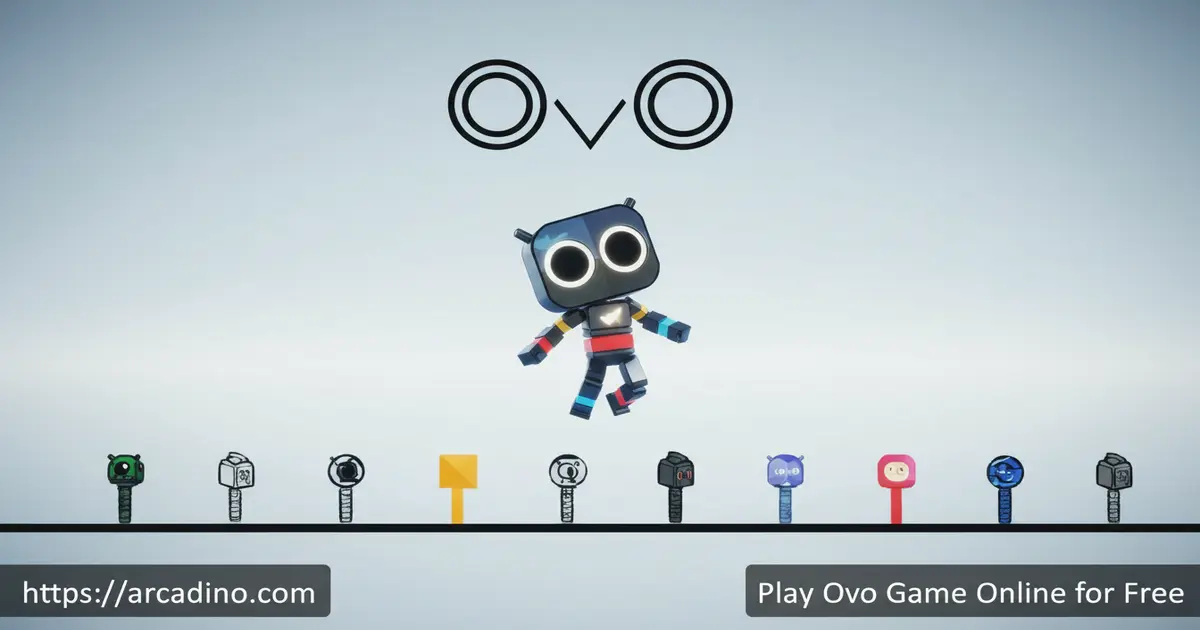
Picture a stickman who can wall-jump, smash through floors, and sprint at full speed — that’s Ovo Game in a nutshell. It’s a free stickman platformer you can play right in your browser, and it’s genuinely exciting from the very first level. The goal sounds simple: reach the flag at the end of each stage. But the way you get there — chaining jumps, slides, and aerial smashes — is where the real fun begins.
- 61 levels with a live speedrun timer on every stage
- Parkour-style moves: slides, wall jumps, mid-air smashes, and more
- Collectible coins unlock character skins like aliens and watermelons
- Developed by Dedra Games, playable free online without any download
What Is Ovo Game?
Ovo Game is a fast-paced platformer developed by Dedra Games, a studio based in France. You control a stickman character and race through obstacle-filled levels, aiming to hit the flag at the end as quickly as possible. The minimalist visual style keeps the screen clean and focused on your movement. Every level introduces trickier hazards, so the challenge builds steadily as you go.
What makes this title stand out is how deeply the movement mechanics connect. Sliding, smashing, and wall-jumping aren’t separate tricks — they combo together to create real momentum. The controls respond instantly in-browser, with no noticeable input lag even on Chrome at full speed. That snappy feel is a big reason why players keep replaying levels to shave seconds off their times.
Ovo Game Gameplay — What Actually Happens Each Level
The moment a level loads, the timer starts — so there’s no time to relax. You sprint toward the flag while dodging hazards, jumping gaps, and squeezing through tight spaces. Hit a hazard and you restart the level from the beginning, with the clock resetting too. That instant-restart design keeps the pace fast and the frustration low.
Coins are scattered throughout the levels as optional collectibles. They appear as large circles with a “C” in the centre, and you grab them simply by running through them. Collecting coins builds up your credits, which you spend on skins back at the main menu. The game also autosaves your best time for every level, so you can always come back and try to beat your own record. 🏃
Levels and Progression in Ovo Game
There are 61 levels in total, and most unlock in sequence as you complete each stage. The final stage is labelled “Level 99” inside the game, and it exists specifically for practising advanced moves rather than standard progression. Each new level introduces a fresh set of hazards and layout challenges that push your skills further. You’re never thrown into something brand new without building up to it first.
The game is available in four languages: American English, Brazilian Portuguese, French, and European Spanish. You can select your preferred language from the welcome screen before starting. Your browser automatically saves your progress and best times, so nothing gets lost between sessions. If you ever want a clean slate, there’s a Restart option right on the welcome screen.
Hazard Types You’ll Face Across the Levels
The early levels keep things simple with static spike pits and low-ceiling gaps that test your basic jumping and sliding. As you push into the mid-game, moving platforms start sliding side to side, forcing you to time your jumps more carefully. Later levels add crushers — heavy blocks that drop or squeeze from both sides — and timed gates that only stay open for a split second. By the final stages, several hazard types appear together in the same room, so you’ll need to read the whole layout before you sprint. Knowing which hazard is coming next makes each replay feel like a puzzle you’re solving faster every time.
Customization — Skins and Characters
Your stickman doesn’t have to stay plain for long. As you collect coins across levels, you build up credits to spend on character skins in the main menu store. Some of the available costumes include an alien, a watermelon, and even a Coolmath Games logo skin. These are purely cosmetic — they don’t change how the game plays — but picking a favourite look adds a fun personal touch.
The skin selection screen is easy to find right from the home page. Once you’ve unlocked a skin, you can swap between them freely whenever you like. It gives you a nice extra reason to chase coins even on levels you’ve already beaten.
Achievements — Extra Goals Beyond the Skins
Ovo Game also has an in-game achievements system that gives you goals beyond just finishing levels. You can earn achievements by completing fun challenges — like clearing a level without dying, or collecting every coin in a stage. Some achievements are linked to the coin system, so grabbing every collectible you see counts toward multiple rewards at once. It’s a nice extra layer that keeps the game feeling fresh even after you’ve seen every level. Check the achievements list in the menu to see which challenges you’re closest to finishing.
Speedrunning Ovo Game — For Competitive Players
Every level in Ovo Game has a live timer running from the moment it loads. That makes it a natural fit for speedrunning, and a real community has formed around it. Speedrun leaderboards are tracked at speedrun.com, where you can find the current fastest times — figures change regularly as new runners improve, so check there for the latest records. The game’s design rewards players who experiment with movement chains rather than just playing it safe. Even casual players tend to start naturally racing their own best times without meaning to.
Speedrun Movement Chains That Actually Save Time
If you want to seriously cut your time, it’s not enough to just play fast — you need to know which movement combos shave the most seconds. The biggest time-saver is the smash-jump: hit a smash just before you land on a low ceiling or platform, then immediately press jump to launch your stickman higher and further than any normal jump allows — this can skip entire platforming sequences in mid-game levels. Wall slides are another hidden tool; instead of falling freely down a tall drop, slide against the wall to control your descent speed and land exactly where you need to charge your next move. Chaining a slide directly into a wall jump lets you clear wide gaps without losing momentum — it feels tricky at first but becomes natural fast. Practise these three chains in Level 99 until they’re automatic, and you’ll find your total run time drops by whole minutes rather than just seconds.
How to Play Ovo Game
From the welcome screen, hit the Play button to jump in. You can also pick your language from that same screen using the flag icon. The early levels act as a gentle tutorial, introducing each movement mechanic one step at a time before the real challenge kicks in. Your browser saves everything automatically, so you can pick up right where you left off.
On desktop, everything is controlled with the arrow keys alone. On mobile and tablet, the game displays on-screen arrow buttons at the bottom of the screen that work exactly like the keyboard. The game is also available in four languages, so it’s accessible to players around the world. If you want to tweak your controls on desktop, there’s a key customisation option in the game settings.
Controls for Ovo Game
- Left / Right arrow: Move your stickman left or right
- Up arrow: Jump — press while next to a wall to perform a wall jump
- Down arrow (while running): Slide — useful for tight gaps and extra speed
- Down arrow (while in the air): Smash — breaks through transparent platforms and stuns obstacles below
- Up arrow (while sliding down a wall): Wall jump — lets you climb vertical surfaces
- Jump immediately after a smash: Gain extra height and distance in the air
Tips and Tricks for Ovo Game
- Chain your smash into a jump: Landing a smash and immediately pressing up sends your stickman much higher than a normal jump — this is essential for reaching hard platforms.
- Use walls to boost your jumps: Standing next to a wall and jumping gives you extra height even without a full wall-jump. Position yourself close to walls before big leaps.
- Slide through every tight gap: Pressing down while running lets you duck under low obstacles. It’s faster than stopping and repositioning, so make it a habit.
- Don’t ignore the coins on your first run: Grabbing coins while learning a level is easier than going back for them later. Build your credit stash early and unlock skins sooner.
- Use Level 99 as a practice arena: The secret final stage exists specifically for drilling advanced moves. Spend time there when a particular trick isn’t clicking.
Key Features of Ovo Game
- 61 levels with live speedrun timing: Every stage tracks your completion time, making every run feel competitive even against yourself.
- Deep parkour movement system: Slides, smashes, wall jumps, and combo moves give a stickman game surprising depth and skill expression.
- Coin-based skin shop: Collectible in-game coins unlock cosmetic skins — no real-money purchases needed to access them.
- In-game achievements: Complete special challenges to earn achievements on top of your skin unlocks — there’s always another goal to chase.
- Dedicated practice stage: Level 99 is a dedicated space for drilling tricky moves without the pressure of a full level run.
- Four-language support: American English, Brazilian Portuguese, French, and European Spanish are all available from the start screen.
Where to Play Ovo Game
Ovo Game is available to play free in your web browser at arcadino.com. It loads quickly as an HTML5 game and runs smoothly on modern browsers like Chrome, Firefox, Safari, and Edge. There’s nothing to install and no account required — just hit play and go. The game also works on Chromebooks and most desktop computers.
If you prefer playing on your phone, the official mobile app is available on both major platforms. Download it from the Google Play Store for Android or from the Apple App Store for iOS. Stick to the official store versions — avoid any APK files from third-party sites, as these can carry security risks. The mobile version uses on-screen controls that mirror the keyboard layout perfectly.
You can also install Ovo Game straight from your browser without visiting any app store. On iOS, open the game in Safari, tap the Share button, then tap Add to Home Screen. On Android, open the game in Chrome, tap the three-dot Menu, then tap Install App. This creates a shortcut on your home screen that opens the game just like a real app — and it keeps your save data, so your progress stays safe.
Browser and Device Compatibility — What Works Best
Chrome and Chromium-based browsers like Edge give the smoothest frame rate because their JavaScript engines are optimised for HTML5 canvas games like this one. Firefox is a solid second choice and works great on most laptops. Safari on iOS handles the game well too, though older iPhones running iOS 13 or below may see slight slowdowns in later levels with lots of moving parts. On school Chromebooks, the game runs reliably in the Chrome browser even on older models, since it doesn’t rely on heavy graphics — just clean HTML5 code. The game does not currently support full offline play via service worker cache, so you’ll need an active internet connection to load it; once it’s loaded in your tab, short drops in connection usually won’t interrupt your run. If the game ever feels sluggish, try closing other browser tabs to free up memory — that alone fixes most performance issues.
For Parents
Ovo Game is a great fit for kids aged 8 and up. The content is completely clean — no violence beyond a cartoon restart animation, no chat features, and no real-money purchases. The coins you collect in-game unlock cosmetic skins, but none of that requires spending actual money. A play session of 20–30 minutes is easy to fit around homework or other activities.
There’s a genuine problem-solving element to each level as kids figure out which movement tricks to use and when. Timing-based platformers build patience and hand-eye coordination in a way that feels rewarding rather than frustrating. The instant-restart design means kids learn quickly from mistakes without long penalties. It’s the kind of game where getting better is clearly visible, which keeps motivation high.
Similar Games to Ovo Game
If you love the parkour precision of this stickman platformer, these browser games scratch a similar itch:
- OvO Classic — The original version of the game by Dedra Games, featuring the same stickman parkour gameplay in its earlier level set.
- OvO Dimensions — Another Dedra Games title that expands the OvO universe with new mechanics and stages.
- Tag Game — A minimalist platformer with a similar clean visual style and precision movement focus.
- Plactions — A tricky skill-based platformer that rewards mastering movement just like Ovo does.
Browse more fast-paced titles in the Action category.
FAQs About Ovo Game
What is Ovo Game?
Ovo Game is a free stickman parkour platformer made by Dedra Games. You control a stickman through 61 obstacle-filled levels, using slides, jumps, and aerial smashes to reach the flag at the end of each stage. A live timer tracks your speed on every level, which gives the game a strong speedrun appeal.
How do you wall jump in Ovo Game?
Press the up arrow while sliding down a wall to perform a wall jump. This lets your stickman scale vertical surfaces and reach platforms that normal jumps can’t reach. Practising wall jumps in the Level 99 practice stage is a great way to get the timing right.
How many levels does Ovo Game have?
Ovo Game has 61 levels in total. Most levels unlock sequentially as you complete each one. The 61st stage is labelled “Level 99” inside the game and serves as a dedicated space to practise advanced movement techniques.
Is Ovo Game free to play?
Yes, Ovo Game is completely free to play in your browser. The coin-based skin shop uses only in-game currency collected during levels — there are no real-money purchases required. The mobile app versions are also free to download from the Play Store and App Store.
Who made Ovo Game?
Ovo Game was developed by Dedra Games, a game studio based in France. They also created OvO Classic and OvO Dimensions. The game is built in HTML5, which is why it runs smoothly across browsers and mobile devices without any plugin or download.
Can you play Ovo Game on mobile?
Yes, Ovo Game works on phones and tablets. The browser version displays on-screen arrow buttons that replace the keyboard controls on touchscreen devices. You can also download the official app from the Google Play Store or Apple App Store, or install it directly from your browser using Add to Home Screen for a quick app-like shortcut.
What skins can you unlock in Ovo Game?
Collectible coins unlock cosmetic character skins from the main menu store. Known skins include an alien, a watermelon, and a Coolmath Games logo costume. These skins are purely visual and don’t affect gameplay or speed.
Ready to Beat Your Best Time?
Ovo Game delivers something rare in browser platformers: a movement system with genuine depth that keeps rewarding practice. The combo of wall jumps, aerial smashes, and slide-chains means there’s always a faster route to discover on levels you think you’ve mastered. Sixty-one stages, a live speedrun timer, achievements to chase, and a skin shop full of quirky costumes give you plenty of reasons to keep coming back.
Head to arcadino.com and take your first run at the flag. See how fast you can finish — then try to beat it.
Gameplay Video


