


























Watch one short ad and play ad-free for 30 minutes.
Room Clicker
Minimun Studios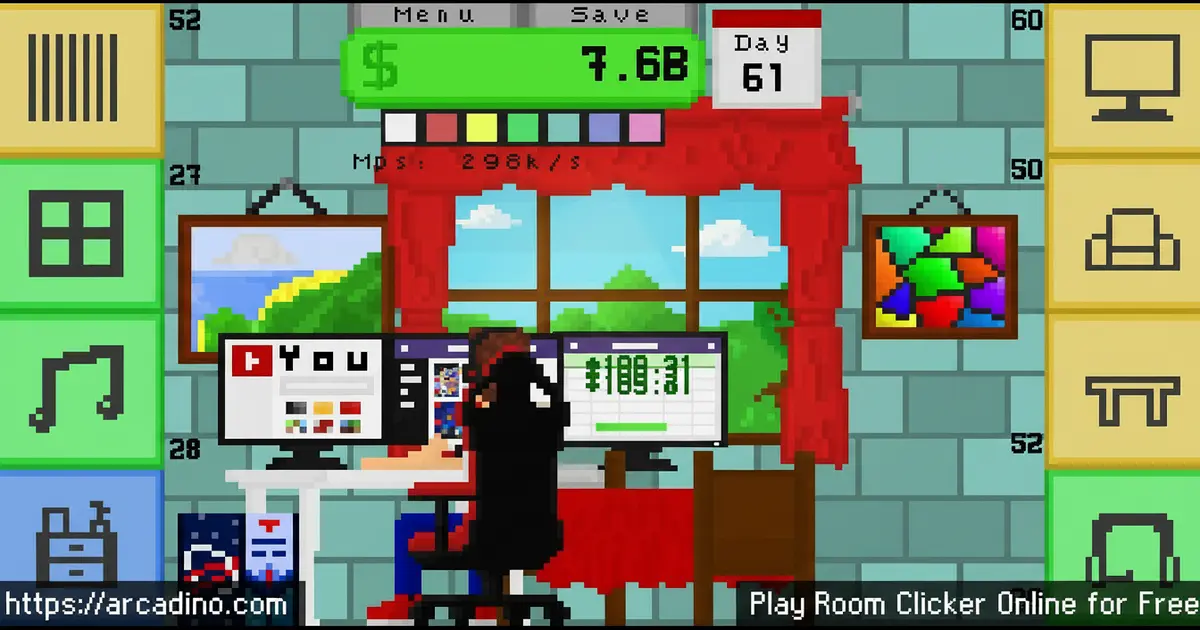
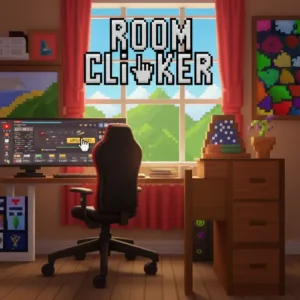
What if clicking your mouse could turn a bare, empty room into a stylish apartment? That’s exactly the hook behind Room Clicker, a free idle clicker game you can play instantly online. Each click earns you in-game cash to spend on furniture, gadgets, and upgrades. The room transforms right before your eyes as your wallet grows. 🖱️
- Click anywhere in the room to earn money — no specific target needed.
- Buy real items like desks, chairs, PCs, headphones, windows, and cabinets.
- Upgrades escalate fast — prices grow exponentially, so every purchase counts.
- Automation tools let the cash flow even when you stop clicking.
What Is Room Clicker?
Room Clicker is an idle clicker game developed by MinimunStudios and released in December 2018. You start inside a simple, empty room and click your way toward turning it into a modern, fully furnished living space. The goal isn’t just to rack up numbers — it’s to visually rebuild your environment one purchase at a time. That room-decoration angle sets it apart from most clicker games that focus purely on abstract currency.
The game runs smoothly as an HTML5 browser title, and the pixel art visuals stay crisp even on smaller laptop screens. Controls respond immediately to clicks, which makes the early game feel snappy and satisfying. One genuinely clever detail: there’s a calendar on the wall of the room that tracks time as you play. It’s a small touch, but it makes the idle world feel surprisingly alive.
Room Clicker Gameplay — The Core Loop
The loop in Room Clicker is simple to pick up but harder to put down. You click anywhere in the room to generate cash, then spend that cash on furniture and equipment. Every item you buy speeds up how fast money comes in, either by boosting your click value or adding passive income. That cycle of click, earn, upgrade, and repeat is endlessly satisfying.
What keeps the loop interesting is that upgrades don’t stay cheap for long. Prices grow exponentially, meaning the third upgrade can already feel out of reach without careful saving. You’ll need to think about when to splurge and when to stockpile. That tension between spending now and waiting for a bigger payoff gives Room Clicker a surprising amount of strategic depth for such a simple game.
Customization and Upgrades in Room Clicker
The upgrade system is the heart of this idle title. You can purchase items like PC screens, desks, chairs, headphones, music equipment, windows, and cabinets to furnish your room. Each item doesn’t just boost your income — it also changes how the room looks on screen. Watch a bare corner fill up with gear as your upgrades kick in.
Keep upgrading the same items and they’ll eventually transform into cooler, higher-tier versions. A basic desk might evolve into a full gaming setup over time. This visual progression gives every purchase a clear payoff beyond just the numbers ticking upward. It’s one of the most rewarding feedback loops in the clicker genre.
Levels and Progression
Room Clicker doesn’t use traditional levels, but its progression system feels just as structured. You start with almost nothing — a few basic pieces of furniture and a PC. From there, every upgrade unlocks a new stage of the room’s transformation, edging it closer to a luxury apartment.
The escalating upgrade prices are the real difficulty curve. Early on, you can grab several upgrades in quick succession. But the cost jumps sharply, and soon you’re grinding clicks just to afford the next item. That steep but fair climb gives the game a sense of real accomplishment when you finally unlock a new piece of furniture.
To give you a real sense of how fast prices climb: most players find they can only afford two or three upgrades before the game starts to feel genuinely expensive. That first handful of purchases feels quick and fun. Then the price gap between items widens fast, and you’ll start saving for several minutes just to reach the next one. Don’t let that surprise you — it’s by design, and pushing through is exactly where the satisfaction lives.
Does Room Clicker Have Achievements?
Room Clicker does include an achievements system as part of its progression. Achievements track milestones like reaching certain cash totals or purchasing specific items. It’s worth checking your achievements regularly — they give you a clear sense of how far you’ve come and hint at what to aim for next. Think of them as bonus goals layered on top of the main upgrade loop.
Graphics and Pixel Art Style
The visuals in this game are clean, simple pixel art. There’s a young man sitting in the room, focused on his work, while your clicking happens independently around him. The art style is charming without being flashy, which keeps the focus on the upgrade progression where it belongs.
The calendar on the wall is a standout visual detail. It quietly updates as you play, acting as a reminder that time is passing inside the game’s world. It’s not just decoration — it makes the room feel like a real living space rather than an abstract clicker interface. Small artistic choices like this show real care from the MinimunStudios team.
How to Play Room Clicker
Getting started is instant. Open the game in your browser on arcadino.com and you’ll land straight in the empty room with a small amount of starting cash. Click anywhere on the screen to begin earning money right away. Once you’ve saved enough, head to the shop and pick your first upgrade.
The smartest early move is to prioritize items that increase passive income. Once automation kicks in, your cash grows even when you’re not actively clicking. From there, it’s all about balancing active clicking with smart upgrade purchases to push the room to its full potential.
Room Clicker Controls
The controls in Room Clicker couldn’t be simpler. Use your mouse to click anywhere inside the room and generate cash. On mobile devices, tap anywhere on the screen to earn money instead. There are no complicated key combinations or menus to navigate — just click, earn, and spend.
Does Room Clicker Save Your Progress?
One of the most common questions about any idle game is whether your progress sticks around when you close the tab. In Room Clicker, the browser version saves your game state locally, so your upgrades should still be there when you come back and reload the page. However, passive income does not keep ticking in the background while the tab is closed — the game needs to be open and running for your cash to accumulate. If you switch to another tab or minimize your browser, progress may also slow or pause depending on your browser’s background activity settings. The safest approach is to leave the tab active and visible when you want to farm idle income. For the best experience, play in a dedicated browser window rather than a buried background tab.
What Things Actually Cost in Room Clicker
It helps to know what you’re getting into before your first session. Your very first item in the shop is affordable within just a minute or two of clicking — we’re talking a small handful of in-game dollars to get started. Automation tools, which let the game earn cash without your clicks, typically come into reach after you’ve spent some time grinding and have purchased a few early items first. By the time you’re looking at tier 3 upgrades, prices can be many times higher than what you paid for tier 1 — the gap isn’t just big, it’s enormous. That jump is what makes early automation so valuable: even a small passive income stream changes the math completely. Knowing this going in means you won’t be caught off guard when the costs start looking intimidating.
Tips and Tricks for Room Clicker
- Click fast in the early game. Before you can afford passive income tools, raw clicking speed is your only income source — go all out.
- Prioritize automation early. Once you save enough for an item that generates passive income, buy it before anything decorative. It pays off much faster.
- Don’t rush expensive upgrades. Prices jump exponentially, so skipping to a high-tier item too soon can leave you cash-strapped and slow. Build steadily. Most players can only grab two or three upgrades before the costs get really steep — expect that wall and plan for it.
- Upgrade existing items repeatedly. Each item can be upgraded multiple times, eventually transforming into a new, cooler version — don’t ignore items you’ve already bought.
- Watch the calendar. The wall calendar tracks in-game time, and keeping an eye on your progression milestone helps you gauge when to start saving for the next big purchase.
- Check your achievements. The achievements system tracks your milestones. Review it often — it’s a great way to set short-term goals and stay motivated between big upgrades.
Key Features of Room Clicker
- Room transformation system: Your upgrades physically change the room’s appearance, giving every purchase a visible, satisfying payoff.
- Exponentially scaling prices: Upgrade costs climb steeply, creating a genuine challenge that goes beyond just clicking as fast as possible.
- Passive income automation: Unlock tools that generate cash automatically, letting the game progress even during idle periods.
- In-room calendar detail: A clock-like calendar on the wall tracks time as you play, adding a unique layer of personality to the game world.
- Furniture item variety: Buy and upgrade a real range of items — PC screens, desks, chairs, headphones, windows, cabinets — each with its own income boost.
Where to Play Room Clicker
Room Clicker is available completely free in your browser at arcadino.com. There’s nothing to install — the HTML5 game loads directly in the page. It’s fully accessible without restrictions, so you can jump in on a school computer, a home laptop, or any desktop browser.
You can also take the experience mobile. The Android version is available on the Google Play Store, and iOS players can find the app by searching for Room Clicker directly in the Apple App Store. If you ever see an APK download for this game on a third-party site, avoid it — always use the official store links to stay safe.
For Parents
Room Clicker is a low-stakes, single-player game with no chat features, no violent content, and no multiplayer interactions. The pixel art style and simple mechanics make it a comfortable fit for most primary school-aged children — the reading level is minimal, there are no scary or mature themes, and the gameplay never becomes frantic or stressful. It involves basic decision-making around saving versus spending, which quietly builds budgeting instincts in a fun context.
There are no real-money purchases in the browser version, so there’s no risk of accidental spending. A session of 15–20 minutes is a natural stopping point, as the game’s upgrade pacing creates clear moments to pause. It’s a calm, focused game that won’t overstimulate younger players.
Similar Games to Room Clicker
If you love the idle upgrade loop in Room Clicker, these other clicker games are worth checking out:
- Clicker Heroes — A classic idle clicker where you defeat monsters and hire heroes to automate your damage output.
- Capybara Clicker — A quirky idle game where clicking multiplies capybaras and unlocks wild upgrades.
- Cookie Clicker — The legendary idle game that started the genre, built around baking absurd numbers of cookies.
- Kiwi Clicker — A simple browser clicker with a charming mascot and a satisfying progression of passive income unlocks.
Room Clicker vs. Cookie Clicker — Which Should You Play?
Both games share the same core loop of clicking to earn and spending to grow, but they feel very different in practice. Room Clicker gives you a visual goal — a real room that fills up with furniture — so every upgrade has a clear, satisfying picture attached to it. Cookie Clicker, on the other hand, is all about pure number escalation; the satisfaction comes from watching counters spiral into the millions with no physical space to decorate. Room Clicker also has a much shorter, more contained session length — you can feel genuine progress in 20 minutes. Cookie Clicker is designed to run almost forever, with layers of complexity that can take weeks or months to fully explore. If you want a cozy, visual upgrade experience with a clear endpoint in sight, Room Clicker is the better pick. If you want endless, mind-bending scale with no finish line, Cookie Clicker is your game.
Browse more games in the Clicker category for even more idle fun.
FAQs About Room Clicker
Is Room Clicker free to play?
Yes, Room Clicker is completely free to play in your browser. There’s no sign-up or payment required to start. The browser version on arcadino.com loads instantly with full access to all game content.
Who developed Room Clicker?
MinimunStudios developed Room Clicker. The game was released in December 2018. It’s a single-developer indie title that’s earned a steady fanbase thanks to its satisfying idle loop.
Can I play Room Clicker on mobile?
Yes, Room Clicker is available on both Android and iOS. You can download it from the Google Play Store or the Apple App Store. The tap controls work just as well as mouse-clicking on desktop.
What can I buy in Room Clicker?
You can buy furniture and equipment like PC screens, desks, chairs, headphones, cabinets, and windows. Each item boosts your income and changes how the room looks. Items can also be upgraded multiple times to unlock improved, higher-tier versions.
Why do upgrades get so expensive in Room Clicker?
Upgrade prices scale exponentially by design. This forces you to grind and save between major purchases. That steep pricing curve is what gives the game its long-term challenge and makes each upgrade feel genuinely earned.
Is there a way to earn money passively in Room Clicker?
Yes, automation tools in the game generate income even when you’re idle. You need to save up and purchase these tools before they kick in. Once unlocked, they significantly speed up your progress without constant clicking.
Does Room Clicker have achievements?
Yes, Room Clicker includes an achievements system. Achievements reward you for hitting milestones like earning certain amounts of cash or buying specific items. Checking them regularly is a great way to set goals and track your progress through the game.
Does Room Clicker save my progress?
The browser version of Room Clicker saves your progress locally, so your upgrades should still be there when you reload the page. Keep in mind that passive income does not accumulate while the tab is closed — the game needs to be open and running for your cash to grow. To make the most of idle income, leave the tab active rather than closing it between sessions.
Is Room Clicker appropriate for kids?
Yes, Room Clicker is a comfortable choice for most primary school-aged players. It contains no violence, no chat, and no real-money purchases in the browser version. The calm pixel art style, minimal reading, and simple mechanics make it an easy recommendation for younger players.
Start Building Your Room Today
Room Clicker stands out in the idle genre thanks to three things that work together beautifully: a room that visually transforms as you upgrade it, a genuinely tricky escalating price curve, and the satisfying drip of automation income once you’ve invested wisely. It’s a game that rewards patience just as much as fast clicking.
MinimunStudios packed a lot of personality into a simple concept — from the calendar on the wall to the evolving furniture designs. If you want to find out just how luxurious you can make that tiny room, fire up the game on arcadino.com and start clicking. Your dream apartment is exactly one upgrade away.
Gameplay Video


