


























Watch one short ad and play ad-free for 30 minutes.
Zoo Boom
FamobiIf you love tapping bright tiles and watching them burst into sparkles, Zoo Boom is about to eat your afternoon. It’s a free browser puzzle game where you match animal cubes to fill up a cartoon zoo. You don’t need to download anything – just load it up and start tapping giraffes, ducks, and elephants. The twist that makes Zoo Boom stand out is its flexible matching rule: you aren’t locked to groups of three. 🐘
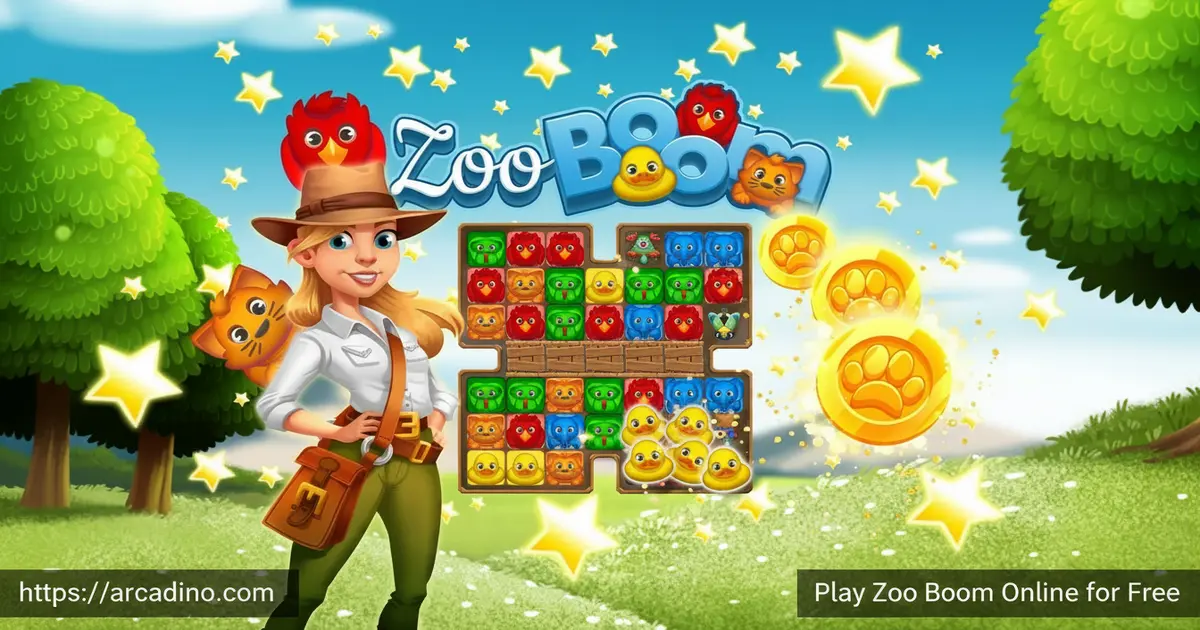
- Tap any two or more touching animals of the same color to clear them
- Trigger buzzing bees and stinky skunks as special boosters
- Free animals from tiny cages, smash boxes, and remove poison mushrooms
- Earn three stars per level and open treasure chests for rewards
What Is Zoo Boom?
Zoo Boom is an animal-themed match puzzle game where you clear boards of cute critters to build up your own zoo. It belongs to the match-3 family, but it breaks the usual rules in a fun way. Instead of swapping tiles, you simply tap a group of touching same-color animals – two is enough, and bigger groups trigger better rewards. The whole thing runs in your browser with no install.
Playing it in Chrome, the tiles pop quickly and the cartoon animals feel squishy and responsive under a single click. Loading is fast because it’s a lightweight HTML5 title, which makes it easy to pick up for a five-minute break. The art style leans cheerful – parrots, tigers, ducks, snakes – and fits the safari theme without feeling babyish. It’s the kind of animal puzzle game that’s genuinely relaxing but still asks you to think.
Zoo Boom was made by Famobi, a German studio known for polished HTML5 puzzle games. It first launched back in June 2019 and has been updated with new levels ever since. That long life is part of why you’ll spot it on so many game portals today. Famobi also makes other match and merge games you might recognize from the same websites.
Gameplay in Zoo Boom
Every round in Zoo Boom drops you onto a board packed with animal cubes and a list of objectives on the side. Your core move is simple: find two or more matching animals sitting next to each other horizontally or vertically, then tap them to clear them. There’s no limit on how many tiles you can chain – if nine parrots are all touching, they all vanish in one click. That freedom is what makes the puzzle feel different from standard match-3 games.
Bigger matches are where things get spicy. Line up five or more of the same critter and a special tile appears on the board. Bees zip through a whole row or column, while skunks blast everyone in a small radius with their stink cloud. Combining two specials together creates massive chain reactions that wipe huge portions of the grid at once.
Setting Up the Perfect Bee + Skunk Combo
Here’s a real combo setup that will change how you play. Say you spot six parrots stacked in a vertical column on the left side of the board. Tap them to spawn a bee tile right where your click landed. Now, before you detonate that bee, look for a cluster of four or five skunks nearby – maybe a couple rows down. Match the skunks to create a skunk booster sitting close to your bee. Finally, tap the bee so its row-clear passes through the skunk tile. The skunk triggers from the blast, exploding its radius at the same time. That double-pop can clear more than half the board in one shot and finish tough objectives instantly.
Levels and Progression in Zoo Boom
Zoo Boom has a massive level count – around 1,250 hand-designed stages in the current Famobi build, with more added in regular content updates. Each stage has its own objective, so the game keeps feeling fresh instead of repetitive. One level you might be clearing a set number of duck tiles, and the next you’re freeing trapped animals from small cages.
You earn up to three stars per level based on how efficiently you clear the board. Those stars fill up treasure chests, which hand out helpful boosters. There’s also a daily gift to encourage you to check back, plus events that rotate in and out of rotation.
Community Events and Tournaments in Zoo Boom
Zoo Boom isn’t just a solo puzzle – there are rotating community events and tournaments that run on a weekly schedule. During these events you’ll see a leaderboard where you can compare your star totals or level progress against other players. Finishing inside the top ranks earns extra boosters, coins, and sometimes exclusive chest rewards. Seasonal events also swap in holiday-themed boards around Halloween, Christmas, and summer. It’s a friendly way to add stakes without any chat or messaging – perfect for younger players.
Boosters and Power-Ups in Zoo Boom
Boosters are the heart of the strategy in this animal puzzle. The bee booster clears a straight line – perfect for reaching awkward tiles at the edge of the board. Skunks hit everything in a small blast radius, which is great for clearing clumps of mixed animals. There are also color bombs and other specials that appear from really big matches.
If you get stuck, you can buy extra boosters from the in-game shop and drop them into a level before or during play. Stacking a bee next to a skunk before setting either off creates a combined effect that can practically solve a level on its own.
Challenges and Obstacles in Zoo Boom
The further you push into Zoo Boom, the weirder the obstacles get. Cages lock animals in place until you match next to them. Wooden boxes need to be smashed with nearby matches before they break. Poisonous mushrooms spread across the board and block your view of the tiles underneath.
These obstacles force you to plan ahead instead of just tapping the first match you see. Sometimes the smart move is saving a big combo for a specific corner of the board. That strategic layer is what keeps older kids and even adults hooked.
How to Play Zoo Boom
Getting started takes about ten seconds. Open the game in your browser, hit play, and the first level loads with a short tutorial bubble showing you where to tap. Check the objective panel on the side of the screen – it tells you what you need to clear to win. Then scan the board for the biggest group of touching same-color animals and click.
Controls for Zoo Boom
Controls couldn’t be simpler. On desktop, use your mouse to click on a group of matching animals. On phones and tablets, just tap the cubes with your finger. There are no key combos, no drag gestures, and no timing requirements – it’s a pure one-click puzzle, which is why it works so well on any device.
Tips and Tricks for Zoo Boom
- Always scan for groups of five or more before tapping smaller matches – those are what spawn bees and skunks
- Save special tiles for tough corners instead of wasting them on easy clears in open space
- Combine two boosters side by side for a huge chain blast that can finish stubborn levels
- Read the objective panel first so you don’t accidentally clear the wrong animal type
- Claim your daily gift and open treasure chests before starting a hard level – free boosters add up fast
Key Features of Zoo Boom
- Around 1,250 hand-designed levels with unique win conditions in each one
- Flexible matching – chain any number of touching same-color animals in one tap
- Powerful bee and skunk boosters that combo into massive board clears
- Obstacle variety including cages, boxes, and spreading poison mushrooms
- Star-based progression with treasure chests and daily gift rewards
Where to Play Zoo Boom
The easiest place to play Zoo Boom is right in your browser on desktop or mobile – no install, no signup, and it’s completely free. The HTML5 build works in Chrome, Firefox, Safari, and Edge, and it runs well even on older laptops or Chromebooks. If you prefer an app experience, there are official mobile versions too.
Most browser portals also include a fullscreen button, usually in the bottom corner of the game window. Clicking it blows the board up to fill your whole screen, which is great on a laptop or tablet. Press Escape to pop back out anytime.
Grab it on Google Play for Android or the App Store for iPhone and iPad. Stick to those official stores – random APK sites can bundle unsafe files. Many players also find the game through MSN Games, AARP, and USA TODAY’s game portals, which is why it shows up in so many different search results.
Browser Performance and Device Compatibility
Zoo Boom is super light on your hardware. On a basic Chromebook it runs at a smooth 60 frames per second with no stutter, even when a huge chain reaction is firing off. The tab uses only about 150-200 MB of RAM, so you can leave it open alongside homework tabs without slowing things down. After the first load, a lot of the assets are cached, which means the game boots almost instantly on later visits – and some levels even keep working briefly if your Wi-Fi blinks out. Compared to the native mobile app, the browser version sips less battery on short sessions because it skips background services. The app wins if you want offline play for a long car trip, but for a quick puzzle break, the browser is the smarter pick.
For Parents
Zoo Boom is a gentle, family-friendly puzzle suitable for kids ages 7 and up. There’s no violence, no chat feature, and no scary content – just colorful animals and satisfying pops. The game does include optional booster purchases in the shop, so if you’re handing over a device, it’s worth disabling in-app buys or playing in a browser where there’s less pressure to spend.
Short levels make it a great pick for 15-to-20-minute play sessions. It also quietly builds pattern recognition and planning skills as kids learn to spot the biggest possible matches on the board.
Learning Benefits: What Zoo Boom Trains
Teachers and parents often ask what kids actually gain from puzzle games like this one. Zoo Boom’s flexible tap-to-match system trains three clear skills. First, visual scanning – players sweep the whole board looking for the largest same-color cluster before clicking. Second, chunking, which is the brain’s trick of grouping small items into bigger patterns – a core reading and math skill. Third, delayed gratification, because saving a bee or skunk for the perfect moment beats using it right away. The no-swap rule is also more forgiving than Candy Crush-style games, where one wrong drag wastes a move. That means younger kids can focus on thinking instead of fighting the controls. It’s puzzle practice dressed up as zoo fun.
Similar Games to Zoo Boom
If you enjoy the tap-to-match rhythm and animal theme of this puzzle, these browser games scratch the same itch.
- Tropical Merge – Build your own tropical paradise by merging items into bigger ones
- Candy Crush — the iconic match-3 puzzle game with addictive colour-matching gameplay, delivering the exact core loop Zoo Boom fans love.
- Cookie Crush 3 — a match-3 puzzle with charming visuals and tricky levels, perfect for Zoo Boom fans who love colour-matching challenges.
- Candy Rain 6 — a colourful match-3 puzzle with satisfying mechanics, sharing Zoo Boom’s cheerful puzzle-solving appeal.
- Garden Tales — a match-3 puzzle set in a charming garden world, capturing Zoo Boom’s relaxing yet strategic gameplay.
- Candy Riddles — a colourful match-3 puzzle with creative level design, ideal for Zoo Boom fans who love chained combos.
- Bubble Shooter — the classic bubble-popping puzzle with colour-matching mechanics, sharing Zoo Boom’s satisfying “clear the board” appeal.
- Bubble Shooter 3 — the modern version of the bubble-popping classic with fresh levels, perfect for Zoo Boom fans who love match-colour puzzles.
- Hexa Sort — a colour-sorting puzzle with clean mechanics, capturing Zoo Boom’s calm yet strategic puzzle-solving core.
- Explore more in Puzzle Games
FAQs About Zoo Boom
How do you play Zoo Boom?
Tap at least two touching animals of the same color to clear them from the board. Each level has a specific objective shown on the side panel – sometimes clearing a set number of animals, sometimes rescuing trapped critters. Chain bigger matches to spawn special boosters.
How many levels are in Zoo Boom?
Zoo Boom has around 1,250 hand-designed levels in the current Famobi build, with more added in regular updates. Some smaller portal versions start with just 100 stages. You’ll always have new challenges waiting.
Who made Zoo Boom?
Zoo Boom was developed by Famobi, a German HTML5 game studio. It launched in June 2019 and has received steady level updates since then. Famobi has published dozens of other browser puzzle games too.
Is Zoo Boom free to play?
Yes, Zoo Boom is completely free to play in your browser. There are optional booster purchases in the in-game shop, but you never have to spend money to progress. The core puzzle experience is fully unlocked.
Can I play Zoo Boom on my phone?
Yes, Zoo Boom works on phones through the browser or as a dedicated app. The tap controls are designed with touchscreens in mind, so it actually feels great on mobile. Download the official app from Google Play or the App Store for the full mobile experience.
Do I need to sign up to play Zoo Boom?
No, you can play Zoo Boom instantly with no account needed. Just open the page in your browser and start matching animals. Some versions offer optional sign-in to save progress across devices.
What are the special tiles in Zoo Boom?
Matching five or more animals creates special tiles like bees and skunks. Bees clear an entire row or column when triggered. Skunks blast all the tiles within a small radius around them for huge board damage.
Ready to Fill Your Zoo?
Zoo Boom nails that sweet spot between relaxing and challenging – the no-limit matching feels great, the bee-and-skunk combos are genuinely fun to pull off, and the obstacle variety keeps levels surprising hundreds of stages deep. Open it up in a new tab, tap your first group of giraffes, and see how far you can push your three-star streak before the cages and mushrooms slow you down.
Gameplay Video


