



























Watch one short ad and play ad-free for 30 minutes.
Zombs.io
End GameImagine chopping trees by day and watching glowing zombies pour toward your wooden walls by night. That’s the heartbeat of Zombs.io, a free browser tower defense where you mine, build, and pray your arrow towers hold. It’s a popular pick in the .io games scene, often searched simply as “io” by fans hunting their favorite multiplayer survival hit. No download needed – just hop online and start gathering wood.
The mix of resource grinding and base building hooks you fast. One minute you’re swinging a pickaxe at stone, the next you’re frantically slapping down walls before a boss wave hits. 🧟
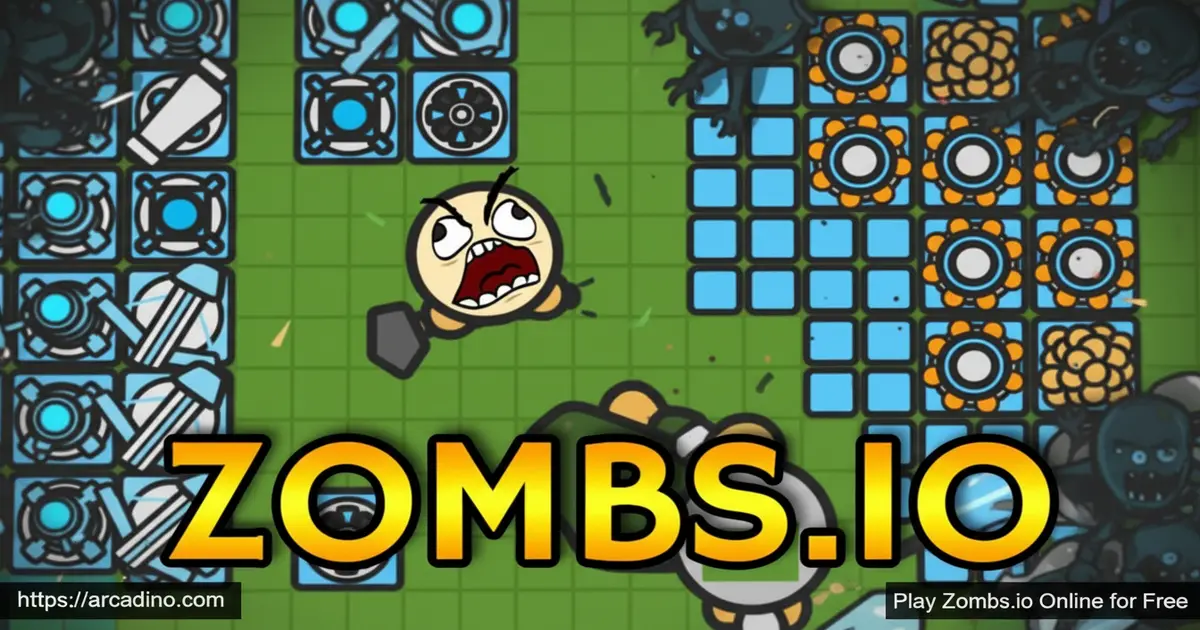
- Day-and-night cycle with zombie attacks every night
- Gold stash, gold mines, towers, walls, and traps to build
- Tiered upgrades from rough wood walls to powerful end-game defenses
- Solo or party play with a C.A.R.L pet companion option
What Is Zombs.io?
Zombs.io is a 2D top-down tower defense game that runs right in your web browser. You drop a gold stash, harvest wood and stone, and turn that loot into a fortress. Every night, waves of zombies march toward your base, and your towers do the heavy lifting while you keep mining.
The art style is bright and cartoony, which keeps the zombie theme friendly rather than scary. Loading is quick on Chrome and Firefox, and the controls feel snappy once you learn the hotkeys. The game has been around for a few years and still draws a steady crowd of base-builders.
Zombs.io Gameplay Loop
The loop is simple but addictive. Gather resources, build defenses, survive the night, repeat. Each survived wave gives you more gold, which unlocks bigger walls, stronger towers, and better weapons from the shop.
Bosses crash the party at certain waves, like wave 9, and they hit way harder than regular zombies. That’s when smart base layout matters. You’ll want a corridor or symmetrical tower ring around your gold stash so enemies funnel into your strongest weapons.
Towers, Walls, and Base Building in Zombs.io
Your base in this io tower defense isn’t just decoration – every block matters. The standard upgrade chain runs stash, gold mine, resource harvester, walls and doors, then arrow tower, cannon tower, bomb tower, mage tower, and finally melee tower. Pros call the symmetrical layout a “box technique,” placing long-range towers on the outside and melee on the inside.
Walls and doors block zombie paths, while slow traps buy your towers extra firing time. Quality matters more than quantity. A handful of upgraded tier VI towers easily beats a sprawl of weak tier I ones.
Box Technique vs Corridor Layout: Which Should You Pick?
New players usually pick between two base styles, and each has clear trade-offs. The box technique wraps your stash in a square: cannon towers on the outside corners, then arrow towers, then mage towers, with melee towers tucked closest to the stash. This shape catches zombies from any direction, which is great for solo play and corner-stash setups. The downside is cost – you need a lot of gold to fully upgrade every side.
The corridor layout (sometimes called the “open doorway”) leaves one narrow path open and walls off the rest. Zombies funnel down the lane straight into stacked bomb and mage towers, so you can focus your firepower in one spot. It’s cheaper to build, but a single broken wall can let a boss waltz right to your stash. Beginners should start with a small box, then experiment with corridors once they hit tier IV towers.
Levels and Progression
Progression in Zombs.io is tied to wave numbers, not classic levels. Early waves (0-7) are about setting up a 3×3 gold farm and dropping resource harvesters. By waves 18-24, you’re aiming for tier VI buildings, and the real grind is saving 100,000 gold for a tier VII stash around wave 31.
Push past wave 50 and you’re in serious end-game territory. Some players take their bases past wave 100 with optimized layouts. The longer you survive, the higher your score climbs on the daily and all-time leaderboards.
Late-Game Survival: Waves 42 and Beyond
Once you cross wave 41, the game shifts into a whole new gear. A tier VII gold stash pumps out around 24,000 gold per cycle, which finally lets you afford constant tower repairs and upgrades. The big trick here is the “timeout” ability – skipping the day phase early to trigger night faster. Used right, timeout nets you about 14,000 extra gold profit per cycle without losing prep time.
From waves 42-55, focus on maxing every tower to tier VI and stockpiling stone for emergency wall swaps. Waves 56-100 throw boss zombies at you almost every night, so heal towers and slow traps become must-haves. Push past wave 101 and you’re chasing leaderboard glory – players up there usually run perfect symmetrical boxes with full tier VII defenses. Patience and steady upgrades beat panic-building every time.
Training Your C.A.R.L Pet the Smart Way
C.A.R.L is your loyal companion, but he only gets stronger if you train him on purpose. The bow’s secret job isn’t damage – it’s tagging targets so C.A.R.L knows what to attack. Every zombie your pet defeats gives him experience toward his next tier. Aim to evolve him to tier II by waves 9-11, when the first big boss usually crashes in.
To train him fast, equip the bow at the start of each night, tag the closest zombies, and let C.A.R.L finish them off. Avoid auto-attacking with melee, since that steals kills from your pet. By wave 20, a well-trained C.A.R.L can solo entire packs while you keep mining. Think of him as a second tower that follows you around.
Weapons and the Shop
The shop (press B) is where gold turns into firepower. You can buy a better pickaxe to mine faster, plus weapons like the bow, spear, and bomb. Each weapon comes in tiers, and shiny boxes you smash sometimes drop quality loot.
The bow is a sneaky favorite for early game. Its damage isn’t huge, but it tags targets so your C.A.R.L pet learns who to chase. Switching weapons mid-fight is just a tap of Q.
How to Play Zombs.io
Getting started takes about 30 seconds. Open the game in your browser, pick a name, and you’ll spawn on a map full of trees and rocks. Walk up to a tree, left-click to chop, and grab wood. Do the same with stone, then place your gold stash to officially start your base.
From there, build gold mines for steady income, raise walls, and plant towers before the sun sets. Night is when zombies attack, so don’t sleep on prep time.
Zombs.io Controls
- Movement: W, A, S, D or arrow keys
- Turn/aim: Mouse
- Gather, attack, build: Left-click
- Auto-attack: Spacebar
- Quick upgrade: E
- Upgrade all (mass upgrade): Hold Shift or Alt while clicking E – a huge time-saver in the late game
- Quick sell: T
- Quick heal: F
- Cycle weapons: Q
- Shop menu: B
- Party menu: P
- Unselect: Esc or right-click
Tips and Tricks for Zombs.io
- Place your gold stash in a corner of the map – zombies can only attack from two sides instead of four.
- Build a 3×3 gold farm early so you have a tight walking lane around your mines.
- Stockpile around 10,000 wood and stone before you even drop the stash to skip slow early grinding.
- Always upgrade in this order: stash first, then mines, then harvesters, then walls, then towers from longest range to shortest.
- Avoid building right next to monster stones – those monsters can one-shot tier I walls.
- Use the harvester troll trick: keep your stash on the map’s edge so zombies have to walk a long path. They often turn around, form herds, and even fight each other, giving you free breathing room.
- Find a “combo spot” – one tree right next to one stone – and farm there before placing your stash. This temporary “farm base” upgrades your pickaxe faster than running between scattered resources.
Key Features of Zombs.io
- Multi-tier building system with stash, mines, harvesters, walls, doors, slow traps, and five tower types
- A heal towers spell that restores tower HP during tough waves
- C.A.R.L pet companion that grows stronger with experience earned each round
- Solo or party mode so you can team up with friends through the party menu
- Daily, weekly, and all-time leaderboards to chase top wave records
Where to Play Zombs.io
The easiest way to play Zombs.io is right in your web browser on PC or laptop – no download, no install, no account needed. It runs on Chrome, Firefox, Edge, and Safari thanks to WebGL, so most school-friendly setups can launch it instantly. If your browser shows a WebGL error, just refresh and it usually fixes itself.
Mobile support for the original Zombs.io is limited compared to the studio’s battle royale spin-off. If you want a phone version of the universe, ZombsRoyale.io has dedicated app store releases. Stick to official browser play for the tower defense experience and avoid sketchy APK downloads from unknown sites.
Browser Performance and Troubleshooting
Zombs.io leans on WebGL, so a modern browser makes a huge difference. Chrome and Firefox give the smoothest frame rates, especially during boss waves with lots of zombies on screen. Edge and Safari work too, but they sometimes lag once your base hits tier VI. School Chromebooks can struggle because shared GPU resources and strict admin settings often slow WebGL down or block it entirely.
If you hit a WebGL error, refresh the page first – it usually clears right up. Still stuck? Close extra tabs, update your browser, and check that hardware acceleration is turned on in settings. If the game crashes mid-run, your base often saves at the last completed wave, so just refresh and rejoin with the same name to recover your session.
For Parents
Zombs.io is generally fine for kids ages 8 and up. The zombie theme is cartoonish and not gory – enemies pop and disappear without blood or scary visuals. There’s no required purchase to play, and the core loop rewards patience, planning, and resource management, which are nice problem-solving skills.
The game does include an in-game chat and party system, so a quick chat about online safety is worth having. Sessions can run long because waves keep escalating, so setting a 30-45 minute play limit helps kids step away at a natural break point.
Zombs.io vs ZombsRoyale.io: Which Is Right for Your Kid?
These two games share a name and a studio, but they’re built for different ages. Zombs.io is a tower defense game where kids fight cartoon zombies, not other players. There’s no PvP combat, the chat is mostly limited to party mode, and the pace gives kids time to think. That makes it a solid pick for ages 8 and up.
ZombsRoyale.io is a 100-player battle royale where real players shoot each other until one is left standing. The action is faster, the chat is more open, and the competitive pressure is much higher. It’s better suited to ages 10+ and works best with parental supervision or chat turned off. If your kid is new to .io games, start with Zombs.io and graduate to ZombsRoyale.io once they’re ready.
Similar Games to Zombs.io
If you enjoy the build-mine-defend rhythm of Zombs.io, these tower defense and survival io games scratch the same itch:
- ZombsRoyale.io – From the same creators, this 2D 100-player battle royale swaps base building for last-player-standing combat.
- Diep.io – A tank-based io shooter where you upgrade firepower and dominate the arena.
- Tower Defense games – Browse more base-defending picks here.
FAQs About Zombs.io
Is Zombs.io still active?
Yes, Zombs.io is still online and playable today. The daily leaderboard refreshes with new scores, which is a clear signal that real players are still grinding waves. Major updates slowed down years ago, but minor tweaks have continued, so servers stay open for new and returning players.
Can you play Zombs.io on mobile?
Zombs.io is designed for desktop browsers and works best with a keyboard and mouse. The controls rely on hotkeys like B, E, Q, and F, which are tough to replicate on touchscreens. For a mobile experience from the same studio, try ZombsRoyale.io instead.
How do you chat in Zombs.io?
You chat in Zombs.io by pressing Enter to open the chat box. Type your message and hit Enter again to send. Chat is mostly used inside parties, so press P to open the party menu and team up with friends first.
How do you get tokens in Zombs.io?
Tokens drop from smashing the shiny crates that spawn around the map and from surviving waves. You can spend them in the shop on cosmetic skins and weapon upgrades. The further you push into the night cycles, the more tokens stack up, so daily play is the easiest way to earn them.
Is Zombs.io the same as Zombs Royale?
No, they are two different games from the same creators. Zombs.io is a tower defense base-builder, while ZombsRoyale.io is a 100-player 2D battle royale. People often mix them up because of the shared name and studio.
Is Zombs.io free to play?
Yes, Zombs.io is completely free in any modern browser. There’s no required payment to access the full game. You can jump in, build a base, and survive waves without spending money.
What weapons can you buy in Zombs.io?
You can buy pickaxes, bows, spears, and bombs in the shop. Each weapon comes in multiple tiers, with higher tiers dealing more damage. Press B to open the shop and browse upgrades.
Ready to Defend Your Stash?
Zombs.io blends the satisfying grind of resource gathering with the panic of holding the line against night-time zombie hordes. The tier-based tower system, the C.A.R.L pet, and that perfect corner-stash strategy give it real replay value. Drop your gold, raise your walls, and see how many waves you can survive before the horde breaks through.
