


























Watch one short ad and play ad-free for 30 minutes.
Unblock Me
Kiragames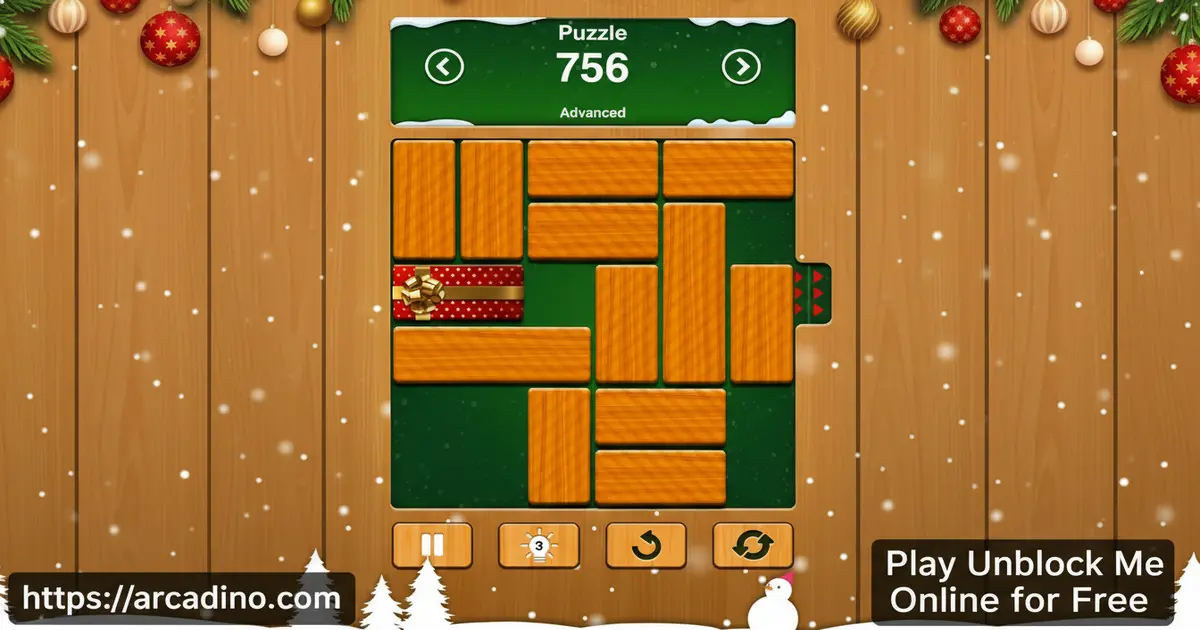
There’s something almost magical about a puzzle that fits in your pocket. Unblock Me is a free browser puzzle game that turns a simple wooden board into a serious brain workout. You slide blocks around a grid to free one trapped red piece — and it sounds easy until it really isn’t. 🧩 This is the kind of thinking game that quietly swallows entire afternoons.
Intel Software once called it “an addictive puzzle game that provides endless hours of new and interesting challenges.” With 4,200 puzzles and four difficulty levels, that description still holds up. You can jump in right now online without downloading a thing.
- 4,200 hand-crafted puzzles ranging from Beginner to Expert difficulty
- Two distinct game modes — competitive Challenge mode and laid-back Relaxed mode
- Offline play supported on mobile — progress syncs automatically when you reconnect (note: the browser version requires an internet connection to load)
- Google Play Editor’s Choice winner with over 100 million downloads worldwide
What Is Unblock Me?
Unblock Me is a wooden board block puzzle game developed by Kiragames, a studio based in Nakhon Ratchasima, Thailand. The goal is beautifully simple: slide the other blocks out of the way so the red block can escape the grid. Every puzzle is a fresh logic challenge with only one clean solution.
The sliding block concept has a long history. Games like Rush Hour and Klotski popularized this style of puzzle decades ago. Unblock Me carries on that tradition with a fresh coat of wood-grain polish and a huge modern puzzle library.
Kiragames launched the game on June 11, 2014, and it went on to earn Google Play’s Editor’s Choice award — a real badge of honor. It has since crossed 100 million downloads, which puts it in rare company for a puzzle title. What sets it apart from other block sliders is the warm, woody visual style and the satisfying snap of each solved board.
Playing it in a browser, the grid loads crisply and the blocks respond to clicks and drags with no noticeable lag. The minimalist design means there’s nothing fighting for your attention except the puzzle itself. That clarity actually makes the harder Expert puzzles feel fair rather than frustrating.
Unblock Me Gameplay — Sliding Blocks and Sharp Thinking
The core loop of Unblock Me is built around one rule: slide blocks horizontally or vertically to clear a path for the red block. Blocks can only move along the axis they’re already aligned with, so planning ahead matters. Each puzzle starts fresh, and the board fills with different arrangements that force you to think two or three moves ahead.
What keeps players hooked is the move counter. The game tracks how many slides it took you to solve each puzzle, which creates a quiet pressure to do better next time. Shaving one move off your solution feels genuinely rewarding. That feedback loop is why this title has held its audience for over a decade.
Game Modes and Challenges in Unblock Me
The game offers two modes that suit completely different moods. Challenge mode puts a scoring system front and center — each puzzle awards up to three stars based on how efficiently you solve it. Earning all three stars on every puzzle adds serious replay value, because a two-star solution is still an invitation to come back and do better.
Relaxed mode strips away the pressure entirely. You still solve the same block puzzles, but there’s no star rating pushing you. It’s perfect for winding down after school or just thinking through problems at your own pace. Having both options in the same game makes it work for very different players.
How the Three-Star Scoring System Actually Works
The three-star system isn’t random — each puzzle has a fixed par move count set by the developer. Hitting that par (or beating it) earns you three stars. Going a few moves over drops you to two stars, and going well over lands you at one star. Think of it like a golf score: the puzzle has a target, and every extra slide pushes you further from it. For example, a Beginner puzzle with a par of 8 moves might give three stars at 8 or fewer, two stars at 9 to 12, and one star beyond that. Knowing this changes how you play Challenge mode completely. Instead of just finishing the puzzle, you’re aiming for the developer’s “perfect” line — and that’s where the real replay value kicks in. Count your planned moves before you touch a single block, and you’ll be surprised how often you can hit three stars on the first try.
Levels and Progression Across 4,200 Puzzles
The puzzle library in this sliding block game is genuinely massive. Four difficulty tiers — Beginner, Easy, Medium, and Expert — let you climb at your own speed. Beginner puzzles teach the core logic cleanly, while Expert grids are dense, tricky, and deeply satisfying when you crack them.
With 4,200 puzzles total, new players won’t run out of content any time soon. The jump in complexity between tiers is gradual enough that you’re always learning without feeling stuck. Schools have actually used Unblock Me in classrooms specifically because the progressive difficulty builds problem-solving skills step by step.
What to Expect at Each Difficulty Tier
Each tier isn’t just “harder” — the puzzles change in specific ways that matter. Beginner boards have fewer blocks, short dependency chains, and generous slack space, so even a wrong move rarely locks you out. Easy puzzles add a couple more pieces and tighten the grid slightly, requiring you to think one move further ahead. Medium is where dependency chains start stacking: moving one block frees another, which then frees the path — you need to hold two or three steps in your head at once. Expert grids pack the board with long blocks, tight corridors, and chains that can run five or six moves deep before the red block has any room to breathe. If Medium feels tough, don’t skip to Expert right away — spending time on Medium until three-star solves feel natural is the fastest way to build the pattern recognition Expert demands.
Achievements and Rewards
Beyond solving puzzles, the game keeps you motivated with a ranking system and achievements. These extras give long-term players a sense of progress that goes beyond just finishing boards. Climbing the rankings rewards consistent play and encourages you to revisit earlier puzzles for better scores.
The three-star system in Challenge mode essentially turns every completed puzzle into an achievement waiting to be perfected. If you’ve already solved all 4,200 puzzles, chasing that clean three-star record on every single one is a whole second playthrough. That’s a lot of mileage from one game.
How to Play Unblock Me
Getting started takes about ten seconds. The board appears right away, packed with rectangular wooden blocks and one red block that needs to escape through an opening on the side. Your only job is to slide the surrounding blocks out of the path. Pick a difficulty, pick a mode, and start thinking.
The real trick is learning to read the whole board before you touch anything. Jumping straight to the obvious moves often boxes you in. Take a breath, find the block that’s closest to the exit, and work backwards from there. That habit alone will boost your star ratings fast.
Unblock Me Controls
On desktop, click and drag a block in the direction it can move. Horizontal blocks slide left and right; vertical blocks slide up and down. On mobile and tablet, tap and swipe the blocks in the same way. The controls are immediate and precise — there’s no learning curve on the input side, only on the puzzle side.
Tips and Tricks for Unblock Me
- Start from the exit: Find the opening where the red block escapes, then trace backwards to see which blocks are directly blocking it first.
- Count your moves before you slide: In Challenge mode, every extra slide costs you a star. Planning before touching anything is the fastest route to a three-star solve.
- Move blockers before the path: Some blocks look clear but are themselves blocked by another piece. Clear the deeper obstacles first, then the ones near the red block.
- Use Relaxed mode to experiment: When a puzzle has you stumped, switching to Relaxed mode lets you try ideas without stressing about your star rating.
- Revisit Beginner puzzles for speed: If you’re chasing better rankings, replaying early puzzles for fast three-star solves builds your score without the pressure of Expert grids.
Key Features of Unblock Me
- 4,200 puzzles across four difficulty tiers — one of the deepest libraries in the sliding block puzzle genre
- Challenge and Relaxed modes — competitive star-rating play or stress-free solving, your choice
- Offline support with auto-sync (mobile only) — puzzles work without Wi-Fi on the app and your progress saves when you reconnect
- Ranking system and achievements — long-term goals that keep the game rewarding well past the first hundred puzzles
- Warm wooden board aesthetic — a calm, distraction-free visual style that keeps the focus on pure logic
Where to Play Unblock Me
You can play Unblock Me free in your browser right now at Arcadino.com. There’s no account required and no file to install. The game runs directly in your browser, so you’re in the middle of a puzzle within seconds of clicking play. Arcadino keeps the game accessible without any restrictions, so you can enjoy it at home or anywhere else you have a connection.
Browser vs. Mobile — Which Experience Is Right for You?
The browser version and the mobile app both deliver the same core puzzle gameplay, but they feel a little different in practice. Playing in a browser on Arcadino means zero ads, zero in-app purchases, and no account setup — you just click and play. The mouse or trackpad controls are crisp and responsive, making it a great pick for desktop sessions at home or at school. The mobile app, on the other hand, is built for life on the go: it works fully offline, sends optional reminders to keep your puzzle streak alive, and lets you unlock the Premium version (ad-free with extra features) if you want the full experience. If you already have the app and wonder whether the browser version is worth trying, the answer is yes — especially if you want a clean, no-friction session without any monetization pop-ups getting in the way.
It’s also worth knowing that Unblock Me comes in two separate app-store products: Unblock Me Free and Unblock Me Premium. The Free version is supported by ads and offers optional in-app purchases to remove them. The Premium version is a one-time paid download that removes ads entirely and unlocks all content upfront. Both versions share the same 4,200-puzzle library and gameplay — the only difference is how they’re monetized. If you’re playing in a browser on Arcadino, none of that applies: there are no ads and no purchases to worry about.
If you want to play on the go, the official mobile apps are available for both Android and iOS. The mobile versions also support offline play, so a long car ride or camping trip won’t stop you mid-puzzle. Always download from the official stores to keep your device safe — avoid any APK files from unofficial sites, as these can carry security risks.
For Parents
Unblock Me is a calm, non-violent puzzle game with no chat features and no social interaction between players. The content is completely appropriate for kids aged 8 and up — in fact, Kiragames notes that the game has been used in real school classrooms to help students sharpen their logical thinking. There are optional in-app purchases available in the mobile version, so parents may want to disable those on younger kids’ devices.
The game is genuinely educational without feeling like homework. Research in educational psychology identifies visuospatial working memory — the brain’s ability to hold and mentally manipulate visual layouts — as a core skill that sliding block puzzles directly exercise. Every time a child plans a sequence of moves, they’re loading and updating a mental map of the board, which strengthens sequential planning and spatial reasoning in ways that transfer to real-world problem-solving. Sessions can be as short as five minutes for a single puzzle or stretch longer if a tricky Expert board has them hooked — so it works well with screen-time limits.
Similar Games to Unblock Me
If you love sliding block puzzles that test your logic and patience, these browser games belong on your list too.
- Unblock Puzzle — a grid-based block slider that challenges you to clear paths using the same horizontal and vertical movement rules.
- Block Puzzle — a browser puzzle game focused on fitting and arranging blocks to clear the board, great for fans of spatial thinking games.
- Wood Block Puzzle — a relaxing wooden-themed puzzle game where you fit block shapes onto a board to clear rows, ideal for fans of Unblock Me’s calm aesthetic.
Explore more games like these in the Puzzle category.
FAQs About Unblock Me
What is the goal of Unblock Me?
Slide the red block out of the board by clearing a path through the other blocks. You move surrounding blocks horizontally or vertically to open a route to the exit. The fewer moves you use, the better your score in Challenge mode.
Is Unblock Me free to play online?
Yes, Unblock Me is completely free to play in your browser. You can access it on Arcadino.com without creating an account or downloading anything. The mobile apps also have a free version available on Google Play and the App Store.
How many puzzles does Unblock Me have?
Unblock Me has 4,200 puzzles in total. They’re spread across four difficulty tiers: Beginner, Easy, Medium, and Expert. That’s enough content to keep even dedicated puzzle fans busy for hundreds of hours.
Can I play Unblock Me offline?
Yes, the mobile version of Unblock Me works without an internet connection. Your progress saves locally and syncs automatically the next time your device goes online. The browser version on Arcadino requires a connection to load.
Who made Unblock Me?
Kiragames, a studio based in Nakhon Ratchasima, Thailand, developed Unblock Me. The game launched on June 11, 2014, on both Google Play and the App Store. It later earned the Google Play Editor’s Choice award and crossed 100 million downloads.
What are the two game modes in Unblock Me?
The two modes are Challenge mode and Relaxed mode. Challenge mode scores each puzzle with up to three stars based on how few moves you use. Relaxed mode lets you solve puzzles freely without any scoring pressure.
Is Unblock Me good for kids?
Yes, Unblock Me is a great puzzle game for kids of all ages. It has no violence, no chat, and no inappropriate content. Schools have actually used it in classrooms because it builds logical thinking and spatial reasoning skills.
What is the difference between Unblock Me Free and Unblock Me Premium?
Unblock Me Free and Unblock Me Premium are two separate app-store products. The Free version includes ads and offers in-app purchases to remove them. The Premium version is a paid one-time download that removes ads and unlocks everything upfront. Both share the same puzzles and gameplay — the difference is purely in how they handle monetization. On Arcadino.com, you get the full browser experience for free with no ads at all.
Start Sliding — Your Next Puzzle Is Waiting
Unblock Me stands out in the puzzle genre for three clear reasons: the sheer depth of 4,200 puzzles, the flexibility of two game modes that suit any mood, and a wooden board aesthetic that keeps the experience calm and focused. It earned its Editor’s Choice badge honestly, and 100 million players can’t all be wrong.
The best way to understand why this sliding block puzzle became a classroom staple and a global hit is to try it yourself. Head to Arcadino.com, pick your difficulty, and see how long it takes before you’re chasing that elusive three-star solve. The red block isn’t going to free itself.
Gameplay Video


