


























Watch one short ad and play ad-free for 30 minutes.
Plactions
Robert AlvarezImagine a platformer where each jump is a precious resource you can’t waste. That’s exactly the twist behind Plactions, a free browser puzzle game where every dash, gravity flip, and teleport is counted before you start. You guide a small white square toward a portal, but you only get a handful of actions per level. Run out, and you’ll have to reset and rethink your route.
It’s a brain-bender that mixes platforming reflexes with tight puzzle logic. The result feels closer to chess than to a typical runner, and that’s why so many players keep coming back. 🧩
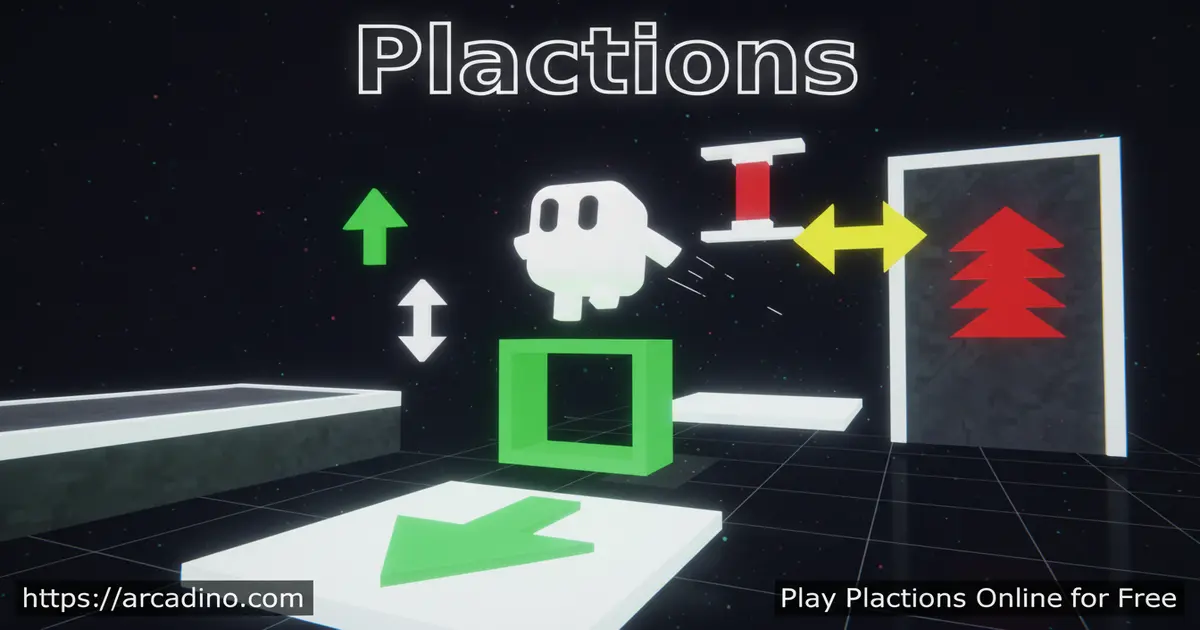
- Puzzle platformer with consumable actions like jump, dash, and teleport
- 24 main levels ending in a “Thanks For Playing” screen
- Pick up extra action icons starting from level 9
- Plays instantly in any browser, no download needed
What Is Plactions?
Plactions is a puzzle platformer made by Robert Alvarez, originally released for web browsers. You control a tiny cube and must reach a teleportation portal at the end of each stage. The catch is that abilities like jumping, dashing, toggling lasers, flipping gravity, and phasing through walls are all limited. Every action you spend is gone for that level.
The game first launched in October 2021 and has stayed popular ever since. Small tweaks and bug fixes have rolled out over the years, so the version you play today feels polished. That’s part of why it still pops up on top puzzle lists for browsers.
What makes this title stand out is how it forces you to plan before you press a key. Loading is quick in Chrome and Firefox, and inputs feel responsive without any noticeable lag. The minimalist white-on-dark art keeps your focus on the puzzle, not on flashy effects. It’s the kind of design choice that pairs perfectly with the strict action budget.
Plactions Gameplay
Each level drops your square into a small arena filled with spikes, walls, and voids. You can always move left and right freely, but special abilities count against your meter shown in the top-left corner. The game tells you which actions are available and in what order you’ll use them. That order matters: a dash queued before a jump plays out differently than the reverse.
One mechanic worth highlighting is the mid-air dash. Right after you jump, you can chain a dash to fly farther across a gap. That combo often saves you a whole action because you skip needing a second jump. Learning to feel the timing of jump-then-dash is a huge step toward beating tougher stages.
From level 9 onward, you can grab extra action pickups scattered around the map. Sometimes you’ll burn an action just to reach another action behind it. Touch a spike and you reset instantly, which keeps the trial-and-error loop fast. Short levels mean you experiment without ever feeling stuck for long.
Levels and Progression in Plactions
The main campaign runs through 24 handcrafted stages that ramp up steadily. Early levels teach single mechanics like jumping or dashing on their own. Later puzzles stack gravity flips with laser toggles and tight teleport timing. By the final stretch, you’re combining four or five different actions in one run.
After clearing level 24, you reach a “Thanks For Playing” screen. Your character appears with every action orbiting around it, which is a small but satisfying reward. Clicking takes you back to the menu, where you can replay any stage to find faster solutions.
Walkthrough: Reading the Action Queue on an Early Level
Let’s walk through a teaching stage like level 3 to show how planning works. Your action queue at the top might read: jump, dash, jump. That means your first ACT press triggers a jump, the second a dash, and the third another jump. Move left or right freely first to line up under the obstacle you want to clear. Then press ACT once to jump up onto a ledge, walk to the edge, and press ACT again to dash across a spike pit. Save the final jump for the small wall right before the portal. If you mess up the order, press R to reset and try the same sequence from a slightly different spot. Reading the queue first is the single biggest habit that turns hard levels into easy ones.
Action Economy: When to Use Each Ability
Each of the five abilities has a job it does best, and matching the tool to the gap saves moves. Use jump for vertical height, like climbing onto a ledge or hopping a short wall. Use dash for horizontal distance, especially over wide spike pits where a jump alone falls short. Save gravity flip for routes along the ceiling or when a pickup is stuck above you. Pull out teleport when a whole spike field blocks your path, since it skips danger you can’t cross any other way. Toggle lasers only when a beam is actively in your way or when you need to switch one on as a wall. Thinking about each action in these terms before you move makes long queues feel a lot less scary.
Graphics and Audio
Visuals stay simple on purpose. A clean white square, sharp geometric obstacles, and a moody background let your eyes track the puzzle without distraction. The soundtrack is low-key and atmospheric, perfect for the kind of focused thinking the game demands. There’s no clutter, no pop-ups, and no flashing tutorials breaking your concentration.
Accessibility and Performance Notes
Plactions is a lightweight game, so it runs smoothly on most school Chromebooks at a steady frame rate. Once the level loads, brief network drops usually won’t kick you out, though a fresh launch does need an internet connection. The controls aren’t remappable in-game, but the multiple default keys (arrows, WASD, Space, X) cover most preferences. The white-on-dark palette has strong contrast, which helps players with low vision, and color isn’t used to signal danger, so colorblind players can read every hazard clearly. Spikes are shaped pointy and pickups glow, so you don’t need to rely on hue to tell them apart. That makes it a solid pick for classroom devices and shared family computers.
How to Play Plactions
Getting started takes about ten seconds. Open the game in your browser, press Enter or Space, and you’re in the first level. There’s no sign-up and no account needed. You’ll learn the basics through level design rather than text walls.
Plactions Controls
On keyboard, use the left and right arrow keys or A and D to move your cube. Press the up arrow, W, X, or Space to use the next action in your queue. Tap R to reset the current level, and press B or Esc to back out to the menu. On mobile and touch devices, on-screen buttons replace the keyboard, including a dedicated ACT button and a circular reset button.
Tips and Tricks for Plactions
- Read the action list at the top of the screen before you move a single pixel
- Remember that you can dash in mid-air right after a jump, which often saves a move
- Treat spikes as instant resets and use them to test routes without penalty
- From level 9 on, scout for action pickups before spending what’s already in your queue
- If a puzzle seems impossible, you probably need to use an action just to reach the next one
Key Features of Plactions
- Consumable action system that turns platforming into a resource puzzle
- Five distinct abilities: jump, dash, laser toggle, gravity flip, and teleport
- 24 levels with a clean difficulty curve and a hidden ending screen
- Tight keyboard and touch controls that respond on the first frame
- Free to play in any modern browser with no installs or accounts
Where to Play Plactions
The fastest way in is right here on arcadino.com, where the game loads in your browser with no download. It also shows up on Math Playground, which is why a lot of students search for “plactions math playground” and find it through school-friendly portals. The game runs equally well on Windows PCs, Macs, and Chromebooks.
On mobile, the touch buttons mimic the keyboard layout, so phones and tablets work fine for short sessions. There’s no official Android or iOS app from the developer, so be cautious with any APK files claiming to be Plactions. Stick to a trusted browser version to stay safe.
For Parents
Plactions is a great fit for kids ages 8 and up. The challenge is purely mental: planning, sequencing, and learning from mistakes. There’s no chat, no in-app purchases, and no violent content beyond a cartoon square bouncing off spikes. Ads depend on the host site, so playing on arcadino.com or Math Playground keeps the experience clean and school-friendly.
Short levels make it easy to set a timer for 20 to 30 minutes of play. The game quietly builds problem-solving, perseverance, and the patience to test ideas one at a time. Those are skills that carry into math and coding work later on.
Similar Games to Plactions
If the action-budget puzzle loop clicks with you, these browser games scratch a similar itch:
- Fireboy and Watergirl – A two-character puzzle platformer focused on coordinated movement through traps.
- Fireboy and Watergirl 2: Light Temple — the sequel with mirror-based puzzles and clever level design, capturing Plactions’ rewarding “figure out the trick” feel.
- Fireboy and Watergirl 3: Ice Temple — an icy adventure with timing-based puzzle mechanics, perfect for Plactions fans who love planning ahead.
- Cut the Rope — a clever physics puzzle where every action must be planned for the perfect outcome, sharing Plactions’ “think before you act” gameplay.
- Cut the Rope 2 — the sequel with creative new mechanics and tricky puzzles, capturing Plactions’ rewarding logic-based problem-solving.
- The World’s Hardest Game — a brutal logic-platformer that tests patience and planning, ideal for Plactions fans who love a serious challenge.
- Love Balls — a physics drawing puzzle where you connect two balls using clever paths, sharing Plactions’ creative problem-solving core.
- Happy Glass — a physics drawing puzzle where you guide water into a glass using clever paths, capturing Plactions’ “plan the solution” appeal.
Browse more brain-teasers in the Puzzle category.
FAQs About Plactions
Who made Plactions?
Plactions was made by Robert Alvarez. He’s an indie developer known for minimalist puzzle platformers that share a similar art style. The same white-square character has appeared in his earlier projects, including Jumphase and Start Powerless.
Is Plactions free to play?
Yes, Plactions is completely free to play in your browser. There’s no paywall, no premium tier, and no required account. You just open the page and start solving levels.
How many levels does Plactions have?
Plactions has 24 main levels plus a final “Thanks For Playing” screen. Difficulty climbs steadily, and from level 9 onward you can collect bonus action pickups inside the stages.
How do you beat level 22 on Plactions?
Level 22 is one of the toughest late-game stages, and the layout can vary by version, so there’s no single right move list. The general strategy for the final stretch is to read the full action queue first, look for any pickups you can reach, and try sequences that combine gravity flips with dashes. If you stall, press R and try ordering your moves differently — the answer is almost always a small change in route, not raw speed.
What are the controls in Plactions?
Move with the arrow keys or A and D, and act with W, Space, X, or the up arrow. Press R to reset and B or Esc to go back. Touch users get on-screen arrows and an ACT button.
Can I play Plactions on mobile?
Yes, Plactions runs in mobile browsers with on-screen touch controls. The buttons replace the keyboard inputs and work on both phones and tablets. There’s no dedicated app store version available.
Is Plactions on Math Playground?
Yes, Plactions is hosted on Math Playground alongside other strategy and action puzzlers. That’s why it pops up in school-safe game lists. You can also play it directly here without leaving the page.
Final Thoughts on Plactions
Plactions takes one clever idea, limited actions in a platformer, and squeezes every drop of puzzle potential out of it. The five abilities, the tight 24-level arc, and the hidden ending screen make it feel like a complete little package rather than a quick time-waster. Each stage is short, but the planning behind every solution feels meaningful.
Ready to see how few actions you really need to reach that portal? Fire up Plactions, count your moves, and find out which level finally makes you say “oh, that’s how it works.”
