



























Watch one short ad and play ad-free for 30 minutes.
Idle Supermarket Tycoon
CodigamesEver wanted to run your own grocery empire from a single dusty shelf to a giant mega-store? Idle Supermarket Tycoon lets you do exactly that, free in your browser, with no installs needed. You start with a tiny mini-mart and just enough cash to stock a handful of products, then watch shoppers pour in and turn your spare change into a retail kingdom. 🛒
It’s a casual clicker game from Codigames that mixes idle progression with smart management choices. You’ll add departments, hire staff, and chase bigger cities as your profits climb. Below is everything you need to know before you open the doors.
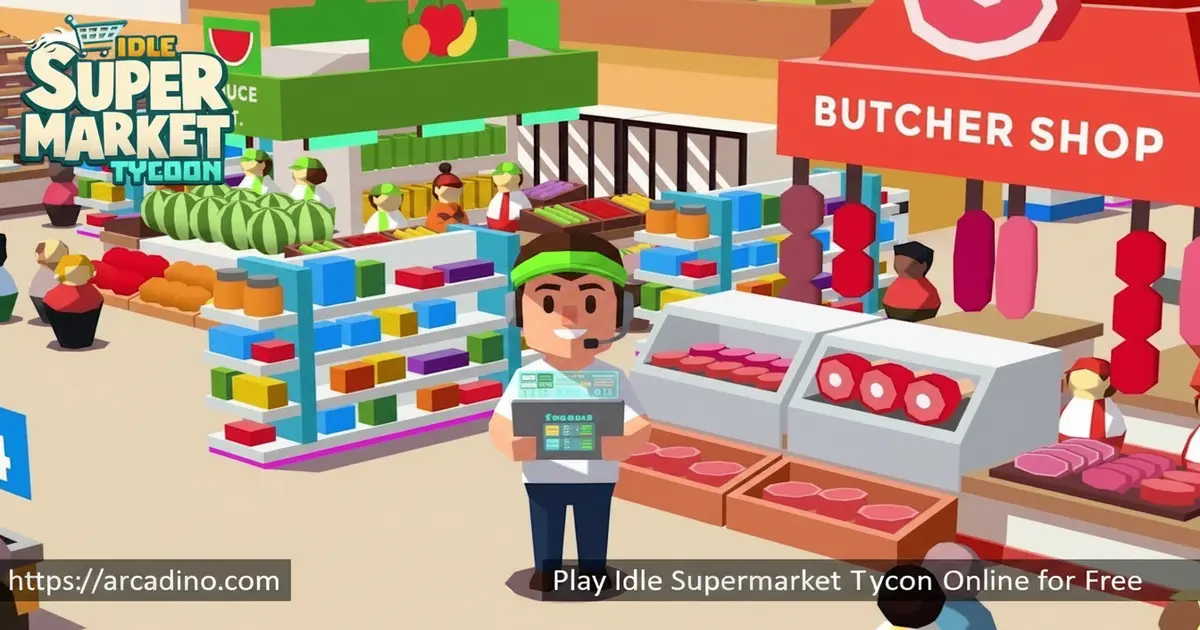
- Grow a mini-mart into a sprawling mega supermarket
- Unlock departments like bakery, butcher, perfume, and electronics
- Hire cashiers and managers to keep checkout lines moving
- Free to play in any modern web browser, no download required
What Is Idle Supermarket Tycoon?
Idle Supermarket Tycoon is a casual idle clicker where you manage a shopping mall and grow it into a chain. Built by Codigames, it belongs to the supermarket tycoon family of free tycoon games that reward smart reinvestment. You serve customers, earn money and reputation, then plow those profits back into bigger shelves, fancier products, and shinier signage.
What makes this idle hit click is the balance between tapping for instant cash and stepping away while sales pile up. The browser version loads quickly and the 3D shop view stays smooth even as crowds of cartoon shoppers fill the aisles. Controls feel light, and the camera zoom keys make it easy to admire your growing empire.
Gameplay in Idle Supermarket Tycoon
You begin with a few shelves and money for around four products. As shoppers discover your store, revenue ticks up and unlocks licenses for pricier goods with better margins. Bit by bit, you open new aisles and tap on tills to speed up sales.
The core loop is simple: buy stock, watch customers swipe it up, reinvest the profit. You’ll juggle worker salaries, parking spaces, and grocery deliveries between upgrades. Diamonds and gems sometimes pop up on screen, and tapping them gives a short revenue boost during busy rushes.
There’s also a delivery and maintenance side most players miss at first. You can buy delivery vehicles that haul extra stock and bring in bonus income on the side. Keep an eye on your corridors too, since shelves and aisles need maintenance to stay productive. Letting them slip means slower restocking and grumpier shoppers, so a quick tap fixes things fast.
From Mini-Mart to Mega Store
Progression is the heart of this grocery tycoon. After your starter shop turns a steady profit, you can branch into a bakery, fresh produce, fish and meat, and even high-end perfume and electronics departments. Each new section pulls in different shoppers and stacks your income.
Eventually you push beyond a single store and start opening supermarkets in bigger cities. Permanent upgrades carry across runs, so every expansion makes the next one faster.
Best Department Unlock Order and Payback
Not every department pays back the same way, so the order you unlock them really matters. The bakery should come first, since it’s cheap and turns a profit within a few minutes of busy shoppers. Fresh produce is your next best buy, with low stock costs and fast restocks that keep cash flowing. After that, jump to the butcher and seafood aisles, which cost more but pull in higher-margin shoppers and balance the store’s mix. Save perfume for the mid-game, because the upfront cost is steep but each sale is huge once you can afford the licenses. Electronics is the late-game powerhouse, with the slowest payback but the biggest single-sale tickets in the whole shop. The trick is to fully upgrade each department before moving up, so your money keeps doubling instead of getting spread thin.
Staff and Customer Management
Running a supermarket is a balancing act. Hire cashiers, stock clerks, bakers, and sales experts to keep registers humming, but don’t over-hire or idle workers will eat into profits. Under-hire and customers stand in long queues, dragging revenue down.
Once you have a solid team, you can bring in a store manager to boost overall productivity. Set salaries, open new checkouts, and use temporary boosters when you want a quick sales spike.
Research, Marketing, and Upgrades
Smart business decisions are what separate a corner shop from a chain. Research new features to improve product quality, add healthier options, and unlock fresh deals. Marketing campaigns pull in new shoppers, while a bigger parking lot keeps existing ones coming back.
Limited-time events show up too, offering exclusive rewards if you hit certain goals. Permanent upgrades make every future supermarket grow faster than the last one.
How to Play Idle Supermarket Tycoon
Getting started takes about ten seconds. Open the game in your browser, watch a quick intro, and you’re already inside your first mini-mart. Tap shelves to stock them, tap customers to speed up checkout, and follow the on-screen prompts that nudge you toward your next upgrade.
From there, just keep reinvesting. The game gives steady objectives so you always know what to aim for next, whether that’s a new department or a manager hire.
Controls
- Left mouse button to interact with shelves, staff, and the in-game UI
- + and – keys to zoom the camera in and out
- On mobile or tablet, tap the screen to interact with everything
Tips and Tricks for Idle Supermarket Tycoon
- Tap the diamonds and gems when they appear during busy rushes for a short revenue boost
- In the early game, spend every coin on profit upgrades before cosmetic stuff
- Hire just enough cashiers to clear lines, then add a store manager for a productivity bump
- Unlock the bakery and produce sections early since they pay back fast
- Save up for permanent upgrades, since they carry into every new supermarket you open
Idle Earnings: How Offline Income Really Works
Idle earnings are the secret sauce of this game, but they don’t work the same on every platform. On mobile, the game keeps banking money while the app is closed, usually capped at around two hours of offline income per session. That means logging in every couple of hours gives you the biggest payouts, while leaving it overnight wastes most of the timer. The browser version doesn’t bank true offline earnings, since it needs the tab open and the connection live to keep the simulation running. If you minimize the tab but leave it open, modern browsers usually keep the game ticking, so you still get idle gains. For the best of both worlds, play the browser version during quick sessions and use the mobile app to soak up overnight cash.
Key Features of Idle Supermarket Tycoon
- Idle clicker progression that earns money even while you take a break
- Multiple unlockable departments including bakery, butcher, seafood, perfume, and electronics
- 3D graphics with smooth animations and zoomable camera
- Staff management with cashiers, clerks, salaries, and store managers
- Limited-time events with exclusive rewards and permanent upgrades between runs
- Delivery vehicles and corridor maintenance for extra income streams
The mobile app also supports cloud save and cross-device sync, so you can pick up your shop on a phone and finish the same run on a tablet. Sign in with your Google Play or Game Center account, and your progress, gems, and unlocked cities follow you around. The browser version saves locally to that browser, so it doesn’t sync with your phone. If you want one shared empire, stick with the mobile app on every device you use.
Where to Play Idle Supermarket Tycoon
The fastest way in is right here in your browser on desktop or mobile, free and with no sign-up. The HTML5 version runs in Chrome, Firefox, Safari, and Edge, so school Chromebooks and home laptops both handle it fine. Many players also search for the title under “idle supermarket tycoon unblocked” or “supermarket tycoon online” because the browser build doesn’t need installs.
If you’d rather play on the go, grab the official mobile apps. Get it on Google Play for Android or the App Store for iPhone and iPad. Stick to those official stores rather than random APK sites, since unofficial files can carry malware.
Release History
Idle Supermarket Tycoon first hit Android back in December 2022, with an iOS launch following soon after. Codigames then ported the game to HTML5 in July 2024, which is the version you can play in any browser today. That makes it both a tested veteran on mobile and a fresh, lightweight pick for browser players. Updates still roll out regularly, adding new cities, departments, and limited-time events.
Browser Performance on Chromebooks and Low-End PCs
The HTML5 version is built to run on light hardware, which is great news for school Chromebooks. On a basic Chromebook with 4GB of RAM, the game holds a steady 50-60 frames per second when your shop is small. Once you fill the aisles with crowds of shoppers, expect dips into the 30-40 fps range, which still feels smooth for an idle game. Chrome and Edge handle the 3D view best, since they share the same rendering engine and lean memory use of around 300-400MB. Firefox runs fine too but uses a bit more RAM, while Safari on older Macs sometimes stutters during big rushes. Closing other tabs and turning off browser extensions gives you the cleanest frame rate, especially on older laptops.
For Parents
Idle Supermarket Tycoon is rated suitable for ages 3 and up, so it’s an easy fit for kids 8-13. The gameplay is calm and non-violent, focused on counting money, planning upgrades, and basic resource management. There’s no open chat with strangers, which keeps the social risk low.
The mobile version does include ads and optional in-app purchases for gems, so it’s worth turning on parental purchase controls. Short play sessions of 15-20 minutes work well, since the idle pacing rewards stepping away rather than marathon clicking. 👍
Similar Games to Idle Supermarket Tycoon
If you enjoy this grocery tycoon, you’ll probably like other casual clickers and idle management titles where progress builds while you plan.
- Tiny Fishing – A relaxing idle game where you reel in bigger fish and upgrade your gear between casts.
- Gold Miner – Drop a hook to dig up treasure and spend your earnings on better tools, just like reinvesting in your shop.
- Idle Mining Empire – Another idle clicker where you stack passive income and unlock new departments, this time underground.
- More Clicker Games
FAQs About Idle Supermarket Tycoon
Is Idle Supermarket Tycoon free to play?
Yes, Idle Supermarket Tycoon is completely free in browsers and on mobile. The browser version has no purchases at all. The mobile apps include optional in-app purchases for gems, but you can finish without spending anything.
How do you reset or restart Idle Supermarket Tycoon?
On browser, the game saves your shop in localStorage, so the cleanest reset is to clear site data for the game’s domain. In Chrome or Edge, open the page, click the lock icon, choose “Site settings,” and hit “Clear data” – that wipes only this game without nuking your other saves. On mobile, you can reinstall the app or use the in-game settings menu to reset progress.
How do you make money fast in Idle Supermarket Tycoon?
Tap diamonds and gems when they appear to trigger a short revenue boost. Time those taps for when your supermarket is busy with shoppers. Also focus early upgrades on profit margins rather than decoration, and unlock new departments as soon as you can afford them.
Is Idle Supermarket Tycoon offline?
The mobile version supports offline earnings while you’re away, usually capped around two hours per session. The browser version needs an internet connection to load and the tab to stay open. Either way, your idle income keeps stacking up between sessions.
How do you get medals in Idle Supermarket Tycoon?
Medals come from completing missions and reaching milestones inside the game. Keep an eye on the objective prompts and finish them in order. Limited-time events also hand out special rewards if you hit their goals.
Has anyone finished Idle Supermarket Tycoon?
The game is built around endless expansion, so there’s no fixed finish line. Long-time players have pushed past dozens of cities and unlocked every base department, including the high-tier electronics and perfume floors, before looping into prestige-style permanent upgrades. New cities and events keep getting added in updates, so even top players have something fresh to chase. Think of it as a long-term project rather than a story with credits.
Can I play Idle Supermarket Tycoon on PC?
Yes, you can play it on PC right in your web browser, no installer required. It works on Windows, Mac, and Chromebook. Use a mouse for the smoothest experience, especially when zooming the camera.
Build Your Empire in Idle Supermarket Tycoon
Between the satisfying tap-to-earn loop, the steady stream of new departments, and the cute 3D shoppers, Idle Supermarket Tycoon nails the relaxed-but-rewarding sweet spot. Hiring smart, tapping gems at the right moment, and saving for permanent upgrades all make a real difference. Open the game in a fresh tab, stock that first shelf, and see how big your grocery empire can grow before dinner.
Gameplay Video


