
























Watch one short ad and play ad-free for 30 minutes.
Billiards
EivaaGamesReady to chalk up and sink some shots? Billiards is a free online cue sports game you can play right in your browser. You line up your cue, judge the angle, and pocket balls one by one. It’s the classic game of pool, the same one you’ve seen in bars and game rooms, now on your screen. 🎱
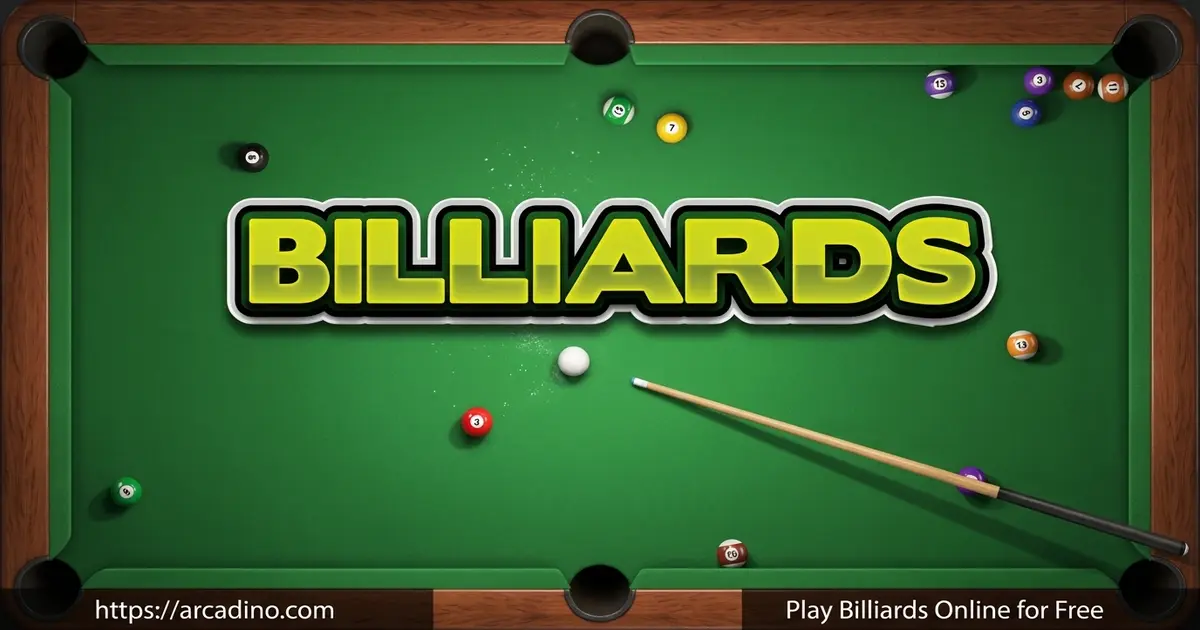
This title nails the satisfying feel of a clean break. You drag to aim, set your power, and watch the balls scatter across the green felt. Some folks call it pool, others call it Billiards, but the goal is the same. Pot your balls and beat your opponent.
- Free to play instantly online, no download required to start
- Realistic ball physics that mimic a real pool table
- Aim with your mouse and control shot power easily
- Classic 8-ball style gameplay against the computer or a friend
What Is Billiards?
Billiards is a cue sports game played on a rectangular felt table with pockets. You use a long stick called a cue to strike a white cue ball. That ball then knocks the numbered object balls into the six pockets. The version most people play online is pocket billiards, better known as pool.
Here’s something handy to know. Lots of players search for “pool” when they actually mean this exact game. Billiards and pool get used to mean the same thing all the time. In this title you get the pool experience, with 15 object balls and one cue ball on the table.
When I tested this game in a browser, the controls felt smooth and the aiming line responded right away. The ball physics roll and bounce off cushions in a believable way. It loads fast and runs cleanly in Chrome, Firefox, Safari, and Edge. That makes it easy to pick up for a quick match between other things.
Billiards vs Pool vs Snooker
People mix up these three games a lot, but they’re a little different. Pool uses 15 object balls and a cue ball on a smaller table with six pockets. Snooker uses way more balls, 21 in total, on a much bigger table. Snooker also has its own scoring system with red and colored balls. This game is pool, so it’s the quick, friendly version with solids and stripes.
Other Cue Sport Variants
Pool and snooker aren’t the only cue games out there. Carom billiards, sometimes called French billiards, uses a table with no pockets at all. You score points by bouncing your ball off the other balls instead. Three-cushion billiards adds a twist where your ball must hit the rails three times. English billiards mixes potting and carom rules into one game. This browser game keeps things simple with classic pocket pool.
A Quick Look at Billiards History
Billiards is way older than you might think. The game traces back to 15th century Europe, where people played a lawn game with sticks. Over time it moved indoors onto a table covered in green cloth, like grass. There’s no single inventor we can name for it. The game grew and changed across many countries over hundreds of years.
Billiards Gameplay
The core loop is simple but tricky to master. You aim the cue ball, set your power level, and take your shot. Sink your assigned balls before your opponent sinks theirs. Then pot the 8-ball last to win the game.
In this 8-ball game, the object balls split into two groups. Seven are solid colors and seven are stripes. After the break, the balls you pot decide your group. If you sink a solid first, solids are yours, and stripes go to your opponent. Clear all seven of your group before you’re allowed to aim for the 8-ball.
What keeps you hooked is the planning. A great shot isn’t just about pocketing one ball. You want to leave the cue ball in a good spot for your next shot too. That forward thinking turns every turn into a little puzzle. Miss your aim and it becomes your opponent’s chance to clear the table.
Billiards Controls and Aiming
The aiming system is the heart of this cue sports game. You move your mouse to point the cue, and a guide line shows where the cue ball will travel. Pull back to set your power, then release to strike. More power sends balls flying, while a soft tap is great for delicate position shots.
You’ll also learn to use angles and the cushions. Bouncing the cue ball off a rail can set up shots that look impossible at first. Getting a feel for spin and rebound takes practice. That learning curve is exactly what makes each match rewarding.
Realistic Physics on the Pool Table
The physics engine is what sells the whole thing. Balls collide, spread, and slow down just like on a real felt table. When you nail a tight angle, the satisfying click of a sunk ball feels earned. It rewards precision over luck.
The clean visuals help too. The green table, the colored balls, and the simple layout keep your focus on the shot. There’s no clutter getting in the way of your aim. It looks like a real pool hall table viewed from above.
Game Modes and the AI Opponent
This browser game lets you play in a couple of fun ways. You can take on the computer in single-player mode for a solo challenge. There’s also pass-and-play, where you and a friend share one screen. In that mode you just take turns at the same device, no second computer needed. The AI opponent plays a steady game and won’t gift you easy wins. Beating the computer feels like a real test of your aim and planning. Pass-and-play is perfect for sitting beside a friend or sibling.
How to Use Spin and English
Once you’re comfy aiming, try adding spin to control the cue ball. Spin is sometimes called “English,” and it changes where the cue ball goes after contact. Aim your strike point at the top of the cue ball for top spin, which rolls it forward. Hit it low for back spin, also called draw, to pull the ball back toward you. Touch the left or right side for side spin to nudge the ball sideways off a rail. With a mouse you pick the contact spot before you shoot, and on touch you tap that spot. Practice each one slowly, since a little spin goes a long way. Mastering spin turns tough position shots into easy follow-ups.
How to Play Billiards
Getting started takes seconds. Open the game in your browser and the table appears with the balls racked up. Take the break shot first to scatter the pack. From there you take turns potting balls until someone clears their set and sinks the 8-ball.
Controls
Use your mouse to aim the cue ball and drag to set shot power. Click or release to take the shot. On mobile, tap and drag on the screen to aim and shoot. The aiming line helps you predict where the cue ball goes.
Fouls and How You Win or Lose
Knowing the foul rules helps you avoid losing by accident. A scratch happens when you sink the cue ball, and it hands the turn and ball-in-hand to your opponent. Hitting your opponent’s ball first, instead of your own group, also counts as a foul. The biggest mistake is pocketing the 8-ball too early, before you’ve cleared your group. Here’s a quick guide to common fouls and what happens:
- Scratch (cue ball pocketed): Turn passes over, opponent places the cue ball freely.
- Pot the 8-ball early: You lose the game instantly, so save it for last.
- Hit opponent’s ball first: Foul, and the turn goes to the other player.
- No ball hit at all: Foul, turn passes to your opponent.
- Pot the 8-ball and scratch together: You lose, even on the final shot.
Tips and Tricks for Billiards
- Plan two shots ahead. After potting a ball, think about where the cue ball lands for your next turn.
- Don’t always use full power. A soft, controlled shot keeps the cue ball close for easier follow-ups.
- Use the aiming line to find the exact contact point on each object ball.
- Bank shots off the cushions can rescue tricky positions when you have no direct path.
- Save the 8-ball for last and only pot it after clearing all your assigned balls, or you’ll lose.
Key Features of Billiards
- Authentic pocket billiards rules with 15 object balls and a cue ball
- Drag-to-aim controls with a helpful guide line for precise shots
- Believable ball physics that roll, spin, and rebound off cushions
- Clean overhead table view that keeps every shot easy to read
- Instant browser play that works on desktop and mobile screens
Where to Play Billiards
You can play Billiards free in any modern browser with no download and no sign-up. Just open the page and the table is ready to go. It runs on desktop, laptop, and mobile, so you can shoot a quick game almost anywhere.
If you’d rather have it on your phone, there are mobile versions too. You can grab it on the Google Play Store for Android or the App Store for iPhone and iPad. Always download from these official stores rather than random APK sites to stay safe. The browser version remains the fastest way to jump straight into a match.
For Parents
Billiards is a clean, friendly game that suits kids ages 8 and up. There’s nothing violent or scary, just a calm game of cue sports skill. Games like this can give kids practice with hand-eye coordination, judging angles, and thinking a step ahead. Many parents and teachers see cue sports as a gentle way to build focus and patience. Those are nice little brain workouts wrapped in a fun activity.
The browser version is simple to start and easy to step away from between turns. Short matches make it good for a quick break rather than long sessions. If your child uses a mobile app version, check it for ads or in-app purchases before they download.
Similar Games to Billiards
If you enjoy lining up cue shots, these other table and aiming games are worth a try.
- Snooker – A cue sport with red and colored balls and a bigger scoring system.
- 9 Ball Pool – A faster pool variant where you pot balls in number order.
- 8 Ball Billiards Classic – The classic 8-ball game played against a friend or the computer.
- Pool Practice – A relaxed mode for training your aim and cue control.
- Pool Club – A polished pool game where you join matches and sharpen your cue skills.
Browse more games in our Sports category for extra picks.
FAQs About Billiards
Is pool and billiards the same thing?
Pool is one type of billiards, so they’re closely related. Billiards is the broader term for cue games played on a table. Pool, played with 15 object balls and a cue ball, is the most popular kind. This game gives you that classic pool experience.
Is Billiards free to play online?
Yes, Billiards is completely free to play in your browser. You don’t need to pay or sign up to start a match. Just open it and break the rack. Mobile app versions are also available for download.
What is billiards?
Billiards is a cue sport played on a felt table with balls. You use a stick called a cue to strike a white cue ball. The goal is to knock the other balls into the pockets. It’s a game of angles, power, and precision.
How do you play billiards pool?
Aim your cue ball, set your power, and pot your assigned balls. Take turns with your opponent sinking balls into the pockets. Clear all your balls first, then sink the 8-ball to win. Missing a shot passes the turn to the other player.
How many balls are used in Billiards?
Pool-style Billiards uses 16 balls in total. That’s 15 numbered object balls plus one white cue ball. So when we say “15 object balls,” we mean all the balls except the cue ball. The cue ball is the only one you strike directly, which is why it’s counted on its own.
Can I play Billiards on my phone?
Yes, Billiards works on phones and tablets through the browser. You tap and drag on the screen to aim and shoot. There are also dedicated app versions on the Play Store and App Store. The touch controls feel natural once you get used to them.
Do I need to download Billiards to play?
No, you don’t need to download anything to play in your browser. The game loads instantly on the web page. Downloading is only needed if you want the mobile app version. The browser play is the quickest way to start.
Conclusion
Billiards brings the calm, focused thrill of a real pool table right to your screen. The smooth drag-to-aim controls and believable physics make every clean pot feel great. With instant browser play and free access, there’s nothing stopping you from a quick match. Grab your cue, line up the break, and see how many balls you can sink in a row.
Gameplay Video