















Watch one short ad and play ad-free for 30 minutes.
Masked Special Forces
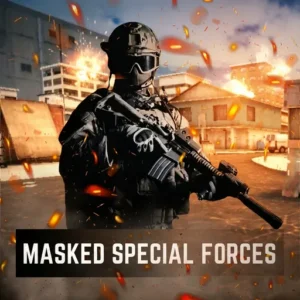
VariousIf you’ve ever wanted to drop into a fast 3D shooter without installing anything, Masked Special Forces is the kind of arena brawl that scratches the itch. It’s a free first-person shooter you can play online right in your browser, built by FreezeNova using Unity. You pick a masked commander, load up two weapon slots, and jump into rooms full of real players or bots. The pace is chaotic, the maps are tight, and every match feels different. 💥
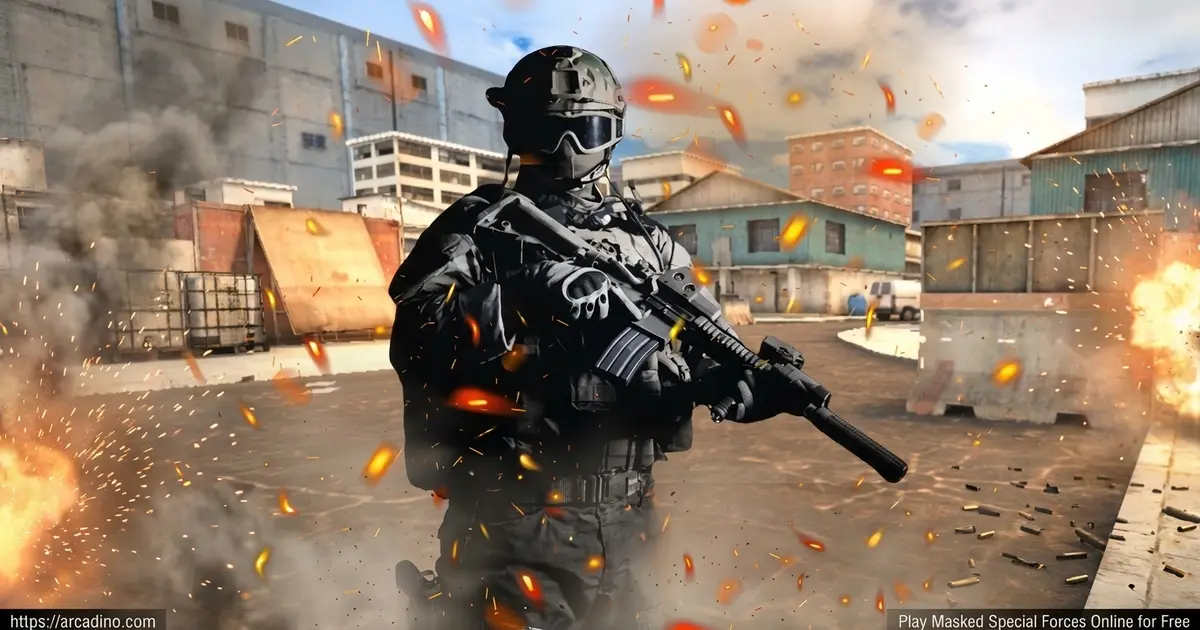
- Six game modes including Team Deathmatch, Capture the Flag, and Gun Game
- Four detailed maps: Abandoned House, Factory, Killhouse, and Warehouse
- Custom loadouts with rifles, crossbows, magnums, and grenades
- Unlockable perks like Samurai, UAV Ghost, and Bomber Man
What Is Masked Special Forces?
Masked Special Forces is a 3D multiplayer first-person shooter developed by FreezeNova. You play as a masked commander dropped into a battle arena, where the goal is simple: out-aim, out-move, and outsmart everyone else. The game stands out because it mixes console-style visuals with the convenience of running straight in a browser tab. No installs, no launchers, just pick a room and shoot.
What surprised me when testing this title was how snappy the controls felt for a Unity-based browser FPS. Aiming with the right mouse button locks in quickly, and the slide-while-running move adds a layer of skill you don’t expect from a free web shooter. Load times were short on my Chrome session, and the menus are clean enough that younger players can find the Armoury without help.
Gameplay in Masked Special Forces
The core loop is room-based combat. You either join a public room or create your own by picking the map, max players, round time, bot count, and game mode. Once inside, the battle starts right away, with a HUD showing your health, ammo, kill feed, and a mini-map.
Between matches you can dive into the Armoury to swap weapons, change perks, set a kill message, or pick a victory dance. The profile screen tracks K/D rate, headshots, knife kills, total wins, and play time. It’s a satisfying little progression layer that gives short sessions a reason to add up.
Reading the HUD at a Glance
Once you spawn, the screen is split into easy-to-read corners. Top-left shows your BP (battle points) and health bar, plus the rolling kill feed so you can see who’s eliminating who. Top-right holds the mini-map with red dots for enemies and blue dots for teammates. Bottom-right tracks your current weapon, ammo count, and grenade stock, while the center keeps your crosshair clean. Learning to flick your eyes between corners between fights is a huge skill boost – you’ll dodge ambushes before they happen.
Maps and Game Modes
The shooter ships with four maps, each with its own rhythm. Killhouse is tight and brutal for close-range duels. Warehouse and Factory give you more verticality, and Abandoned House rewards players who learn the corners and chokepoints.
Six modes keep things fresh:
- Team Deathmatch – classic squad-vs-squad eliminations
- Free For All – battle royale style, everyone for themselves
- Capture the Flag – grab the enemy flag and run it home
- Gun Game – cycle through weapons with each kill
- Arcade Doom – retro-flavored chaos
- Online PvP – straight competitive shooting against real players
Weapons, Armor, and Perks
The Armoury gives you two loadout slots to fill. Available gear includes the SC-DMR rifle, a Crossbow, the Magnum pistol, Frag Grenades, a Syringe for healing, and several tiers of Helmets and Armor. You can mix ranged options for a balanced kit, or commit fully to one weapon style.
Perks add the spice. You can equip options like Quickdraw Ammo for faster reloads, Bolt Runner for extra speed, Silence Walker for stealthy footsteps, Explosion Master, Bomber Man, Samurai, UAV Ghost, Sitrep, and Fast Drawer. Two perks at a time means you have to commit to a build.
Picking the Right Weapon for the Job
Each of the three main weapons has a sweet spot, and choosing well wins matches. The SC-DMR rifle is your all-rounder – solid range, steady damage, and a reload speed that’s fine for most fights. It shines on Warehouse and Factory where sightlines are longer. The Crossbow rewards patience and headshots; one clean hit usually drops a target, which makes it amazing in Gun Game where every kill cycles a new weapon. The Magnum pistol hits hard up close but reloads slowly, so it’s perfect for Free For All scrambles on Killhouse where fights end in two or three shots. Pair the Magnum with Quickdraw Ammo to cover its main weakness, and pair the SC-DMR with Sitrep so you can spot flanks before they reach you.
Map-by-Map Perk Pairings That Actually Work
Most guides list perks in isolation, but the real meta is pairing them to a specific map. On Warehouse, run Silence Walker plus Bolt Runner – the verticality means flanking from upper catwalks wins rounds, and silent footsteps keep snipers from turning around in time. On Killhouse, Explosion Master plus Bomber Man turns every doorway into a trap, perfect for the cramped chokepoints. On Abandoned House, defenders thrive with Sitrep plus UAV Ghost – you’ll hear pushes through walls and stay off the enemy mini-map while you camp the angles. On Factory, Fast Drawer plus Samurai lets you swap to melee instantly when a fight closes, which happens a lot around the crates. Try these combos before you build your own.
Customization and Personality
This shooter doesn’t take itself too seriously, which is part of the fun. You can taunt downed enemies with kill messages like “You noob!” or “Why so serious?” And after a win, you can fire off emotes such as the Chicken Dance, Macarena, Boogaloo, or Robot Hip Hop Dance. It’s silly in the best way.
The profile also has a handy load/save code system. You can copy your progression code to a note, then paste it back in later to restore your experience, unlocks, and stats. That’s a lifesaver if you switch browsers, clear cookies, or want to keep playing on a different computer.
There’s also a Store with loot boxes you can open with in-game diamonds earned through play. Common cases cost around 500 diamonds, Rare cases run about 1,000, and Legendary cases sit near 2,000. If you want to speed things up, rewarded ads usually grant a +5,000 gold bump or a +1,000 diamond bump per watch. Nothing is required to enjoy the full game.
How to Play Masked Special Forces
Getting started is quick. Open the page, set your nickname in the profile section, then head to the Room List or hit Create Room. Pick your map, your mode, and your bot count, then enter the lobby. The match kicks off the moment you spawn, so be ready.
Controls for Masked Special Forces
- WASD or arrow keys – move
- Left mouse – fire
- Right mouse – aim down sights
- Space – jump
- Left Shift – run
- Q – slide while running
- C – crouch
- 1, 2, 3 or scroll – switch weapon
- E or F – pick up / interact
- G – throw dynamite
- H – use medkit
- R – reload
- T – chat
- L – toggle cursor lock
- Tab – scoreboard
- Escape – pause
Tips and Tricks for Masked Special Forces
- Slide into cover – tap Q while sprinting to slide low. It throws off enemy aim and lets you reach corners faster.
- Pair your perks smartly – Silence Walker plus Bolt Runner turns you into a flanker, while Explosion Master plus Bomber Man rules tight maps like Killhouse.
- Use the mini-map – the top-right HUD shows movement. Glance at it between fights to spot pushes.
- Save medkits for after fights – press H once you’re behind cover, not mid-shootout, since healing locks your movement briefly.
- Switch weapons instead of reloading – if your clip runs dry, tap 2 to pull your secondary. It’s faster than R in close-range duels.
Key Features of Masked Special Forces
- Six distinct multiplayer modes including Gun Game and Arcade Doom
- Four hand-designed maps with hidden routes and pickups
- Two-slot loadout system with rifles, crossbows, magnums, and grenades
- Nine unlockable perks that genuinely change how you play
- Profile stats tracking K/D, headshots, wins, and total play time
Where to Play Masked Special Forces
The fastest way in is right here in your browser – no download, no sign-up, just hit play and the Unity client loads. On my test laptop with integrated graphics and 8GB of RAM, the game held a steady 50-60 FPS at default settings in Chrome. Firefox and Edge performed similarly, while Safari on older MacBooks ran closer to 35-45 FPS. Many students also search for masked special forces unblocked, and the browser version works on networks that allow standard HTML5 game sites.
Getting the Smoothest Browser Performance
A few small tweaks can make a real difference. Press L to toggle cursor lock the moment you spawn – it stops the mouse from drifting off the window and cuts input lag noticeably. Disable heavy browser extensions like ad blockers on the game tab, since they can slow the Unity WebGL build down. Avoid switching tabs mid-match; WebGL sometimes throttles the framerate when the tab loses focus, and you’ll re-enter the fight at half speed. Closing extra tabs and turning off background downloads frees up RAM for smoother aiming. If you still see stutters, lower your browser zoom to 90% to shrink the render area.
For phones and tablets, you can check the official mobile stores for related FreezeNova titles via Google Play and the App Store. Avoid sketchy APK files from random sites – stick to official storefronts to stay safe. Desktop with a mouse remains the best way to enjoy this shooter, since precision aiming matters.
For Parents
Masked Special Forces is a cartoon-styled FPS with masked characters, gunfire, and combat between players. There’s no blood-heavy gore, but it does feature shooting and the kill-message taunts can be cheeky. The game is best suited to players around 10 and up who already understand that it’s a competitive arcade shooter, not a realistic war game.
There’s an optional in-game store with loot boxes paid in earned diamonds, plus rewarded ads for bonus currency – no required purchases. A short 20 to 30 minute session is plenty for after-school play. Voice chat isn’t a feature, though there is a text chat key.
Similar Games to Masked Special Forces
If you enjoy this fast browser FPS, here are some related shooters worth a look:
- Masked Forces – the original FreezeNova shooter with campaign and PvP modes
- Masked Forces Zombie Survival – same engine feel, but you’re fighting waves of zombies
- Masked Forces Ultimate – an expanded entry in the same series
- Crazy Strike Force – another browser-based team shooter with quick rounds
- Masked.io – a lighter io-style take on masked combat
- Confront – a fast browser FPS with tight maps and tactical team play
- COD Zombies Portable – a survival shooter where you blast through waves of undead
Browse more in Shooting Games.
FAQs About Masked Special Forces
Who made Masked Special Forces?
Masked Special Forces was developed by FreezeNova. They’re the same studio behind Masked Forces, Masked Forces Ultimate, and Masked Forces Zombie Survival. The game was built using the Unity engine for browsers.
Is Masked Special Forces free to play?
Yes, Masked Special Forces is completely free in your browser. There are no required purchases to access the full game. Optional loot boxes use diamonds earned through play or rewarded ads.
How many game modes does Masked Special Forces have?
The shooter has six game modes in total. They are Team Deathmatch, Free For All, Capture the Flag, Gun Game, Arcade Doom, and Online PvP. Each mode plays across the same four maps.
Can I play Masked Special Forces with friends?
Yes, you can play with friends by sharing a room name. Create a room from the menu, then have your friends find it in the Room List. You can also set how many bots fill the empty slots.
What are the controls for Masked Special Forces?
You move with WASD, shoot with left-click, and aim with right-click. Space jumps, Shift runs, Q slides, and C crouches. Number keys 1, 2, 3 swap weapons, while G throws grenades and H uses medkits.
Can I play Masked Special Forces unblocked at school?
You can play it on any site that hosts the HTML5 build, including this page. Since it runs in-browser with no download, it works on most school-friendly portals. Always check your school’s network policy first.
Does Masked Special Forces work on mobile?
The game is primarily designed for desktop with a mouse and keyboard. Some browsers may run it on tablets, but precision aiming is much easier on a computer. For phone-friendly FPS action, check the official app stores.
What perks should I unlock first in Masked Special Forces?
Quickdraw Ammo and Bolt Runner are great starter picks. Quickdraw speeds up reloads, while Bolt Runner boosts your sprint. Once you know the maps, swap to Silence Walker or Samurai for more advanced builds.
Final Thoughts on Masked Special Forces
What keeps me coming back to Masked Special Forces is the combination of fast Unity gunplay, the silly victory dances, and the way perks like Samurai or UAV Ghost let you actually build a playstyle. Four maps and six modes is plenty for short browser sessions, and the room-based system makes group play simple. Pick your loadout, lock in two perks, and see how long you can hold the top of the scoreboard. The arena’s waiting – go grab a mask.
Gameplay Video