






















Watch one short ad and play ad-free for 30 minutes.
Retro Bowl College
New Star Games
Managing 250 college football teams sounds wild — and that’s exactly why Retro Bowl College is so addictive. This free browser game puts you on the sideline as a head coach, juggling recruitments, GPAs, and game-day play-calls. You don’t need to download anything to start coaching. Jump in right now and build your program from the ground up. 🏈
The college setting flips everything you know about football management games. Rosters rotate constantly, budgets are tight, and one failing grade can bench your star player. It’s a sharper, more unpredictable challenge than your average football sim.
- 250 college teams to choose from across major and minor conferences
- GPA system that can suspend players if their grades slip too low
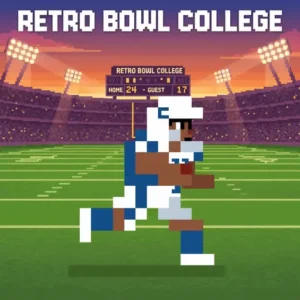
- Pixel-art football action with fast, side-scrolling offensive gameplay
- Constant roster rebuilding as players graduate and new recruits arrive each season
What Is Retro Bowl College?
Retro Bowl College is a pixel-art American football management game developed by New Star Games. It’s the official college spin-off of the smash-hit Retro Bowl, moving the action from pro franchises to the unpredictable world of college athletics. You step into the role of head coach, handling everything from recruiting incoming freshmen to tracking player GPAs. The game features 250 college teams spread across major and minor subdivisions.
What makes this title stand out is how much the college setting changes the strategy. In professional football games, you build a roster over many seasons and hold onto star players. Here, athletes graduate, eligibility runs out, and you’re constantly reshaping your squad. The game launched with updates that now include a 12-team playoff format in the major subdivision, reflecting real college football’s current structure. The pixel art loads crisply in-browser with controls that respond immediately — passing especially feels tight and deliberate once you get the rhythm down.
How Retro Bowl College Has Grown Since Launch
Retro Bowl College has changed a lot since it first came out. The early version gave you the core coaching loop — recruiting, managing GPAs, and playing games — but it was missing features fans loved from the original Retro Bowl. A major update added many of those most-requested features, making the college game feel much more complete. The biggest update came in 2024, when New Star Games overhauled the conference and playoff structure to match real college football, introducing the 12-team playoff bracket that’s now central to the major subdivision experience. If you played at launch and drifted away, the game you come back to is meaningfully better — more options, more depth, and a playoff format that actually mirrors what happens on Saturdays in real life.
Retro Bowl College Gameplay — Offense, Downs, and Decision-Making
The on-field action in Retro Bowl College uses a 2D side-scrolling view focused entirely on offense. Your goal is simple: move the ball down the field and score before the defense shuts you down. Each possession gives you four downs to reach the first-down marker. If you cross it, the downs reset and you keep driving.
Passing is the heart of the gameplay. You pull back on the screen to aim your throw, and holding longer sends the ball further downfield. Short, quick passes let you chain first downs together consistently. Smart rushing plays mix things up and keep the defense guessing. Both choices matter — pure passing strategies leave you vulnerable, and ignoring the run game makes your offense predictable.
Team Management and the GPA System
Off the field is where Retro Bowl College gets genuinely clever. You’re not just a play-caller — you’re managing tight budgets, monitoring player condition, and keeping an eye on grades. Every college team has its own GPA requirements, and they differ by school and by class year. Freshmen and sophomores might need a 1.0 GPA minimum, while juniors and seniors face a higher bar. Let those grades slip and your players get suspended.
GPA management sneaks up on you if you’re not paying attention after each game. It’s worth checking grades regularly, not just before big matchups. Beyond academics, you’re also scouting recruits and finding hidden talent that other programs overlooked. Discovering a diamond-in-the-rough recruit who becomes your team’s best player is one of the most satisfying moments this game delivers.
Smart GPA Monitoring — Don’t Wait for the Warning
The GPA system has a suspension floor, but smart coaches set their own personal warning line well above it. For example, if your school requires a 1.3 GPA minimum for upperclassmen, start worrying when any player dips below 2.0. That buffer gives you roughly two full games to correct course before things get dangerous. GPA doesn’t crash overnight — it creeps down slowly, which is exactly why it catches coaches off guard. Check every player’s grade after each game, not just your starters. A backup who slips below the floor mid-season can suddenly become your only healthy option at a key position during playoff time, and that’s a situation you really don’t want to be in.
The Scholarship System and How It Shapes Recruiting
Recruiting in Retro Bowl College isn’t just about finding talented players — it’s about managing your scholarships wisely. Each program has a limited number of scholarships available, and every player you bring onto the roster uses one. You can’t simply sign everyone who looks promising. You’ve got to decide which positions need the most help, which recruits fit your budget, and which spots are worth saving for a higher-rated prospect down the road. Think of scholarships as your most important resource — spend them carelessly early and you’ll be short-handed when graduation clears out your depth. Balancing scholarship offers against your program’s real needs each season is one of the trickiest and most rewarding parts of the game.
Recruiting, Roster Turnover, and Season Structure
Unlike pro football games, your roster in this college sim never stays the same for long. Players graduate, eligibility expires, and each new season demands a fresh wave of recruiting. You’ll need to find incoming freshmen who fit your program’s style while staying within your budget. The challenge is rebuilding your depth every single year, not just patching one or two gaps.
You also choose whether to compete in the major or minor conference right at the start. The major conference includes a 12-team playoff, which raises the stakes significantly. The minor conference offers a different path to the championship. Each season becomes its own mini-story of rebuilding and competing with whoever you’ve got.
College football seasons are also shorter than what you’d find in the NFL’s 17-game schedule, and that shorter runway changes how you think about pacing. You’ve got fewer games to correct mistakes, fewer chances to build momentum after a slow start, and every loss hurts your playoff hopes more than it would in a longer professional season. That compressed schedule means you need to get your roster right before the season begins — there’s not enough time to fix big problems once the games start.
Graphics, Style, and the Retro Vibe
The pixel-art visuals here are crisp and full of personality. New Star Games nailed the retro 80s and 90s aesthetic without making the game feel dated. Everything on screen is readable at a glance — player positions, yards to gain, and field position are all easy to track. The side-scrolling field view keeps the focus exactly where it belongs: on the next play.
Customization adds a fun personal touch. The Unlimited Version lets you change facemask colors through the Team Editor, so your squad can look exactly how you want. It’s a small detail, but it gives your program a real identity on the field.
How to Play Retro Bowl College
Getting started is fast. Pick your conference — major or minor — then choose from the coaching offers available at the start. It’s important to know that you begin with only a limited number of coaching offers, and you can’t freely pick any of the 250 teams right away. Take the offer that excites you most from the ones available, because the game won’t let you browse the full list until you’ve built your reputation. From there, the game walks you through the basics of managing your roster and taking the field.
On game day, focus on stringing together first downs with smart passing and timely rushes. Between games, check your players’ GPAs, manage their condition, and line up recruits for next season. The deeper you get into a career, the more decisions pile up — and the more rewarding each championship run feels.
Retro Bowl College Controls
Passing works by pulling back on the screen to set your aim and release to throw. The longer you hold before releasing, the farther the ball travels. On mobile, all actions are handled through screen taps and swipes. In the browser version, mouse controls replicate the same pull-and-release mechanic smoothly.
Tips and Tricks for Retro Bowl College
- Check GPAs after every game. Grades drop quietly, and a suspension before the playoffs can wreck your season. Intervene early — don’t wait until a player is already at risk.
- Balance short passes with rush plays. Quick short passes move the chains reliably, but rushing keeps the defense honest. Mix both to avoid becoming predictable.
- Scout recruits for your scheme, not just ratings. Finding a lower-rated recruit who fits your system beats overpaying for a flashy name that doesn’t mesh.
- Start in the major conference if you want the full playoff experience. The 12-team playoff bracket adds high-stakes rounds that the minor conference doesn’t have.
- Don’t ignore player condition. Fatigued players perform worse and are more likely to drop passes or miss blocks. Rotate your depth smartly across a season.
Key Features of Retro Bowl College
- 250 college teams across major and minor subdivisions — far more variety than any pro football browser game offers
- GPA and academic management — a mechanic unique to the college setting that adds real strategic depth
- Scholarship system — a limited pool of scholarships per program that forces tough recruiting decisions every season
- Constant seasonal roster rebuilding — graduates and new recruits keep every season feeling genuinely different
- 12-team playoff bracket in the major subdivision, updated to match real college football’s current format
- Team Editor with facemask customization in the Unlimited Version for personalizing your program’s look
Where to Play Retro Bowl College
Retro Bowl College is free to play in your browser right here on arcadino.com — no download required and no account needed. It runs smoothly on both desktop and laptop browsers. The game is accessible without restrictions on the site, so you can jump into a career whenever you have time.
Does Retro Bowl College Run Well in a Browser?
The browser version of Retro Bowl College is lightweight and built to run on a wide range of devices — you don’t need a powerful computer to enjoy it. It doesn’t require WebGL or any special browser plugins, which means it loads and plays smoothly even on older laptops and school-issued Chromebooks. If you’re playing at school or on a library computer, the game doesn’t demand extra permissions or downloads, so it’s one of the easier titles to access from a restricted device. There’s no meaningful feature gap between the browser version and the mobile app in terms of core gameplay — both give you the full coaching experience. The main difference is that the mobile app supports touch controls naturally, while the browser version uses mouse input with the same pull-and-release passing mechanic. Either way, the experience is responsive and consistent.
Prefer playing on your phone? The game is also available as a dedicated mobile app. Download it on Android via the Google Play Store or grab it for iPhone and iPad on the Apple App Store. If you’re searching for an APK version elsewhere, stick to the official Play Store link — unofficial APK sources can carry security risks.
For Parents
Retro Bowl College is generally well-suited for younger players. The football action is cartoonish and pixel-styled with no violence beyond standard sporting tackles. There’s no live chat system, so there’s no risk of contact with strangers during gameplay.
The GPA tracking and budget management actually make this game quietly educational. Kids practice balancing priorities — keeping grades up, managing limited resources, and planning ahead for roster needs. In-app purchases exist in the mobile version, so it’s worth setting up parental controls if you’re handing a device to a younger player. A session of 20–30 minutes is usually enough to complete a game and check team management tasks.
Similar Games You’ll Love
If the retro football management style of this game hooks you, these other titles are worth checking out:
- Retro Bowl — The original pro football game from New Star Games that started it all, with 32 NFL-style teams and longer player careers.
- Retro Bowl 2 — The official sequel with expanded features, updated rosters, and deeper management options for fans who’ve mastered both the original and College editions.
- Retro Bowl 25 — The latest entry in the Retro Bowl series with refreshed rosters and updated gameplay, keeping the franchise’s signature pixel football formula feeling current.
- Retro Bowl 26 — A version in the Retro Bowl series focusing on professional teams, stable long-term rosters, and multi-season franchise building.
Want more sports games? Browse the full Sports category for more action.
FAQs About Retro Bowl College
Is Retro Bowl College free to play online?
Yes, Retro Bowl College is completely free in your browser. No sign-up or download is needed to start a career. The mobile app version is also free with optional in-app purchases available.
How many teams are in Retro Bowl College?
There are 250 college football teams in Retro Bowl College. They’re split across major and minor subdivisions. You choose your conference at the start of your coaching career.
What is the GPA system in Retro Bowl College?
The GPA system tracks your players’ academic performance each season. If a player’s GPA falls below your school’s minimum requirement, they get suspended. Requirements vary by school and by the player’s class year — upperclassmen typically face a higher minimum than freshmen.
What’s the difference between Retro Bowl College and the original Retro Bowl?
Retro Bowl College uses college teams instead of pro franchises. The biggest difference is roster turnover — players graduate and you must recruit new ones every season. The original Retro Bowl features 32 pro teams where star players can stay for many seasons.
Can I get Retro Bowl College on mobile?
Yes, Retro Bowl College is available on both Android and iOS. Download it from the Google Play Store or the Apple App Store. The mobile version mirrors the browser experience closely.
What is the Retro Bowl College career mode?
Career mode puts you in charge of a college program across multiple seasons. You recruit players, manage budgets, and compete for the conference championship and playoff berth. Each season your roster changes as players graduate, making every year a fresh rebuild challenge.
Who developed Retro Bowl College?
New Star Games developed Retro Bowl College. They also created the original Retro Bowl, which launched in January 2020. New Star Games has continued updating the college title, including adding the 12-team playoff format for the major subdivision.
Start Your Coaching Career in Retro Bowl College
Three things make Retro Bowl College genuinely special: the pressure of managing GPAs alongside touchdowns, the thrill of rebuilding a completely different roster every season, and the satisfaction of guiding a small program all the way to a championship. No other football browser game combines academic management with pixel-art play-calling quite like this one.
Pick your conference, accept a coaching offer, and see how far you can take your program. The bowl game isn’t going to win itself — get on the field and prove you’ve got what it takes.
Gameplay Video


