


























Watch one short ad and play ad-free for 30 minutes.
Retro Bowl 25
New Star Games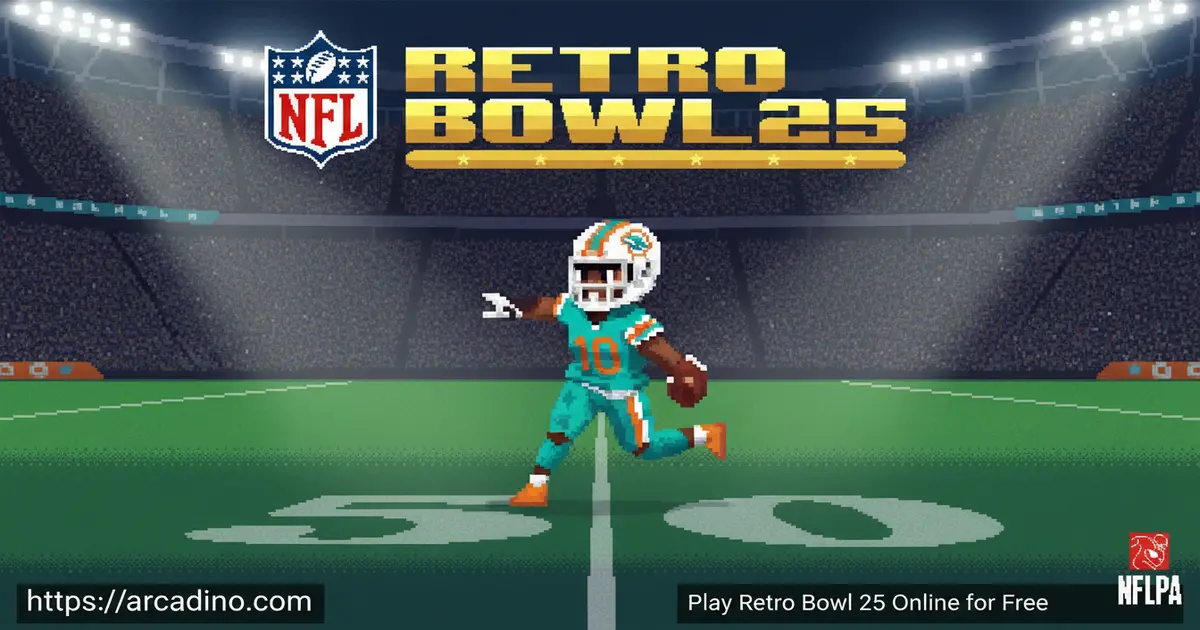
Pixel helmets, real NFL rosters, and a coaching career that starts the moment you load the page — Retro Bowl 25 packs a surprising amount of football into a retro-styled browser game. It’s free to play online, and you don’t need to install a single thing to get started. The game comes from New Star Games, the studio that turned the original Retro Bowl into a chart-topping App Store sensation. If you’ve ever wondered what it feels like to run an NFL franchise from the front office to the end zone, this title answers that question beautifully.
- Official NFL & NFLPA licensing — real teams and real players, not fictional stand-ins
- Two-phase gameplay — manage your roster off the field, then take direct control on it
- Retro pixel-art visuals — an 8-bit and 16-bit aesthetic that feels genuinely nostalgic
- Adjustable difficulty — dial the challenge up or down to match your skill level
What Is Retro Bowl 25?
Retro Bowl 25 is a football simulation game developed by New Star Games that blends classic retro visuals with official NFL licensing. It sits squarely in the sports simulation genre, giving players the dual role of head coach and on-field quarterback. The game carries official NFL and NFLPA approval, meaning every team name, logo, and player you see is the real deal. That alone sets it apart from most browser-based football games, which rely on fictional leagues.
What makes this title genuinely exciting is how it respects both sides of running a football team. You’re not just pressing buttons on offense — you’re also making tough calls in the front office. The pixel-art presentation loads crisply in-browser, with the retro sprites staying sharp and readable even on smaller laptop screens. It’s the kind of visual style that’s instantly familiar to anyone who grew up with early console football titles.
Retro Bowl 25 Gameplay — Two Roles, One Championship
The game is split into two distinct phases that work together to create a full football experience. In the front-office phase, you step into the role of head coach and make decisions that shape your entire season. That means scouting and signing players from a pool of nearly 2,000 real-life NFL and NFLPA athletes, negotiating trades, and managing your roster within a budget. Your choices here directly affect how competitive your squad is when game day arrives. 🏈
On the field, Retro Bowl 25 shifts into fast-paced, direct gameplay where you control the action. The retro mechanics keep things accessible — you don’t need years of sports gaming experience to enjoy a drive. Player morale and press duties also factor into the simulation, adding a layer of management depth that goes beyond just picking the best stats. It’s a satisfying loop that keeps pulling you back for one more game, one more trade, one more shot at the championship.
Retro Graphics and Audio in Retro Bowl 25
The pixel-art style in this game is a deliberate love letter to 8-bit and 16-bit football titles of the past. Every player sprite, stadium detail, and menu screen is crafted in that same charming retro aesthetic that made the original Retro Bowl a visual standout. New Star Games put real care into making the NFL teams look faithful even within the pixel-art format. Seeing your favorite real franchise rendered in glorious retro style is a genuine treat.
The visual approach also means the game runs efficiently in a browser without demanding heavy hardware. Animations are smooth and readable, so you can always follow the action on the field. The retro presentation isn’t a limitation — it’s a deliberate creative choice that gives the game its distinctive personality. It’s the same quality that helped the franchise earn its #1 App Store ranking.
The Artist Behind the Pixel-Art Style
The iconic pixel-art look you see in Retro Bowl 25 is closely linked to the artist known as @PIXELNFL. This creator played a key role in shaping the visual identity of the franchise, turning real NFL teams into charming retro sprites that fans instantly recognize. Their work makes each team feel unique, even in an 8-bit style. If you love the art style as much as the gameplay, you can find @PIXELNFL’s work on social media. It’s a big reason why the series stands out from every other football game on the internet.
Customization and Upgrades in Retro Bowl 25
Building your roster is one of the most rewarding parts of this football sim. You start by assembling your team from a huge pool of real NFL and NFLPA players, and your budget determines who you can realistically sign. Balancing a strong offense against a solid defense is a real strategic puzzle — you can’t max out every position at once. Smart roster decisions early in a season pay off massively down the stretch.
Here’s the key thing to understand about the budget: there’s a hard squad value cap in place. That means your total roster value can’t go above a set limit no matter what. You physically can’t build an elite offense AND an elite defense at the same time — the cap won’t allow it. You have to pick your strengths and accept some weaknesses. That’s not a bug; it’s the core strategic challenge of the game. Knowing this upfront saves a lot of frustration later.
Trades are another tool you can use to reshape your squad mid-season. To start a player-for-player swap, you need to initiate the trade from your own roster screen by selecting the player you want to move first — not by browsing available players. This trips up a lot of new coaches who expect a simple trade menu. Once you select your outgoing player, the game then shows you matching swap options from other teams. Managing player morale adds another wrinkle, because a disgruntled star can hurt team performance even if their stats look great on paper. Handling press duties keeps your locker room happy and your franchise reputation strong.
Difficulty Settings and Challenges
One of the smartest design choices in Retro Bowl 25 is its range of difficulty settings. Younger or newer players can set the challenge lower and still experience the full game without frustration. Veterans who want a real test can crank things up and face opponents who genuinely push back on every drive. The difficulty system makes this title approachable for a wide range of ages and skill levels.
Higher difficulty settings demand smarter roster management and more precise on-field play. You can’t just rely on star players to carry every game — strategy matters more as the challenge increases. The game’s community has noted that the toughest settings create genuinely intense moments that feel like real NFL pressure. That kind of scalable challenge is rare in browser football games.
What About Extreme Mode?
If you’ve been searching for Extreme Mode in Retro Bowl 25, you’re not alone — it’s one of the most searched terms in the whole series. Extreme Mode was a brutal top-tier difficulty setting that pushed even experienced players to their limits. It has been removed from the current version of the game, but the good news is that the developer has confirmed it will return in a future update. Keep an eye on New Star Games’ official channels for the announcement. If you loved the raw challenge it offered, it’s worth coming back for when it drops.
How to Play Retro Bowl 25
Getting started is straightforward. You pick your NFL franchise, set your budget, and begin assembling your coaching staff and player roster. The game walks you through the front-office decisions before your first on-field matchup, so you never feel thrown in without context. Once your roster is set, game day plays out in real time with you controlling the offensive action.
Between games, you return to the front office to handle trades, press conferences, and morale management. The cycle of managing and playing is what gives Retro Bowl 25 its depth and replay value. Each season brings new challenges, new rivals, and new chances to push your franchise toward the championship. It’s a rhythm that’s easy to pick up but takes real skill to master.
Retro Bowl 25 Controls
On desktop, you use your mouse to interact with menus and make front-office decisions. On-field gameplay uses intuitive click or tap inputs to pass, run, and manage plays. To throw a pass, click and hold on the field, then release toward your receiver — aim matters, so practice your timing. To hand off to a running back, tap quickly without dragging. On mobile, touchscreen controls handle everything naturally — swipe to throw and tap to hand off. You can also swipe left or right to scramble with your quarterback when a play breaks down. The control scheme is designed to feel responsive whether you’re playing on a phone, tablet, or laptop browser, and most players get the hang of it within one or two drives.
Tips and Tricks for Retro Bowl 25
- Balance your roster budget wisely: Don’t spend everything on offensive stars — a weak defense will cost you games when it matters most.
- Remember the hard cap: You can’t have an elite offense AND elite defense at the same time. Pick your team’s identity early and build around it.
- Initiate trades the right way: Start a player-for-player swap by selecting the player you want to move from your own roster first — that’s what unlocks the trade options.
- Keep player morale high: Handle press duties regularly, because unhappy players underperform even if their skill ratings look strong.
- Use trades strategically: If a position is consistently letting you down, don’t wait — trade for a better player before the season slips away.
- Start on a comfortable difficulty: Learn the on-field mechanics at a lower setting first, then gradually increase the challenge as your confidence grows.
- Prioritize depth at key positions: Injuries happen in long seasons, so having solid backup options at quarterback and key defensive spots can save a championship run.
Key Features of Retro Bowl 25
- Official NFL and NFLPA licensing: Every team and player is real — no made-up names or generic uniforms.
- Nearly 2,000 real NFL players to choose from: Build your dream roster from one of the biggest licensed player pools in any browser football game.
- Dual gameplay phases: Switch between running your franchise in the front office and calling plays on the field in the same game session.
- Authentic retro pixel-art style: The 8-bit and 16-bit visual aesthetic is a core part of the experience, not just a visual gimmick.
- Player morale and press management: Keep your locker room in check with press duties that actually affect how your team performs on game day.
Where to Play Retro Bowl 25
You can play Retro Bowl 25 for free right in your browser at arcadino.com — no download required and no account needed. The game runs directly in the browser, so you can jump into a season from any device with an internet connection. It’s also fully accessible on the site without restrictions, making it a solid pick for gaming sessions at home.
Prefer playing on your phone or tablet? The game is available on both major mobile platforms. Download it from the Google Play Store for Android devices or grab it from the Apple App Store for iPhone and iPad. If you ever come across APK files from unofficial sources, avoid them — they can contain malware and won’t give you the real game experience. Stick to the official stores or the browser version for safe, reliable play.
Browser Version, Google Play, or Apple Arcade — What’s the Difference?
You might have seen Retro Bowl 25 described as an Apple Arcade exclusive in some places — and that can be confusing. Here’s how it actually breaks down. The Apple Arcade version is a premium, subscription-based release available through Apple’s gaming service on iPhone and iPad, and it may include features or content not found elsewhere. The Google Play Store version is a free download for Android devices and represents the standard mobile experience. The browser version you can play right now at arcadino.com is also free, with no download needed, and is the most accessible way to jump in instantly. The core gameplay is the same across all versions — the differences are mostly about platform, access method, and any bonus content tied to Apple Arcade. If you’re on an Apple device and already subscribe to Apple Arcade, that version is worth checking out. Everyone else can enjoy the free browser or Play Store builds without missing the main game.
Retro Bowl vs. Retro Bowl 25 vs. Retro Bowl 26 — Which Should You Play?
Not sure which game in the series is right for you? Here’s a quick breakdown. The original Retro Bowl is where it all started — it’s a pure, fun football experience, but it doesn’t have official NFL licensing, so teams and players use fictional names. Retro Bowl 25 is where the series leveled up: it added official NFL and NFLPA licensing for the first time, giving you real teams, real players, and a genuine front-office management layer. It’s the best pick if you want the full NFL coaching experience in a retro package. Retro Bowl 26 builds on that foundation by adding updated rosters, rivalry-based challenges, and new seasonal content. If you’re new to the series, start with Retro Bowl 25 to get the licensed experience — then move to Retro Bowl 26 when you’re ready for the freshest content. If you just want a quick, no-frills game, the original Retro Bowl still holds up great.
For Parents
Retro Bowl 25 is a great fit for kids aged 8 and up who enjoy sports and strategy games. The football content is entirely non-violent in presentation — it’s pixel-art touchdowns and coaching decisions, not anything graphic or inappropriate. There’s no live chat or social features in the browser version, so younger players aren’t exposed to strangers online.
The management side of the game — budgeting, trading, and handling team morale — actually builds some useful thinking skills around planning and resource management. In-app purchases may exist in the mobile versions, so parents should check purchase settings on their child’s device before handing it over. A session of 20–30 minutes per day is plenty to enjoy a full game cycle without it eating into homework or bedtime.
Similar Games to Retro Bowl 25
If you love the mix of retro football action and team management, these other titles are worth exploring next.
- Retro Bowl — The original game that started it all, featuring the same addictive coaching and gameplay loop that made the series famous.
- Retro Bowl 26 — The newest entry in the series, featuring all real NFL teams and players with updated rosters and rivalry-based challenges.
Love sports simulation games? Check out more titles in our Sports category.
FAQs About Retro Bowl 25
Is Retro Bowl 25 free to play online?
Yes, Retro Bowl 25 is free to play in your browser at arcadino.com. You don’t need to create an account or download anything to start your NFL coaching career. The browser version gives you full access to the game’s core experience instantly.
Is Retro Bowl 26 a thing?
Yes, Retro Bowl 26 is a real game and the next entry in the series. It features all real NFL teams and players, with nearly 2,000 licensed NFL and NFLPA athletes to build your roster from. It also introduces rivalry-based challenges as a new feature for players on supported devices.
Can I play Retro Bowl 25 on Android?
Yes, Retro Bowl 25 is available on Android via the Google Play Store. You can download it directly from the official Play Store listing for a safe install. Avoid unofficial APK downloads from third-party sites, as these can pose security risks.
Who developed Retro Bowl 25?
New Star Games developed Retro Bowl 25. They’re also the studio behind the original Retro Bowl, which reached the #1 spot on the App Store. The developer is known for combining accessible gameplay with surprisingly deep sports simulation mechanics.
Does Retro Bowl 25 have real NFL teams and players?
Yes, the game features all real NFL teams and players thanks to official NFL and NFLPA licensing. You can pick from a roster pool of nearly 2,000 real-life athletes. That level of official licensing is one of the biggest things that sets this game apart from generic football browser games.
What does the front-office phase involve in Retro Bowl 25?
The front-office phase covers trades, drafts, roster management, and player morale. You also handle press duties, which affect how your players perform during the season. It’s a full team management experience, not just a simple menu between games.
Is there a difficulty setting in Retro Bowl 25?
Yes, the game offers multiple difficulty settings you can adjust. Lower settings make the game accessible for newer players or younger kids. Higher settings create a genuinely tough challenge where smart roster management and sharp on-field play are both essential to winning. Extreme Mode, the hardest setting of all, has been temporarily removed but is confirmed to be returning in a future update.
Conclusion
Retro Bowl 25 delivers something rare in browser sports gaming: an officially licensed NFL experience wrapped in a pixel-art style that’s genuinely fun to look at and play. The combination of deep front-office management and direct on-field action gives it a game loop that holds up across many seasons. Add in nearly 2,000 real NFL and NFLPA players to build your roster from, and you have a football game with real staying power.
If you’ve been hunting for a football game that respects your intelligence as a coach and still keeps the on-field action exciting, this is the title to bookmark. Head over to arcadino.com, pick your franchise, and see if you’ve got what it takes to go all the way.
Gameplay Video


