


























Watch one short ad and play ad-free for 30 minutes.
Slope 3D
Rob Kay / Y8 GamesBuckle up for a wild downhill ride where one twitchy finger is the difference between glory and a spectacular tumble into space. Slope 3D is a free online arcade runner that drops you onto endless neon platforms and dares you to keep rolling. It’s often searched simply as “Slope,” but this is the modern 3D take packed with red obstacles, speed boosters, and that addictive “just one more try” pull. You play instantly in any browser, no sign-up needed. 🎮
The hook is brutally simple: steer a glowing ball, don’t fall off, don’t hit anything red. The longer you survive, the faster the slope gets.
- Endless 3D slope with randomized platforms every run
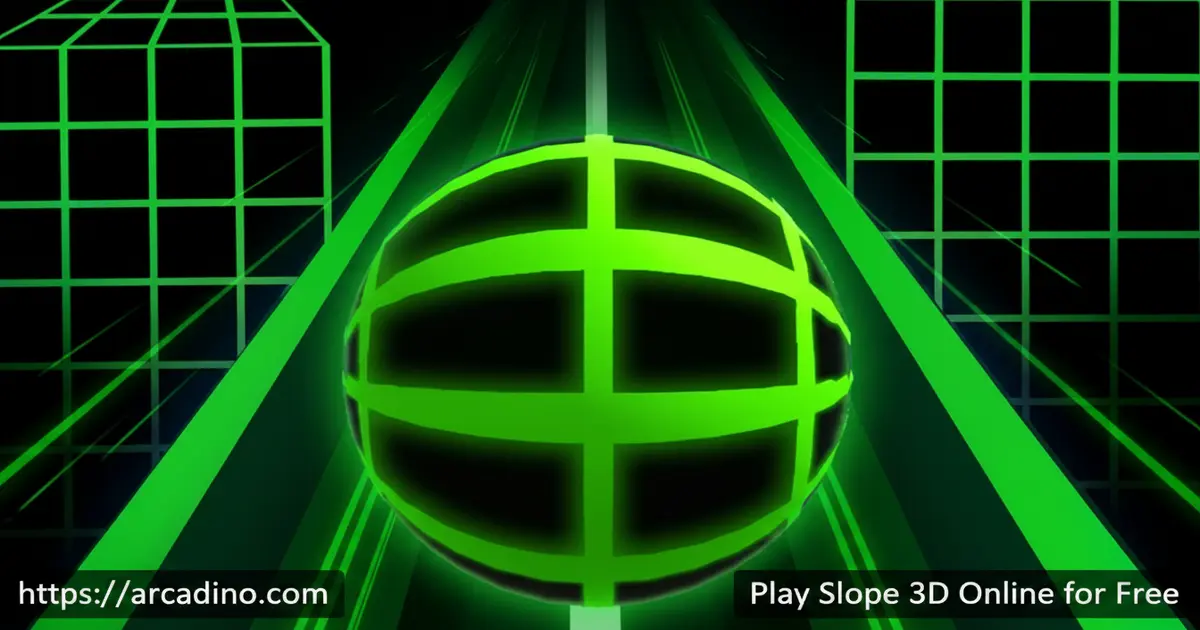
- Neon visuals and smooth ball physics
- Auto-acceleration that ramps up the longer you survive
- Free in your browser, plus iOS and Android versions
What Is Slope 3D?
Slope 3D is a fast-paced endless runner where you guide a rolling ball down a never-ending track of tilted neon platforms. Your only job is to steer left and right while the ball picks up speed on its own. Hit a red block or slip off the edge, and the run ends instantly. There are no levels, no checkpoints, just one long survival sprint.
The game sits firmly in the arcade genre and shares DNA with the original Slope released back in 2014. What stands out about Slope 3D is how clean it feels in a browser. The ball reacts the moment you press a key, and the framerate stays steady even as the track twists and the speed climbs. That responsiveness is what turns a 30-second run into a 30-minute obsession.
The Story Behind Slope
The original Slope was created by Rob Kay, the same designer known for helping build Guitar Hero. He released it back in 2014, and it quickly became a browser classic on sites like Y8. The simple ball-rolling idea spread fast in schools and online arcades. Slope 3D builds on that legacy with smoother visuals and trickier tracks. Knowing the roots makes the modern version feel even cooler to play.
Slope 3D Gameplay
You drop in, the ball starts rolling, and the slope unfolds in front of you in random shapes. Sometimes you’ll get a wide straight stretch with one red column. Other times the path narrows into a thin bridge with gaps on both sides. The track is procedurally generated, so memorizing a single layout won’t save you.
Speed is the real enemy in Slope 3D. The ball auto-accelerates, meaning every second alive makes the next second harder. Speed boosters scattered along the slope shove you forward even faster, turning calm steering into panicked micro-adjustments. Your score climbs by one point for every platform you clear, and that ticking number is what keeps you slamming the restart button.
Why It’s Called Slope: The Math Link
The name isn’t random. In math class, slope means how steep a line is, measured by rise over run. This game turns that idea into a playable thing you can feel under your ball. Steeper inclines mean faster acceleration, just like in physics. The downhill speed-up follows the same logic gravity uses on a ramp. So next time your teacher draws a slope on the board, you’ll already know how it feels at full speed.
Graphics and Audio in Slope 3D
The visual style leans into a glowing neon aesthetic against a deep space background. Platforms shift between bright greens and blues, while obstacles pulse red as a clear warning. It’s a clean, retro-techno look that’s easy on the eyes during long sessions.
The soundtrack is upbeat electronic music designed to match the rising speed. As your ball hits boosters and weaves through tight corridors, the audio amps up the tension. You can also pop into full-screen mode for a more immersive run.
Difficulty Progression in Slope 3D
There aren’t traditional stages here. Instead, difficulty scales with distance. The first 30 seconds feel manageable, almost slow. Past the 50-point mark, the ball moves so fast that you’re reading the track three platforms ahead just to react in time.
The track itself also gets meaner the further you go. Expect tighter walkways, more red obstacle clusters, and unexpected drops where the slope just ends. This is what gives Slope 3D its endless replay value: every run feels like a personal duel with your own reflexes.
Score Tiers: What to Aim For
Want to know where you stack up? Here are the rough skill tiers most players hit. 0-30 (Beginner): the slope feels slow and forgiving, with wide platforms. 30-80 (Intermediate): speed climbs noticeably, and red obstacles start clustering in twos. 80-150 (Advanced): the track narrows, gaps appear often, and you’re reacting on instinct. 150+ (Expert): the ball moves so fast that platforms blur, and only muscle memory keeps you alive. Set a tier above your current best and chase it run by run. Each jump up feels like a real win.
How to Play Slope 3D
Getting started couldn’t be easier. Open the game page, wait a couple of seconds for it to load, and the ball starts rolling on its own. From there, your only focus is left and right movement and watching the horizon. There’s no pause button, so once you’re in, you’re committed.
New players usually crash within the first 10 seconds, and that’s normal. Treat your first handful of runs as practice, not performance. Your brain is learning how to read the track, and that takes a few attempts.
Slope 3D Controls
On desktop, use the Left and Right arrow keys, or A and D, to steer the ball. The ball auto-accelerates forward, so you never need a forward or jump key. On mobile, tap or tilt to move side to side. Keep your inputs gentle, since sharp taps tend to send the ball flying off the edge.
Why Slope 3D Feels So Smooth in Your Browser
Slope 3D runs through WebGL, the tech that lets browsers draw fast 3D graphics without any plugins. That’s why it loads quickly even on cheap school Chromebooks and older laptops. For the smoothest run, turn on hardware acceleration in your browser settings. You’ll usually find it under “System” in Chrome or Edge. Closing extra tabs also helps, since each open tab eats memory your game could use. A clean browser plus a solid Wi-Fi signal equals zero lag and snappy steering. That tiny bit of setup can shave milliseconds off your input delay, and at high scores, milliseconds matter.
Tips and Tricks for Slope 3D
- Stay center-track: Keeping the ball in the middle gives you reaction room on both sides when an obstacle pops up.
- Look ahead, not down: Watch the upcoming platforms instead of staring at the ball. Your eyes need to scout, not babysit.
- Tap, don’t hold: Short, gentle taps steer better than long presses, especially after a speed booster.
- Respect the red: Anything red ends your run instantly. Treat red columns as walls and route around them early.
- Train in short sessions: Fifteen focused minutes beat an hour of frustrated marathoning. Your reflexes sharpen between sessions, not during them.
Key Features of Slope 3D
- Procedurally generated tracks so no two runs are identical
- Auto-acceleration that turns the slope into a true reflex test
- Neon 3D visuals with full-screen mode support
- Distance-based scoring that rewards survival over tricks
- Cross-device play with keyboard, touch, and tilt controls
Accessibility and Comfort Tips
Slope 3D uses red obstacles on a dark background, which can be tricky if you have red-green colorblindness. If reds blur into the track, try bumping up your screen contrast or using a colorblind filter built into Windows or macOS. The fast scrolling can also cause motion sickness during long sessions. Sit a bit further from the screen and avoid full-screen mode if your stomach starts to flip. We suggest taking a 5-minute break every 20 minutes to rest your eyes and reset focus. Short, frequent runs feel better than one long marathon.
Where to Play Slope 3D
The fastest way in is right here on Arcadino, free in your browser, no download or account needed. The game loads in seconds on Chrome, Firefox, Safari, and Edge, and runs smoothly even on older school laptops. That’s why it’s a favorite under search terms like “slope unblocked” and “slope game unblocked” – it just works wherever you open it.
Slope Unblocked at School
“Slope unblocked” is the #1 related search for a reason. Lots of school and library networks block big gaming sites, so kids hunt for versions that slip through. Arcadino hosts Slope 3D directly in the browser, with no flashy redirects that trip filters. As long as your network allows standard web traffic, the game should load on a Chromebook during free periods. Always check your school’s tech rules first, though – getting Wi-Fi privileges yanked is way worse than missing a run.
Want it on your phone? You can grab the official mobile versions here: Google Play for Android and the App Store for iPhone and iPad. Stick to those official stores – random APK sites can bundle unsafe files. On PC, the browser version is honestly the smoothest way to play.
Slope 3D for Parents
Slope 3D is genuinely kid-friendly. There’s no chat, no social features, no in-game purchases pushing buttons during play. The content is purely abstract: a ball, some platforms, a few red obstacles. We suggest it for ages 8 and up, since younger kids may struggle with the reflex demand.
The game actually trains useful skills like spatial awareness, pattern recognition, and patience under pressure. Runs are short, usually under two minutes, which makes it easy to set time limits. We recommend capping sessions around 20 minutes to keep eyes fresh and avoid frustration.
For Teachers: Slope 3D in the Classroom
Slope 3D works surprisingly well as a 5-minute brain break between lessons. It sharpens focus, resets attention, and gets restless students re-engaged without the chaos of group games. The game runs in any browser, so it fits BYOD and Chromebook classrooms with zero setup. Math teachers can even tie it back to lessons on slope, gradient, and acceleration – the in-game physics matches what’s on the whiteboard. A quick “play one run, then explain why the ball speeds up” makes for a fun discussion hook. Just keep sessions short and make sure your school’s network policy allows it.
Similar Games to Slope 3D
If the neon-tunnel rush of this title clicks with you, these endless runners scratch the same itch:
- Slope 2 – The direct sequel with shifting platforms, sudden gaps, and trickier obstacle patterns.
- Slope 3 – A more advanced version featuring upgraded graphics and new mechanics.
- Tunnel Rush – Swap the slope for a spinning neon tunnel with the same reflex-twisting speed.
- Snow Rider 3D – Sled down snowy mountains dodging logs and jumps instead of red blocks.
- Drive Mad – A physics-based driving puzzle that tests reflexes and timing on wild obstacle courses.
- Electron Dash – A friendlier endless runner with neon vibes and a gentler speed curve than Slope.
Browse more reflex runners in the Arcade category.
FAQs About Slope 3D
Is Slope 3D free to play?
Yes, Slope 3D is completely free in your browser. There are no downloads, accounts, or payments required. You just open the page and start rolling immediately on desktop or mobile.
Is Slope 3D the same as Slope?
Slope 3D is the modern 3D version of the classic Slope arcade game. The original Slope launched in 2014, created by Rob Kay, and built a huge following. Slope 3D keeps the same core ball-rolling concept but updates the visuals and platform variety.
Does Slope 3D have levels?
No, Slope 3D has no levels or stages. It’s an endless runner, so the goal is simply to survive as long as possible. Your score grows with every platform your ball clears.
How do I get a high score in Slope 3D?
Stay centered, look several platforms ahead, and use small steering taps. The biggest score killer is overcorrecting after a near-miss. Calm, steady inputs beat panicked swerves every single time.
Can I play Slope 3D on mobile?
Yes, Slope 3D works on phones and tablets through the browser. There are also official iOS and App Store apps if you prefer a dedicated app. Touch and tilt controls both feel responsive on mobile.
Why does Slope 3D get harder?
The ball auto-accelerates the longer you survive, so speed naturally rises. The track also throws tighter platforms and more red obstacles at higher distances. That climbing difficulty is the whole point of the game.
Is Slope 3D safe for kids?
Yes, we consider Slope 3D safe for kids ages 8 and up. There’s no chat, no violence, and no in-game purchases interrupting play. It’s pure reflex-based arcade fun.
What happens when I hit an obstacle in Slope 3D?
Hitting any red obstacle ends the run immediately. Falling off the edge of a platform also ends it. You’ll see your score and a restart button, so you can jump back in within a second.
Ready to Roll?
Slope 3D nails the formula that’s kept arcade fans hooked for over a decade: simple controls, rising speed, and randomized neon tracks that punish hesitation. The auto-acceleration loop, the red-obstacle danger, and the endless distance scoring make every run a personal challenge. Fire it up, beat your last score by even one point, and see how long you can keep that glowing ball alive.
Gameplay Video


