



























Watch one short ad and play ad-free for 30 minutes.
Plants vs Zombies 2
PopCap GamesTime travel meets tower defense in Plants vs Zombies 2, the sequel that sends Crazy Dave, Penny, and a whole greenhouse of leafy fighters chasing a stolen taco through history. You can play Plants vs Zombies 2 free in your browser, no install needed, then take it on the go through the official mobile apps. Often shortened to PvZ2 and sometimes confused with the original Plants vs Zombies, this version cranks up the chaos with new plants, new zombies, and brain-hungry bosses. It’s a goofy, strategic battle for your lawn across 11 wild worlds. 🌱
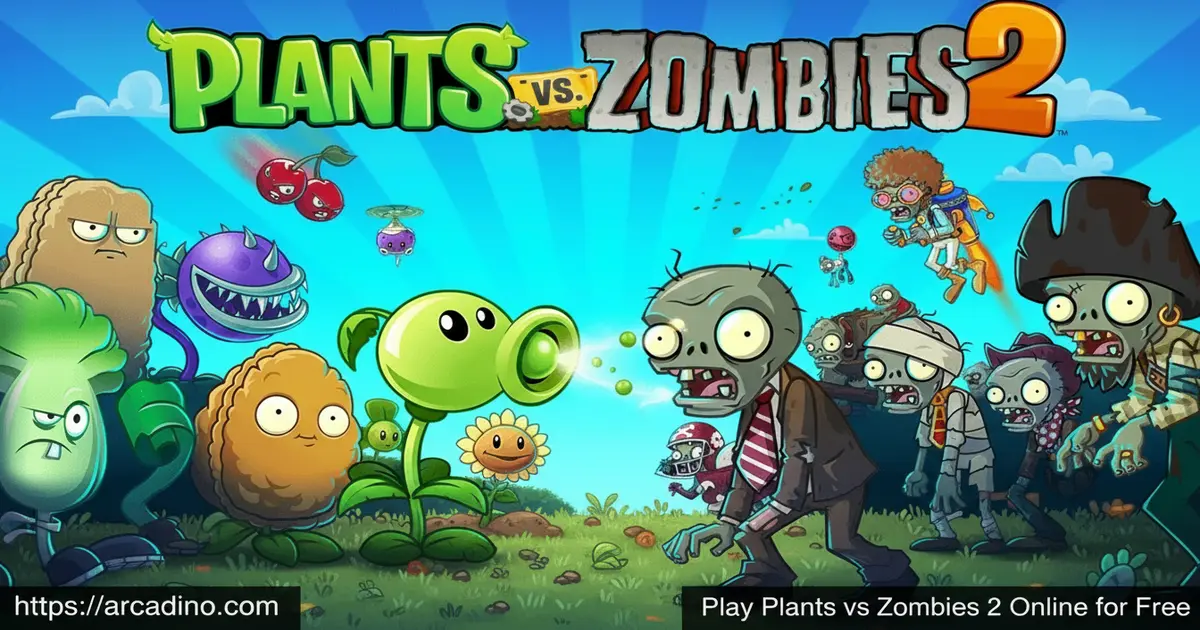
- Action-strategy tower defense across 11 themed worlds
- Hundreds of plants and zombies, including Lava Guava and Jetpack Zombie
- Plant Food power-ups and Seed Packet upgrades
- Arena mode with leaderboards, Leagues, and Piñata Party events
What Is Plants vs Zombies 2?
Plants vs Zombies 2 is an action-strategy tower defense game developed by PopCap Games and published by Electronic Arts. It first launched on iOS in 2013 and later came to Android, and EA reports the game has passed 200 million+ downloads worldwide. The story picks up after the first game, when Crazy Dave wishes he could eat his taco again and convinces Penny, his time-traveling RV, to whisk him 4,500 years into the past. Cue Ancient Egypt, pharaoh zombies, and a brand-new battle for your brain.
What I love about playing PvZ2 in a browser is how quickly it loads and how clean the controls feel with a mouse. Drag a Sunflower, drop a Peashooter, tap a Plant Food can, and you’re rolling. The art style is bright and cartoony, the zombies still moan that famous moan, and every world has its own twist. It’s the kind of session you start “for five minutes” and end an hour later.
Plants vs Zombies 2 Gameplay
The core loop is classic tower defense with a twist. Sun drops from the sky (or from Sunflowers you plant), and you spend it on plants placed across a 5-lane lawn. Zombies shamble in from the right, and your job is to stop them before they reach your house. Each level throws different waves at you, so picking the right plant lineup before the round starts is half the strategy.
Where Plants vs Zombies 2 separates itself is Plant Food and time travel. Plant Food is a power-up that supercharges any plant for a few seconds, like turning a Peashooter into a machine-gun blast or a Bonk Choi into a punching frenzy. Each world also adds gimmicks: minecarts in the Wild West, tides in Pirate Seas, gravity tiles in Far Future. You’re constantly learning new tricks.
Worlds and Levels in Plants vs Zombies 2
The campaign sprawls across 11 worlds, from Ancient Egypt and Pirate Seas to the Wild West, Far Future, and beyond. Together they pack more than 300 levels, plus tough Endless Zone challenges that keep going until your brains get eaten. Each world ends with a Dr. Zomboss boss fight, and his giant zombie mech changes form depending on the era.
You also unlock new plants and meet new zombies in every era. Pharaoh Zombies hide inside sarcophagi, Cowboy Zombies ride chickens, and Jetpack Zombies fly right over your front-row defenses. Mixing the right counters into your seed slots is the puzzle that keeps the campaign fresh.
Best Plants for Each World: A Mini Strategy Guide
Knowing which plants shine in which world saves you a ton of restarts. In Ancient Egypt, lean on Bonk Choi to smash sarcophagus zombies up close, plus Iceberg Lettuce to freeze Explorer Zombies before they light their torches. Pirate Seas loves Spring Bean, which pops Swashbuckler Zombies right off the planks into the water. For Wild West, Bonk Choi rides minecarts beautifully, while Split Pea covers your back from miners digging up behind you. Far Future is built for Laser Bean, since its beam shreds whole lanes of robotic zombies in a single shot. Frostbite Caves demands Hot Potato and Pepper-pult to thaw frozen plants and melt ice blocks fast. Big Wave Beach rewards Lily Pad plus Tangle Kelp combos, and Neon Mixtape Tour is where Phat Beet absolutely crushes the dance-floor zombies. Build around these picks and the late-game becomes way friendlier.
Arena, Piñata Party, and Mini-Games
Outside the main story, Plants vs Zombies 2 stacks on extra modes. Arena pits your zombie-bashing strategy against other players on weekly levels, where you chase the highest score for coins, piñatas, and League rankings. Daily Piñata Party events deliver quick, rewarding rounds with random plant lineups.
There are also mini-games, Penny’s Pursuit, and the chill Zen Garden, where you grow plants for bonus coins. If the main campaign ever feels too familiar, one of these side modes will pull you back in.
Travel Log and Quest Progression
The Travel Log is your in-game quest board, and it’s the main way you unlock new content as you play. Each quest gives you a small goal, like beating a level with a specific plant, finishing a Piñata Party, or trying a Penny’s Pursuit run. Completing quests rewards you with coins, gems, Seed Packets, and sometimes brand-new plants you can’t get anywhere else. Quests refresh often, so checking the Travel Log every session keeps your collection growing fast. If you ever feel stuck on the campaign, knock out a few Travel Log goals and you’ll come back stronger. 🗺️
Customization and Plant Upgrades
You earn Seed Packets as you play and use them to level up your favorite plants. Upgrades boost damage, shorten recharge time, beef up health, and sometimes unlock entirely new abilities at higher tiers. A leveled-up Snapdragon hits way harder than a fresh one, which matters in late-game worlds.
There are also Premium plants, costumes, and Power-Ups you can buy with in-game coins or real money. Most of the game can be enjoyed without spending, but if you want to fast-track a tough level, the option is there.
How to Play Plants vs Zombies 2
Getting started is simple. Open the game in your browser, watch the short intro with Crazy Dave and Penny, and you’ll drop straight into Ancient Egypt, Day 1. The early levels teach you sun collection, plant placement, and Plant Food, so even brand-new players ease in fast. From there, you progress level by level, unlocking new plants and worlds as you win.
Controls for Plants vs Zombies 2
On desktop, click a seed packet to select a plant, then click an empty tile to place it. Click on falling sun to collect it, and click a Plant Food can in the corner to drag it onto a plant for a power boost. On mobile, tap to select, tap to place, and tap-and-drag for Plant Food. That’s really all you need.
Tips and Tricks for Plants vs Zombies 2
- Build a Sunflower wall first. You need a steady sun economy before you can afford bigger plants like Cabbage-pult or Snapdragon.
- Save Plant Food for emergencies. Drop it on a Bonk Choi or Cherry Bomb when a wave is about to break through, not on a single zombie.
- Match plants to the world. Pirate Seas needs lane-fillers like Spring Bean to knock zombies off planks; Far Future loves area attackers.
- Use Wall-nuts and Tall-nuts up front. They soak hits while your damage plants chip away from behind.
- Replay early levels for stars and Seed Packets. Upgraded plants make the harder worlds way more manageable.
Key Features of Plants vs Zombies 2
- 11 themed worlds spanning Ancient Egypt to the Far Future
- More than 300 levels plus Endless Zone challenges
- Hundreds of plants and zombies, each with unique abilities
- Plant Food power-ups for instant supercharged attacks
- Arena mode with weekly leaderboards and League progression
Where to Play Plants vs Zombies 2
You can play Plants vs Zombies 2 right here in your browser for free, with no download and no sign-up needed. The browser version is great for quick sessions on a school laptop or a home PC. For the full mobile experience with cloud saves, grab the official apps: Google Play for Android and the App Store for iPhone and iPad.
If you’re searching for a PC version, note that there’s no official Steam release. Most “PvZ 2 PC” guides use Android emulators like BlueStacks. Stick to the official Play Store and App Store links above, and avoid random APK sites because those files can be tampered with.
System Requirements and Device Compatibility
The mobile app needs Android 7.0 or newer, and on iOS it asks for a fairly recent iPhone or iPad running an up-to-date version of iOS. Older tablets sometimes struggle once a level fills with zombies, so a device from the last few years runs best. For the browser version, any modern Chrome, Edge, Firefox, or Safari build works fine on a laptop, Chromebook, or desktop. You don’t need a fancy GPU, just a steady internet connection to load the game.
Browser Performance and Lag Tips
PvZ2 is cute, but it can chew through resources once a lane is packed with zombies, plant projectiles, and Plant Food explosions. If you notice slowdown during big waves, here’s what helps. Close extra browser tabs and pause heavy background apps like video calls or downloads. Turn on hardware acceleration in your browser settings so your graphics card handles the animations. Chrome and Edge usually run PvZ2 smoothest, and giving the page a quick refresh between long sessions clears out memory buildup. On older laptops, lowering the browser zoom can also keep the framerate steady when zombies flood the screen.
For Parents
Plants vs Zombies 2 is rated E10+ by the ESRB and PEGI 7, which means it’s fine for most kids 8 and up. The zombie humor is silly and cartoony, with no blood or scary imagery. The game does include optional in-app purchases for coins, gems, and Premium plants, so it’s worth turning on purchase confirmation on your child’s device. Sessions are easy to break into 10 to 20 minute chunks, since each level is short.
Great Pick for Classrooms and School Chromebooks
PvZ2 is a sneaky-good fit for school laptops and reward-time slots. Because the browser version needs no install, it runs on locked-down Chromebooks where students can’t add apps. The E10+ rating keeps the content classroom-safe, with goofy zombies instead of anything scary. Levels finish in about 10 to 20 minutes, so teachers can drop it into a single recess or end-of-week reward block without losing track of time. It also sneaks in real thinking skills like resource management, pattern recognition, and planning ahead. Parents looking for a screen-time pick that feels earned will love how easy it is to set a “one level, then break” rule.
Similar Games to Plants vs Zombies 2
If PvZ2’s mix of strategy, humor, and tower defense clicks with you, these picks have a similar vibe.
- Plants vs Zombies – The original that started the series, with the classic backyard, pool, and rooftop levels.
- Zombie Catchers – A goofier, action-focused take on hunting zombies across colorful worlds.
- Bloons TD 6 – A deeper tower defense with monkey towers, ideal if you want pure strategy depth.
- Kingdom Rush – Fantasy tower defense with heroes, upgrades, and big boss fights.
Browse more in Tower Defense.
FAQs About Plants vs Zombies 2
Is Plants vs Zombies 2 free to play?
Yes, Plants vs Zombies 2 is free to download and play. The full campaign across 11 worlds is available without paying. Optional in-app purchases exist for Premium plants, coins, and gems, but they aren’t required to finish the game.
When did Plants vs Zombies 2 come out?
Plants vs Zombies 2 had a soft launch in Australia and New Zealand on July 9, 2013, then got its worldwide iOS release on August 15, 2013. The Android version followed on October 2, 2013 in most regions. It’s been receiving updates and seasonal events ever since.
Is Plants vs Zombies 2 the same as Plants vs Zombies?
No, Plants vs Zombies 2 is the direct sequel to the first game. It keeps the lawn-defense formula but adds time travel, Plant Food power-ups, new plants, and 11 themed worlds. Many players search for the original by mistake.
How do I play Plants vs Zombies 2 on PC?
You can play it free in a browser on this page, no install needed. There’s no official Steam or Windows version. Some players use Android emulators like BlueStacks to run the mobile app on PC, but the browser version is the simplest option.
Is Plants vs Zombies 2 offline?
The mobile app can be played offline for most of the campaign. Online modes like Arena, daily events, and Penny’s Pursuit need a connection to sync rewards and leaderboards. The browser version requires internet to load.
Is Plants vs Zombies 2 endless?
Yes, Plants vs Zombies 2 has Endless Zones in most worlds. These modes keep going as long as your brains are safe, with difficulty climbing each round. They’re the best place to test high-level plant builds.
Was Plants vs Zombies 2 successful?
Yes, PvZ2 was a huge hit. PopCap announced 25 million downloads within ten days of launch, beating the lifetime numbers of the first game. EA has since reported 200 million+ downloads, making it one of their most-downloaded mobile titles of all time.
Why is Plants vs Zombies 3 not really around?
PvZ3 went through several soft launches starting in 2021 and was reworked from scratch after player feedback. It went quiet for a long stretch, leaving Plants vs Zombies 2 as the main current entry in the series for most players.
Ready to Defend the Lawn?
With 11 worlds, 300-plus levels, Plant Food chaos, and Dr. Zomboss waiting at every finale, Plants vs Zombies 2 still earns its spot as one of the most replayable tower defense games out there. Whether you’re chasing Arena trophies or just trying to keep Crazy Dave’s taco safe, there’s always one more level worth planting. Pick a Sunflower, line up your Peashooters, and show those zombies the lawn is yours.
Gameplay Video


