


Golf Orbit
TapNation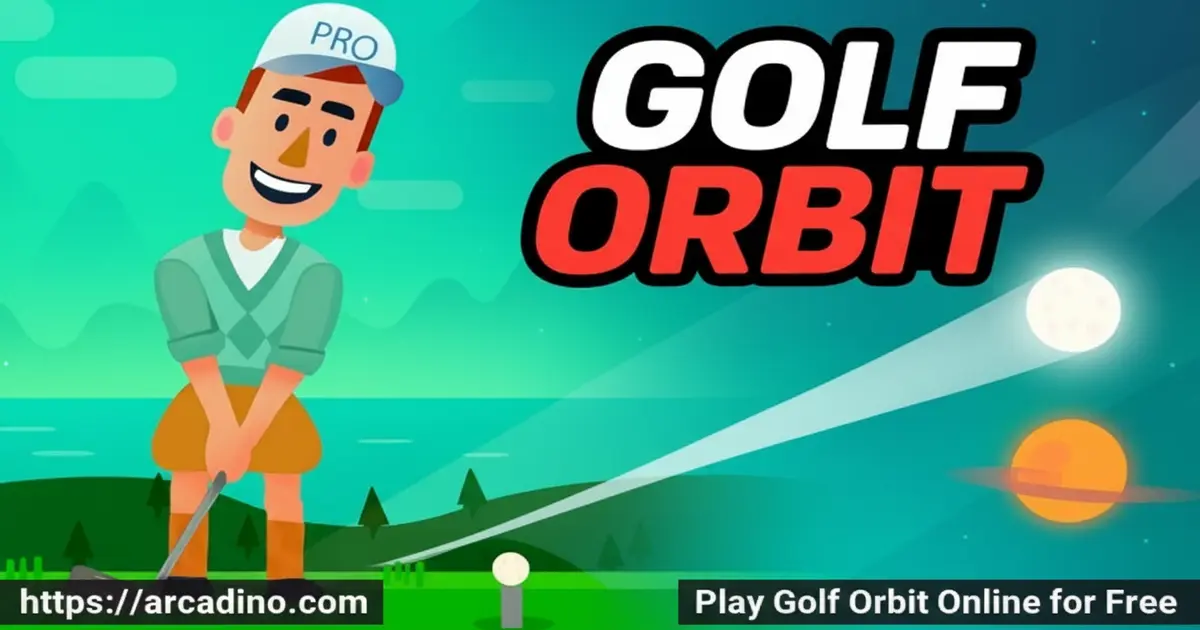
What if one golf swing could send a ball flying past the clouds — and all the way to Mars? Golf Orbit is a free online sports game that turns that wild idea into reality. You hold one button, release at the right moment, and watch your ball soar through physics-fueled chaos. It’s one of those browser games that hooks you instantly and keeps pulling you back for one more shot. 🏌️
Every launch feels different thanks to terrain obstacles, coin pickups mid-flight, and upgrades that genuinely change how far your ball travels. Here’s a quick look at what makes this game special:
- One-button controls — hold and release to set power, that’s it.
- Distance-based progression — every shot is recorded, and you push further each time.
- Three upgradeable shot elements — strength, speed, and bounce all improve with coins.
- Out-of-this-world destinations — hit far enough and you’ll eventually golf on Mars.
What Is Golf Orbit?
Golf Orbit is a physics-based, 2D sports game developed and published by Green Panda Games in 2018. The goal sounds simple: smash a golf ball as far as humanly — or cosmically — possible. But underneath that simple premise is a satisfying loop of upgrading your gear, mastering your timing, and watching each new shot beat your last record.
What sets this title apart from typical golf games is its distance-game DNA mixed with real golf scoring. You’re not playing 18 holes — you’re chasing a personal best with every single swing. The controls respond instantly in the browser, and the moving power indicator feels snappy enough that even a first-time player can get a feel for good timing within a few shots.
Golf Orbit is a single-player game — there’s no multiplayer mode or live competition against other players. That means every session is just you versus your own best distance. It’s a relaxed, pressure-free experience where you set the pace and celebrate your own progress.
Golf Orbit Gameplay — The Core Loop
The gameplay in Golf Orbit revolves around one charged swing. You hold your left mouse button (or tap and hold on touch screens) to build power, then release to send the ball flying. A moving arrow indicator shows the direction your ball will travel, and stopping it closest to the green zone gives you the best launch angle.
While the ball is airborne, you collect coins along its flight path. Those coins feed directly into upgrades between rounds. The terrain isn’t empty, either — rocks, sand bunkers, and water hazards can cut your distance short if your angle is off. Each shot’s distance gets recorded automatically, keeping your progress visible as you push toward greater and greater heights.
Levels and Progression in Golf Orbit
Golf Orbit uses a distance milestone system rather than traditional levels. The further your ball travels, the more you unlock and the closer you get to golfing on another planet entirely. Reaching Mars isn’t just a fun idea — it’s a real in-game destination that gives players a massive long-term goal to work toward.
Scoring also matters for progression. If you score a birdie — sinking the ball in two shots — you earn significantly more points than a standard shot. An eagle, which is a hole in one, rewards you with even bigger bonuses. Those extra points mean faster upgrades and quicker progress across the distance milestones.
Distance Milestones — How Far Can You Really Go?
Golf Orbit’s distance milestones are what keep every session feeling meaningful. Early on, you’ll clear short distances just fine with basic stats — but the real fun starts when your ball starts breaking through the atmosphere. Each major milestone unlocks a new visual backdrop, shifting the scenery from green fairways to rocky outer-space terrain as you push further. The jump from Earth to the Moon is a thrilling mid-game landmark that signals you’re upgrading efficiently. Beyond the Moon, distances grow dramatically, and only a well-upgraded ball will make the full trip to Mars. Tracking these milestones gives you a concrete sense of how much your upgrades are paying off with every single shot. It’s one of the smartest ways a browser game has ever made “just one more go” feel genuinely rewarding.
Customization and Upgrades at the Clubhouse
Between shots, you head to the Clubhouse to spend your earned points and coins on upgrades. There are three core elements you can improve: strength, speed, and bounce. Boosting each one changes how your ball behaves after it launches, which directly affects how far it travels.
The Clubhouse also lets you swap out equipment aspects when you’ve gathered enough points. It’s a clean, incremental upgrade system — the kind where every session feels like you’re inching forward. Choosing which stat to upgrade first is actually a small but real strategic decision that shapes your early game.
Smart Upgrade Order — Which Stat Should You Max First?
Knowing which stat to upgrade first can save you hours of slow progress. Bounce is the top pick for early upgrading because it multiplies the distance your ball travels after it hits the ground — even a weak hit can roll a surprising distance with high bounce. Once bounce feels strong, shift your coins into speed, which keeps the ball moving faster through the air and reduces energy lost mid-flight. Strength is best saved for later upgrades because its benefit is most noticeable once your bounce and speed are already solid. Think of it like building a rocket: speed is your fuel, bounce is your landing gear, and strength is your engine — you need all three, but order matters. Spending coins evenly across all three at once will slow your progress compared to focusing on one at a time. Once you’ve cleared the Moon milestone, revisit each stat and push them toward equal levels for the final Mars push.
Graphics and Physics in Golf Orbit
The game’s 2D visual style is clean and colorful, with a clear cartoon aesthetic that works well on both desktop and mobile screens. The ball physics feel satisfying — especially when a perfectly timed swing sends the ball bouncing dramatically off the terrain in unexpected directions.
Obstacle variety keeps the visual experience from feeling repetitive. Sand bunkers, water traps, and rocky terrain all look distinct from each other, so you always know what you’re dealing with before the ball lands. The distance counter ticking upward as the ball flies is a small visual touch that makes every shot feel like an event.
Sound and Music in Golf Orbit
Golf Orbit keeps its audio simple and fun, which works perfectly for a casual browser game. The swing sound gives a satisfying thwack every time you nail a good hit, and the bounce effects add a playful pop each time the ball skips off the terrain. Background music is upbeat and light — it doesn’t get in the way, but it keeps the energy high while you’re waiting for your ball to land. The audio cues are subtle enough that you can play with sound on in a classroom or library without disturbing anyone nearby. If you prefer silence, muting the game doesn’t hurt the experience at all — the visuals carry the fun on their own.
How to Play Golf Orbit
Playing Golf Orbit takes about ten seconds to learn. When the shot screen loads, you’ll see a moving arrow that swings back and forth across a power gauge. Your job is to click or tap at the exact moment the arrow sits in the optimal green zone. The timing of your release determines both the power and direction of your swing.
After you launch, the ball flies automatically — just watch it go and grab coins along the way. If your ball lands on the green, you’ll get a second interaction to set the angle for your putt. The game tracks every distance you achieve, so you can always see whether your latest shot was your best.
Golf Orbit Controls
- Desktop: Hold the left mouse button to set power, then release to hit the ball.
- Mobile / Tablet: Tap and hold the screen to charge your shot, then lift your finger to swing.
- Putt shot: When the ball lands on the green, use the mouse or tap to set power and angle for your second shot.
- Power indicator: Watch the moving arrow and release when it’s closest to the green zone for maximum distance.
Tips and Tricks for Golf Orbit
- Chase the green zone every time. Releasing the power indicator right at the green marker consistently gets you better launch angles than guessing. Train your eye on it before every shot.
- Upgrade bounce early. The bounce stat keeps your ball rolling further after it lands. Early investment there adds big distance even before your strength is maxed out.
- Avoid water hazards at all costs. Landing in water cuts your distance run short just like in real golf. Aim slightly away from water-heavy sections until your ball control improves.
- Go for eagles when you can. Hole-in-one shots reward dramatically more points than standard finishes. That points boost lets you reach the next upgrade tier much faster.
- Collect every coin mid-flight. Coins earned during the ball’s flight are your main upgrade currency. Don’t ignore them — even small batches add up quickly across multiple rounds.
- Don’t spread coins too thin. Upgrading all three stats at once slows your progress. Pick one stat, max it to the next tier, then move on — focused spending beats scattered spending every time.
- Watch the terrain before you swing. Take a quick look at the landscape ahead so you know where the hazards are. Planning your angle around them before you release saves distance you’d otherwise lose to bad luck.
Key Features of Golf Orbit
- One-button browser gameplay — a single mouse click or screen tap controls every shot, making it instantly accessible without tutorials.
- Mars as an actual destination — the game’s distance milestones extend beyond Earth, giving players a cosmic long-term target to aim for.
- Three-stat upgrade system — strength, speed, and bounce each have their own upgrade path, letting players shape their playstyle at the Clubhouse.
- Real golf scoring mechanics — birdies and eagles trigger bonus point rewards, blending classic golf rules with the arcade distance format.
- Terrain obstacle variety — rocks, sand bunkers, and water hazards create different challenges across shots, keeping the physics feel fresh across many sessions.
- Single-player focus — no accounts, no opponents, and no pressure. Just you, the ball, and your personal best distance to beat.
Where to Play Golf Orbit
You can play Golf Orbit free in your browser right now at arcadino.com — no download, account, or installation required. It runs smoothly on desktop and laptop browsers, and the touch controls work well on tablet screens too. The game is accessible without restrictions on the site, so you can jump in whenever you have a few minutes.
If you prefer gaming on your phone, Golf Orbit is available on both major mobile platforms. Grab it from the Google Play Store for Android devices or from the Apple App Store for iPhone and iPad. Always download from these official stores — avoid third-party APK sites, as unofficial files can carry security risks.
For Parents
Golf Orbit is a great pick for kids aged 8 and up. The gameplay is non-violent — it’s purely about hitting a ball far and watching physics play out. There’s no chat system or social features in the browser version, so younger players can enjoy it independently without online interaction concerns.
The upgrade and coin system introduces a basic concept of saving resources and making smart choices about where to invest them, which is a light but real critical-thinking element. Play sessions naturally wrap up after a few shots, so it’s easy to set a time limit without fights. It’s the kind of quick-play game that fits well into a 15-minute free period rather than an hours-long session.
Because Golf Orbit is strictly single-player with no in-game purchases required to progress, parents don’t need to worry about unexpected spending or exposure to strangers online. The browser version at arcadino.com runs without ads that interrupt gameplay, keeping the experience clean and focused for younger players. It’s a genuinely low-risk game pick for a homework break or a quiet weekend afternoon.
Similar Games to Golf Orbit
If you love the mix of golf mechanics and big-distance launches, these other browser titles are worth a swing:
- Golf Battle — a real-time golf battle game where you compete head-to-head on themed courses, perfect if you enjoy the one-shot challenge format.
- Super Stickman Golf — A 2D physics golf game with creative course obstacles and power-ups, sharing the same aim-set-power-launch formula.
- Mini Golf Club — A polished mini golf game with realistic physics and beautifully designed courses, perfect for players who want a more grounded golf challenge after Golf Orbit’s chaos.
- Basket Random — A wacky one-button physics sports game with exaggerated launches and unpredictable outcomes, matching Golf Orbit’s over-the-top energy.
Explore more titles like these in the Sports category.
FAQs About Golf Orbit
How does Golf Orbit work?
You hold the left mouse button to set power, then release to hit the ball. The goal is to launch your golf ball as far as possible with each shot. Coins collected mid-flight go toward upgrading your strength, speed, and bounce stats at the Clubhouse.
Is Golf Orbit free to play?
Yes, Golf Orbit is completely free to play in the browser. You can also download it for free on Android via Google Play and on iOS via the App Store. No payment is needed to access the core distance-shooting gameplay.
When did Golf Orbit come out?
Golf Orbit was released in 2018 by Green Panda Games. It’s been available on browser and mobile platforms since then. The game remains popular thanks to its simple controls and satisfying upgrade loop.
Can you really reach Mars in Golf Orbit?
Yes — Mars is an actual in-game destination you can reach by hitting long enough distances. It serves as one of the game’s major long-term milestones. Getting there requires consistent upgrades to your strength, speed, and bounce stats over many sessions.
What are birdies and eagles in Golf Orbit?
A birdie means you sink the hole in two shots, and an eagle means you get a hole in one. Both score you significantly more points than a standard finish. Those bonus points let you upgrade your equipment faster at the Clubhouse.
Is Golf Orbit available unblocked?
Yes, Golf Orbit is playable unblocked directly at arcadino.com without any restrictions. It runs in your browser with no special permissions or installations needed. That makes it easy to access wherever you’ve got a stable internet connection.
What are the three upgrade stats in Golf Orbit?
The three upgradeable elements are strength, speed, and bounce. Each one affects a different part of how your ball travels after you swing. You spend coins and reward points earned during gameplay to level them up at the Clubhouse.
Is Golf Orbit single-player or multiplayer?
Golf Orbit is a single-player game. There’s no online multiplayer or competitive mode — it’s just you trying to beat your own distance record each round. That makes it a great pick when you want to play at your own pace without any pressure.
Conclusion
Golf Orbit nails something rare — it takes a one-button mechanic and builds a genuinely deep upgrade loop around it. The combination of real golf scoring rules, mid-flight coin collecting, and a three-stat Clubhouse system gives every session a clear sense of progress. And the fact that Mars is sitting out there as a real target? That’s the kind of long-term hook that keeps players coming back.
If you’ve been looking for a sports game that’s quick to pick up but rewards patience and smart upgrading, this is your shot. Head over to arcadino.com, line up that power arrow, and find out exactly how far your first swing can go.
Gameplay Video

