

























Watch one short ad and play ad-free for 30 minutes.
Ball Orbit
Pinpin Team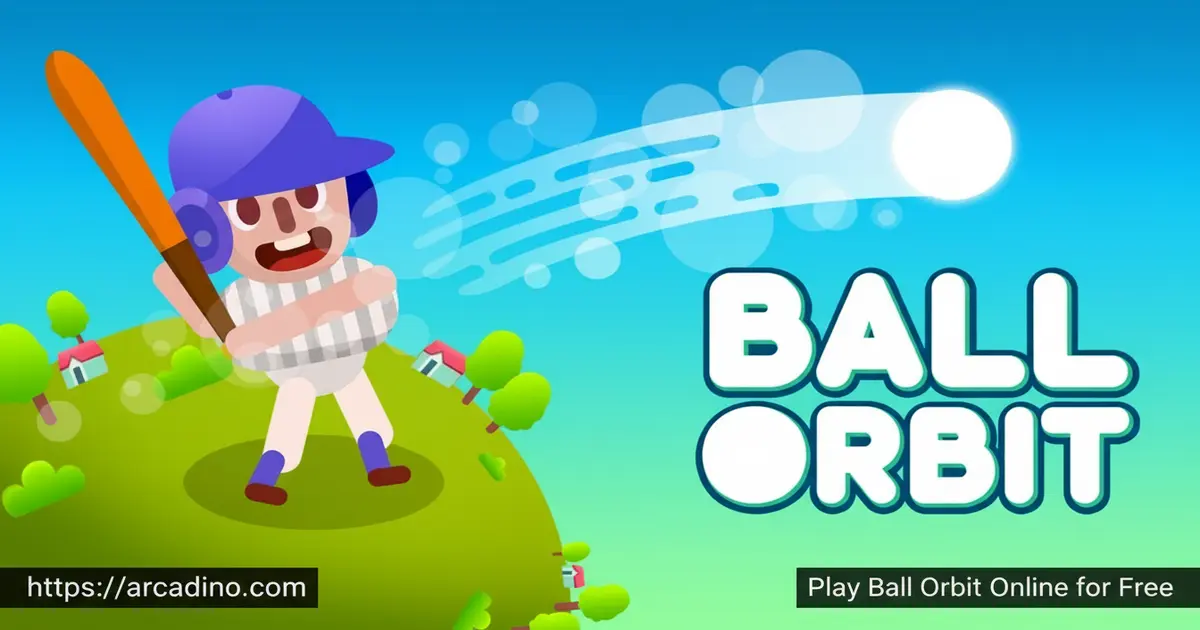
Every launch in Ball Orbit feels different — and that’s the whole point. This free browser game from 1Games dares you to send a baseball as far as humanly possible, then keeps pulling you back to beat your own record. 🚀 It runs instantly online with no download needed, making it easy to jump in between classes or after homework. The satisfying crunch of a perfect hit followed by a chain of bounces across ramps and turbo pads is genuinely hard to put down.
- Developer: 1Games (1Games.IO)
- Release Date: 27 Jun 2025
- Technology: HTML5 — no download or plugin required
- Platforms: Browser (desktop, tablet, mobile), iOS App Store, Google Play Store
- Physics-driven launcher: Set your power and angle, then watch the ball fly across dynamic terrain.
- Coin collection mid-flight: Grab coins while the ball is airborne to fund your next upgrade.
- Three upgrade paths: Boost strength, speed, and bounce to cover greater distances each run.
- Unpredictable maps: Ramps, turbo pads, trees, dunes, and puddles all change how each bounce plays out.
What Is Ball Orbit?
Ball Orbit is an HTML5 arcade launcher game developed by 1Games. The core idea is beautifully simple: hit a baseball as far as possible, collect coins during its flight, and use those coins to upgrade the ball’s performance. It sits at the crossroads of casual sports gaming and incremental progression, which is a combination that turns one-more-go sessions into full afternoons.
What makes this title stand out from similar launchers is its focus on terrain variety. Maps shift between environments like a Peaceful Village and a Rugged Mountain Range, so the ball behaves differently depending on where it lands. Playing in a browser on a mid-range laptop, the controls respond instantly with zero noticeable input lag — the single-click mechanic translates perfectly to a mouse or a touchscreen tap without any adjustment needed.
Gameplay — Timing, Physics, and the Upgrade Loop
Each round of Ball Orbit starts the moment you click. A power indicator bar fills and speeds up, so releasing at exactly the right moment determines both the launch angle and the force behind it. Get the timing right and the ball sails off the screen, bouncing off ramps and shooting across turbo pads for maximum distance. Miss that sweet spot and the run ends fast, but the urge to try again kicks in immediately.
The game loop is built around steady improvement. Coins scatter across the terrain during each flight, and every coin you collect brings you closer to the next upgrade. That cycle — launch, collect, upgrade, relaunch — creates a rhythm that keeps the experience feeling fresh even after dozens of runs. The deeper you push into each session, the more the physics start to feel like a puzzle you’re slowly cracking.
One of the smartest decisions you’ll make mid-flight is whether to chase a coin or protect your momentum. Coins often sit just off the path toward a ramp or turbo pad. Grabbing them is tempting, but a missed ramp can cut your run short. Better players learn to skip coins that would cost them a bounce — saving the momentum is often worth more than the coins themselves. That split-second choice is what separates casual launchers from leaderboard climbers.
Dynamic Maps Full of Surprises
The terrain in Ball Orbit is never the same twice. Environments introduce obstacles like trees, dunes, and puddles that redirect the ball in unpredictable ways. Ramps can send it soaring if hit at the right angle, while turbo pads give it a sudden burst of extra speed mid-flight.
Some maps reward careful momentum building, like the Peaceful Village where you can chain bounces safely. Others, like the Rugged Mountain Range, demand split-second decisions to avoid losing distance. Learning how each terrain type interacts with your current upgrades is a genuine strategy layer on top of the basic launch mechanic.
Upgrades
Upgrading is where Ball Orbit’s progression really shines. There are three key stats to invest in: strength (how hard the ball launches), speed (how fast it travels through the air), and bounce (how well it rebounds off surfaces). Each upgrade level pushes your maximum distance noticeably further, which makes every coin feel worth chasing.
Players find themselves choosing which stat to prioritize based on how their runs are going. If the ball keeps dying on the first bounce, investing in bounce makes sense. If early launches feel weak, strength upgrades pay off faster. That decision-making adds a layer of strategy that goes beyond just clicking at the right time.
Smart Upgrade Progression: Early, Mid, and Late Game
Knowing which stat to upgrade and when makes a huge difference to your total distance. In your early runs, bounce is the most important stat — a better rebound keeps the ball alive through multiple terrain hits, giving it more chances to reach ramps and turbo pads. Once your bounce is high enough to chain three or four surfaces reliably, shift your coins toward strength. A stronger launch pushes the ball deeper into the map on the first shot, unlocking terrain features you simply can’t reach with a weak start. At high upgrade levels, speed becomes your best investment — it compounds distance by carrying momentum across longer stretches of open terrain between bounces. Following this order (bounce first, then strength, then speed) gives you a roadmap that makes every coin feel purposeful rather than random.
Competitive Leaderboards
Ball Orbit includes competitive leaderboards that let you measure your best distance against other players. Climbing the ranks means not just landing lucky hits — it requires a well-upgraded ball and a strong understanding of how terrain and timing interact. Seeing your name move up the board after a monster run is one of the most rewarding moments the game offers.
The leaderboard system gives this title long-term replay value beyond just beating your personal best. Casual players can enjoy chasing their own records, while competitive players have a clear target to aim for with every upgrade they unlock. It turns a solo experience into something that feels connected to a wider community of launchers.
How to Play Ball Orbit
Getting started takes about ten seconds. Open the game in your browser, watch the power indicator bar begin to charge, and click or tap at the exact moment that gives you the best angle and force. The ball launches immediately, and from there, gravity and physics take over — your job is to watch how the terrain interacts with your shot and figure out how to improve next time.
After each run, head straight to the upgrade menu and spend any coins you collected. Even small upgrades in strength or bounce can add surprising extra distance to your next launch. The real skill in Ball Orbit grows over time as you learn which terrain features to aim for and which ones will cut your run short.
Controls
- Mouse click or screen tap: The single control for launching the ball — timing this determines everything.
- Mouse interaction: Used to navigate menus, select upgrades, and manage in-game activities.
- Mobile tap: Works identically to a mouse click, making touchscreen play just as precise.
Browser and Device Performance
Ball Orbit’s HTML5 build runs smoothly across all major browsers — Chrome, Firefox, and Safari all handle it without any noticeable issues. On desktop, Chrome tends to give the most consistent frame rate, but Firefox and Safari perform well too on mid-range and newer hardware. Touchscreen responsiveness is strong on both Android Chrome and iOS Safari, though Android Chrome feels slightly snappier when tapping the power bar at speed. On older or low-end devices, you may notice minor frame drops during fast bounces, but the game remains fully playable — the single-tap control means input timing is still accurate even if the animation isn’t perfectly smooth. If you’re on a school Chromebook or an older tablet, it’s worth a quick test run before committing to a long upgrade session.
Tips and Tricks for Ball Orbit
- Watch the power bar closely: Releasing at the peak of the bar’s speed gives the longest launch distance — don’t click too early or too late.
- Prioritize bounce upgrades early: Better rebound means the ball stays in play longer, giving it more chances to hit turbo pads and collect coins.
- Use ramps intentionally: Hit a ramp at the right angle and the ball can double its airtime — aim for them rather than treating them as random terrain.
- Collect every coin you can: Even short runs are worth finishing because coins earned mid-flight fund upgrades that directly improve your next attempt.
- Learn the map you’re on: Environments like the Rugged Mountain Range punish careless launches, so adjust your angle strategy based on the terrain ahead.
Key Features of Ball Orbit
- Timing-based power bar: A single click determines both launch angle and force, making precision the core skill to develop.
- Three-stat upgrade system: Strength, speed, and bounce each change how the ball behaves in measurable, satisfying ways.
- Terrain variety across maps: Environments shift between distinct settings, each with unique obstacles like dunes, puddles, and tree lines.
- Mid-flight coin collection: Coins appear across the terrain during each run, tying reward-earning directly to launch performance.
- Competitive leaderboards: Distance records are tracked globally, giving skilled players a reason to keep refining every launch.
Where to Play Ball Orbit
Ball Orbit is free to play directly in your browser at arcadino.com — no download, no account, and no waiting. The HTML5 build works on desktop computers, tablets, and mobile browsers without any additional software. It’s fully accessible without restrictions on arcadino.com, so you can load it up whenever you have a few minutes free.
Prefer playing on a phone or tablet with the native app experience? The game is also available on both major mobile platforms. Download it for Android via the Google Play Store or grab it for iPhone and iPad from the Apple App Store. Always download from these official sources — unofficial APK files from third-party sites can contain harmful software, so it’s not worth the risk.
For Parents
Ball Orbit is a casual arcade game with no violence, no chat features, and no mature content — it’s built around launching a ball and collecting coins, which makes it appropriate for kids aged 8 and up. The upgrade system encourages basic resource management thinking, as players decide which stats to invest in based on how their runs are performing.
The skills this game quietly develops go further than just resource management. Each upgrade teaches cause-and-effect reasoning — kids can directly see how spending coins on bounce produces longer runs, which makes the connection between choice and outcome very clear. The upgrade loop also builds delayed gratification, since saving coins across several short runs to afford a bigger upgrade pays off more than spending everything immediately. On top of that, adjusting launch angle and strategy based on how each terrain reacts develops iterative problem-solving — the same thinking kids use in science experiments and maths puzzles. These aren’t skills that need to be explained to a child; the game teaches them naturally through play.
There’s no evidence of in-app purchases or social features in the browser version, making it a low-risk choice for unsupervised play. Sessions are short by design — a single run lasts under a minute — but the upgrade loop can extend playtime if kids get hooked on improving their records. Setting a time limit of 20–30 minutes works well for this type of incremental game.
Ball Orbit vs. Golf Orbit — Which Should You Play?
Both games share the same core idea — launch something as far as possible and upgrade your way to bigger distances — but they feel quite different in practice. Ball Orbit uses baseball theming across chaotic multi-environment terrain, and its strength is adaptability: every map throws new obstacles at you, and learning to read each one is the real challenge. Golf Orbit, on the other hand, follows a more structured one-shot format where the goal is reaching height milestones like the Moon or Mars in a single giant arc. If you love variety and unpredictability, Ball Orbit is the better pick. If you prefer a clean progression toward a single enormous target distance, Golf Orbit is the one to try first.
Similar Games to Ball Orbit
If the launch-and-upgrade formula in Ball Orbit has you hooked, these physics-driven games offer the same satisfying combination of precision and progression:
- Golf Hit — A golf-themed launcher with distance-chasing gameplay and upgrade mechanics very close to Ball Orbit’s style.
- Golf Orbit — Launch golf balls to incredible heights across wild environments, collecting rewards to upgrade your shot power.
- Burrito Bison — A chaotic launcher where you bounce a wrestler through candy-filled worlds, with a deep upgrade system fueling every run.
- Blumgi Ball — A fun ball-based arcade game with physics challenges and colorful level design worth exploring.
- Curve Rush — A fast-paced physics momentum game where you ride curves and build speed, perfect for fans of incremental distance challenges.
Browse more titles in the Golf category for even more launch and distance games.
FAQs About Ball Orbit
Is Ball Orbit free to play?
Yes, Ball Orbit is completely free in your browser with no sign-up required. You can also download it free from the Google Play Store and Apple App Store on mobile devices.
Who developed Ball Orbit?
Ball Orbit was developed by 1Games, also known as 1Games.IO. They’re known for creating arcade titles with intuitive launch controls and incremental progression systems.
How do you control Ball Orbit?
You use a single mouse click or screen tap to launch the ball. That one input controls both the power and angle of your shot, depending on the exact moment you click the power bar.
What upgrades are available in Ball Orbit?
The game offers three upgrades: strength, speed, and bounce. Each one changes how the ball performs in a different way — strength affects launch power, speed affects how far it travels, and bounce determines how well it rebounds off surfaces.
Can I play Ball Orbit on mobile?
Yes, Ball Orbit works on mobile browsers and has dedicated apps on iOS and Android. The tap controls on touchscreen devices feel just as responsive as mouse controls on desktop.
Does Ball Orbit work offline?
Ball Orbit is an HTML5 browser game, which means it needs an active internet connection to load from arcadino.com. It doesn’t support offline play through browser caching, so you’ll need a working connection to start a session. If you want to play on the go without Wi-Fi, the iOS or Android app versions may offer more reliable access in low-connectivity situations — check the app store listing for offline details.
What is the goal in Ball Orbit?
The goal is to launch the ball as far as possible in each run. You beat your previous distance records, collect coins mid-flight, and use those coins to upgrade the ball for even longer future runs.
Are there different maps in Ball Orbit?
Yes, Ball Orbit features multiple terrain environments. Maps like the Peaceful Village and the Rugged Mountain Range each have different obstacles and layouts that change how each bounce plays out.
Ready to Chase Your Best Distance?
Ball Orbit nails a very specific feeling — the one where a single click sends something flying, and you can’t look away until it stops. The combination of a timing-based power bar, terrain that shifts across genuinely different environments, and a three-stat upgrade system means no two sessions feel identical. Every run teaches you something new about how the physics works.
Head to arcadino.com, hit that power bar at exactly the right moment, and see how far you can push your first run. The leaderboard is waiting — and your current best distance is just the starting point.
Gameplay Video


