




























Watch one short ad and play ad-free for 30 minutes.
Drive Mad 3
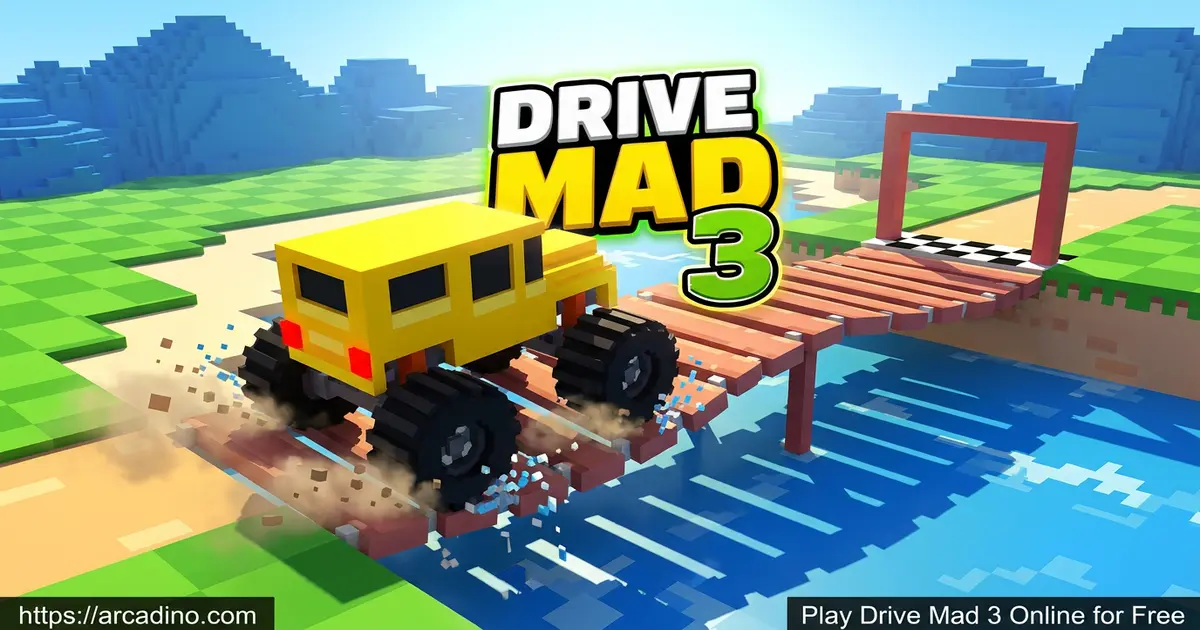
Martin MagniBuckle up, because Drive Mad 3 throws your 4×4 onto some of the wildest obstacle courses the series has ever cooked up. This free online physics racer is the third chapter in the popular Drive Mad lineup, and it leans hard into balance, timing, and patience. You’ll splash through water, wobble across bridges, and try not to flip your truck on tricky inclines. It’s often just called “drive mad” by fans, but this sequel adds fresh tracks and meaner obstacles. 🚙
Drive Mad 3 runs straight in your browser with no download, so you can hop in and start crashing (and conquering) right away.
- Physics-based off-road driving with realistic tipping and rolling
- Brand-new tracks featuring water, bridges, and tricky terrain
- Simple two-button style controls that hide deep skill
- Instant browser play on desktop, Chromebook, and mobile
What Is Drive Mad 3?
Drive Mad 3 is the third installment of the popular Drive Mad car game series. The goal stays familiar: drive your vehicle from start to finish without flipping or crashing. What changes is the difficulty. The tracks are sneakier, with obstacles that punish a heavy foot on the gas.
You’ll cross bridges, wade through water, and balance over uneven ground. Go too fast and your truck nosedives. Go too slow and you stall on a ramp. Finding that sweet spot is the whole game.
Honestly, the first thing I noticed loading Drive Mad 3 in Chrome was how snappy the restart button feels. When you crash, you’re back on the line in about a second. That keeps the “just one more try” loop alive, which is the heart of any good physics driver.
Who Made Drive Mad 3?
The Drive Mad series was created by Martin Magni, the same indie developer behind the Fancade platform. Fancade is a kid-friendly app that hosts tons of mini-games built with simple physics blocks. Drive Mad started life as a Fancade hit before exploding onto browser portals worldwide. Drive Mad 3 carries that same Fancade DNA: clean visuals, snappy physics, and bite-sized levels. Knowing the origin helps explain why every Drive Mad game feels so polished and easy to pick up.
Drive Mad 3 Gameplay
The gameplay loop is short, punchy, and addictive. Each level drops your truck at a starting point with a clear finish line in view. Between you and the goal sits a puzzle of ramps, gaps, moving parts, and hazards.
You only really control two things: throttle and brake/reverse. That sounds basic, but the magic is how your weight shifts. Tap the gas and the nose lifts. Tap reverse and the back end dips. Learning to feather both is the key to clearing the meanest sections of Drive Mad 3.
Tricky Terrains and Obstacles
This sequel mixes up the terrain a lot more than the original. One stage you’re crawling across a flimsy bridge. The next you’re trying to roll through shallow water without tipping over. Hit water at a bad angle and the run ends instantly.
Other levels throw in steep hills, narrow platforms, and gaps that demand a perfect jump. Each track is built around one main idea, so once you figure out the trick, you can usually clear it. Figuring it out is the fun part.
Signature Drive Mad Level Mechanics
Across the Drive Mad series, a few signature mechanics show up again and again. Magnets pull metal parts of your truck, yanking you off course at the worst moment. Moving machinery like spinning gears, swinging hammers, and rising platforms force you to time your throttle to the beat. Low-gravity zones make your truck float higher on jumps, so you have to brake mid-air to land flat. Hazard timing levels add spikes, falling blocks, or fire that only hurt during certain windows. Some stages are also goal-based puzzles, where you must push a box, hit a button, or carry cargo before crossing the line. Spotting which mechanic a level uses is the first step to beating it.
Vehicles and Customization in Drive Mad 3
You’ll pilot a range of rugged trucks and off-road vehicles across the levels. Some are nimble, some are heavy, and the heavier ones handle bumps differently. Customization usually covers paint colors, wheel styles, and small body tweaks so your truck pops on screen. The options are cosmetic, so they don’t change how the truck drives, but they make your ride feel like yours.
Heavier vehicles are tougher to flip but slower to recover from a bad landing. Lighter ones bounce around more but can squeeze through tight gaps. Picking the right tool for the track is half the strategy.
Light vs. Heavy Trucks: Which to Pick
Matching your truck weight to the obstacle type is a low-key superpower in Drive Mad 3. Water crossings punish light trucks because they tip easily on the surface, so go heavy if a stage starts with a splash. Wooden bridges are the opposite: heavy trucks sag the planks and snap them, while lighter rides glide across. Long jumps favor light vehicles because they fly farther and land softer when you feather the brake. Steep climbs belong to heavy trucks, since their extra weight grips the slope instead of spinning out. If a level lets you swap, scout the first obstacle and pick your weight class to match. That single choice can turn a 20-attempt nightmare into a one-try win.
Graphics and Sound
Drive Mad 3 keeps the colorful, slightly goofy look the series is known for. The trucks are chunky, the tracks are bright, and the crashes are satisfyingly dramatic. Engine sounds and tire skids give every run a bit of weight.
It’s not a hyper-realistic sim, and that’s the point. The cartoony style makes the physics gags funnier instead of frustrating.
How to Play Drive Mad 3
Getting started couldn’t be simpler. Load the page, hit play, and you’re on the first level within seconds. There’s no sign-up, no tutorial wall, just a truck waiting for you to mess up. Work through the levels in order to unlock tougher tracks.
If you crash, tap restart and try again with a smarter approach. Most levels reward small tweaks rather than huge changes in strategy.
Drive Mad 3 Controls
- Drive forward: W, D, or the Up/Right arrow keys
- Reverse or brake: S, A, or the Down/Left arrow keys
- Restart level: R
- Next level / retry: Spacebar
- Mobile: Tap and hold the on-screen arrows
Tips and Tricks for Drive Mad 3
- Don’t hold the gas down. Tap the throttle in short bursts so your truck stays level over bumps.
- Use reverse as a balancer. If your nose is diving, a quick tap of brake shifts weight backward and saves the run.
- Read the track before moving. Each Drive Mad 3 level is built around one main trick, so spot the hazard first.
- Slow down before water and bridges. Speed flips light vehicles, and a rollover in water ends the attempt.
- Replay early levels for practice. The controls are simple, but the muscle memory you build pays off in the harder stages.
Named Weight-Shift Patterns That Actually Work
Once you stop mashing the gas, Drive Mad 3 becomes a rhythm game. Here are a few named tap patterns that solve common trouble spots.
- The Bridge Teeter: Roll onto the plank, then tap gas-brake-gas-brake in slow half-second beats. The rocking cancels itself out and keeps the bridge level.
- The Water-Entry Angle: Brake fully before the edge, then give one short gas tap as you drop. You want to enter the water with your nose just barely down, not pointing straight in.
- The Ramp Stall Fix: If you stop mid-ramp, tap reverse once to roll back a bit, then hold gas for two seconds to build real momentum. Slow crawling never makes it over.
- The Mid-Air Flat-Land: Right after a jump, tap brake to tip the nose up, then tap gas to level out. Land with all four wheels and you keep your speed.
- The Magnet Escape: When a magnet grabs you, alternate full gas and full reverse in quick bursts. The shake usually rips you free before it flips you.
Key Features of Drive Mad 3
- Third entry in the Drive Mad series with fresh tracks and obstacles
- Water crossings, bridges, and unstable surfaces that test your balance
- A range of off-road trucks with different weights and handling
- Vehicle customization so your truck stands out on the track
- Instant restart that keeps the trial-and-error loop fast and fun
Where to Play Drive Mad 3
The easiest way to play is right here in your browser, free, with no download or install. Drive Mad 3 runs on Chrome, Firefox, Edge, and Safari, and it works on Chromebooks too. That makes it a popular pick on “drive mad unblocked” style game portals at school-friendly sites.
If you want the experience on the go, the original Drive Mad app from Martin Magni is available on mobile. Grab it on Google Play or the App Store. Stick to official stores and skip random APK downloads, which can carry malware.
Why Drive Mad 3 Runs on School Chromebooks
If you’ve tried other games at school, you know most heavy 3D titles freeze or get blocked. Drive Mad 3 is different because it’s a lightweight HTML5 build, often under a few megabytes total. It doesn’t lean on big WebGL shaders or huge texture packs, so it uses very little RAM, perfect for budget Chromebooks. The game loads once and runs locally in the tab, so it doesn’t keep pinging servers that school firewalls block. Once it’s loaded, you can even keep playing for a bit if Wi-Fi drops. That mix of tiny file size, low RAM use, and minimal network chatter is the real reason it sneaks through locked-down school networks.
Drive Mad 3 for Parents
Drive Mad 3 is a great fit for kids around 8 and up. There’s no violence, no chat, and no scary content, just goofy trucks tipping over on obstacle courses. The simple controls and short levels make it easy for younger players to jump in without help.
The game quietly teaches patience, cause and effect, and basic physics like weight and momentum. Sessions are easy to cap at 20 to 30 minutes since levels are bite-sized and a natural stopping point is never far away.
Games Similar to Drive Mad 3
If the balance-and-crash loop of Drive Mad 3 grabs you, these physics-driving picks scratch the same itch.
- Drive Mad – The original 100-level challenge that started the series and built the core physics.
- Drive Mad 2 – The snowy winter sequel with slippery tracks and trickier obstacles.
- Drive Mad 4 – The latest sequel with even wilder contraptions and fresh weight-shift puzzles.
- Monster Tracks – Another Fancade-style balance challenge across rugged terrain.
- Stunt Car Extreme – Timed stunt courses that reward controlled landings over raw speed.
- Moto X3M – A fast physics racer on a dirt bike, packed with stunts, traps, and timed checkpoints.
- More Racing Games
FAQs About Drive Mad 3
Is Drive Mad 3 free to play?
Yes, Drive Mad 3 is completely free to play in your browser. There’s no sign-up, no paywall, and no install needed. You just load the page, pick a level, and start driving.
Is Drive Mad 3 the same as Drive Mad?
No, Drive Mad 3 is the third installment of the Drive Mad series. The original Drive Mad has 100 base levels and started the franchise. Part 3 keeps the same physics style but adds new tracks, fresh obstacles like water and bridges, and tougher challenges.
How many levels are in Drive Mad 3?
Drive Mad 3 most commonly ships with 22 levels across the main run. Each one introduces a new twist, like moving parts, magnets, or unstable surfaces. For comparison, the original Drive Mad has 100 base levels and some expanded versions push past 250. The 22-level count for part 3 is shorter, but every stage is hand-tuned to be tricky.
Can I play Drive Mad 3 on mobile?
Yes, Drive Mad 3 works in mobile browsers with touch controls. You can tap on-screen arrows to drive forward and reverse. The original Drive Mad is also available as a dedicated app on iOS and Android.
Is Drive Mad 3 unblocked at school?
Drive Mad 3 is widely available on unblocked game portals. Because it runs as a lightweight browser game with no downloads, it loads on most school Chromebooks. Access depends on your school’s specific network filters.
What are the controls for Drive Mad 3?
Use WASD or the arrow keys to drive and reverse. Press R to restart a level instantly. On mobile, tap and hold the on-screen arrows to move your truck forward or backward.
Why does my truck keep flipping in Drive Mad 3?
You’re probably holding the gas too long. Drive Mad 3 is built around weight shifts, so short taps keep the truck balanced. Try feathering throttle and reverse together when crossing bumps or landing jumps.
Ready to Conquer Drive Mad 3?
Drive Mad 3 nails the trial-and-error magic that makes physics drivers so addictive. The water crossings, the bridge wobbles, the satisfying click of a perfect landing – it all adds up to a quick game you’ll keep coming back to. Pop the hood, pick your truck, and see how far your patience can drive you.
Gameplay Video


