

























Watch one short ad and play ad-free for 30 minutes.
Snake Game
Google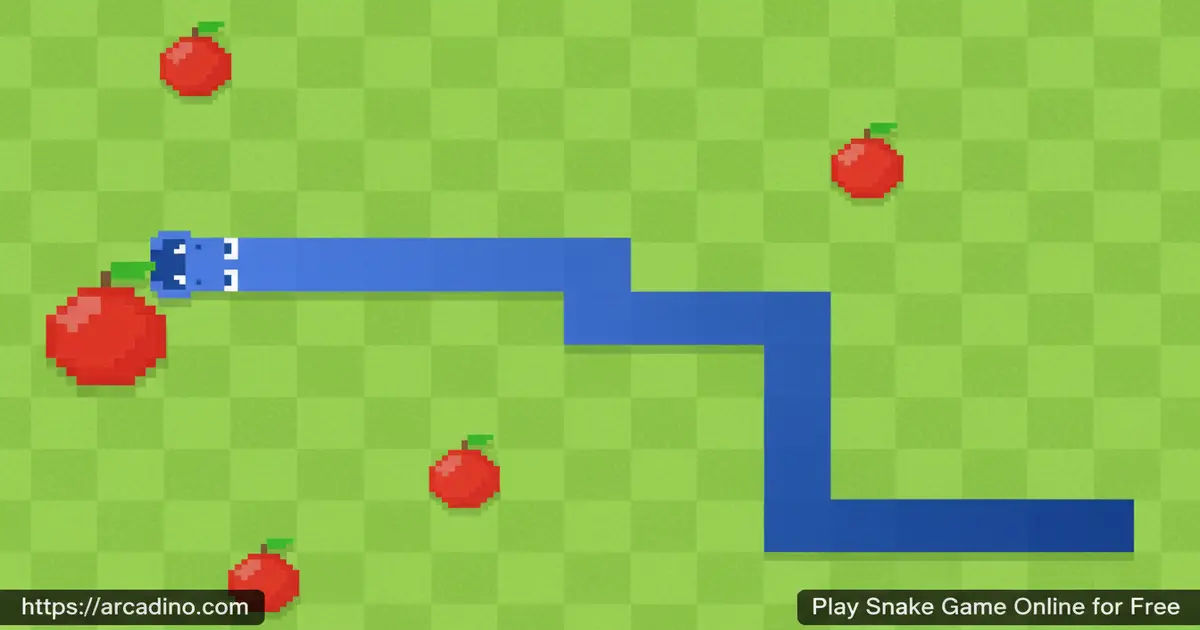
Few games have survived decades the way Snake Game has — and it’s still free to play right in your browser. What started on tiny Nokia phone screens is now a polished online classic that keeps players hooked. The goal sounds simple: guide your snake, eat the fruit, and grow as long as possible. But the longer your snake gets, the harder it becomes to avoid your own tail. 🐍
- Classic arcade gameplay rooted in the original Nokia snake formula
- Free to play instantly in your browser — no app installation needed
- Arrow key controls that feel tight and responsive from the very first move
- Customizable settings let you tweak the game before you start
What Is Snake Game?
Snake Game is a classic single-player arcade title that puts you in control of a slithering snake on a grid-based playing field. Your job is to eat the fruits scattered around the arena, which makes your snake grow longer with every bite.
The eat-and-grow idea is actually older than most people think. The very first version of the concept was an arcade cabinet called Blockade, released by Gremlin in 1976. Players steered a trail on-screen and tried not to crash — the same core rule that Snake still uses today. In 1982, Rock-Ola’s arcade game Nibbler pushed it further by adding a scoring system and a snake that kept growing with every bite. By the time Nokia loaded it onto mobile phones in 1997, the formula had already been perfected over two decades. Today’s browser version brings that same addictive core loop to modern screens.
What sets this version apart is how faithfully it captures the feel of the original while adding small quality-of-life touches. The Settings menu lets you adjust the game before jumping in, which is a smart addition. From a pure browser experience standpoint, the controls respond instantly to arrow key inputs — there’s no noticeable input lag even on slower machines. That snappy responsiveness makes every near-miss with a wall feel genuinely earned rather than frustrating.
Gameplay — How the Snake Loop Works
Every round of Snake Game starts the same satisfying way: your snake is small, the arena is wide open, and the first few fruits are easy pickings. Each piece of food you eat adds a new segment to your tail, making every future turn slightly more dangerous. The tension builds naturally — what felt like a roomy playfield starts to feel cramped once your snake stretches across half the screen.
The game ends the moment your snake hits a wall or bites its own tail. That single rule creates an incredibly tight feedback loop: you always know exactly why you lost, and you always believe you can do better next time. Competing against your own high score — or beating the records of your friends — is what gives this title its long-term grip. It’s deceptively simple to start but genuinely hard to master.
Game Modes and Challenges
The browser version of Snake Game includes different modes you can explore to test your reflexes in new ways. You can try an endless mode where you simply go as long as possible, a timed mode that challenges you to eat as much fruit as you can before the clock runs out, or a speed mode that cranks up the pace right from the start. Each mode shifts the pressure slightly, forcing you to adapt your movement strategy rather than rely on muscle memory alone.
The Settings icon on the main screen is your gateway to customizing the experience before each round. Click it before you press Play and you’ll find several real options you can change: speed (how fast your snake moves), board size (how big the playing grid is), color (your snake’s color), theme (the overall look of the arena), and graphics mode (which affects the visual style of the game). Tweaking these before each session means even experienced players have a reason to experiment rather than defaulting to the same run every time.
Settings Menu Explained
The Settings menu is one of the most useful parts of this browser version, and it’s worth knowing exactly what each option does before you dive in. Speed controls how quickly your snake moves across the grid — beginners should start on the slowest setting to give themselves more time to react, while experienced players can crank it up for a real challenge. Board size changes how big the playing field is — a larger grid gives you more room to maneuver and is great for learning, while a smaller grid forces tighter turns and higher pressure. Color and theme are purely cosmetic, but picking a color you like makes the game feel more personal and fun. Graphics mode lets you switch the visual style, which can make the game feel fresh even if you’ve played hundreds of rounds. A solid beginner setup is slow speed with a large board, while confident players can challenge themselves with fast speed on a small grid.
Graphics and Visual Style
The visual style of Snake Game leans into its retro roots without feeling outdated. The clean, minimal presentation keeps the focus exactly where it belongs — on the snake’s movement and the fruit you’re chasing. There’s no visual clutter competing for your attention, which actually makes the gameplay feel sharper and more intense.
The grid-based arena is easy to read at a glance, which matters a lot when you’re making split-second decisions. Compared to the black-and-white Nokia originals, this browser version offers a noticeably cleaner look. It respects the classic aesthetic while making sure everything is clear and easy to follow, even for younger players picking it up for the first time.
How to Play Snake Game
Getting started with Snake Game takes about five seconds. Head to the game page, use the Settings icon to adjust any options you want, then press Play. Your snake will start moving immediately, and it’s your job to steer it toward the fruit while keeping it away from the edges and its own growing body.
The biggest thing to remember early on is to think a few moves ahead. It’s tempting to chase every fruit in a straight line, but leaving yourself a clear escape route matters more as your snake grows. Practice every day and your reaction times will improve noticeably — the game genuinely rewards consistency.
Snake Game Controls
- Arrow Up — Move the snake upward
- Arrow Down — Move the snake downward
- Arrow Left — Turn the snake left
- Arrow Right — Turn the snake right
On mobile devices, tap the on-screen directional controls to guide your snake. The touch controls are straightforward and follow the same four-direction logic as the keyboard. Switching between keyboard and touch feels natural because the core input system is so simple.
Tips and Tricks for Snake Game
- Hug the walls early on: When your snake is short, staying near the edges gives you a wider open path through the middle to chase fruit safely.
- Think in loops, not straight lines: Curving your snake in wide circular patterns keeps more of the board clear as your tail grows longer.
- Never rush the last fruit: When there’s only one fruit left in a tight spot, pause and plan your approach — a reckless dash ends most high-scoring runs.
- Use the Settings menu to find your comfort zone: Adjust the available game options before you start to find the configuration that best matches your skill level.
- Quick reaction time matters more than speed: The snake moves at a set pace, so focused attention beats frantic button mashing every single time.
- Choose a larger board size when learning: A bigger playing field gives you extra room to make mistakes and correct your path. As you get better, switch to a smaller grid to make things harder. Board size is one of the easiest Settings tweaks that makes a huge difference to how difficult the game feels.
Key Features of Snake Game
- Classic Nokia-inspired gameplay: The core eat-and-grow mechanic that made Snake famous in 1997 is preserved perfectly in this browser version.
- Pre-game Settings menu: Customize your experience before every session by adjusting speed, board size, color, theme, and graphics mode through the built-in Settings screen.
- Multiple game modes: Choose from endless, timed, and speed modes to train specific skills and keep the experience fresh beyond the default single-player run.
- Instant browser play: The game loads quickly and runs entirely in your browser — no account required and nothing to install.
- High score competition: Beating your personal best — or your friends’ records — gives every session a concrete goal to chase.
Where to Play Snake Game
Snake Game is available for free right here on arcadino.com. It runs entirely in your browser, so there’s nothing to download or install on your computer. The game loads fast and works smoothly on both desktop and laptop screens. You can also access it on arcadino.com without any restrictions.
If you’d rather play on your phone or tablet, you can find snake-style games on both major app stores. Always download games through official stores — avoid third-party APK files, as they can carry security risks.
For Parents
Snake Game is a genuinely appropriate choice for kids aged 8 and up. There’s no violence, no mature themes, and no chat system — it’s purely about steering a snake around a grid and eating fruit. The gameplay naturally builds spatial awareness and quick decision-making skills, which makes it a mildly educational pick alongside the entertainment value.
Why Snake Is Genuinely Good Mental Exercise
Snake isn’t just fun — it actually gives your brain a solid workout in ways that are easy to miss. Spatial planning is the biggest one: every move requires you to think about where your tail will be in three or four steps, not just where you’re going right now. That kind of forward-thinking is the same skill used in puzzles and strategy games, and Snake trains it in short, snappy bursts. Peripheral attention also gets a real boost — as your snake fills more of the screen, you have to track your head and your tail at the same time without losing focus on either. Research on action video games shows that players who regularly practice this kind of split-focus attention get faster at noticing things in their surroundings in real life too. Finally, decision speed under pressure improves with every session: the game forces you to choose a direction quickly, stay calm when space runs out, and recover from near-misses without panicking. These three skills — spatial planning, divided attention, and fast calm decision-making — make Snake a surprisingly rich mental exercise for kids and adults alike.
The game doesn’t feature in-app purchases in its browser form, so there’s no risk of accidental spending during a play session. A short session of 10–15 minutes is plenty for younger players, since the challenge increases steadily and focus can fade after a few intense runs. It’s the kind of game parents can feel comfortable leaving on screen without needing to monitor every moment.
Classic Snake vs. Multiplayer Snake — Which Should You Play?
If you’re trying to decide between classic Snake and a multiplayer version like Snake.io, the choice really comes down to what kind of experience you’re after. Classic Snake is a solo game — it’s just you, the grid, and your own best score. The pace starts slow and builds naturally, which makes it perfect for beginners or anyone who wants a relaxed session where they’re in full control. There’s no pressure from other players, and every loss is a clean lesson you can act on immediately. Multiplayer Snake games like Snake.io throw you into a live arena with real opponents from around the world, which makes every session feel unpredictable and electric. The skill curve is steeper because you’re not just avoiding your own tail — you’re also reading other snakes and reacting to their moves in real time. Classic Snake is the better pick for building core skills and chasing personal bests; Snake.io is the better pick once you’re confident and want a social, competitive edge. Most players enjoy both — start here to learn the fundamentals, then head to Snake.io when you’re ready to test them against real opponents.
Similar Games You’ll Enjoy
If you love the grow-and-survive formula of classic snake gameplay, these titles take that same tension in exciting new directions:
- Snake.io — A multiplayer arena twist on snake where you slither against real players and try to become the biggest worm on the leaderboard.
- Worms Zone — A colorful multiplayer snake-style battle where you chomp food and outmaneuver other worms in a chaotic shared arena.
- Worm Hunt — Battle against other worms online in a lively, fast-paced environment that rewards smart movement over brute size.
- Cubes 2048.io — A clever mashup that layers 2048 number merging onto a snake-style growth mechanic for a uniquely strategic challenge.
- TileMan.io — A multiplayer io game where you claim territory by slithering across the map, punishing rivals who cross your path.
- Snake Clash — A massive snake battle game with over 100 million players, featuring multiplayer modes, unlockable skins, a global ranking system, and offline play for when you’re on the go.
Explore more titles like these in the Arcade games category.
FAQs About Snake Game
What is Snake Game?
Snake Game is a classic arcade game where you guide a growing snake to eat fruit. It originated on Nokia mobile phones in 1997 and has since become one of the most recognized games in history. Your goal is to eat as many fruits as possible without hitting the walls or your own tail. The longer your snake grows, the harder the challenge becomes.
Is Snake Game free to play online?
Yes, Snake Game is completely free to play in your browser. You can access it on arcadino.com without creating an account or downloading anything. The game runs directly in the browser window and loads quickly on most devices.
What are the controls for Snake Game?
Use the arrow keys on your keyboard to control the snake’s direction. On mobile, tap the on-screen directional buttons to steer. The control scheme has just four directions — up, down, left, and right — keeping inputs simple and beginner-friendly.
Where did Snake Game originally come from?
The Snake concept actually goes back further than most people realize. The earliest version was Blockade, an arcade game by Gremlin released in 1976. Nibbler by Rock-Ola in 1982 added the growing-snake mechanic that the game is famous for today. Nokia then brought it to millions of mobile phone users starting in 1997, cementing it as one of the most iconic games ever made.
Can I play Snake Game on mobile?
Yes, Snake Game is available on both Android and iOS devices. You can download it from the Google Play Store or the Apple App Store. The browser version also works on mobile, so you have multiple options depending on your preference.
What are some good games similar to Snake Game?
Snake.io, Worms Zone, and Worm Hunt are great options if you enjoy snake-style gameplay. Snake.io adds a real-time multiplayer leaderboard, while Worms Zone throws you into a colorful battle arena. Cubes 2048.io is a more unique pick that blends snake mechanics with number-merging puzzles. Snake Clash is worth checking out too — it’s a big multiplayer snake battle game with a huge player base and lots of customization.
How do I get a high score in Snake Game?
Plan your path ahead of time instead of chasing every fruit in a straight line. Moving in wide, looping patterns keeps more of the board open as your tail lengthens. Quick reaction time and consistent daily practice are the two biggest factors in pushing your score higher.
Conclusion
Snake Game is proof that a brilliant core mechanic never gets old. The eat-and-grow loop, the rising tension as your tail fills the screen, and the instant replay pull are as compelling today as they were on those early Nokia devices — and compelling long before Nokia too, all the way back to the arcades of the 1970s. The pre-game Settings menu with options for speed, board size, color, theme, and graphics mode gives it just enough modern flexibility to keep sessions feeling fresh every time.
If you’ve never played it — or haven’t picked it up in years — now is a great time to see how long your snake can really get. Head to arcadino.com, hit Play, and find out if your reflexes are as sharp as you think.
Gameplay Video


