

























Watch one short ad and play ad-free for 30 minutes.
Pizza Clicker
Bazuro Games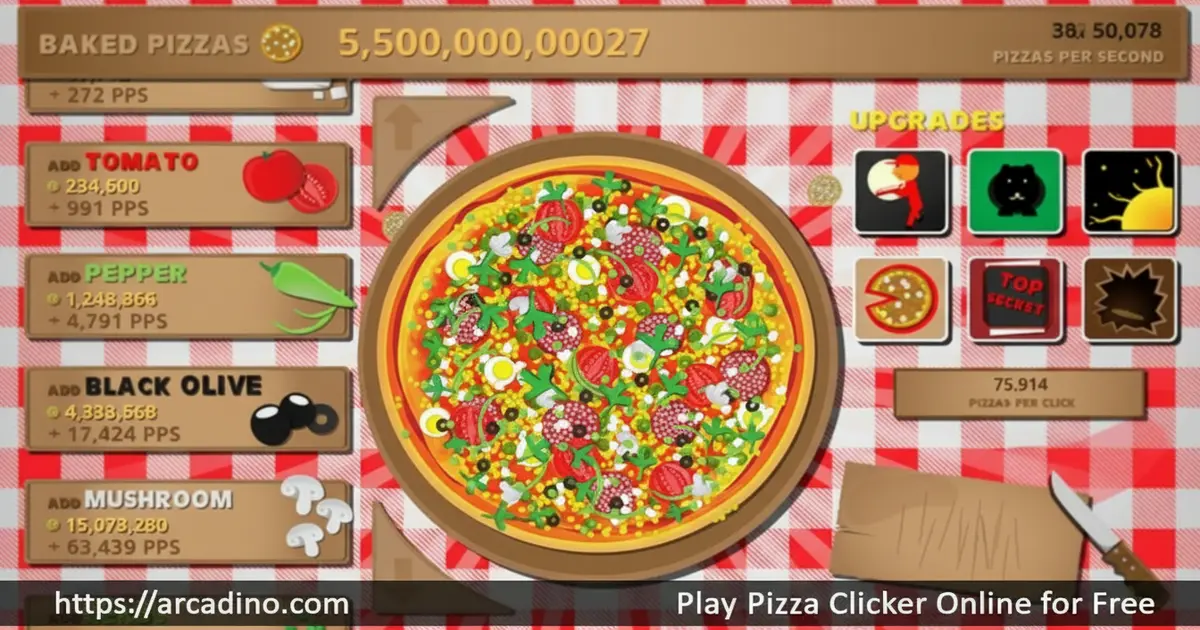
What if every click you made produced a fresh pizza? That’s exactly the delicious idea behind Pizza Clicker, a free idle clicker game you can play right now in your browser. 🍕 Start with a single pizza, and before long you’ve got a full-blown pizza empire on your hands. It’s one of those games that sneaks up on you — one click becomes a hundred, and suddenly you’re hooked.
- Click to bake: Tap the giant pizza to earn money and grow your business.
- Buy real toppings: Unlock ingredients like tomato sauce, olives, mozzarella, and basil.
- Catch golden pizzas: Special bonus pizzas appear and reward extra clicks or currency.
- Idle progression: Upgrades keep your pizzeria running even when you slow down clicking.
What Is Pizza Clicker?
Pizza Clicker is a free browser-based idle clicker game where your mission is simple: click a giant pizza to earn money and build the biggest pizza empire possible. It belongs to the same family as Cookie Clicker — you generate a resource by clicking, then reinvest those earnings into upgrades that multiply your output. The game was developed by FGL Indie Showcase and has attracted a dedicated fanbase across browser and mobile platforms.
What makes this idle hit stand out is its food theme and satisfying upgrade loop. Instead of abstract currency, you’re buying real pizza ingredients that feel rewarding to unlock. The game loads quickly in modern browsers with no lag, and the click response feels crisp and immediate — making that core loop satisfying from the very first tap.
A Note on Pizza Clicker Versions
It’s worth knowing that more than one game uses the name Pizza Clicker. The version covered in this article is the browser and mobile title developed by FGL Indie Showcase — the one you can play free in your browser right now. A separate game also called Pizza Clicker was released on Steam in 2024 by Bazura Games. That version works differently: it’s built around real-world pizza delivery timers that refresh every two hours, making it a completely different experience. If you searched for the Steam version, that’s a different product. This article covers the FGL Indie Showcase browser and mobile version only.
Pizza Clicker Gameplay — The Loop That Keeps You Clicking
Every session in Pizza Clicker starts the same way: you click the large pizza on screen, and each click generates more pizzas and money. The more money you collect, the more upgrades you can purchase. Those upgrades speed up your pizza production dramatically, so the game rewards active clicking early and passive earning later.
The genius of the loop is that it never really stops. Even when you step away from the keyboard, your upgrades keep producing pizzas in the background. Then you return to a pile of earnings to spend, which pulls you right back into the upgrade screen. It’s a rhythm that idle game fans will recognize immediately, but the pizza theme gives it its own flavor.
Toppings, Ingredients, and Customization in Pizza Clicker
As you earn more pizzas, you unlock a range of tasty toppings and ingredients to add to your creation. Tomato sauce, olives, mozzarella, basil, mushrooms, cheese, and salami are among the ingredients you can purchase. Each addition makes your pizzas more valuable and increases your production rate.
This customization layer gives Pizza Clicker a creative angle that pure number-clicker games often skip. Watching your plain pizza transform into a fully loaded masterpiece as you invest in upgrades feels genuinely satisfying. Each ingredient purchase is a small victory that nudges you to keep going.
Upgrades and Progression in Pizza Clicker
Upgrades are a core pillar of the Pizza Clicker experience. Each upgrade can only be bought once, which means every purchase feels meaningful and permanent. Rather than grinding through identical upgrade tiers, you’re steadily unlocking new tools that change how your pizzeria operates.
The progression system rewards players who think ahead about which upgrades to prioritize. Buying the right ingredient at the right time can send your pizza output soaring. As your shop grows, the scale of your operation becomes almost absurd — millions of pizzas pouring out from what started as a single click.
Golden Pizzas and Achievements in Pizza Clicker
Golden pizzas are special bonus items that pop up during gameplay, and catching them is a key part of the strategy. They can deliver bonus rewards, supercharge your clicks for a limited time, or trigger special events that boost your pizza count fast. Missing one feels painful — which makes keeping an eye on the screen genuinely exciting.
Pizza Clicker also includes an achievements system that gives you goals beyond just clicking. Hitting milestones and unlocking achievements adds structure to what could otherwise feel like an endless loop. These goals encourage players to experiment with different upgrade paths to complete their achievement list. Achievement milestones are tied to your pizza count and upgrade history — early targets include baking your first 100 pizzas and reaching 1,000 pizzas total, which unlock once you’ve stacked a few ingredient upgrades. From there, milestones jump to 10,000 pizzas, 100,000 pizzas, and beyond, with each tier rewarding a production bonus that meaningfully boosts your output. Other achievements are tied to actions like catching a set number of golden pizzas, buying every available ingredient, or spending a certain amount of coins in the shop — so there’s always a fresh goal to aim for no matter how far you’ve progressed.
How to Play Pizza Clicker
Getting started with Pizza Clicker takes about three seconds. Open the game in your browser, and you’ll immediately see the giant pizza in the center of the screen. Click it to start earning, then head to the shop to spend your first coins on ingredients and upgrades. The game explains itself naturally — you never feel stuck or confused about what to do next.
The key habit to build early is checking the shop regularly. New upgrades become available as your pizza count grows, so revisiting the shop after every big earning burst keeps your progression moving. Don’t hoard your earnings — spending them quickly on upgrades almost always pays off faster than saving.
Pizza Clicker Controls
The controls in Pizza Clicker are as simple as a game can get. Click or tap the pizza with your mouse to generate pizzas and money. Use your mouse to navigate the shop and purchase upgrades and ingredients. On mobile, tap the pizza and tap menu items to interact — everything works smoothly with a touchscreen too.
Saving Your Progress in Pizza Clicker
Pizza Clicker saves your progress automatically using your browser’s local storage. That means your pizzeria is still there when you close the tab and come back later — and your idle upgrades keep earning while you’re gone, so you’ll return to a stack of uncollected pizzas waiting to be spent. It’s a good idea to play in the same browser on the same device to keep your save intact. If you clear your browser’s cookies or cache, your save data may be wiped, so avoid doing that if you want to protect your progress. If your progress does disappear, there’s no built-in export or save code system in the browser version, so starting fresh is the only option — which is actually a great excuse to try a smarter upgrade strategy the second time around. Mobile app saves are tied to your device’s app storage and are generally more stable than browser saves.
When to Stop Clicking and Let Idle Take Over
Early in Pizza Clicker, every click matters a lot — your per-click income is a big chunk of your total earnings. But there’s a turning point where active clicking stops being the most efficient use of your time. A good rule of thumb: once your passive income per second is roughly ten times higher than what a single click earns, your upgrades are doing the heavy lifting and you can relax. At that stage, stepping away for 15 to 20 minutes and letting idle production stack up is actually faster than sitting there clicking non-stop. Check back in, spend the pile of coins on the next wave of upgrades, then let idle work again. This rhythm — short bursts of active clicking early, long idle stretches later — is the most efficient way to grow your pizza empire without burning out your clicking finger.
Tips and Tricks for Pizza Clicker
- Spend early, spend often: Don’t sit on your pizza coins. Buying upgrades immediately increases your earning rate, which compounds over time.
- Watch for golden pizzas: These special pizzas appear suddenly and disappear fast. Clicking them delivers huge short-term boosts, so stay alert.
- Prioritize production upgrades: Ingredients that boost your pizzas-per-click rate are more valuable than cosmetic additions when you’re just starting out.
- Let idle mechanics work for you: After a big upgrade session, step back and let the passive production pile up before your next spending spree.
- Chase achievements strategically: Check which achievements are close to completion and adjust your upgrade buying to unlock them faster — they often reward bonus production boosts.
Key Features of Pizza Clicker
- One-tap idle mechanics: Click the pizza to earn, then let upgrades handle production automatically — perfect for casual play sessions.
- Real topping unlocks: Collect and add authentic pizza ingredients like tomato sauce, olives, mozzarella, basil, mushrooms, and salami as you progress.
- Golden pizza events: Randomly appearing golden pizzas create exciting, time-sensitive moments that break up the idle routine.
- Permanent upgrade system: Each upgrade is purchased only once, making every spending decision feel impactful and permanent.
- Achievement milestones: A built-in achievement system gives players specific goals to chase, adding structure and replay value to the idle loop.
Where to Play Pizza Clicker
Pizza Clicker is available for free on arcadino.com — open it in any modern browser and start clicking straight away. There’s no account to create and nothing to install. The game is accessible without restrictions on the platform, so school networks and shared computers aren’t a barrier.
Looking for Pizza Clicker unblocked? You’re in the right place. arcadino.com hosts the game in a fully unblocked format, which means you can play it at school, at the library, or on a work computer without hitting any firewall or access restrictions. Unlike some sites that label themselves “unblocked 76” or similar, arcadino.com runs the game directly in your browser with no extra steps needed — just open the page and start clicking. No VPN, no workarounds, no fuss.
If you prefer playing on a phone or tablet, Pizza Clicker has dedicated mobile apps too. Grab the Android version from the Google Play Store or download the iOS version from the Apple App Store. Always download from the official stores — avoid unofficial APK files from unknown websites, as these can carry security risks.
For Parents
Pizza Clicker is a calm, non-violent idle game that’s well-suited for children aged 8 and up. There’s no chat system, no interaction with strangers, and no graphic content of any kind — it’s just pizza-making math dressed up in a fun wrapper. The clicking and upgrade mechanics introduce kids to basic concepts like resource management and investment in a very approachable way.
The game has no timed pressure or stressful fail states, which makes it a low-stress choice for younger players. Mobile versions may include ads, so parents of younger children may want to supervise app use. A 15-to-30 minute session is plenty to make meaningful progress without it becoming a distraction.
Similar Games to Pizza Clicker
If you love the satisfying click-and-upgrade loop of this idle hit, these browser clickers are worth your time next:
- Cookie Clicker — The original idle clicker that inspired Pizza Clicker’s core mechanics. Click cookies, buy grandmas and factories, and watch your cookie empire explode in scale.
- Burger Clicker — a food-themed clicker with the same fast-food vibe, perfect for Pizza Clicker fans who love themed clicker games.
- Donut Clicker — a sweet-themed clicker with addictive upgrades, capturing Pizza Clicker’s satisfying tap-to-grow loop.
- Candy Clicker — a sugar-rush clicker with deep upgrade trees, sharing Pizza Clicker’s incremental progression core.
- Cookie Clicker 2 — the sequel to the iconic clicker with new mechanics and upgrades, ideal for Pizza Clicker fans craving more idle gameplay.
- Clicker Heroes — a fantasy-themed idle game with deep progression and prestige systems, perfect for players who love Pizza Clicker’s “click forever” appeal.
- Capybara Clicker — a viral animal-themed clicker with charming visuals, sharing Pizza Clicker’s lighthearted incremental fun.
- Chicken Clicker — a quirky clicker game with a fun farm theme, capturing Pizza Clicker’s casual clicker spirit.
Explore more games like these in the Clicker category.
FAQs About Pizza Clicker
Is Pizza Clicker free to play?
Yes, Pizza Clicker is completely free on browser and mobile. You can play it instantly on arcadino.com without signing up or downloading anything. The mobile apps on Google Play and the App Store are also free to download, though they may include ads.
Who made Pizza Clicker?
Pizza Clicker was developed by FGL Indie Showcase. The game began as a browser title and expanded to mobile platforms over time. There are also community-made Scratch versions created by independent developers, though these are separate fan projects. Note that a separate game also called Pizza Clicker was released on Steam in 2024 by Bazura Games — that’s a different product with different mechanics, and this article covers the FGL Indie Showcase version.
What do golden pizzas do in Pizza Clicker?
Golden pizzas give you special bonus rewards when you click them. They can supercharge your clicks temporarily, deliver a burst of extra pizzas, or trigger limited-time events. They appear randomly during gameplay, so keeping an eye on the screen is part of the strategy.
How do I get more pizzas fast in Pizza Clicker?
Buy upgrades and ingredients as quickly as possible to boost your output. The fastest way to scale up is to reinvest your earnings constantly rather than saving. Catching golden pizzas whenever they appear also gives your count a significant short-term spike.
How do I restart Pizza Clicker?
To restart Pizza Clicker and wipe your save for a fresh start, you’ll need to clear your browser’s local storage for the game’s site. In most browsers, you can do this by opening the developer tools (press F12), going to the Application or Storage tab, finding Local Storage, and deleting the Pizza Clicker data entry. Alternatively, clearing your browser’s cookies and site data will also reset the game — just remember this will wipe all saved progress permanently. On mobile apps, uninstalling and reinstalling the app is the quickest way to get a clean slate. There’s no in-game reset button in the browser version, so using one of these methods is the way to go when you want to start over.
Is Pizza Clicker similar to Cookie Clicker?
Yes, Pizza Clicker shares Cookie Clicker’s core idle clicker structure. Both games ask you to click a central item to earn currency, then spend that currency on upgrades that automate production. Pizza Clicker swaps cookies for pizzas and adds a topping-unlock system as its own twist.
Can I play Pizza Clicker on mobile?
Yes, Pizza Clicker has official apps for both Android and iOS. Download it from the Google Play Store or the Apple App Store for a mobile-optimized experience. The browser version on arcadino.com also works well on mobile browsers if you prefer not to install an app.
What is Pizza Clicker Scratch?
Pizza Clicker Scratch refers to fan-made versions of the game built on the Scratch platform by independent creators. These are community projects inspired by the original game and are separate from the official FGL Indie Showcase release. They’re fun to try, but the original browser version has more polish and features.
Conclusion
Pizza Clicker nails the idle clicker formula with a food theme that’s impossible not to enjoy. The combination of permanent upgrades, real ingredient unlocks, and surprise golden pizza events keeps every session feeling fresh. It’s the kind of game that rewards both frantic clicking and patient, strategic upgrade planning.
If you haven’t started your pizza empire yet, arcadino.com is the place to build it. Jump into Pizza Clicker today and see how many millions of pizzas you can bake — your first click is waiting.
Gameplay Video


