











Watch one short ad and play ad-free for 30 minutes.
Speed Stars
Luke J. Garrett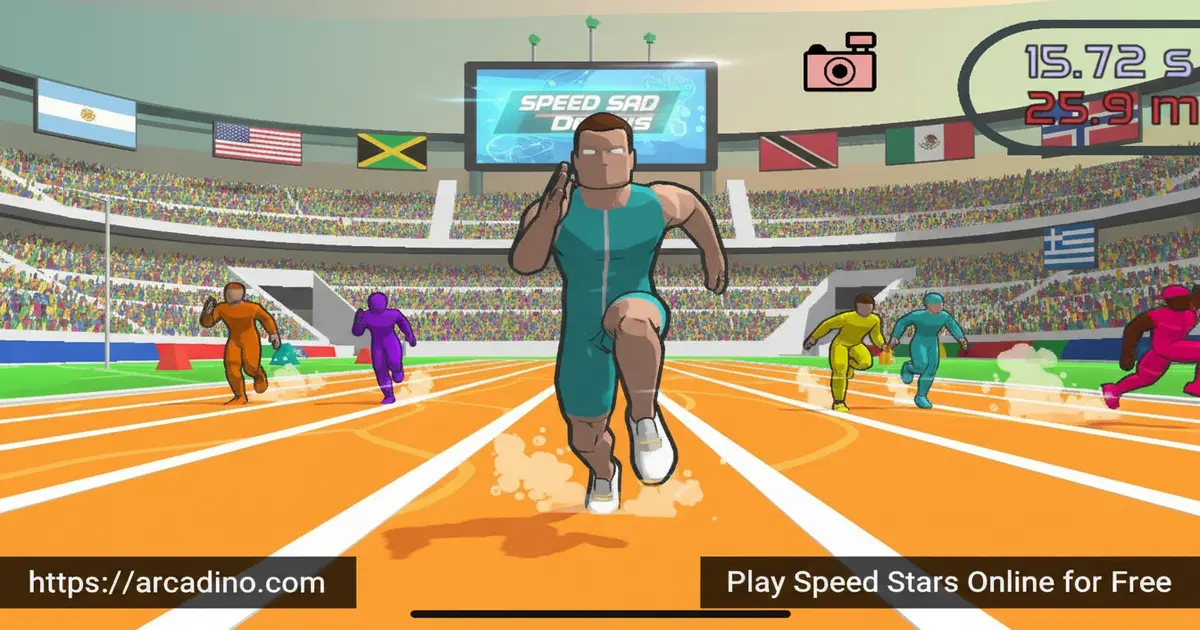
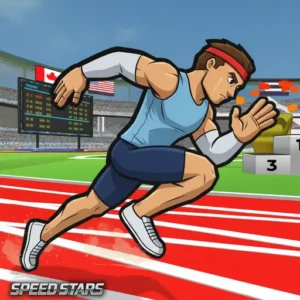
Most running games just want you to press fast. Speed Stars flips that idea completely — press too fast and you’ll stumble. Press with perfect rhythm and you’ll blaze past every rival on the track. Developed by Luke Doukakis and released in November 2024, this physics-based sprinting game is free to play right now in your browser. It pulls you into real-world track events, from 100m sprints to relay races, and makes every millisecond feel genuinely exciting. 🏃
- Rhythm-based controls where timing beats button-mashing every time
- Multiple track and field modes including hurdles and relay races
- Stamina bar that punishes reckless sprinting and rewards smart pacing
- Replay system so you can review every stride and improve your next run
What Is Speed Stars?
Speed Stars is a competitive, physics-based sprinting game where players control an elite athlete by pressing the left and right arrow keys in a precise rhythm. The game was created by indie developer Luke Doukakis and launched in November 2024. It draws inspiration from real-world track and field competitions, giving it a grounded feel despite its playful, physics-driven chaos.
What sets this title apart from other browser runners is how it punishes impatience. Pressing buttons in a rushed, uneven pattern slows your runner down noticeably — you can actually feel your athlete losing coordination. On desktop browsers the controls feel remarkably responsive, with each keypress registering instantly so rhythm mistakes are always on the player, never the game. That honest feedback loop is what makes Speed Stars genuinely satisfying to master.
Ongoing Updates and Active Development
Speed Stars is actively maintained by developer Luke Doukakis. Since launch, the game has received updates covering bug fixes, physics refinements, and graphics improvements. This means the version you play today is smoother and more polished than the one that launched in November 2024. If you’re searching for what’s new in Speed Stars, it’s worth checking the official app store pages for the latest patch notes, as updates roll out regularly across both the browser and mobile versions.
Gameplay — Master the Rhythm or Lose the Race
The core loop of Speed Stars is deceptively simple: alternate your left and right inputs to move your runner’s legs, and keep that alternation smooth and consistent. A perfectly timed sequence builds speed and momentum. Break the rhythm even once and you’ll watch competitors drift ahead while your athlete stumbles.
There’s also a stamina system to manage. The green bar in the top right of the screen tracks your athlete’s energy. Sprint too aggressively and you’ll drain it fast, making it nearly impossible to maintain peak velocity in the final stretch. Finding the balance between speed and stamina is where real skill lives in this game.
Game Modes and Challenges
Speed Stars offers a solid range of track and field events beyond the basic sprint. The hurdles modes — 100m hurdles and 400m hurdles — demand you press the down arrow key at the right moment to duck into the correct position for clearing each barrier. Miss the timing and your smooth rhythm shatters instantly.
The 4x100m relay mode adds a team dimension that feels completely different from solo sprinting. You’ll need to press the down arrow key at just the right moment to extend your arm and pass the baton to your next teammate. Timing your handoff slightly before contact gives your team the best possible speed boost. Free Run mode acts as the practice ground, letting beginners work on stride rhythm without the pressure of a live race.
Full Version — Extra Race Distances
The free browser version of Speed Stars gives you a great set of events to race right away. But the full version of the game unlocks five additional iconic track and field distances. These include the 60m dash, 200m dash, 400m dash, and 110m hurdles, among others. If you love the core mechanics and want more race variety, upgrading to the full version through the mobile app is worth exploring. The extra distances all use the same rhythm-based controls you already know, so there’s no new learning curve — just more track to conquer.
Customization and Upgrades
Between races, you can personalize your athlete with a range of cosmetic options. Shoes, socks, arms, hands, and facial features are all customizable, letting you build a runner that feels distinctly yours. Some items unlock immediately, while others require gems you earn through racing.
It’s worth noting that character skins in Speed Stars are purely cosmetic — they don’t give any runner a performance edge. Every player competes on equal mechanical footing, which keeps competition fair across all skill levels.
Multiplayer and Leaderboards
Speed Stars connects players through a global leaderboard where finishing times are tracked and compared worldwide. You can race against AI opponents, challenge ghosts of real players, or run solo time trials to chase personal bests. After each race, you’re shown exactly where you stand.
The replay feature pairs perfectly with the competitive side of the game. Watch your full run back after every race, spot exactly where your rhythm broke down, and go again with sharper technique. That combination of leaderboard pressure and personal replay review gives the game strong replay value for competitive kids.
How to Play Speed Stars
Getting started in Speed Stars is quick. From the main menu, pick any event you want to race. The race begins the moment the starting pistol fires — don’t press your keys too early or you’ll get a false start penalty, which costs precious time at the start line.
Once you’re off, settle into a steady alternating rhythm and keep your stamina bar in mind as the finish line approaches. For hurdles events, scroll the main menu and select your hurdles distance, then press the down arrow key at the right moment as each barrier approaches. In the relay event, watch for your teammate and press down to extend the baton arm at just the right moment.
Speed Stars Controls
- Left/Right Arrow Keys (or A/D): Alternate these to control your runner’s stride and build speed
- Down Arrow Key: Press at the right moment to take the hurdle position when approaching a barrier
- Down Arrow Key (Relay): Press near your teammate to extend your arm and pass the baton
- Mobile: Tap the left and right sides of the screen alternately to run — same rhythm rules apply
Tips and Tricks for Speed Stars
- Never mash — find your tempo: Pressing alternating keys at a consistent, measured pace builds far more speed than frantic button-bashing ever will.
- Nail the starting signal: A clean, well-timed start right as the pistol fires sets you up for momentum early. False starts waste your lead before the race even begins.
- Watch your stamina bar closely: The green bar drops fast if you sprint at full intensity from the start. Pace yourself through the middle stretch to save energy for the final push.
- Time your hurdle press early: Press the down arrow key just before the barrier reaches you — waiting until the last instant usually clips the hurdle and kills your rhythm.
- Use Free Run to practice: This mode removes race pressure entirely. It’s the best place to dial in your key-press tempo before jumping into competitive events.
Finding Your Rhythm Sweet Spot
Most players who struggle with Speed Stars are pressing too fast, not too slow. The optimal cadence is closer to a steady metronome beat than to the fastest tapping you can manage. Think of it like pressing one key per stride, not one key per heartbeat. A useful mental trick is to pick a calm song with a clear beat — around 120 to 140 BPM works well — and try to match your alternating keypresses to that pulse. This BPM-training approach gives your brain a concrete target rather than the vague instruction to ‘stay consistent.’ Once you lock in that internal rhythm, you’ll notice your runner smoothing out immediately and pulling away from rivals who are still mashing. Practice this tempo in Free Run mode first, then bring it into a real race when it feels natural.
Key Features of Speed Stars
- Physics-driven stride control: Every keypress physically moves one of your runner’s legs, making rhythm feel tactile and real rather than abstract.
- Stamina management system: A visible green stamina bar forces strategic pacing — flat-out sprinting the whole way is a losing strategy.
- Full track and field event roster: Sprint, 100m and 400m hurdles, 4x100m relay, and free run practice mode all offer distinct mechanical challenges.
- Post-race replay review: Watch your complete run back after every race to identify exactly where your timing slipped and fix it next time.
- Global leaderboard with ghost racing: Compete against recorded times from real players around the world, not just local AI opponents.
Where to Play Speed Stars
Speed Stars runs entirely in your browser with no installation required. You can play it free on Arcadino, where it loads quickly and runs without restrictions — no login, no waiting. It works on desktop and laptop computers using the keyboard controls described above.
Browser Performance and School Accessibility
Speed Stars runs on standard web technology and doesn’t require any plugins, downloads, or special software to work. It loads quickly even on modest hardware, and performs well on school-issued Chromebooks and older laptops — making it one of the more accessible browser games for classroom or library settings. Because it runs without needing high-end graphics support, you won’t hit the kind of lag or loading errors that trip up heavier browser games. This also means Speed Stars works on most school networks without the technical barriers that block plugin-dependent titles. If you’re looking for a game that simply opens and plays without fuss, Speed Stars delivers that reliably.
If you prefer playing on a phone or tablet, the game is also available as a dedicated mobile app. The tap controls on mobile mirror the keyboard rhythm mechanic perfectly. Download it from the official stores below:
Always download from these official store links. Avoid third-party APK sites, as unofficial files can carry security risks and often run outdated versions of the game.
For Parents
Speed Stars is appropriate for kids aged 8 and up. There’s no violent content — it’s a cartoon-style athletics game inspired by Olympic track events. The rhythm-based controls actually build hand coordination and timing skills, and the stamina system introduces light strategic thinking about pacing.
Motor Skills and Cognitive Benefits
The alternating left/right keypress mechanic in Speed Stars does more than just move a character on screen — it directly mirrors bilateral coordination exercises used in physical education curricula and occupational therapy settings. Bilateral coordination is the brain’s ability to use both sides of the body in a controlled, coordinated sequence, and it underpins skills like handwriting, sports, and musical instrument playing. When kids practice matching their left and right keypresses to a smooth rhythm, they’re engaging the same neural pathways that those structured exercises target. The game also demands real-time rhythm processing — players must internally track a tempo and adjust their timing on the fly, which is a genuine cognitive load task. For educators or therapists looking for engaging digital tools that reinforce these skills, Speed Stars offers a surprisingly purposeful activity wrapped inside a fun racing game. Parents can feel confident that screen time spent here is doing something constructive beyond entertainment.
The customization system uses an in-game gem currency earned through play. There is no chat system visible in the competitive modes, making this a lower-risk online experience for younger players. Sessions are naturally short — individual races last seconds to a couple of minutes — so it’s easy to manage screen time without mid-game interruptions.
Similar Games You Might Enjoy
If the rhythm-based racing in Speed Stars has you hooked on track games, these browser titles are worth checking out next:
- Speed Stars 2 — The follow-up to the original, building on the same rhythm sprint formula with additional content for fans of the first game.
- QWOP — The classic physics-based running game where you control each leg muscle separately, making it the original test of coordination and patience for browser gamers.
- Run 3 — A fast-paced space runner with precision platforming and hundreds of levels, perfect for players who love Speed Stars’ reflex-driven gameplay.
- Sprinter — An old-school keyboard sprinting game where rapid key presses simulate running, sharing the same satisfying feeling of nailing a personal best time.
- Geometry Dash — A rhythm-based game where timing your inputs to the beat is everything, sharing Speed Stars’ core mechanic of rhythm over raw speed.
Explore more fast-paced titles in the Running category on Arcadino.
FAQs About Speed Stars
How do you play Speed Stars?
Alternate the left and right arrow keys to control your runner’s stride. Consistent, even timing builds speed — rushing the inputs actually slows your athlete down. Use the down arrow key to clear hurdles or pass the baton in relay mode.
Who created Speed Stars?
Speed Stars was created by indie developer Luke Doukakis. It launched in November 2024 and quickly gained traction on browser game platforms for its unique rhythm-based mechanics and physics-driven sprinting.
Is Speed Stars free to play?
Yes, Speed Stars is completely free to play in your browser. You can also download the mobile app at no cost from the Google Play Store and Apple App Store. The in-game gem currency is earned through races.
Can I play Speed Stars on mobile?
Yes, Speed Stars is fully playable on phones and tablets. The mobile version uses tap controls — tap the left and right sides of the screen alternately to run. The same rhythm rules apply as on desktop.
What is the stamina bar in Speed Stars?
The stamina bar is the green bar in the top right of the screen. It depletes as you sprint at high intensity. Draining it completely makes it very hard to keep peak speed through the final stretch of the race.
What modes are available in Speed Stars?
Speed Stars includes sprint races, 100m hurdles, 400m hurdles, a 4x100m relay mode, and a Free Run practice mode. Each mode tests your rhythm and timing in a different way, with hurdles and relay adding extra layers beyond basic sprinting.
Does Speed Stars have a leaderboard?
Yes, Speed Stars features a global leaderboard tracking player times worldwide. You can also race against ghosts of real players or compete against AI opponents, giving you multiple ways to measure your performance.
Can you customize your runner in Speed Stars?
Yes, Speed Stars lets you customize your athlete’s shoes, socks, arms, hands, and facial features. Some items are unlocked immediately while others cost gems earned through racing. Cosmetic choices don’t affect race performance.
Why is Speed Stars so hard at first?
Speed Stars feels hard at first because it goes against your natural instincts. When most players struggle, their first reaction is to press faster — but that’s exactly what makes your runner stumble and slow down. The game punishes the button-mashing habit that works in almost every other action game. Your brain expects speed to come from fast inputs, but Speed Stars rewards a calm, even rhythm instead. It usually takes a few races before that click happens and the controls start to feel right. Using Free Run mode to practice your tempo without race pressure is the fastest way to get past that early frustration.
Conclusion
Speed Stars earns its reputation with a genuinely clever central mechanic: rhythm beats raw speed, every single time. The stamina system, post-race replays, and diverse track events from hurdles to relay mode give it far more depth than a typical browser runner. Developer Luke Doukakis built something that’s easy to pick up but takes real practice to master — and with regular updates keeping the game fresh, there’s always a reason to come back for one more race.
If you’re ready to find your stride, head to Arcadino and take the starting blocks. Your personal best is waiting — and so is every rival on that global leaderboard.
Gameplay Video


