
Incredibox
So Far So Good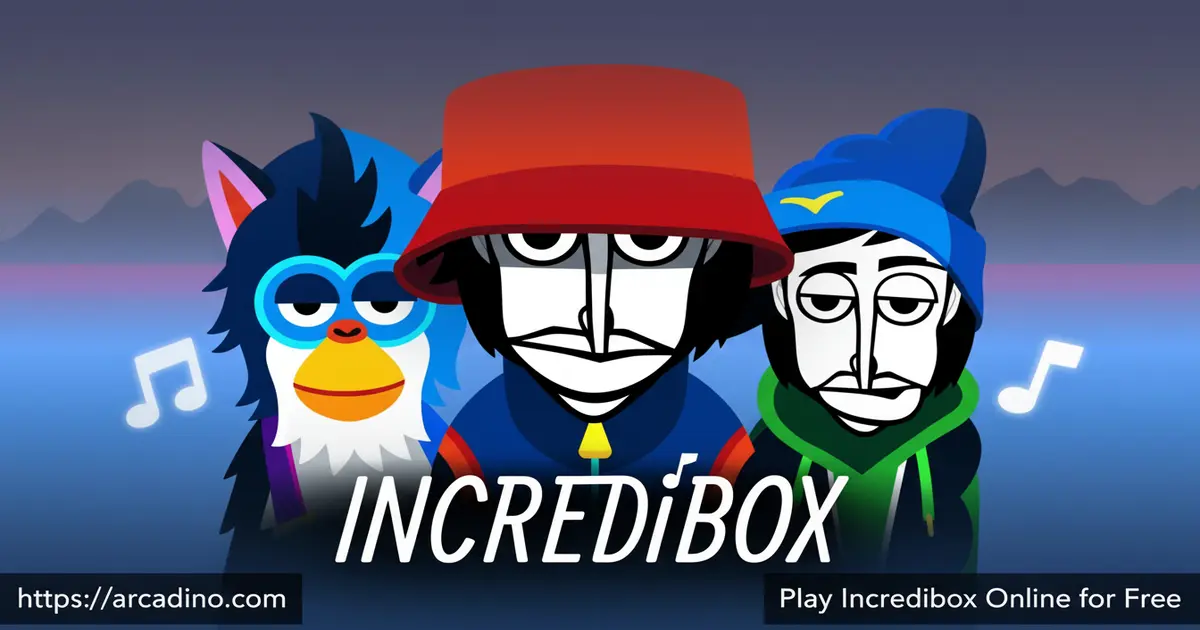
What if making a real music track took less than a minute? Incredibox hands you a crew of animated beatboxers and lets you build looping tracks right in your browser, free to play. You drag sound icons onto characters, stack layers, and suddenly you’re a producer. It’s genuinely one of the most creative experiences in browser gaming right now. 🎵
This music creation game comes from Lyon, France-based studio So Far So Good and has been delighting players since 2009. Each version brings its own visual style, sound palette, and crew of quirky characters to experiment with.
- Drag-and-drop music creation — build tracks by placing sound icons onto animated beatboxers
- Multiple themed versions — each with unique characters, sounds, and visual styles
- Unlock animated choruses — find the right sound combos to trigger special sequences
- Share your mix — save your creation and compete for a spot on the Top 50 chart
What Is Incredibox?
Incredibox is part music game and part creation tool — a browser-based experience where you compose looping tracks by dressing animated characters with sounds. You pick from beats, melodies, effects, and vocal layers, then stack them until your groove clicks. The studio So Far So Good built it in Lyon, France, launching the original version in 2009 as a webpage before expanding it to mobile and tablet apps.
What genuinely sets this title apart is how it makes music theory invisible. You’re not reading notes or setting BPMs — you’re just experimenting with drag-and-drop, and the combinations do the work. On a standard laptop browser, the animations load crisply and the audio layers sync without noticeable lag, which makes the creative loop feel satisfying rather than frustrating. It’s an audio and visual experience designed for people of all ages, not just musicians.
Incredibox Gameplay — How the Creative Loop Works
The core gameplay loop in Incredibox is beautifully simple. You see a row of animated characters on screen, and above them sit icon categories: beats, effects, melodies, and voices. Drag an icon onto a character and they start performing that sound. Stack more icons across more characters and the track builds up layer by layer.
The real hook is discovering sound combos that trigger secret animated choruses. When you hit the right combination, the whole crew launches into a special animated sequence that enhances your tune. That reward keeps you experimenting, swapping icons in and out, chasing the next unlock. It turns music-making into something that feels like puzzle-solving.
How Choruses Actually Unlock — What’s Really Happening
Each version of Incredibox hides several chorus combinations, and cracking them feels like a mini-puzzle inside the music game. When you assign the correct set of icons — usually a specific beat, melody, and effect together — the characters’ costumes change and a short cinematic animation plays. Some versions have three or four hidden choruses to find, and each one sounds and looks completely different. You don’t get any hints, so the discovery feels genuinely rewarding when it happens. Try filling all your characters with sounds first, then swap out one icon at a time to zero in on a trigger. Patient players who work through every combination will eventually unlock them all. It’s one of those satisfying challenges that keeps you coming back long after your first session.
Incredibox Versions — Each One Feels Like a New World
One of the strongest reasons to keep coming back is the range of versions available. While the core drag-and-drop mechanic stays consistent, each Incredibox version has its own distinct characters, sound palette, and visual theme. The shift in atmosphere between versions is dramatic enough that they each feel like a fresh experience.
Whether you prefer chilled-out vibes or high-energy beats, there’s a version that fits your mood. Players hunting for all the hidden chorus combos will find plenty to explore across the full lineup. The variety also means younger players can start with more accessible versions and work their way into more complex ones.
A Quick Tour of the Official Incredibox Versions
So Far So Good has released eight official versions of Incredibox, and each one has its own identity worth knowing before you dive in. The original version, simply called The Original, keeps things clean and stripped-back — it’s the best starting point for first-timers. Little Miss leans into a sweet, bubbly sound palette with pastel visuals that younger players tend to love. Sunrise brings a warmer, more soulful groove with longer melodic loops that feel great layered up. The Love shifts the mood to something smoother and more romantic, while Brazil injects samba-influenced rhythms that make it one of the most energetic versions in the lineup. Alive and Dystopia push into more complex electronic and orchestral sounds that reward players who’ve already spent time in the simpler versions. Knowing which version matches your mood before you start saves time and makes the whole experience more enjoyable from the first drag.
Graphics and Audio in Incredibox
The visual side of Incredibox is clean, bold, and personality-packed. Each beatboxer character is animated with smooth, expressive movements that react to the sounds they’re assigned. When a chorus unlocks, the animation kicks into a higher gear — it’s genuinely exciting to watch your composition come alive on screen.
The audio design is where this game truly shines. Every sound icon is crafted to blend naturally with the others in its version, so even random combinations tend to sound musical rather than chaotic. That thoughtful sound design is what makes the game feel rewarding for total beginners and satisfying for players with a genuine ear for music. The sound designers behind each version clearly put serious work into making sure every possible combo stays in key and in time, which is a harder problem to solve than it looks. That invisible guardrail is what makes Incredibox feel magical rather than accidental.
Automatic Mode and Sharing Your Incredibox Mix
Not feeling creative? The automatic mode plays a mix for you, which is great for just sitting back and enjoying the sound design. It’s also a smart way to hear what a well-balanced track sounds like before you start building your own.
Once your mix sounds exactly how you want it, you can save it and share it with the community. Other players can vote on your creation, and the best mixes climb toward the Top 50 chart — a real leaderboard of community-voted tracks. The mobile and tablet app version also lets you download your mix as an MP3 to keep and listen to offline.
Browser vs. Mobile — Which Version Should You Play?
Both the browser and mobile versions of Incredibox deliver the same core experience, but there are a few real differences worth knowing. The browser version on Arcadino is the fastest way to start playing — no download, no account, just instant access on any laptop or desktop. The official mobile app on Android and iOS adds one major bonus: you can export your finished mix as an MP3 and actually keep it. Touch controls on the app feel smooth and natural, making it especially good on tablets where your fingers have plenty of room to drag icons around. The browser version is better for quick sessions at school or on a shared computer, while the app suits players who want to build, save, and collect their best tracks over time. If you’re new, start in the browser to explore freely, then grab the app when you’re ready to save something you’re proud of.
How to Play Incredibox
Getting started takes about ten seconds. Pick a version, and you’ll see the beatboxer crew lined up on screen with sound icon categories hovering above them. Drag any icon onto any character to assign that sound, then keep adding layers until your track starts taking shape.
The goal is to experiment freely and find combinations that click. Pay attention to when the characters’ animations shift — that’s often a clue that you’re close to unlocking a chorus. Once your mix sounds great, hit save to share it with the community or start fresh with a completely different sound direction.
Incredibox Controls
The controls are entirely mouse-driven on desktop. Click and drag sound icons from the menu down onto the beatboxer characters to assign them. To remove a sound, drag the icon back off the character. On mobile and tablet, tap and drag with your finger to do the same thing — the touch controls feel just as natural as the desktop version.
Tips and Tricks for Incredibox
- Layer beats first, then melody. Start with a rhythm foundation before adding melodic icons — it keeps your track from sounding muddy.
- Swap icons systematically to find choruses. Change one icon at a time rather than reshuffling everything, so you can pinpoint which combo triggers the animated sequence.
- Use automatic mode as a reference. Let it run for a minute to hear a balanced arrangement, then try to recreate or improve on it manually.
- Try every version’s full sound set. Each version’s icons are balanced specifically for that theme — mixing icons between styles isn’t possible, so explore each one fully on its own terms.
- Share early for votes. The Top 50 chart rewards mixes that get voted on quickly after posting, so don’t sit on a good track — share it while your session is fresh.
- Watch for costume changes. When a character’s outfit subtly shifts after you drop an icon, it’s a sign that you’re one or two sounds away from triggering a hidden chorus.
Key Features of Incredibox
- Drag-and-drop composition system — assign beats, effects, melodies, and voices to animated characters with no music knowledge needed
- Hidden animated choruses — discover specific sound combinations to unlock special animated sequences that transform your track
- Multiple distinct versions — each version offers its own visual theme, character roster, and curated sound palette
- Community voting and Top 50 chart — share your mix and let other players vote it toward the leaderboard
- Automatic mode — a hands-free playback option that generates a mix without any input from the player
- MP3 export on mobile — download your finished mix as an audio file using the official Android or iOS app
Where to Play Incredibox
You can play Incredibox free right now in your browser at arcadino.com — no download or account needed. The browser version loads quickly and runs smoothly on most modern computers and laptops. It’s also fully accessible without restrictions on Arcadino, so school or library networks shouldn’t get in the way.
If you want to take the experience further, the official app is available on both Android and iOS. The mobile version adds the ability to download your finished mix as an MP3 file, which the browser version doesn’t offer. Stick to the official app stores for safe downloads — avoid unofficial APK sites, as third-party versions can carry security risks.
For Parents
Incredibox is a great fit for kids aged 8 and up. There’s no violence, no chat system, and no random opponents — just a calm, creative space where players build music at their own pace. The drag-and-drop format is intuitive enough for younger children, while older kids can dig into the challenge of finding every hidden chorus combination.
The game has genuine educational value, too. It teaches kids how musical layers work together — rhythm, melody, harmony, and effects — without ever feeling like a lesson. The community voting feature on saved mixes is the only social element, and it’s mild. A 20–30 minute session is plenty for most ages, though creative kids may happily lose track of time chasing that perfect mix.
Using Incredibox in the Classroom
Teachers have used Incredibox as a low-barrier introduction to music production concepts for years. It’s a practical way to demonstrate how rhythm, melody, harmony, and timbre work together without needing instruments or sheet music. Students can work individually on a laptop or collaborate around a shared screen, making it flexible for different classroom setups. Because every combination sounds musical by design, even students with no prior music experience finish a session feeling successful. Some music teachers use the different versions as a starting point for discussing genre and mood — asking students why Brazil sounds energetic while Sunrise feels calm is a genuinely rich classroom conversation. The automatic mode also works well as a quick listening exercise before a lesson on music structure.
Similar Games to Incredibox
If you love building music and experimenting with sound, these browser games offer a similar creative buzz:
- Sprunki — a fan-made spiritual successor to Incredibox with its own cast of characters and sound loops, widely considered the closest match to the Incredibox experience.
- Sprunki 2 — the sequel packed with new characters, mixes, and sound combinations for Incredibox fans who want more layered beat-making.
- Sprunki Phase 3 — a darker, more atmospheric take on the Incredibox formula with deeper sound design and mysterious vibes.
- Sprunki Pyramixed — an Egyptian-themed Sprunki mod with fresh sound packs and visuals, perfect for Incredibox fans craving new creative directions.
- Sprunki Clicker — an idle spin-off from the Sprunki music universe, delivering the same character-driven charm in a different gameplay style.
- Friday Night Funkin’ — a rhythm battle game where you hit notes in sync with the beat, perfect for players who love Incredibox’s musical timing and expression.
- FNF Mods — a massive library of Friday Night Funkin’ custom tracks and mods, delivering endless rhythm-based creativity for music-loving players.
- FNF Garcello — an emotional fan-made Friday Night Funkin’ mod with memorable music, great for Incredibox fans who appreciate artistic rhythm gameplay.
Want to explore more music games? Check out the Music category for more creative sound experiences.
FAQs About Incredibox
Is Incredibox free to play online?
Yes, Incredibox is completely free to play in your browser. Head to arcadino.com and start building your first track instantly. The official mobile app is also free to download from the Play Store and App Store.
Who made Incredibox?
So Far So Good, a studio based in Lyon, France, created Incredibox. They launched the first version in 2009 as a webpage. It later expanded into a full mobile and tablet app that became a hit worldwide.
How do you unlock the animated choruses in Incredibox?
Drag specific combinations of sound icons onto your beatboxers to trigger a chorus. The exact combos vary by version, so experiment by swapping icons one at a time. When you hit the right mix, the whole crew launches into a special animated sequence. Watch for subtle costume changes on the characters — those are a clue that you’re getting close to the right combination.
What are the different Incredibox versions?
So Far So Good has released eight official versions, each with its own unique characters, sound set, and visual theme. These include The Original, Little Miss, Sunrise, The Love, Brazil, Alive, and Dystopia, among others. The core drag-and-drop gameplay stays the same across all of them, but the atmosphere and complexity vary significantly. Trying every version is the best way to find your favorite style.
Can I save and share my Incredibox mix?
Yes, you can save your mix and share it with the community. Other players can vote on it, and top-voted tracks appear on the community Top 50 chart. The mobile app also lets you download your mix as an MP3 file.
What is Incredibox Sprunki?
Incredibox Sprunki is a fan-made mod inspired by the original game. It features its own cast of characters and a distinctive sound palette that feels more experimental than the official versions. It’s popular among players looking for a fresh twist on the Incredibox formula. The broader Sprunki community has also produced dozens of further spin-off mods, each with its own themed characters and sounds.
Does Incredibox have an automatic mode?
Yes, Incredibox includes an automatic mode that plays a mix without any input from you. It’s perfect for when you just want to enjoy the sound design without building a track yourself. It’s also a handy way to hear what a balanced arrangement sounds like before you start composing.
Conclusion
Incredibox pulls off something rare: it makes music production feel like play. The drag-and-drop system, the hidden chorus unlocks, and the range of distinct versions give it real replay value long after your first track. So Far So Good built something that works equally well as a five-minute creative break or a deep session chasing every secret combination.
Fire up the browser version at arcadino.com, pick a version you haven’t tried yet, and see how far you can push your mix before sharing it with the world. The Top 50 chart is waiting.
Gameplay Video

