


























Watch one short ad and play ad-free for 30 minutes.
Paper Minecraft
Griffpatch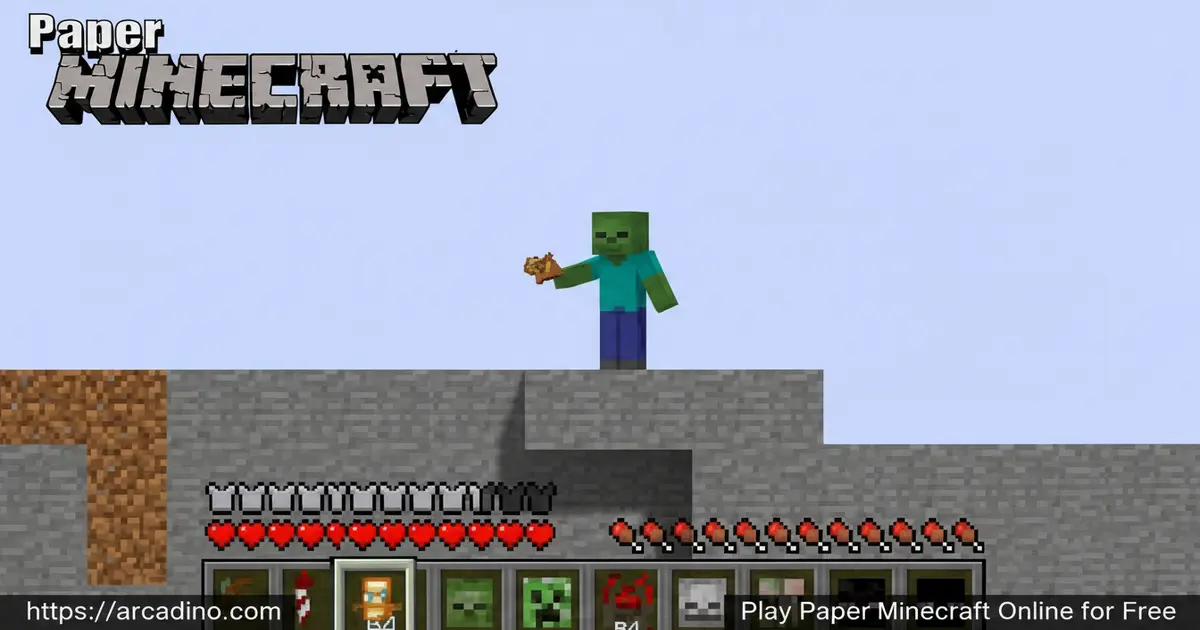
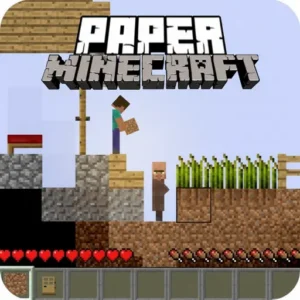
What happens when the world’s most famous block game gets flattened into 2D? You get Paper Minecraft — a free browser game that reimagines Minecraft’s survival and creativity on a flat, side-scrolling plane. It’s completely free to play, and you can jump into it right now with nothing to install. Griffpatch built this fan-made gem on Scratch, MIT’s free game-making tool, and it’s been pulling players in since 2013. The 2D twist makes everything feel fresh, even if you’ve spent hundreds of hours in the original.
- Two iconic game modes: Switch between Survival and Creative depending on your mood.
- Classic crafting loop: Gather resources, craft tools, and build shelters just like the original.
- Real biomes and weather: Explore snowy regions, forests, and fields — and watch it actually rain or snow.
- Authentic Minecraft features: Endermen, Nether Portals, Elytra, Beacons, and more all made the cut.
What Is Paper Minecraft?
Paper Minecraft is a 2D side-scrolling browser game that recreates the Minecraft experience on a flat plane. It belongs to the survival and craft game genre, and it was created by Griffpatch — a well-known YouTuber and developer in the Scratch community. The game originally launched in May 2013 and has been updated continuously ever since. That kind of long-term support is rare for a free fan project, and it shows in how polished the experience feels.
What makes it stand out is how faithfully it captures Minecraft’s spirit in a completely different format. You still dig, craft, build, and survive — just from a side view instead of first-person 3D. Since it runs on Scratch inside the browser, the controls snap into action almost instantly after the page loads, with no noticeable input lag even on older school laptops. That responsiveness makes a real difference when you’re trying to place blocks quickly or dodge mobs at night.
Paper Minecraft Gameplay — The Core Loop
The gameplay loop in Paper Minecraft centers on the same satisfying rhythm that made Minecraft a cultural phenomenon. You punch trees, gather wood, craft a workbench, then build better tools — all rendered in charming 2D pixel art. Every session starts with that familiar rush of figuring out what to do first. It’s incredibly easy to lose track of time once you’re deep in a mining run.
Survival mode is where this game gets intense. Night falls, and monsters start roaming the map — you need a shelter fast. You can also farm animals and trade with villagers using the crafting table interaction. The loop of gather, build, survive, and explore keeps each session feeling purposeful rather than aimless. 🎮
Game Modes and Challenges in Paper Minecraft
The game offers two distinct ways to play, and they cater to very different personalities. Survival mode drops you into the world with nothing — no tools, no shelter, no food. You have to use the environment around you to stay alive as hostile mobs hunt you after dark. It’s a genuine challenge that rewards smart planning and quick crafting.
Creative mode flips the script entirely. You get unlimited access to every tool and building material in the game. You can fly freely across biomes — through forests, over water, across rocky fields — and build anything your imagination comes up with. This mode is perfect for players who want to experiment with construction without worrying about survival. Switching between these two modes gives the game serious replay value.
Biomes, Weather, and World Features
One of the most impressive things about this title is how much of Minecraft’s world variety made it into 2D. You’ll discover different biomes as you explore sideways — including snowy regions that were introduced in version 11.0 and appear roughly one in every ten biome segments. The weather system adds real atmosphere too: rain rolls in, snow settles on the ground in cold biomes, and you can even trigger weather changes using commands.
The world is packed with features pulled straight from the original game. You can build a Nether Portal to reach the Nether, construct an End Portal to face the final challenge, and set up a Beacon or Conduit for powerful effects. Endermen wander the map and react if you look at them. Elytra lets you glide through the air — equip it in your chestplate slot, then jump from a high point and press jump again mid-air to open the wings and start gliding. The amount of content crammed into this 2D fan game is genuinely remarkable.
Graphics and Audio in Paper Minecraft
The visual style leans into its 2D identity rather than trying to mimic 3D Minecraft. Blocky sprites represent every material — earth, stone, wood, water, lava — and they’re immediately recognizable to any Minecraft fan. The pixel art is clean and readable, which matters a lot when you’re scanning a busy screen full of blocks and mobs. Everything you need to identify is always clear at a glance.
The side-scrolling view gives the world a storybook quality that’s genuinely charming. Watching snow actually settle across the terrain during a snowstorm, or seeing rain fall across a forest biome, adds surprising life to the flat world. It’s not trying to be the full 3D experience — it’s something with its own personality.
Paper Minecraft vs. the Original Minecraft — Which Should You Play?
Not sure whether to play Paper Minecraft or fire up the real Minecraft? Here’s the quick breakdown. Paper Minecraft is completely free — no subscription, no launcher, and no account needed. The original Minecraft costs money and requires a dedicated app install. Paper Minecraft loads instantly in your browser and runs in 2D, while the original is a full 3D first-person experience with infinite worlds. The trade-off is world size: Scratch does impose some limits on how large and complex a Paper Minecraft world can get, which you’d never hit in the original. If you want zero barriers and a fun 2D twist on the formula right now, Paper Minecraft wins easily. If you want the deepest, most expansive experience possible and don’t mind the cost, the original is unmatched. Many players happily enjoy both.
Performance Tips — Why Paper Minecraft Might Lag and How to Fix It
Because Paper Minecraft runs on Scratch, it shares the same CPU and rendering limits as every other Scratch project. That means very large builds or nights packed with lots of mobs can cause the game to slow down — this is totally normal and not a problem with your computer. The game performs best when the browser tab is active and in focus, so avoid switching to other tabs while playing if you notice any choppiness. Closing unused browser tabs and pausing any video streams before you play can also free up enough memory to keep things smooth. If you’re on a school Chromebook or an older laptop, Creative mode tends to run more cleanly than a mob-heavy Survival night, so consider that when choosing your session. Knowing these limits upfront means you’ll never be caught off guard wondering why your epic underground fortress is causing a slowdown.
How to Play Paper Minecraft
Getting started in Paper Minecraft is simple. Head to the game page, pick your character skin, and choose either Survival or Creative mode before your world generates. In Survival, your first job is always the same: find trees, harvest wood, and craft a basic shelter before night arrives. In Creative, you can start building immediately with unlimited materials from the moment the world loads.
The inventory system works just like the original game. Press E to open or close your inventory, and hover over a chest, crafting table, or door while pressing E to interact with it. You can even trade with villagers the same way. Mastering the inventory early makes everything else in the game much smoother.
Controls for Paper Minecraft
- [WASD] — Move, jump, and crouch
- [Click] — Place or mine blocks
- [1 to 9] — Select an item from your hotbar
- [E] — Open or close your inventory
- [E + hover] — Interact with chests, crafting tables, doors, command blocks, and villagers
- [Space] — Drop a single tile from a stack while dragging in your inventory
Save Codes — How to Save and Resume Your World
Paper Minecraft uses a save code system to let you pick up exactly where you left off. When you want to save your progress, open the in-game menu and copy the save code it generates — it’s a long string of text that stores your entire world state. Paste that code somewhere safe, like a notes app or a document, before you close the tab. Next time you visit, choose the option to load from a save code and paste it in to restore your world. Some players share their save codes online so friends can explore the same world — it’s a cool way to show off a big build. Always keep a backup of your code somewhere safe, because closing the tab without copying it means starting fresh.
Tips and Tricks for Paper Minecraft
- Build a shelter before the first sunset: Mobs spawn at night, so use your first minutes to gather wood and throw up four walls with a door before darkness hits.
- Use E+hover to trade with villagers: Villager trading is easy to miss — approach one, hold E, and hover to open the trade menu without needing a dedicated interact button.
- Hunt for snowy biomes: Snowy biomes are rare, appearing roughly one in ten biome segments (introduced in v11.0). They contain unique resources worth the sideways trek.
- Use Creative mode to learn crafting recipes: If you’re unsure how to craft something in Survival, switch to Creative first and experiment freely — then carry that knowledge back.
- Set up a Beacon early in Survival: Beacons provide powerful ongoing effects. Getting one running sooner rather than later makes the later stages of Survival much more manageable.
- Master the Elytra for fast travel: Find Elytra and equip them in your chestplate slot. Jump from a tall structure, then press jump again while falling to open the wings and glide. It’s the fastest way to cross big distances in the 2D world.
Key Features of Paper Minecraft
- Faithful 2D Minecraft recreation: Built on Scratch by Griffpatch, this game captures the original’s crafting and survival loop in a side-scrolling format.
- Survival and Creative modes: Two completely different playstyles in one game — intense monster-dodging survival or unlimited creative building.
- Dynamic weather and biome variety: Rain, snow that settles on terrain, snowy biomes, forests, and fields all appear as you explore sideways.
- Advanced game features: Nether Portals, End Portals, Endermen, Elytra, Beacons, and Conduits are all present and functional.
- Decade-plus of continuous updates: Active development since May 2013 means bugs get fixed and new features keep arriving — unusual for a free fan game.
Paper Minecraft Version History — Key Milestones
Griffpatch has kept Paper Minecraft growing steadily since its 2013 launch, and the changelog tells a great story. Version 11.0 was a landmark update that introduced snowy biomes, giving players a whole new region to explore sideways. Version 11.1 followed quickly with snow weather, making those cold biomes feel truly alive as flakes settled on the ground. Version 11.2 brought rain to the warmer biomes, completing the weather system that players enjoy today. Version 11.6 focused on polish, delivering a round of bug fixes that tightened up the overall experience. Each update has kept the community coming back, and the fact that a free Scratch fan game has versioned releases at all says a lot about Griffpatch’s dedication to the project.
Where to Play Paper Minecraft
Paper Minecraft is available for free in any modern web browser — no download and no account required. You can play it right here on arcadino.com, where it loads quickly and runs without restrictions. The Scratch-based engine means it works reliably across most desktop and laptop browsers you’d find in a school or home.
If you prefer playing on the go, there’s an Android version available. Grab it safely from the official Google Play Store using the link below. Always download from official stores rather than third-party APK sites — unofficial files can carry security risks that no game is worth.
Paper Minecraft at School — Unblocked and Classroom-Friendly
One of Paper Minecraft’s biggest hidden advantages is how well it works on school networks. Because the game runs through Scratch’s own CDN rather than a standalone game domain, it bypasses many of the content filters that block dedicated gaming sites — making it genuinely unblocked on most school Wi-Fi setups. Chromebooks and older school laptops handle it well, especially in Creative mode where the rendering load stays low. Teachers have used Paper Minecraft to introduce concepts like resource management, planning ahead, and cause-and-effect thinking in a format kids actually want to engage with. Chrome and Firefox are the most reliable browsers for school environments, and the game needs no plugins or extensions to run. If your school allows Scratch, it almost certainly allows Paper Minecraft — so bookmark this page and you’re set.
For Parents
Paper Minecraft is a great fit for kids aged 8 and up. The content is completely non-graphic — monsters are blocky pixel sprites, and there’s no blood or mature themes. The survival mechanics actually encourage planning, resource management, and creative problem-solving, which are genuinely useful thinking skills.
The game has no in-app purchases and no chat system built into the browser version, making it a lower-risk pick for younger players. Creative mode is especially parent-friendly — it’s essentially a digital LEGO set with no pressure or danger. As a general suggestion, 30 to 45 minutes can be a good session length to aim for, since the open-ended nature of the game makes it easy for kids to keep going without noticing the time.
Similar Games to Paper Minecraft
If you love the crafting and block-building style that makes this 2D survival game so addictive, these browser games are worth trying next.
- Minecraft Classic — The official free browser version of Minecraft lets Paper Minecraft fans step into the original 3D world that inspired it all, with 32 players and classic creative building.
- Bloxd.io — A multiplayer crafting and parkour hybrid where you build worlds, tackle obstacle courses, and compete in diverse game modes with blocky 3D graphics — great for Paper Minecraft fans who want to team up with friends.
- MineFun.io — A lightweight Minecraft-inspired sandbox that shares Paper Minecraft’s pick-up-and-play spirit, ideal for fans who want that crafting loop without a long setup.
Browse more games like this in the Adventure category on arcadino.com.
FAQs About Paper Minecraft
Who made Paper Minecraft?
Paper Minecraft was made by Griffpatch, a YouTuber and Scratch developer. He built it using Scratch, the free game-making tool developed at MIT. The project originally launched in May 2013 and has been updated continuously with new features and bug fixes ever since.
Is Paper Minecraft free to play?
Yes, Paper Minecraft is completely free to play in your browser. There are no in-app purchases in the browser version. The developer does mention that voluntary support is appreciated, but it’s never required to access the full game.
What game modes does Paper Minecraft have?
Paper Minecraft has Survival mode and Creative mode. Survival starts you with nothing and tasks you with crafting shelter and tools before monsters arrive at night. Creative gives you unlimited materials and the ability to fly freely across all biomes.
Is Paper Minecraft like the original Minecraft?
Yes, it’s very similar but presented in a 2D side-scrolling format instead of 3D. The core mechanics — gathering resources, crafting tools, building structures, and surviving monsters — are all faithful to the original. Features like Endermen, Nether Portals, and weather systems are also included.
What are the controls for Paper Minecraft?
Use WASD to move, jump, and crouch, and click to place or mine blocks. Press E to open your inventory, and use keys 1 through 9 to select hotbar items. Hovering while holding E lets you interact with chests, crafting tables, and villagers.
Can I play Paper Minecraft on mobile?
Yes, Paper Minecraft has an Android version available on the Google Play Store. The browser version runs best on desktop or laptop computers. For the smoothest mobile experience, the official Play Store app is the safest and most reliable option.
Does Paper Minecraft have snowy biomes?
Yes, snowy biomes exist in Paper Minecraft and were introduced in version 11.0. They appear roughly once every ten biome segments. Snow actively settles on the terrain during snowfall, and a weather command system lets you trigger rain, snow, or clear skies manually.
Why Paper Minecraft Deserves a Spot in Your Browser
Not many fan games survive a decade of active development and still feel this complete. Paper Minecraft nails the craft-survive-explore loop that made the original great, then wraps it in a 2D format that’s surprisingly easy to pick up. The depth of content — from snowy biomes and dynamic weather to Endermen, Elytra, and working Nether Portals — goes far beyond what you’d expect from a Scratch project.
Whether you’re a seasoned Minecraft veteran curious about the 2D spin-off or a newcomer looking for a solid free survival game, this title delivers genuine fun without any barriers. Head to arcadino.com, pick Survival or Creative, and start building your flat-world adventure today.
Community and Mods for Paper Minecraft
Paper Minecraft has grown a passionate community that goes well beyond just playing the base game. Players and developers have created mods and extensions that add new mobs, items, and mechanics on top of what Griffpatch built — and there’s a community-maintained wiki that documents many of these additions in detail. If you want to explore modding yourself, YouTube has dedicated tutorials walking through how to remix the Scratch project and add your own features safely. The Scratch platform makes remixing beginner-friendly, so even younger players can experiment with basic tweaks. Searching for ‘Paper Minecraft mod’ on Scratch or YouTube will pull up a wide range of community projects to try or learn from. It’s a great next step once you’ve mastered the base game.
Gameplay Video

