
























Watch one short ad and play ad-free for 30 minutes.
Moto X3M Winter
MadPuffers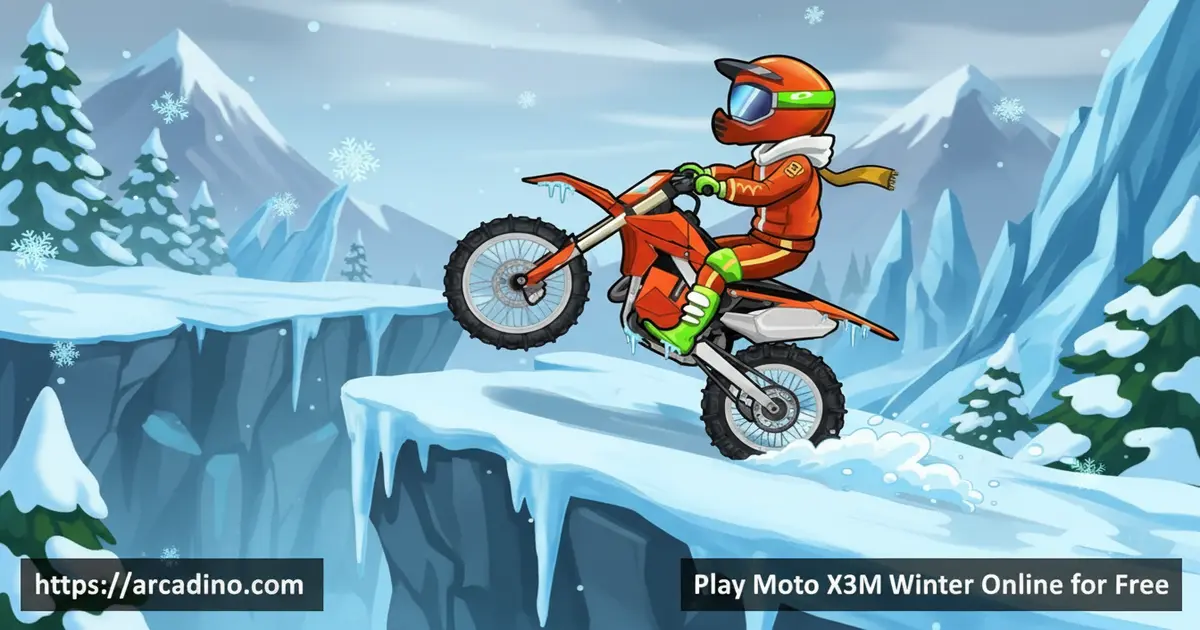
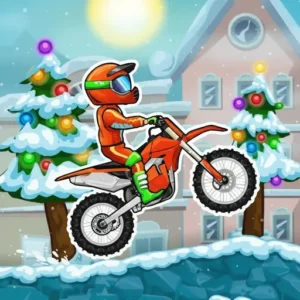
Icy ramps, candy cane bridges, and Nitro boosters — Moto X3M Winter packs a ridiculous amount of fun into a free browser game. It’s the fourth entry in Madpuffers’ legendary stunt bike series, and it’s playable online right now with zero downloads. This winter edition sends you crashing and flipping through 25 snow-soaked tracks full of surprises. Every level feels fresh because the obstacles keep changing in ways you genuinely don’t expect.
- 25 unique winter-themed tracks packed with wild obstacles
- Trigger-based Nitro boosters that launch you across the course
- Stunt flip system — each flip shaves 0.5 seconds off your time
- Bike store unlocked with stars you earn from fast runs
What Is Moto X3M Winter?
Moto X3M Winter is an arcade stunt racing game developed by Madpuffers and released in December 2017. It’s the fourth installment in the Moto X3M series, which has built a massive fanbase for its chaotic, physics-driven bike action. The winter theme wraps every track in snow, ice, and festive decorations that make it stand out from other entries in the series. Madpuffers rebuilt it in HTML5 in November 2018, making it run smoothly in any modern browser.
The controls snap responsively the moment you press the arrow keys — there’s no sluggish input delay that plagues some older HTML5 racers. That tight control feel matters a lot when you’re threading through breakable glass ramps and timed Nitro blasts at high speed. This is a trial-and-error game at its core, but the snappy reset button means frustration never builds for long. You’ll want to retry a level immediately after every crash, which is exactly what makes it so addictive.
Moto X3M Winter Gameplay — How the Loop Works
Each level throws your stunt bike onto a track full of ramps, loops, and hazards. You accelerate forward, hit obstacles, crash spectacularly, and restart until you nail the perfect run. The core challenge is completing each track as fast as possible while staying upright. It sounds simple, but the track designs get seriously creative as you progress.
What really drives the game loop is the star rating system. The faster you finish a level, the more stars you earn — and those stars are your currency in the bike store. Crashing costs you time, so every clean run feels like a personal victory. That constant pressure to shave seconds pushes you to attempt riskier lines through each course.
Levels and Progression in Moto X3M Winter
There are 25 winter-themed tracks in Moto X3M Winter, and they escalate in complexity as you move through them. Early levels introduce you to the icy terrain and basic ramp setups. Later stages layer in trickier obstacle combinations that require precise timing and smart throttle control. Each track unlocks after the previous one, so progression feels earned rather than handed to you.
The obstacles that make this version special include breakable glass ramps, air blowers, candy ropes, and trigger-based Nitro boosters. The Nitro boosters are particularly exciting — hit the right trigger point and you’ll rocket across a section at insane speed. Candy cane bridges and snowmen scattered across levels add to the festive chaos. Every track introduces at least one element that’ll catch you off guard the first time through. 🎿
Difficulty Curve — Which Levels Are the Toughest?
Not all 25 levels hit the same difficulty, and knowing the curve helps you stay prepared. Levels 1–8 are introductory — they teach you the basics of throttle control, simple ramps, and the icy surface feel. Levels 9–16 start introducing Nitro booster timing, where hitting a trigger at the wrong angle sends you straight into a wall. The real challenge wall hits between levels 17 and 25, where glass ramps, Nitro blasts, and air blowers all combine in quick succession and leave little room for error. Many players report getting stuck around levels 18–20 specifically, because the Nitro landing zones get tighter while the glass ramp sequences speed up underneath you. If you’re grinding those mid-to-late levels, slow down your approach speed and study the landing zone before committing to full throttle. Knowing where each obstacle sits before you hit it is the single biggest advantage you can give yourself in the back half of the game.
Customization and Upgrades — The Bike Store
Stars you earn from fast, clean runs unlock new motorbikes in the bike store. The faster you complete tracks and the fewer crashes you rack up, the more stars you collect. Those stars let you browse cosmetic bike upgrades and swap out your ride. It’s a satisfying reward loop that gives you a real reason to replay levels and chase better times.
The bike store adds a layer of personality to the game beyond pure speed runs. Picking a new bike before tackling a tough track makes every session feel a bit different. The store offers two categories of cosmetic upgrades: bike frames, which change the look of the motorcycle itself, and rider skins, which swap out the appearance of your character on top. It’s not deep customization, but it’s enough to keep things feeling fresh across multiple play sessions.
Full Moto X3M Series Comparison — Every Entry at a Glance
The Moto X3M series has grown into one of the most-played stunt bike franchises in browser gaming, and each entry brings its own theme, level set, and signature obstacles. Here’s how every installment stacks up so you can decide which one to tackle next:
-
Moto X3M (2016): The original. 22 desert and canyon levels that introduced the arrow-key flip system and the star rating mechanic the whole series runs on. -
Moto X3M 2 (2017): 25 levels with more complex ramp combos and trickier obstacle sequences built on the original’s formula. -
Moto X3M Pool Party (2017): 22 summer-themed levels featuring water slides, pool floats, and splash hazards — the most cheerful entry in the series. -
Moto X3M Winter (2017): 25 icy levels with glass ramps, candy cane bridges, and trigger-based Nitro boosters. The fourth entry and the one you’re playing now. -
Moto X3M Spooky Land (2019): 22 Halloween-themed levels packed with haunted obstacles, swinging axes, and graveyard ramps — the spookiest entry in the lineup.
Every game in the series uses the same core controls and flip mechanic, so jumping between entries feels natural. If you’re new to the series, starting with the original Moto X3M and working forward is the best way to build your skills before tackling Winter’s trickier obstacle combos.
How to Play Moto X3M Winter
Jump straight into the first track and start learning how the physics behave. The game is built on trial and error — you’re meant to crash, restart, and improve with each attempt. Focus first on staying alive through a full level before chasing a fast time. Once you know a track’s layout, that’s when you can push for three stars.
The restart button sits in the top left corner of the screen, so getting back into action after a crash takes just a second. Keep that habit of resetting quickly — hesitating costs mental momentum. Every level in this stunt racer rewards persistence far more than raw skill. The more you play, the better your instincts get for when to hit the throttle and when to hold back.
Moto X3M Winter Controls
Use the Up arrow key to accelerate forward and the Down arrow key to brake or reverse. The Left and Right arrow keys tilt your rider backward and forward mid-air. Tilting during jumps lets you pull off flips, which directly reduce your completion time. On mobile, on-screen tap buttons replace the keyboard controls.
Tips and Tricks for Moto X3M Winter
- Flip whenever you catch air: Each completed flip removes 0.5 seconds from your time, so look for every ramp as a flip opportunity.
- Don’t rush Nitro sections: The trigger-based Nitro boosters launch you at high speed — approach them at the right angle or you’ll crash on landing.
- Use the restart button freely: The arrow in the top left resets your run instantly. Don’t crawl through a bad run; restart and go again clean.
- Learn the glass ramps: Breakable glass ramps collapse under you — ride fast enough to get across before they shatter beneath your wheels.
- Prioritize stars on early levels: Bank three stars on the simpler tracks first to unlock better bikes before the difficulty spikes in later stages.
Key Features of Moto X3M Winter
- 25 winter-themed tracks: A full set of icy levels with escalating complexity and unique obstacle layouts.
- Stunt flip time bonus: Every completed flip mid-air cuts 0.5 seconds from your finish time, rewarding risky play.
- Trigger-based Nitro boosters: Hit specific trigger points on the course to activate rocket-speed bursts of acceleration.
- Festive obstacle variety: Breakable glass ramps, candy ropes, air blowers, and candy cane bridges keep every track surprising.
- Star-powered bike store: Earn stars through fast runs and spend them unlocking new bikes with cosmetic upgrades.
Where to Play Moto X3M Winter
Moto X3M Winter runs entirely in your browser as a free HTML5 game — no installation, no account needed. It works on Windows, macOS, and Linux desktops, and scales well for play on mobile browsers too. You can access it without restrictions on arcadino.com, where it loads quickly and runs smoothly. The HTML5 version replaced the original Flash build in November 2018, keeping the game alive on modern devices.
If you prefer a dedicated app on your phone, Madpuffers has released the Moto X3M series on both major app stores. Grab it on Android via the Google Play Store or on iPhone and iPad through the Apple App Store. Always download from the official stores — avoid APK files from third-party websites, as they can carry security risks. The official app versions are free to download and safe to use.
Browser Compatibility and Performance Notes
The HTML5 version of Moto X3M Winter runs confirmed and smoothly on Chrome, Firefox, Edge, and Safari — so whatever browser you’ve got open right now, you’re almost certainly covered. Chrome tends to deliver the most consistent frame rate, which matters when you’re threading through fast Nitro sections. Firefox and Edge both perform well on mid-range hardware. Safari works fine on Mac and iPhone, though very old Safari versions on iPad may occasionally stutter on levels with heavy obstacle sequences. The game does not support offline play through the browser cache, so you’ll need an active internet connection to load it. On school Chromebooks, the game runs well in Chrome as long as your network allows access to the host site — it doesn’t require any plugins, extensions, or special permissions to launch.
For Parents
Moto X3M Winter is a cartoon stunt bike racer with no blood, no realistic violence, and no online chat features. The content is entirely age-appropriate for players 8 and up — crashes are slapstick and the tone stays playful throughout. There are no in-app purchases in the browser version, so kids won’t accidentally spend real money while playing. A session of three to five levels takes about 15–20 minutes, making it easy to fit into a natural play-time window.
The level-unlock structure makes managing screen time straightforward. Each individual level takes between one and four minutes to complete, so finishing a single level is a natural short stop, while clearing three levels with three stars each is a satisfying 15-minute goal. The star system gives kids a visible target — chasing that third star on a level they’ve already beaten — which means sessions have a clear end point rather than an open-ended scroll. That built-in progression makes it easy to set a rule like “finish the level you’re on and then we’re done” without arguments, because the game itself signals completion cleanly. You can observe your child learning to read obstacle patterns on screen, adjust their timing after each failed attempt, and plan a new approach before hitting restart — those are concrete, visible problem-solving behaviors the game actively encourages.
Similar Games to Moto X3M Winter
If you love the stunt bike chaos of this icy racer, these games will feel right at home:
- Moto X3M — The original entry in the series that started it all, with the same arrow-key stunt mechanics on a classic set of tracks.
- Moto X3M 2 — The second installment brings new level designs and trickier obstacle combos to the Moto X3M formula.
- Moto X3M Pool Party — A summer-themed spin on the series swapping ice and snow for splashing water slides and pool floats.
- Moto X3M Spooky Land — A Halloween edition loaded with spooky obstacles and haunted track designs for fans of the winter version.
- Snow Rider — A snowy driving game that shares the winter setting and fast-paced feel of this stunt racer.
Browse more games like these in the Racing category.
FAQs About Moto X3M Winter
Is Moto X3M Winter free to play?
Yes, Moto X3M Winter is completely free in any modern browser. There’s no paywall, no subscription, and no account required to start playing. The full set of 25 levels is available from the moment you open the game.
How many levels are in Moto X3M Winter?
Moto X3M Winter has 25 levels in total. Each track introduces new obstacles and gets progressively more complex. You unlock stages one by one as you complete the previous level.
Who made Moto X3M Winter?
Madpuffers developed Moto X3M Winter. They are the studio behind the entire Moto X3M series. The game originally launched in December 2017 and was rebuilt in HTML5 in November 2018.
How long has Moto X3M been around?
The original Moto X3M launched in 2016, which means the series has been running for nearly a decade. Madpuffers released multiple entries across 2016 and 2017, with Moto X3M Winter arriving in December 2017 as the fourth installment. Moto X3M Spooky Land followed in 2019, bringing the series total to at least five mainline entries. The franchise has stayed alive largely because the switch to HTML5 in 2018 kept every entry playable on modern browsers without Flash.
What is Moto X3M 4?
Moto X3M 4 is the same game as Moto X3M Winter. The “4” refers to its position as the fourth installment in the Moto X3M series. It’s sometimes listed under both names, but they refer to the exact same winter-themed stunt racer.
How do flips work in Moto X3M Winter?
Each completed flip during a jump removes 0.5 seconds from your finish time. Use the left and right arrow keys to tilt your bike while airborne and complete full rotations. Landing cleanly is the key — a crashed flip costs you far more time than it saves.
Can I play Moto X3M Winter on mobile?
Yes, the game runs on mobile browsers and also has official app versions. The dedicated app from the Google Play Store or Apple App Store tends to offer smoother touch controls and faster load times compared to the mobile browser version, since it’s optimized specifically for touchscreen input. The browser version is a solid option if you just want to jump in quickly without downloading anything.
What makes Moto X3M Winter different from other Moto X3M games?
The winter setting introduces unique obstacles not found in other entries. Breakable glass ramps, trigger-based Nitro boosters, candy ropes, and candy cane bridges are specific to this version. The icy mountain aesthetic and festive level designs also give it a completely distinct visual identity from the rest of the series.
What is the latest game in the Moto X3M series?
As of the most recent mainline entry, Moto X3M Spooky Land is the newest installment in the series. Released in 2019, it brings a Halloween theme with haunted obstacles and graveyard track designs. If you’ve finished Moto X3M Winter and want more, Spooky Land is the natural next stop.
Conclusion
Moto X3M Winter earns its place as the standout seasonal entry in Madpuffers’ series. The combination of 25 escalating levels, the flip-for-time-bonus mechanic, and inventive obstacles like Nitro boosters and breakable glass ramps gives it a depth that casual racers rarely match. It rewards patience, sharp reflexes, and a willingness to restart — and every three-star run feels genuinely earned.
If you’ve never tried this stunt racer before, the first level will hook you before you even reach the first ramp. Head to arcadino.com and find out how many flips it takes to unlock that first new bike. Your best run is always one restart away.
Gameplay Video


