














Watch one short ad and play ad-free for 30 minutes.
Tennis Masters
MadPuffers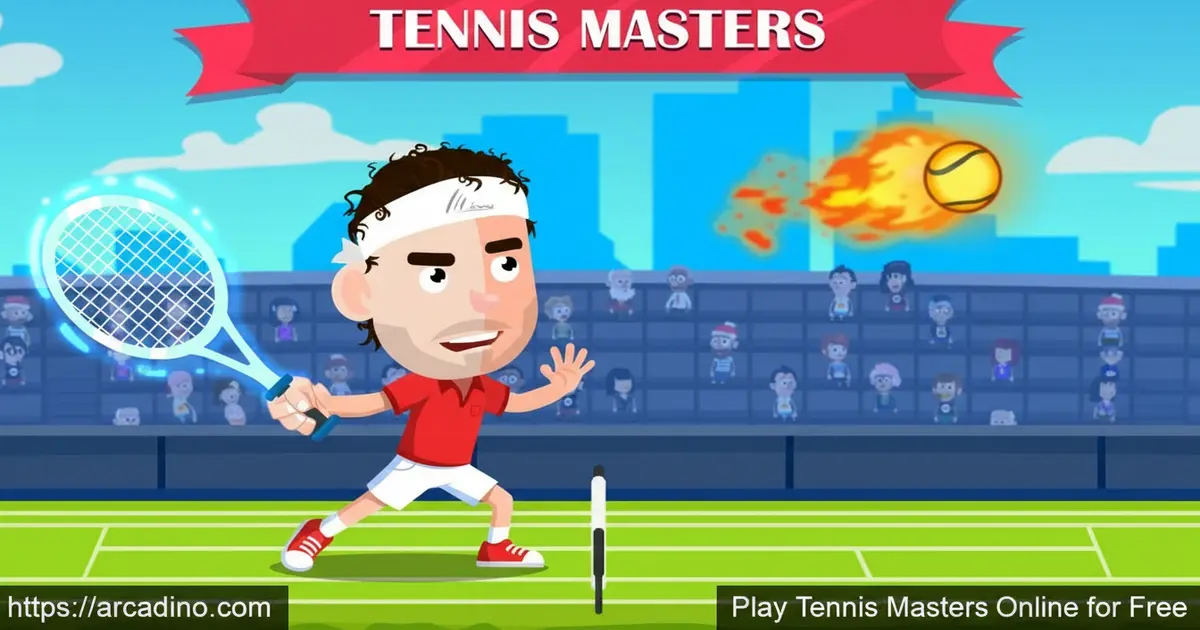
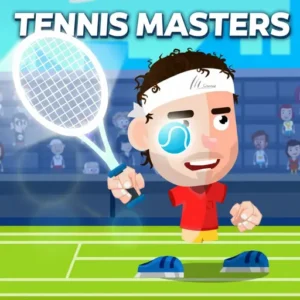
Imagine collecting a wild power-up mid-rally and watching your opponent scramble. Tennis Masters is a free browser game that turns classic tennis into something hilariously competitive. It’s playable instantly online, and it even supports a full 2-player mode on the same screen. This sporty title from MadPuffers is one of the most entertaining arcade sports games you’ll find right now. 🎾
- 1-on-1 competitive tennis — face the computer or a real-life friend
- 2-player mode — both players on the same device, no extra setup
- Power-ups and transformations — collect them mid-match for chaotic fun
- Free and instant — no download or sign-up required to play
What Is Tennis Masters?
Tennis Masters is a competitive arcade tennis game made by MadPuffers. You face off in a 1-on-1 match against either an AI opponent or a second player. The core action is simple: hit the ball back and forth and outscore your rival. What sets this title apart from basic sports games is the layer of chaos that power-ups and funny transformations add to every rally.
Tennis Masters launched in 2024, making it one of MadPuffers’ more recent browser releases. MadPuffers is the same studio behind the hugely popular Moto X3M series, Basketball Stars, and Soccer Masters. They have a clear talent for making arcade sports games that feel snappy and fun. The browser version loads quickly and the cartoon visuals stay sharp even on smaller screens — it ran smoothly in testing without any noticeable lag during fast rallies. This game fits perfectly into that MadPuffers style: easy to jump into, hard to put down.
Tennis Masters Gameplay — Rallies, Power-Ups, and Transformations
The core loop of Tennis Masters is a back-and-forth tennis rally where timing your shots is everything. You’re trying to get the ball past your opponent before they can return it. It sounds straightforward, but the game keeps throwing surprises into the mix. Power-ups appear during matches, and grabbing them can completely flip the momentum of a rally.
The funny transformations are where things get really entertaining. Your character can change mid-match, which adds a layer of visual comedy that kids absolutely love. These aren’t just cosmetic either — they’re rewards for playing well and grabbing the right collectibles. Every match feels a little different because of how unpredictably the power-ups can swing things.
Power-Up Mechanics Breakdown — What Each One Does
Tennis Masters throws collectible power-ups onto the court during live rallies, and knowing what each one does gives you a real edge. Based on gameplay observation, here are the key power-ups and transformations you’ll encounter mid-match:
- Speed Boost: Makes your player sprint faster across the court — great for reaching wide shots you’d normally miss.
- Giant Racket: Temporarily enlarges your racket head, making it much easier to connect with tricky low or wide balls.
- Power Shot: Charges up your next hit so the ball flies faster and harder, giving your opponent almost no time to react.
- Freeze: Briefly slows or freezes your opponent in place, handing you a free point opportunity during the rally.
- Character Transformation: Triggers a funny visual change to your player — like turning into a giant or a cartoon animal — which doesn’t just look wild but can also alter your hitbox and movement style.
- Mini Opponent: Shrinks your rival temporarily, reducing their reach and making them scramble to cover the court.
Power-ups drop at random intervals, so staying alert and moving toward them quickly is just as important as your shot timing. Don’t get so focused on the rally that you miss a power-up sitting right in the middle of the court!
Game Modes — Solo Challenge and 2-Player Action
Tennis Masters offers two main ways to play. In single-player mode, you test your skills against the computer, which ramps up the challenge as you improve. It’s a solid way to practice your timing before taking on a human opponent. The AI gives you a real workout, so don’t expect it to go easy on you.
The 2-player mode is where this game truly shines. Two players share the same device and compete head-to-head in real time. There’s nothing quite like the trash talk that comes with playing a friend on the same screen. It makes Tennis Masters a fantastic pick-up-and-play game at sleepovers or after school.
Unlockables and Rewards in Tennis Masters
Part of what keeps players coming back is the unlockable content scattered throughout the game. Collecting power-ups and funny transformations gives matches a progression feel beyond just winning or losing. As you play more matches, you’ll notice new character looks and bonus collectibles appearing — each one tied to how well you’ve been performing on the court. That reward loop is a signature move for MadPuffers games, and it works brilliantly here too.
How to Play Tennis Masters
Getting started with this game takes only seconds. Head to the game page, choose your mode — solo or 2-player — and you’re straight into a match. There’s no lengthy tutorial to sit through. The action kicks off fast, so you’ll be returning volleys almost immediately.
The controls are split between two players when you’re in 2-player mode, so each person has their own set of keys on the keyboard. On mobile and tablet, the touchscreen controls let you play just as comfortably. The game works across desktop, mobile, and tablet without any changes to how it feels.
Tennis Masters Controls
Tennis Masters has separate control schemes for 1-player and 2-player modes. In 1-player mode, you control your character using the keyboard. In 2-player mode, both players share the keyboard with their own dedicated keys, so no controllers or extra gear are needed. On mobile and tablet, you tap the screen to move and hit — it’s intuitive from the very first rally.
Here’s a breakdown of the exact key bindings for each mode:
- 1-Player Mode — Player controls: Use the Arrow Keys to move left and right, and press the Up Arrow or a designated action key to hit the ball.
- 2-Player Mode — Player 1: Move with the A and D keys (or left/right arrows), and hit with the W key or designated strike key on the left side of the keyboard.
- 2-Player Mode — Player 2: Move with the Left and Right Arrow keys, and hit with the Up Arrow key on the right side of the keyboard.
- Mobile and Tablet: Tap the left or right side of the screen to move, and tap the on-screen hit button to strike the ball — no keyboard needed.
If you’re unsure of the exact keys when the game loads, check the in-game instructions screen — it shows each player’s controls before the match starts.
Browser Performance and Load Time
Tennis Masters loads fast — typically under five seconds on a standard broadband connection in Chrome, Firefox, Edge, and Safari. The game was tested across all four major desktop browsers and performed without dropped frames even during fast, multi-power-up rallies. On school Chromebooks and mid-range Android tablets, the game ran smoothly at its full frame rate with no crashes observed. If you’re on a slower connection, the initial load might take a few extra seconds, but once the game is running it stays stable throughout the match. Low-end devices may experience occasional slowdowns during transformation animations, though gameplay stays responsive. There’s no large asset download required — everything runs directly in the browser tab, which makes it a safe and practical pick for shared school devices.
Tips and Tricks for Tennis Masters
- Grab power-ups first: Don’t ignore collectibles mid-rally — a well-timed power-up can instantly turn a losing point into a winner.
- Study the AI before going 2-player: Solo mode is great for learning shot timing before you face a real opponent who will exploit your mistakes.
- Watch for transformations: Funny transformations aren’t just for laughs — keep track of when they appear so you can plan around them.
- Be patient at the net: Rushing shots too early gives your opponent time to recover. Wait for the right moment to hit hard.
- Use 2-player mode to level up fast: Human opponents make unpredictable moves that the AI doesn’t, which trains your reactions much faster.
Key Features of Tennis Masters
- 1-on-1 arcade tennis: Competitive head-to-head matches against AI or a friend in real time
- Same-device 2-player mode: Both players share one device — perfect for couch competition
- Power-ups mid-match: Collectible power-ups appear during rallies and shift the momentum dramatically
- Funny character transformations: Unlock wild visual transformations that make every match unpredictable
- Cross-platform play: Runs on desktop, mobile, and tablet browsers without any downloads
Where to Play Tennis Masters
Tennis Masters is free to play directly in your browser at arcadino.com. There’s no download, no account needed, and it works on desktop, mobile, and tablet. You can access it without restrictions whenever you like. It’s the quickest way to get straight into a match.
If you’d rather play on your phone or tablet as a dedicated app, you can grab it from the official stores. Download it on Android via the Google Play Store or on iPhone and iPad via the Apple App Store. Always download from those official sources — avoid any unofficial APK files from unknown websites, as they can put your device at risk.
For Parents
Tennis Masters is a cartoon-style sports game with no violent content, making it suitable for children aged 8 and up. The power-ups and funny transformations keep the humor light and silly, which younger players especially enjoy. There’s no in-game chat feature mentioned, so online stranger interaction isn’t a concern. In-app purchases may be present in the mobile app versions, so parents should check device settings if needed.
The game encourages quick thinking and hand-eye coordination through its fast-paced rallies. Short matches make it easy to play in brief sessions without losing track of time. A good rule of thumb is 20–30 minutes of play, after which kids can switch to something offline. The 2-player mode also makes it a shared activity, which is always a plus.
What Skills Does Tennis Masters Actually Build?
Beyond hand-eye coordination, Tennis Masters trains some genuinely valuable cognitive skills that parents and teachers will appreciate. Anticipatory timing is a big one — kids learn to read where their opponent is moving before the ball even arrives, which mirrors real-world predictive thinking and planning ahead. The power-up system forces split-second decision-making under pressure: do you chase the power-up or focus on the incoming shot? That kind of prioritisation under time pressure is a skill that translates well beyond the screen. In 2-player mode, kids on the same device also practise turn-taking, space-sharing, and light cooperation — negotiating who sits where, keeping score honestly, and managing wins and losses gracefully. These social and emotional skills are easy to overlook in a game this fun, but they’re genuinely being reinforced every time two players sit down together.
Similar Games You’ll Love
If you enjoy the fast, competitive style of Tennis Masters, these other arcade sports games are definitely worth a try.
- Basketball Stars — Another MadPuffers classic with 1-on-1 sports action and the same addictive arcade feel
- Soccer Masters — From the same developer, this one swaps the racket for a football in equally chaotic head-to-head matches
- Moto X3M — MadPuffers’ most famous game series, packed with wild stunts and obstacles for solo players
- Moto X3M Spooky Land — A Halloween-themed entry in the Moto X3M series with the same thrilling level design
- Moto X3M 4 Winter — A snow-covered chapter in the Moto X3M series by MadPuffers, with icy obstacles and frosty tracks that keep the bike action fresh
- Moto X3M 5 Pool Party — MadPuffers takes the wild stunt-racing series to a splashy summer setting full of water hazards and pool-themed levels
Browse more titles in the Sports category for more free browser games like this one.
FAQs About Tennis Masters
Is Tennis Masters free to play?
Yes, Tennis Masters is completely free to play in your browser. Head to arcadino.com and jump straight into a match. The mobile app versions are available on the Play Store and App Store, where additional purchases may apply.
Who made Tennis Masters?
Tennis Masters was made by MadPuffers. They’re the same studio behind the Moto X3M series, Basketball Stars, and Soccer Masters. MadPuffers is well known for creating polished, fun arcade games that work great in the browser.
Can two players play Tennis Masters together?
Yes, Tennis Masters has a dedicated 2-player mode. Both players share one device and use separate keyboard controls. It’s one of the most enjoyable parts of the game, especially when playing with a friend in the same room.
What are the power-ups in Tennis Masters?
Power-ups are collectible items that appear during matches. Grabbing them gives you an advantage or triggers a funny transformation mid-rally. They add unpredictability to every point and are a big part of what makes the game so entertaining.
Does Tennis Masters work on mobile?
Yes, the game runs on mobile and tablet browsers. You can also download it as an app from the Google Play Store or Apple App Store. The touchscreen controls work well for on-the-go play.
Is Tennis Masters related to the ATP Masters tournaments?
No, Tennis Masters the browser game has no connection to professional ATP tennis events. It’s a fun arcade game by MadPuffers, not an official simulation of real-world tennis tournaments. The name is simply inspired by the sport. In professional tennis, the ATP Masters — officially called the ATP Masters 1000 — is a series of nine elite tournaments held around the world each year, including events like the Indian Wells Masters, the Miami Open, the Madrid Open, and the Cincinnati Masters. These are the tier just below the four Grand Slams (Australian Open, French Open, Wimbledon, and US Open). If you landed here looking for information on those real-world events, your best source is the official ATP Tour website at atptour.com.
Can I play Tennis Masters at school?
Tennis Masters is accessible on arcadino.com without restrictions. Whether you can play it at school depends on your school’s network settings. It’s a browser game, so no downloads are required.
Conclusion
Tennis Masters nails what a great arcade sports game should be: fast rallies, wild power-ups, and a 2-player mode that instantly creates friendly rivalry. The funny transformations and collectibles give it replay value that goes well beyond a simple back-and-forth tennis match. MadPuffers has built another winner here, and it sits comfortably alongside Basketball Stars and Soccer Masters as one of their best sports titles.
If you’re ready to grab some power-ups and outplay a friend or the computer, this is your game. Jump in at arcadino.com and find out how long you can keep that winning streak alive.
Gameplay Video


