
Tetris
PlayStudios / Tetris Holding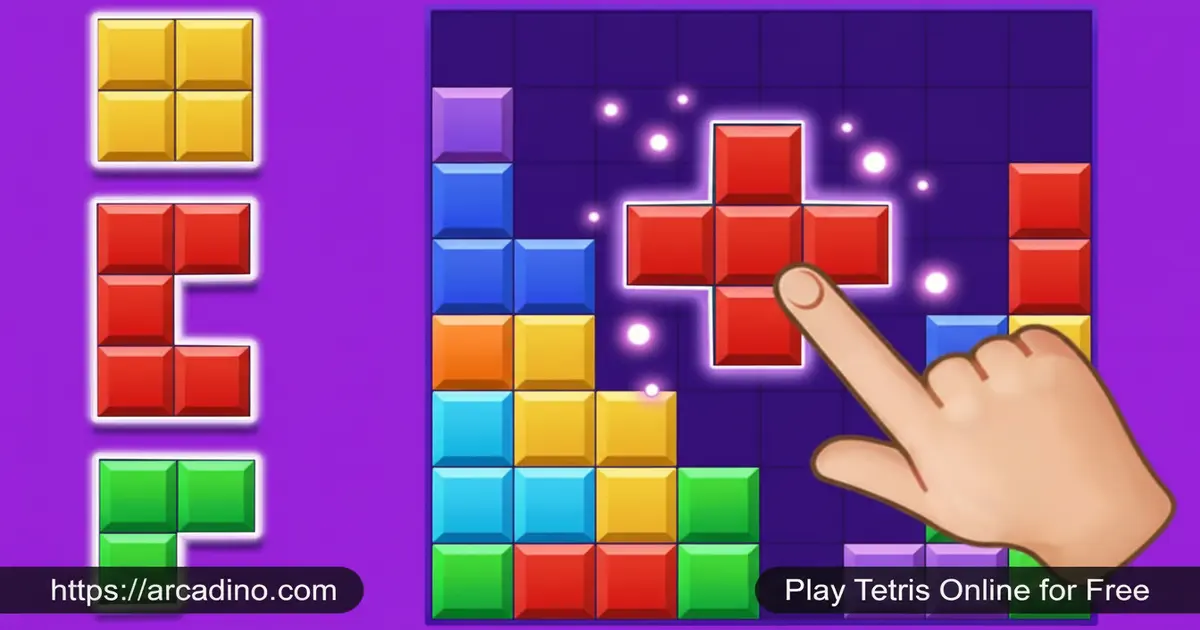
Few puzzle games have lasted 40 years and still feel just as urgent on your keyboard today. Tetris is free to play online, and it pulls you in from the very first falling piece. The challenge sounds simple — clear rows of blocks before your stack reaches the top. But once the Tetriminos start dropping faster, you’ll realize this classic has serious depth. 🎮
If you’ve ever searched for Tetris free online or wanted to rediscover the game that started it all, this is the right place to start. Here’s a quick look at what makes it special:
- Iconic Tetrimino pieces that rotate, slide, and stack inside the Matrix playing field
- Next Queue preview lets you see the upcoming piece and plan your next move
- Progressive difficulty — each cleared level sends pieces falling faster
- Multi-line clears reward smart stacking with bigger scoring opportunities
What Is Tetris?
Tetris is one of the most recognized puzzle games in history, first created in 1985. Tetris Holding owns the official rights, and today the game is sub-licensed to PLAYSTUDIOS for the official mobile experience. The browser version known as Tetris N-Blox was developed by Paul Neave and is now an officially licensed Tetris title under an agreement with Tetris Holding. That seal of authenticity matters — this isn’t a copycat clone.
The core idea is brilliantly tight: seven distinct Tetrimino shapes fall from the top of the Matrix, and you must fit them together to fill complete horizontal rows. Clearing those rows earns points, and clearing multiple rows at once multiplies your scoring opportunities. The game speeds up as you progress, turning a relaxed puzzle session into a frantic race against gravity. It’s one of the few titles where a wrong move from 10 seconds ago can end your run right now.
On browser, the controls respond instantly with no perceptible input lag — the piece locks onto your keypress exactly when you expect it to, which is critical when pieces are falling at higher speeds. That snappy feedback is what separates a good Tetris port from a frustrating one, and this version gets it right.
Tetris Gameplay — The Core Loop
Every session of Tetris begins with a single Tetrimino entering the Matrix from the top of the screen. Your job is to rotate it, shift it left or right, and drop it into a gap that completes a full horizontal row. The moment a row is complete, it disappears — and everything above it drops down to fill the space. That satisfying collapse is the heartbeat of every Tetris session.
Points pile up each time you clear lines, but the real scoring power comes from clearing multiple lines in a single drop. Stack pieces cleverly to leave a single column open, then drop a long I-shaped Tetrimino down it to wipe out four rows at once. That move — known by long-time players as a Tetris — is the highest-scoring single action in the game. Missing it and watching your stack creep upward instead is the feeling that keeps you hitting retry.
As you play, you’ll notice a faint shadow piece sitting at the bottom of the Matrix. That’s called the ghost piece. It shows exactly where your Tetrimino will land if you drop it right now. Use it to line up tricky placements without guessing — it’s one of the most helpful tools in the game, especially when pieces start falling fast.
Tetris Scoring — Exact Point Values
Every line you clear earns points, and the number of lines you clear at once makes a huge difference. Here’s the exact breakdown that the game uses, multiplied by your current level number:
- Single (1 line): 100 points × level
- Double (2 lines): 300 points × level
- Triple (3 lines): 500 points × level
- Tetris (4 lines): 800 points × level
At level 1, a Tetris clear earns 800 points. At level 5, that same move earns 4,000 points. That’s why chasing four-line clears at higher levels is the fastest way to build a massive score. Four single-line clears only add up to 400 points at level 1 — less than half of one Tetris clear. The math strongly rewards patience and smart stacking.
Levels and Progression in Tetris
Tetris doesn’t stay at one pace. As you clear more lines, the level counter climbs and Tetriminos begin falling noticeably faster. Early levels give you plenty of time to think and reposition. By the mid-levels, pieces are moving quickly enough that hesitation costs you the run.
This escalating speed is what gives the game its legendary replay value. No two sessions play out the same way, because the random sequence of pieces changes each time. A smooth run at level five can unravel in seconds at level eight if an awkward piece drops at the wrong moment. Chasing a personal best score through those higher levels is exactly the challenge that keeps players coming back.
The Next Queue — Your Strategic Advantage
One of the most useful tools in Tetris is the Next Queue, which shows you the upcoming Tetrimino before it enters the Matrix. That one preview changes everything about how you think during a game. Instead of reacting blindly, you can set up your current piece with the next one already in mind.
Smart players constantly glance at the Next Queue to decide where to place their active piece. If you know a long I-piece is coming, you might leave that narrow gap open on purpose. This layer of planning is what separates a survival mindset from a high-scoring strategy, and it’s one of the features that makes Tetris genuinely skill-based rather than luck-driven.
Seasonal Events and Updates (Mobile Only)
The official mobile version of Tetris has introduced crossover events that bring new energy to the classic formula. The Tetris × Space Invaders event is a recent example — a limited-time challenge that blends the iconic block-stacking gameplay with a Space Invaders theme. Events like this give returning players a reason to jump back in with fresh objectives. Note: these seasonal events are exclusive to the PLAYSTUDIOS mobile app and are not available in the browser version.
PLAYSTUDIOS regularly updates the app based on community feedback, focusing on performance improvements and a polished mobile experience. These updates show that the team behind the official game takes the player base seriously. If you’re playing on mobile, it’s worth keeping the app updated to catch new events as they launch.
How to Play Tetris
Getting started with Tetris takes about thirty seconds — the rules are easy to pick up, even if mastering them takes much longer. Head to arcadino.com, load the game, and a Tetrimino will start falling immediately. Your goal from the first second is to rotate and position pieces so they fill complete rows without leaving gaps.
Pay attention to how quickly pieces are falling, and don’t panic if your stack grows taller than you’d like. A well-placed piece can clear multiple rows and buy you valuable breathing room. The game ends when a new Tetrimino can no longer enter the Matrix because blocks are stacked too high — so keeping that ceiling low is always the priority.
Tetris Controls
Use the left and right arrow keys to move the falling Tetrimino sideways across the Matrix. Press the up arrow to rotate the piece, and use the down arrow to soft-drop it faster. On mobile, tap the on-screen controls to move and rotate pieces with your thumbs.
You can also press the spacebar to perform a hard drop — this instantly slams the piece straight down to the lowest possible position in one keystroke. It’s much faster than holding the down arrow. Once you get used to hard dropping, it becomes one of the most important controls in your toolkit, especially at higher speeds when every second counts.
Tips and Tricks for Tetris
- Always glance at the Next Queue. Knowing the next piece lets you set up a two-piece plan instead of just reacting to what’s falling now.
- Keep your stack flat and low. Tall, uneven stacks make it harder to place awkward pieces without creating gaps you can’t fill.
- Save your I-piece gaps deliberately. Leave a single-column well on one side so you can drop the long I-piece for a four-line clear and maximum points.
- Rotate early, not late. Decide which rotation you need as soon as the piece appears — last-second rotations cause misplacements at higher speeds.
- Don’t chase perfection at high levels. When pieces fall fast, a decent placement is better than a perfect one that takes too long. Survival beats optimization when the clock is racing.
- Trust the ghost piece. That faint shadow at the bottom of the Matrix tells you exactly where your piece will land — use it instead of guessing, especially in tight spots.
- Use hard drop on safe placements. When you’re confident about a position, tap the spacebar to hard drop instantly. It saves precious time and reduces mistakes caused by slow soft-dropping.
Surviving the S/Z-Piece Drought
Every Tetris player eventually hits a run where S and Z pieces keep coming one after another. These are the two trickiest Tetriminos to stack neatly — they create diagonal overhangs that leave awkward gaps underneath. The reason this happens is that the random piece system doesn’t guarantee even spacing over short stretches, so unlucky runs are completely normal and not a sign something’s wrong. The worst thing you can do during an S/Z drought is keep rotating them desperately trying to find a perfect spot — that just burns time and raises your stack. A smarter move is to accept a slightly messy section of your stack, keep it on one side, and focus on building a flat surface on the other side so better pieces can still score cleanly. Stay calm, keep your stack as low as possible, and the drought will end — then you can clear the mess with an I-piece when one finally arrives.
Key Features of Tetris
- Official licensed gameplay — Tetris N-Blox is an officially recognized version under agreement with Tetris Holding, not an unlicensed clone
- Next Queue preview — see the next Tetrimino before it appears so you can plan placements in advance
- Ghost piece indicator — a faint shadow shows exactly where your piece will land before you drop it
- Hard drop control — press spacebar to instantly place a piece at maximum speed
- Progressive level system — each level raises the drop speed, creating a natural difficulty curve that builds genuine tension
- Multi-line scoring — clearing several rows in a single move rewards smart stacking with a bigger point bonus
- Crossover events on mobile — limited-time events like Tetris × Space Invaders add fresh challenges to the classic experience
Where to Play Tetris
You can play Tetris online right now on arcadino.com — free, instant, and with nothing to install. The browser version loads quickly and works on any device with a modern browser, so you can jump in without creating an account or sitting through a download. It’s accessible without restrictions on arcadino.com, making it a great option for a quick session any time.
If you prefer playing on your phone or tablet, the official Tetris app is available on both major platforms. Download it directly from the Google Play Store or the Apple App Store to get the full mobile experience, including hundreds of levels and live events. Always download from the official stores — unofficial APK files from third-party sites can carry security risks and are not affiliated with Tetris Holding or PLAYSTUDIOS.
Playing Tetris at School or on a Restricted Network
If you’re on a school Chromebook, a library computer, or a workplace network, the browser version of Tetris on arcadino.com is a great fit. The game loads as a standard browser embed with no login required, no Flash dependency, and no plugins to install — just open the page and it works. There are no external account sign-ups or purchasing prompts of any kind, which means it clears most standard school network content filters without any special permissions. You can bookmark the page and reload it instantly the next time you want to play. It runs smoothly on Chrome, Firefox, Edge, and Safari on modern devices, including school-issued Chromebooks.
Browser Version vs. Mobile App — Which Is Right for You?
Not sure whether to play in your browser or download the app? Here’s a quick side-by-side look at what each version offers so you can pick the one that fits your situation best.
- Browser version (N-Blox on arcadino.com): Free, instant access with no download or account needed. Keyboard controls including hard drop. Works on school Chromebooks and restricted networks. No in-app purchases. No seasonal events.
- Mobile app (PLAYSTUDIOS on iOS and Android): Hundreds of levels with structured progression. Limited-time crossover events like Tetris × Space Invaders. Offline play supported. Touch controls optimized for phones and tablets. May include optional in-app features.
If you want to jump in quickly, play with a keyboard, or you’re on a shared or school device, the browser version is the easier choice. If you want a deeper, ongoing experience with events and offline play, the official app is worth downloading.
For Parents
Tetris is a genuinely family-friendly puzzle game with zero violence, no chat features in the browser version, and no inappropriate content of any kind. It’s well-suited for kids aged 8 and up — the spatial reasoning and planning skills it develops are real cognitive benefits, not just marketing language. The game naturally rewards patience, forward-thinking, and the ability to stay calm under pressure, which are all great habits to build.
Cognitive and Educational Benefits of Tetris
Researchers have studied Tetris more than almost any other video game, and the findings are genuinely impressive. Studies have found that regular Tetris play improves spatial rotation skills — the ability to mentally flip and turn shapes — which is directly linked to stronger performance in mathematics and engineering subjects. The Next Queue mechanic specifically engages working memory, because players must hold the current placement plan in mind while simultaneously processing the upcoming piece. Playing under the time pressure of rising levels also builds pattern recognition speed, training the brain to identify and respond to visual patterns faster than it would in a low-pressure environment. A 2009 study published in BMC Research Notes found that adolescent girls who played Tetris for 30 minutes per day over three months showed measurable increases in brain efficiency in regions linked to critical thinking and language. For teachers looking to justify screen time or parents curious about educational value, Tetris is one of the most research-backed games available — and it happens to be completely free to play in a browser with no account or ads.
The official mobile app is free to download, though it may include optional in-app features — parents should review the app’s store listing for the latest details on purchases. For browser play on arcadino.com, there are no sign-up requirements and no purchasing prompts. A 20–30 minute session is a reasonable limit for younger players, since the escalating speed can get genuinely intense toward higher levels.
Similar Games
If you love the block-fitting challenge of Tetris, these other Puzzle games are worth trying next:
- 1010! Deluxe — A relaxed block-placement puzzle where you fit Tetrimino-style shapes onto a 10×10 grid without a timer, great if you love Tetris but want a slower pace.
- Block Champ — A grid-based block puzzle that mixes Tetris-style fitting with gem-clearing combos for a fresh twist on classic stacking.
- Block Blast — A block-placement puzzle where you fit shapes into a grid to clear rows and columns, capturing the same spatial strategy Tetris demands.
- 2048 — A number-merging puzzle where planning ahead and managing limited space are everything, sharing Tetris’s “one wrong move fills the board” tension.
- Suika Game — A physics-based merging puzzle where your container fills up fast if you don’t plan your drops carefully, very similar pressure to a Tetris board creeping toward the top.
- Candy Crush — A match-3 puzzle with satisfying chain reactions and pattern recognition, appealing to Tetris fans who love clearing pieces in combos.
- Mahjong — A tile-matching puzzle that rewards the same spatial awareness and pattern-spotting skills Tetris players develop naturally.
- Sudoku — A number-placement logic puzzle where every cell matters, sharing the same methodical thinking and board-management challenge.
- Wood Block Puzzle — A relaxed block-fitting game where you drag wooden shapes onto a grid to clear lines, essentially Tetris without the time pressure.
FAQs About Tetris
Is Tetris free to play online?
Yes, Tetris is completely free to play in your browser on arcadino.com. The official mobile app is also free to download on Android and iOS. No account or payment is needed for the browser version.
Why is Tetris no longer on some platforms?
EA’s version of Tetris was discontinued in 2020 after EA’s license to publish the game expired. Tetris Holding continues to license the game to other publishers, including PLAYSTUDIOS for the current official mobile app. The browser version remains available through officially licensed platforms.
Where can I play Tetris now?
You can play Tetris free online at arcadino.com right now in your browser. The official mobile app is available on the Google Play Store and the Apple App Store. Both options give you access to the real, licensed Tetris experience.
What are Tetriminos in Tetris?
Tetriminos are the seven falling block shapes that make up every Tetris game. Each one is made of four connected squares arranged in a different pattern — the long stick, the L-shapes, the S and Z shapes, and the square. Rotating and placing them correctly to fill complete rows is the entire skill of the game.
How does scoring work in Tetris?
You earn points by clearing complete horizontal rows inside the Matrix. Clearing multiple rows at the same time scores more points than clearing them one by one. A single-line clear earns 100 points × your current level. A four-line Tetris clear earns 800 points × your current level — by far the most efficient scoring move in the game.
What happens when the level increases in Tetris?
Each new level makes Tetriminos fall faster toward the bottom of the Matrix. The level rises automatically as you clear more lines during a session. Higher levels demand quicker decisions and leave much less time to reposition pieces before they lock in place.
Can I play Tetris on my phone?
Yes, the official Tetris app is available on both Android and iPhone. Download it from the Google Play Store or the Apple App Store for the full mobile experience. The app includes hundreds of levels and limited-time crossover events that aren’t available in the browser version.
Conclusion
Tetris earns its legendary status every single session. The combination of the Next Queue planning mechanic, the escalating level speed, and the high-stakes multi-line scoring creates a puzzle loop that’s been impossible to put down since 1985. No other block game has matched that specific tension of watching your stack grow while calculating exactly where the next piece needs to go.
Whether you’re chasing a personal best in the browser version on arcadino.com or working through levels in the official mobile app, this puzzle classic delivers the same sharp, satisfying challenge it always has. Load it up, place your first piece, and see how far your stacking skills can take you.
Gameplay Video

